Install
This is the repository archive. It installs, but the folder name will carry the branch suffix and updates will not flow.
Install straight from GitHub with WP-CLI:
wp plugin install https://github.com/lso2/tr-comments-import-export/archive/refs/heads/main.zipA powerful WordPress plugin for exporting and importing comments with flexible filtering and status mapping options. Perfect for site migrations, spam filtering workflows, and comment backups.
🚀 Features
Export Features
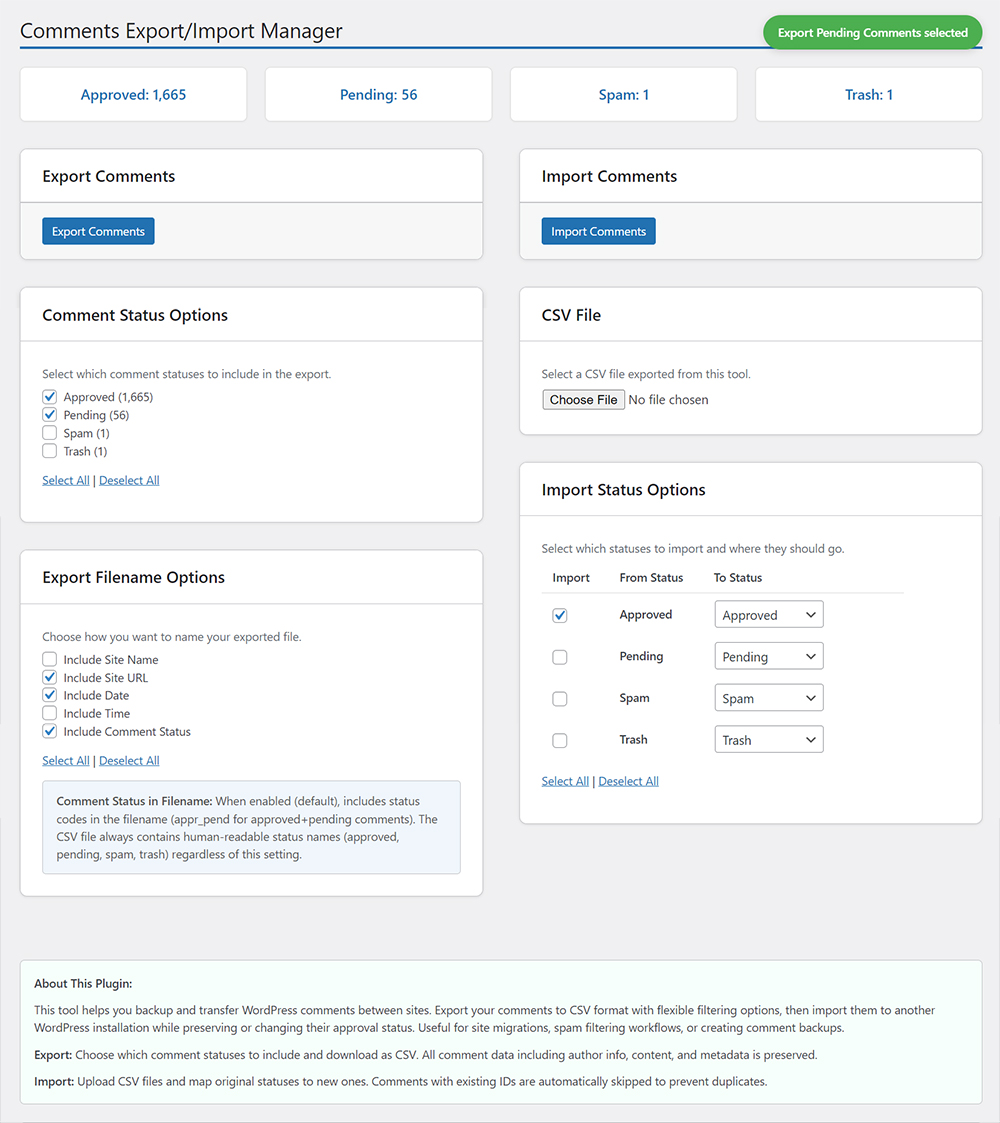
- Selective Status Export: Choose specific comment statuses to export (Approved, Pending, Spam, Trash)
- Flexible Filename Options: Customize export filenames with site name, URL, date, time, and status information
- Complete Data Preservation: Exports all comment metadata including author info, timestamps, and content
- CSV Format: Industry-standard CSV format for maximum compatibility
- Comment Statistics: View current comment counts by status before export
Import Features
- Smart Status Mapping: Map imported comment statuses to new statuses during import
- Enhanced Duplicate Prevention: Comprehensive duplicate detection using multiple criteria
- Detailed Import Reporting: Clear notifications showing what was imported vs. skipped
- Flexible File Support: Compatible with CSV files from this plugin or other WordPress exports
- Validation & Error Handling: Robust validation with user-friendly error messages
User Experience
- Persistent Preferences: Plugin remembers your export/import preferences across sessions
- Real-time Notifications: Instant feedback with bubble notifications for all actions
- Clean Interface: Intuitive admin interface with helpful descriptions and select all/deselect all options
- Mobile Responsive: Works seamlessly on desktop and mobile devices
📸 Screenshots
Main Interface
The plugin provides a clean, organized interface with export and import sections:
🛠️ Installation
From WordPress Admin
- Go to
Plugins > Add New - Search for \"Comments Export/Import Manager\"
- Install and activate the plugin
- Navigate to
Comments > Export/Import
Manual Installation
- Download the plugin files
- Upload to
/wp-content/plugins/tr-comments-import-export/ - Activate through the WordPress admin panel
- Go to
Comments > Export/Importto start using
Via WP-CLI
wp plugin install tr-comments-import-export --activate🎯 Usage
Exporting Comments
-
Navigate to Export Section
- Go to
Comments > Export/Import - Locate the \"Export Comments\" section
- Go to
-
Select Comment Statuses
- Choose which statuses to include: Approved, Pending, Spam, Trash
- Use \"Select All\" or \"Deselect All\" for quick selection
- See live comment counts for each status
-
Customize Filename (Optional)
- Include/exclude site name, URL, date, time
- Include comment status codes in filename
- Preview shows how your filename will look
-
Export
- Click \"Export Comments\"
- CSV file downloads automatically
- Filename example:
mysite.com_comments_appr_pend_2025-05-31_14-30-25.csv
Importing Comments
-
Prepare CSV File
- Use CSV exported from this plugin
- Or create compatible CSV with required headers
- Ensure proper encoding (UTF-8 recommended)
-
Select Import File
- Click \"Choose File\" in Import section
- Select your CSV file
- File validation occurs automatically
-
Configure Status Mapping
- Choose which statuses to import
- Map each original status to desired new status
- Example: Import \"Spam\" comments as \"Pending\" for review
-
Import
- Click \"Import Comments\"
- View detailed results showing:
- Number of comments imported
- Number of duplicates skipped
- Status breakdown of imported comments
🔧 Technical Details
CSV Format
The plugin uses a standardized CSV format with the following headers:
comment_ID,comment_post_ID,comment_author,comment_author_email,comment_author_url,comment_author_IP,comment_date,comment_date_gmt,comment_content,comment_karma,comment_approved,comment_agent,comment_type,comment_parent,user_idDuplicate Detection
The plugin uses a comprehensive duplicate detection system:
- Primary Check: Comment ID matching
- Secondary Check: Content + Author + Email + Post ID + Date combination
- Flexible Matching: Handles comments with or without IDs
- Data Validation: Sanitizes and validates all fields before comparison
Database Operations
- All operations use prepared statements for security
- Bulk operations optimized for performance
- Transactional safety for large imports
- Proper WordPress hooks and filters integration
🔌 Developer Hooks
The plugin provides hooks for developers:
Actions: tr_cei_before_export, tr_cei_after_export, tr_cei_before_import, tr_cei_after_import
Filters: tr_cei_export_query, tr_cei_export_filename, tr_cei_validate_import_data, tr_cei_is_duplicate_comment
🚨 Troubleshooting
Export Issues:
- Verify comments exist for selected statuses
- Check server file download permissions
Import Issues:
- Check file size limits and CSV format
- Increase
max_execution_timefor large imports - Verify CSV headers match expected format
🤝 Contributing
We welcome contributions! Here's how you can help:
Reporting Issues
- Check existing issues on GitHub
- Provide detailed bug reports with:
- WordPress version
- PHP version
- Plugin version
- Steps to reproduce
- Expected vs actual behavior
Feature Requests
- Search existing feature requests
- Describe the use case clearly
- Explain the expected functionality
- Consider backward compatibility
Code Contributions
- Fork the repository
- Create a feature branch (
git checkout -b feature/amazing-feature) - Follow WordPress coding standards
- Write clear commit messages
- Submit a pull request
Coding Standards
- Follow WordPress Coding Standards
- Use meaningful variable and function names
- Add inline documentation for complex logic
- Test on multiple WordPress versions
📋 Requirements
System Requirements
- WordPress: 5.0 or higher
- PHP: 7.4 or higher
- MySQL: 5.6 or higher (or MariaDB equivalent)
Server Requirements
- Memory: 256MB minimum (512MB recommended for large imports)
- Execution Time: 60 seconds minimum for imports
- File Upload: 32MB minimum for large CSV files
Browser Compatibility
- Chrome 80+
- Firefox 75+
- Safari 13+
- Edge 80+
📞 Support & Documentation
Getting Help
- Documentation: Check this README and plugin help text
- WordPress Support: WordPress.org Plugin Support
- GitHub Issues: Report bugs and request features
- Author Website: TechReader.com
Premium Support
For priority support, custom development, or consulting:
- Visit TechReader.com
- Email: support@techreader.com
💖 Support Development
If this plugin has been helpful, consider supporting its development:
Your support helps:
- Keep the plugin free and updated
- Add new features based on user feedback
- Provide community support
- Maintain compatibility with new WordPress versions
📄 License
This plugin is licensed under the GPLv3.
Copyright (C) 2025 TechReader

This program is free software: you can redistribute it and/or modify
it under the terms of the GNU General Public License as published by
the Free Software Foundation, either version 3 of the License, or
(at your option) any later version.

This program is distributed in the hope that it will be useful,
but WITHOUT ANY WARRANTY; without even the implied warranty of
MERCHANTABILITY or FITNESS FOR A PARTICULAR PURPOSE. See the
GNU General Public License for more details.
🏷️ Changelog
Version 1.7.7 (Current)
- Security improvements with static prepared statements and enhanced caching
- Complete WordPress coding standards compliance for database operations
- Final resolution of all plugin check database warnings
Version 1.6.0
- MAJOR IMPROVEMENT: Enhanced duplicate detection system
- NEW: Comprehensive duplicate checking using multiple criteria
- NEW: Detailed import notifications with skip reason breakdown
- IMPROVED: Better error handling and validation
- TECHNICAL: Refactored import logic for better performance
Version 1.5.0
- Persistent checkbox selections across page loads
- Export filename customization options
- Better notifications and user experience
View complete changelog in readme.txt
🔮 Roadmap
Planned Features:
- Advanced filtering by date ranges, authors, keywords
- Additional export formats (JSON, XML)
- Automated scheduling
- REST API endpoints
Under Consideration:
- Multi-site support
- Custom fields support
- Advanced field mapping
Made with ❤️ by TechReader
If this plugin has been helpful, consider supporting development at https://techreader.com/donate.