Auth Gate Popup
WordPress plugin: forced login/register popup with WooCommerce add-to-cart gate, configurable artwork, colors and terms.
by Lawrance Babu Gain · github.com/lawrancebabu/auth-gate-popup · website
Install
No release zip yet. The repository archive installs, but the folder name will carry the branch suffix and updates will not flow:
wp plugin install https://github.com/lawrancebabu/auth-gate-popup/archive/refs/heads/main.zipA WordPress plugin that gates the entire site behind a non-dismissible login / registration popup and requires login before WooCommerce purchases.
Features
- Forced auth popup shown to every logged-out visitor on the front end.
- Non-dismissible: no close button, and the Escape key is blocked.
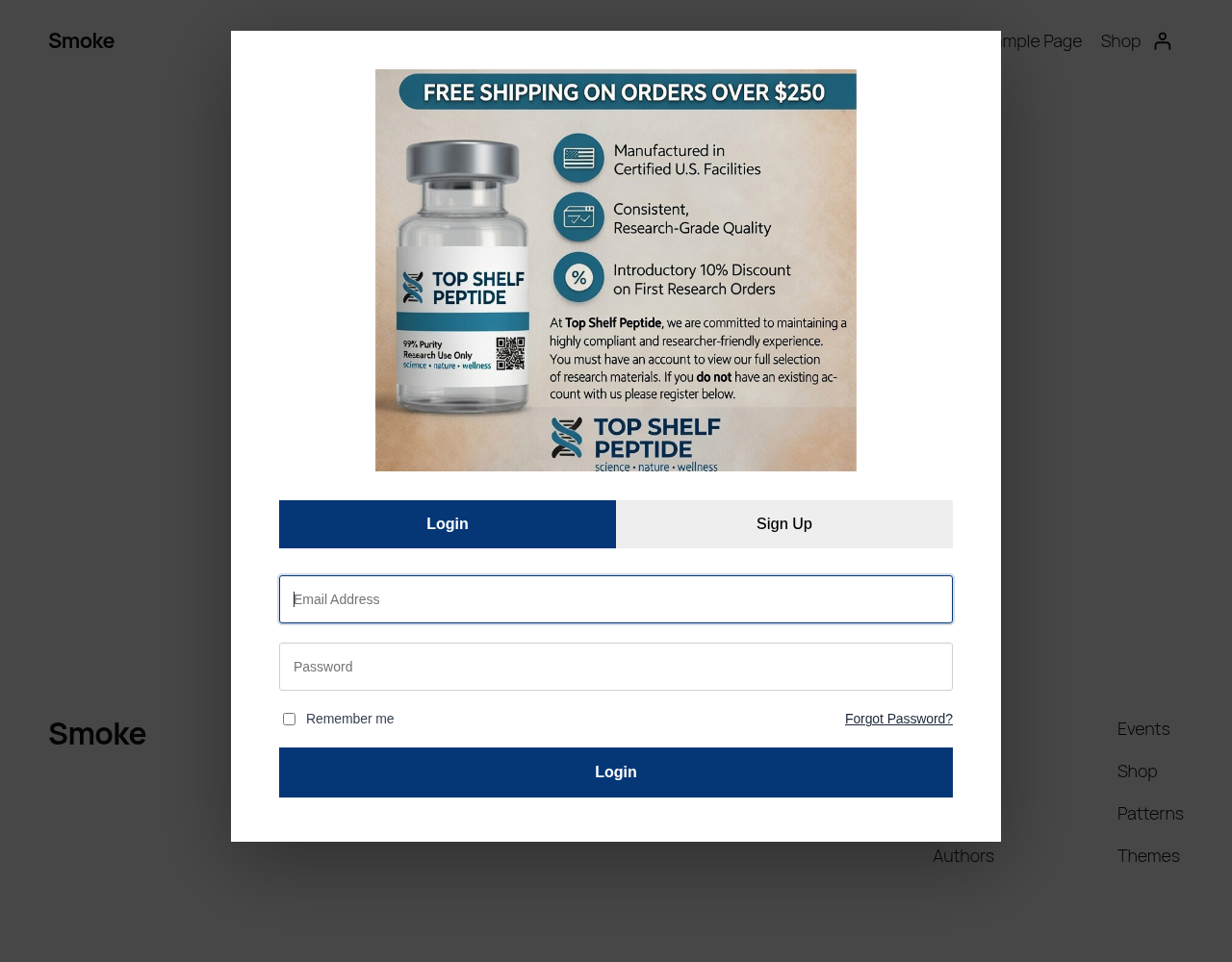
- Login, sign-up and forgot password views in a single modal, all submitted over AJAX.
- Registration from the popup with first name, last name, email and password (min. 8 characters).
- Configurable terms checkbox: custom text (links allowed), optional or required, or hidden entirely. Consent time is stored per user.
- Auto-login after registration, followed by a page reload.
- Password reset feedback: a short-lived cookie shows a "password changed" message the next time the popup is displayed.
- Configurable offer image and alt text, with a media library picker, bundled default artwork and automatic fallback if a custom image fails to load.
- Admin base color setting that drives the popup accent color through a CSS custom property.
- WooCommerce integration: guests cannot purchase products or add them to the cart.
- Activation setup: enables public registration and sets the default role to
customer(orsubscriberif WooCommerce is not active). - Translation ready:
auth-gate-popuptext domain with a bundled.potfile.
Screenshots
| Login view |
|---|
|
The popup artwork shown is the bundled default image. It is sample artwork from the author's own site, topshelfpeptide.com, and should be replaced with your own image in the settings.
Installation
- Download the latest release zip (or clone this repository into
wp-content/plugins/). - In WordPress admin, go to Plugins > Add New > Upload Plugin and upload the zip.
- Activate Auth Gate Popup.
cd wp-content/plugins
git clone https://github.com/lawrancebabu/auth-gate-popup.git
Configuration
Go to Settings > Auth Gate Popup:
| Setting | Description | Default |
|---|---|---|
| Popup image | Offer image at the top of the popup (about 790 x 686). Empty uses the bundled artwork. | assets/top-shelf-popup.jpg |
| Image alt text | Alternative text for the popup image. | Sign in to continue |
| Base color | Hex color used for tabs, buttons and accents. | #053776 |
| Registration terms text | Text next to the Sign Up checkbox. a, strong and em tags allowed. Empty hides the checkbox. |
I agree to the Terms of Service and Privacy Policy. |
| Require terms checkbox | Whether the checkbox must be ticked to register. | On |
Settings are stored in a single option, agp_options.
How It Works
Hooks used
| Hook | Type | Purpose |
|---|---|---|
init |
action | Loads translations and runs the one-time legacy data migration. |
wp_enqueue_scripts |
action | Enqueues popup CSS/JS for logged-out visitors and injects the accent color. |
wp_body_open (priority 1), wp_footer |
action | Renders the popup markup once (footer is a fallback for themes without wp_body_open). |
wp_ajax_nopriv_agp_login |
action | AJAX login via wp_signon(). |
wp_ajax_nopriv_agp_register |
action | AJAX registration via wp_create_user(), then wp_set_auth_cookie(). |
wp_ajax_nopriv_agp_lost_password |
action | AJAX password reset email via retrieve_password(). |
password_reset, woocommerce_customer_reset_password |
action | Sets a 5-minute HttpOnly cookie used to show a reset success message. |
admin_menu, admin_init, admin_enqueue_scripts |
action | Settings page, Settings API registration and media picker script. |
woocommerce_is_purchasable |
filter | Returns false for guests. |
woocommerce_add_to_cart_validation |
filter | Blocks add-to-cart for guests and adds a WooCommerce notice. |
register_activation_hook |
activation | Enables registration, sets default role, migrates legacy data, seeds default options. |
Excluded requests
The popup is not rendered for logged-in users, wp-admin, AJAX and REST requests, feeds, robots.txt, wp-login.php / wp-register.php, and password reset URLs, so users can always complete login and reset flows.
Data keys
| Key | Type | Purpose |
|---|---|---|
agp_options |
option | Plugin settings. |
agp_migration_version |
option | Marks the legacy data migration as done. |
agp_terms_agreed |
user meta | Date/time the user accepted the terms at registration. |
agp_password_reset_success |
cookie | 5-minute flag for the reset success message. |
Versions before 1.1.0 used alphalabs_* keys. On activation (or the first init after upgrading) the plugin copies the old settings option and alphalabs_terms_agreed user meta to the new keys once. Old data is copied, not deleted.
Security measures
ABSPATHdirect-access guard on the main file;WP_UNINSTALL_PLUGINguard onuninstall.php.- Nonce (
wp_create_nonce/wp_verify_nonce) on every AJAX form. - AJAX handlers registered only as
nopriv, so they are available to logged-out visitors only. - Input sanitized with
sanitize_email,sanitize_text_field,sanitize_key,sanitize_userandwp_unslash; passwords are passed to core untouched, as core expects. - Settings sanitized in a Settings API callback (
esc_url_raw,sanitize_hex_color,sanitize_text_field,wp_kseswith a small allowlist); settings page restricted tomanage_options. - All output escaped with
esc_html,esc_attr,esc_url,esc_textareaandwp_kses. - Generic "invalid email address or password" error on failed login.
- Auth cookies set with
is_ssl()awareness; reset cookie is HttpOnly and Secure on HTTPS. - No direct SQL: all data access goes through WordPress core APIs.
- Code checked with PHP_CodeSniffer using WordPress Coding Standards and PHPCompatibilityWP (
phpcs.xml.dist).
Activation, Deactivation and Uninstall
- Activation turns on "Anyone can register" and sets the default new user role to
customer(subscriberwithout WooCommerce). - Deactivation leaves those two site settings unchanged. Review them under Settings > General if you no longer want public registration.
- Uninstall (deleting the plugin) removes
agp_options,agp_migration_versionand the legacyalphalabs_auth_gate_optionsoption. Registration settings and per-user consent timestamps are intentionally kept.
Development
composer global require wp-coding-standards/wpcs phpcompatibility/phpcompatibility-wp
phpcs            # uses phpcs.xml.dist
wp i18n make-pot . languages/auth-gate-popup.pot --exclude=screenshots
Requirements
- WordPress 6.0 or later
- PHP 7.4 or later
- WooCommerce (optional, for purchase gating and the
customerrole)
File Structure
auth-gate-popup/
├── auth-gate-popup.php       # Main plugin file (bootstrap, hooks, settings, AJAX handlers, migration)
├── uninstall.php             # Removes plugin settings on uninstall
├── assets/
│   ├── auth-gate.css         # Popup styles
│   ├── auth-gate.js          # Popup behavior: tabs, AJAX submit, Escape blocking
│   ├── auth-gate-admin.js    # Media library picker for the settings page
│   └── top-shelf-popup.jpg   # Default popup artwork (sample, from topshelfpeptide.com)
├── languages/
│   └── auth-gate-popup.pot   # Translation template
├── screenshots/
│   └── popup.png
├── phpcs.xml.dist            # Coding standards config
├── readme.txt                # WordPress.org-style readme
├── README.md
├── LICENSE
└── .gitignore
License
GPL-2.0-or-later. See LICENSE.
Author
Lawrance Babu Gain, Senior PHP / WordPress / Laravel Developer
- GitHub: @lawrancebabu
- Website: hubstafftalent.net/profiles/lawrance-babu
- Email: lawrance1020@gmail.com