Relivora CRM
CRM and lead management for WordPress: leads, companies, contacts, sales pipeline, activities, tasks, follow-ups, notes and customer communication.
Install
This is the repository archive. It installs, but the folder name will carry the branch suffix and updates will not flow.
Install straight from GitHub with WP-CLI:
wp plugin install https://github.com/landrydjouonang-hue/relivora-crm/archive/refs/heads/main.zipA complete CRM and lead-management platform built into WordPress. Leads and a drag-and-drop sales pipeline, companies and contacts, tasks, follow-ups, notes, an activity timeline, email with templates, CSV import and export, an analytics dashboard, per-role access control and a secure REST API — with no external services and no runtime dependencies.
By Djouonang Landry · GPL-2.0-or-later · Requires WordPress 6.4+ and PHP 8.0+
What it does
| Area | Highlights |
|---|---|
| Dashboard | Ten KPIs (new, qualified, won and lost leads, pipeline value, conversion rate, tasks, follow-ups) and five charts, filtered by period and owner. Charts are rendered by a small dependency-free SVG renderer with keyboard-accessible tooltips and a data table for every chart. |
| Leads & pipeline | Configurable stages with colours and win probabilities, a drag-and-drop board (with a keyboard-friendly "Move to" control and a no-JavaScript fallback), assignment, filters and bulk actions. |
| Companies & contacts | Full CRUD screens with search, status views, sorting, pagination, screen options, trash and restore, plus notes on every record. |
| Tasks & follow-ups | Due dates, priorities, assignees, overdue indicators and a menu bubble; follow-ups record an outcome. |
| Activity timeline | Automatic history (created, stage changes, won/lost, assignment, value, notes, tasks, emails) plus manually logged calls, emails and meetings. |
Reusable templates with {{placeholders}} and a live preview, composing from any record, signature, "send me a copy", per-user hourly limits, delivery errors captured, and a searchable email log. |
|
| Import & export | CSV import with column mapping, type conversion, duplicate detection, an exact preview and an error report; CSV export that re-imports cleanly; and a complete JSON backup. |
| Access control | A permission matrix for every capability and role, a team screen for CRM roles, and safeguards against lock-out and privilege escalation. |
| REST API | CRUD for leads, companies, contacts, tasks and activities with schema-driven validation, permission callbacks, paging, filters and Application Password authentication. |
| Operations | Data-retention policies, a private debug log, a system status report, contextual help on every screen, and clean activation, upgrade, deactivation and uninstall handling. |
Screenshots
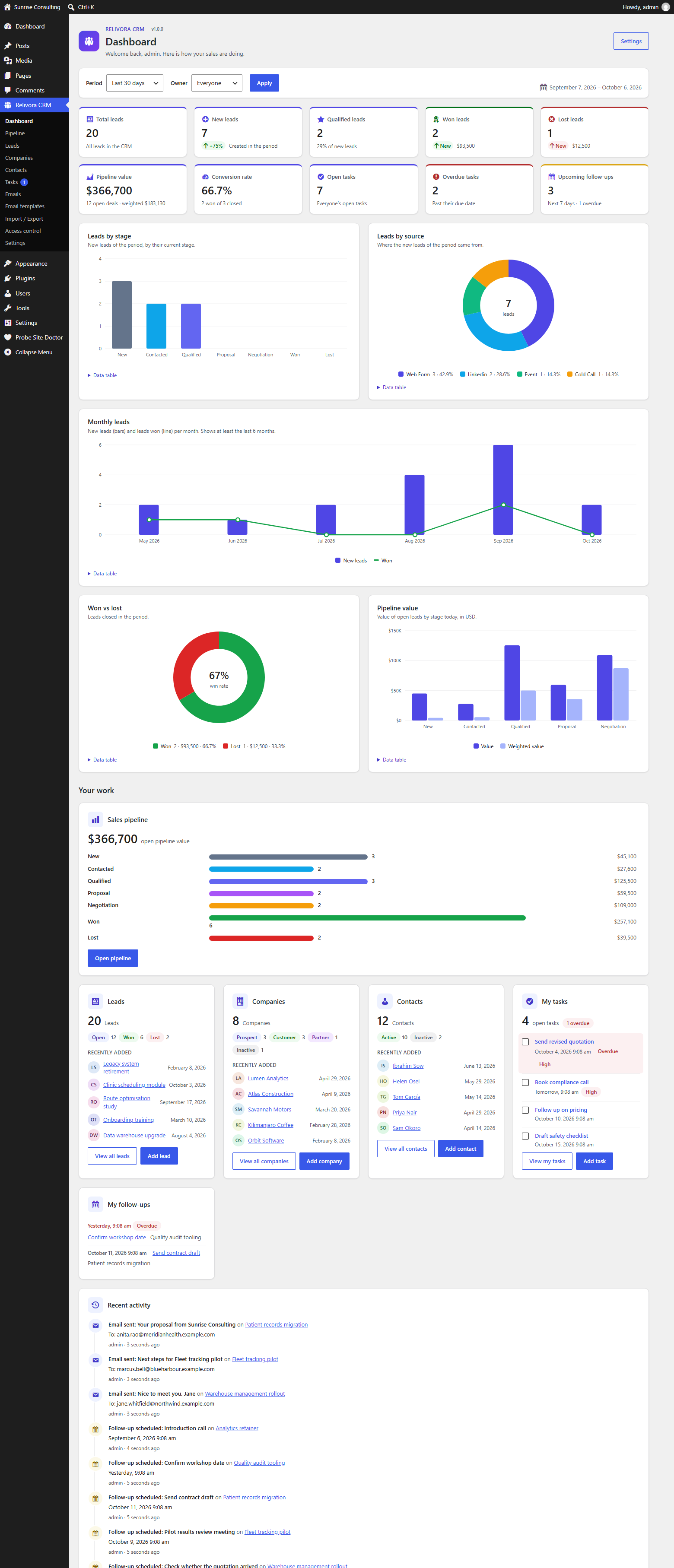 Dashboard — KPIs, five charts and your own work, filtered by period and owner.
| Sales pipeline | Lead record |
|---|---|
 |
 |
| Drag cards between stages, or move them from the keyboard. | Details, stage bar, activity, tasks, emails, follow-ups and notes. |
| Access control | Send email |
|---|---|
 |
 |
| Every capability, every role, in one matrix. | Templates, placeholders and a live preview of the message. |
More: all fourteen screens with captions.
Install
- Copy the
relivora-crmfolder intowp-content/plugins/. - Activate it on the Plugins screen. Tables, roles and settings are created automatically; upgrades run their migrations on the next request.
- Open Relivora CRM → Dashboard, then add team members under Relivora CRM → Access control → Team.
How it is built
- Modular architecture. Each feature area is a module
(
src/Modules/<Feature>) that declares its pages, capabilities, migrations and REST controllers;ModuleManagerboots them. Adding a feature means adding a module, not editing the core. - Repository data layer. All SQL lives in
src/Dataandsrc/Database. Repositories validate and sanitize from a declarative column schema, use prepared statements with allow-listed identifiers, handle soft deletes, object caching and lifecycle hooks — and the same rules serve the admin screens, the CSV importer and the REST API. - Versioned migrations. Thirteen migrations with batches, rollback and error reporting; InnoDB foreign keys where the host supports them.
- Security by default. Nonce, then capability, then work — on every form, AJAX endpoint and REST route; record-level meta capabilities; escaping at output; protected upload and log folders.
- Accessible, responsive admin. ARIA tab panels, labelled controls, live-region announcements, visible focus, reduced-motion support and layouts that work down to phone width. Every JavaScript feature has a server-side fallback.
- No dependencies. No build step, no bundler, no third-party PHP or JS libraries — only WordPress APIs.
Documentation
| docs/USER-GUIDE.md | How to use the CRM, screen by screen. |
| docs/ARCHITECTURE.md | Modules, request lifecycle, data layer, security model, hook reference. |
| docs/DATABASE.md | Every table and column, relationships and migrations. |
| docs/API.md | REST endpoints, authentication, filters, errors. |
| docs/TESTING.md | What the integration suites cover. |
| docs/SCREENSHOTS.md | All fourteen screens, with captions. |
| docs/DEMO-VIDEO.md | Shot-by-shot script for the product video. |
| docs/PUBLISHING.md | Release checklist for GitHub, WordPress.org and the website. |
Demo data and the screenshot pipeline live in .github/demo/; the product landing page is website/index.html.
The REST API in one example
curl -u "jane:APPLICATION PASSWORD" -H "Content-Type: application/json" \
  -d '{"title":"Website redesign","amount":12000,"company_id":7}' \
  https://example.com/wp-json/relivora-crm/v1/leads
Responses follow WordPress conventions: 201 Created with a Location
header, paging headers, _links to related records, and field-level
validation errors.
Development
composer install     # development tools only
composer lint        # php -l over every file
composer phpcs       # WordPress Coding Standards
Roadmap
Lead capture forms, reporting exports, and saved dashboard views.
License
GPL-2.0-or-later. See LICENSE.