Label Vier Media Usage self-updates
WordPress plugin: index every file in wp-content/uploads, find what is really used and safely clean up the rest.
by Label Vier · github.com/labelvier/labelvier-media-usage · website
Install
No release zip yet. The repository archive installs, but the folder name will carry the branch suffix and updates will not flow:
wp plugin install https://github.com/labelvier/labelvier-media-usage/archive/refs/heads/main.zipShips its own WordPress updater (Plugin Update Checker), so new versions show up under Dashboard → Updates.
Find out what is really in your wp-content/uploads folder, what your site still uses and
what can be deleted safely.
The problem
Media Library size plugins only look at attachment metadata. They miss everything in
uploads that is not (or no longer) a Media Library item: leftover zips, sql dumps and
logs, orphaned thumbnails, WebP copies, optimizer backups and copies of whole upload
folders after a migration. They also cannot tell whether a file is still referenced.
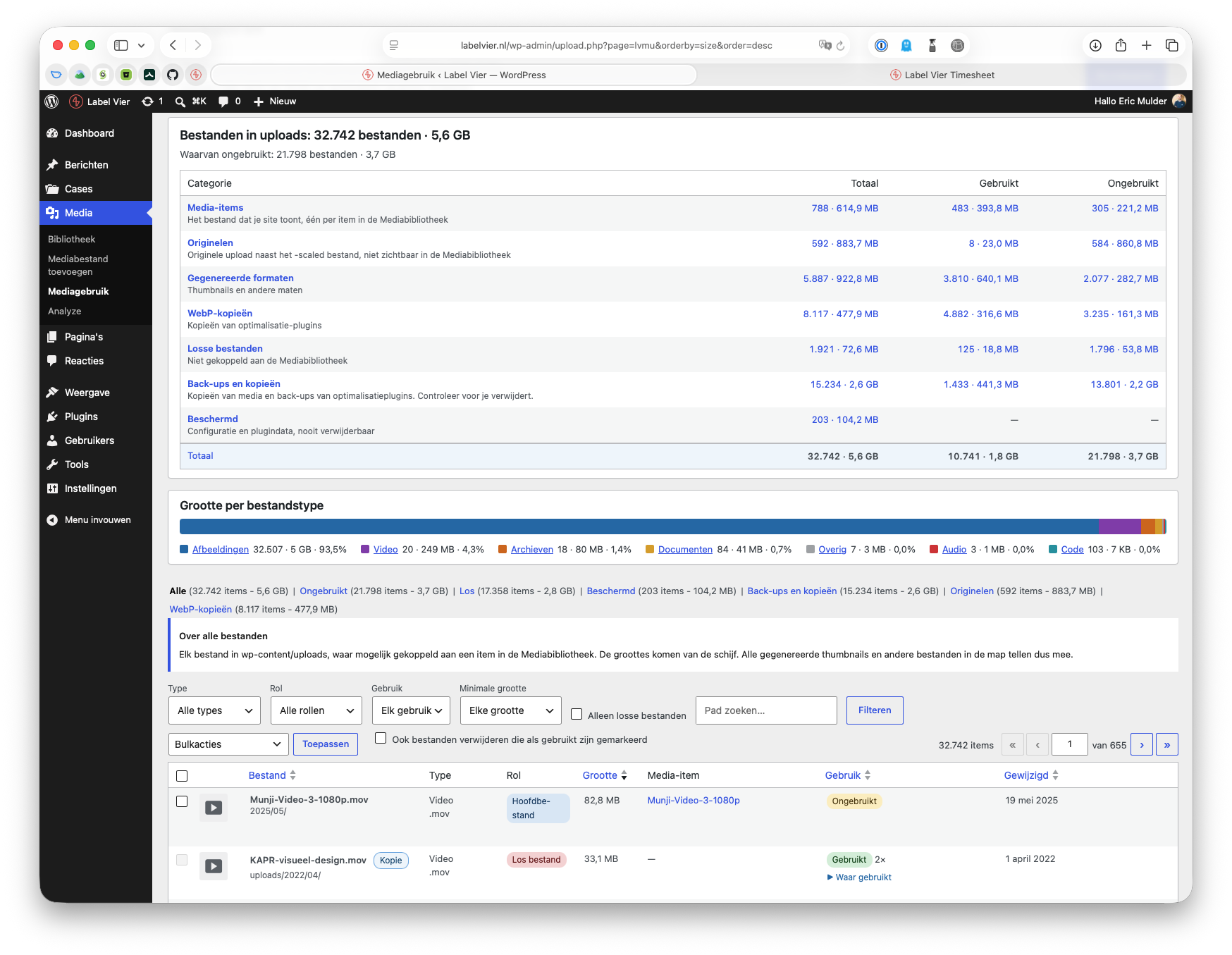
Label Vier Media Usage indexes every file in the uploads folder, links files to Media Library items and checks the whole database for real references. The result is an overview per category with the size you can reclaim, and a safe way to bulk delete.
Features
- Overview by category: media items, originals, generated sizes, WebP copies, loose files, backups and copies, protected files. Each with a count, size and how much is unused.
- Usage detection across the whole database (every table with the WordPress prefix): post content and blocks, galleries, featured images, ACF image/file/gallery fields, page builder data, widgets and options, site icon and logo, plus references from theme files and from text files in uploads (css, html, js, svg), so a font or image that is only used by a stylesheet counts as used.
- Originals: the full size upload WordPress keeps next to
-scaledis tracked separately and only counts as used when it is referenced directly. - WebP copies made by optimizer plugins (
foo.jpg.webp,foo.webp). - Backups and copies: optimizer backup folders and nested copies of the uploads structure are recognised and flagged.
- Protected files (server configuration, folder protection, dotfiles and plugin data) can never be deleted.
- Suspicious PHP and script files in uploads are flagged "Check this file".
- Scheduled bulk deletes that run in the background, one at a time, with progress, cancel, resume after an aborted request and a watchdog for stalled jobs.
- Nightly index at 03:00 (site time) through Action Scheduler.
- WP-CLI commands for indexing and reporting.
- Dutch translation (nl_NL) included.
Requirements
- PHP 8.1 or higher
- WordPress 6.4 or higher
- A single site installation. Multisite is not supported (files of other sites would be reported as unused), the plugin disables itself and shows a notice.
Installation
- Download
labelvier-media-usage.zipfrom the latest release. - In wp-admin go to Plugins → Add New → Upload Plugin, upload the zip and activate.
Do not use the "Source code" archives of GitHub: they do not contain the release build.
Updates are installed automatically through the normal WordPress updates screen: the
plugin checks the GitHub releases of this repository and shows the changelog in
"View version x details". To turn this off, see the lvmu_update_checker_enabled filter.
Usage
Open Media → Media Usage in wp-admin (requires the manage_options capability).
- Index now starts an index run through Action Scheduler. The page shows progress and reloads when done. While the page is open it also processes the queue itself, so runs finish on hosts where the Action Scheduler loopback request is blocked.
- A run is scheduled every night at 03:00 (site time).
- Filter on type, role, usage, orphaned and size. Bulk delete works on the selection or on all files matching the current filters. Files marked as used are only deleted when "Also delete files marked as used" is checked.
- Bulk deletes run in the background: they are scheduled through Action Scheduler and listed at the top of the page, with a Cancel link as long as a job has not started. Running jobs show their progress, finished jobs show the result (deleted, freed, skipped) and can be dismissed. A job waits while an index run is active. Files in a scheduled job are marked and cannot be selected again. Jobs run one at a time, oldest first. A job remembers which files are still to do, so it resumes where it stopped when a request is aborted or PHP dies. A watchdog (every ~2 minutes and on every status poll) restarts a job that made no progress for 3 minutes, or a queued job without an Action Scheduler action; after 3 failed restarts the job is marked failed. A stalled job shows Resume now and Cancel. Status polls keep running a job even when the browser closes the connection. Deleting a single file from its row stays immediate.
File roles
| Role | Meaning |
|---|---|
| main | The attached file of a Media Library item (often -scaled) |
| original | original_image, the full size upload WordPress keeps next to -scaled |
| subsize | Generated image sizes |
| webp | .webp copies made by optimizer plugins (foo.jpg.webp, foo.webp) |
| orphan | Not part of any Media Library item |
What counts as "used"
A file is used when its path or filename is referenced anywhere in the database (all
tables with the WordPress prefix), or when its Media Library item is referenced by id
(blocks, wp-image-123, galleries, featured image, ACF image/file/gallery fields,
site icon/logo, media-ish option and meta keys). All files of a used Media Library item
count as used, except the original: WordPress serves the -scaled file, so an original
is only used when it is referenced directly. Deleting an unused original keeps the
Media Library item working: regenerating thumbnails falls back to the -scaled file,
the image editor already works on the -scaled file, and the frontend never uses the
original. What you lose is the full resolution file itself (e.g. for downloads or
print) and the ability to generate sizes larger than the -scaled file (default max
2560px on the longest side). Revisions, trashed posts and "uploaded to" do not count
as usage.
Not detected: references in plugin code, external sites or newsletters. Check before deleting files that might be linked from outside the site.
Protected and suspicious files
Some files can never be deleted, not even with "Also delete files marked as used". They stay in the list with their size and a "Protected" badge, but cannot be selected:
- Server configuration:
.htaccess,.htpasswd,.user.ini,php.ini,web.configand files with the extensionini,conforconfig. - Folder protection:
index.php,index.html,index.htm. - Hidden files: every file whose name starts with a dot (such as
.DS_Store). - Plugin data: every file in a folder outside the WordPress
YYYY/MMstructure (for examplewc-logs/,gravity_forms/,elementor/css/,some-plugin-cache/). These files belong to plugins, clean them up through the plugin itself. Files directly in the uploads root follow the normal rules.
PHP and script files (php, php3-php8, phtml, phar, cgi, pl, py, sh) are
not protected but flagged "Check this file": in uploads they can be a sign of a hacked
site. They can be deleted under the normal rules, after an extra warning in the confirm
dialog. The views "Protected" and "To check" list both groups.
Files in copy folders are not protected, see below.
Sites can extend the rules in code with the lvmu_protected_patterns filter (keys
names, extensions and folders). The rules live in includes/FileRules.php.
Backups and copies
Some folders outside the YYYY/MM structure are not plugin data but copies of media. They
get the flag copy (category "Backups and copies" in the overview, badge "Copy" or
"Back-up") and can be deleted when unused, after an extra confirmation. Files that are
still referenced (old URLs) stay locked unless "Also delete files marked as used" is
checked. Files with an unknown usage are never deleted.
media_copy: a path that does not start withYYYY/MM/but contains aYYYY/MM/filesegment. Regex:^(?!\d{4}/\d{2}/)(.+/)\d{4}/\d{2}/[^/]+$. Examples:uploads/2022/03/x.jpg(nested uploads after a migration),ShortpixelBackups/wp-content/uploads/2022/03/x.jpg,sites/2/2020/01/x.jpg,old-uploads/2019/05/x.jpg. On a multisite,sites/N/is never treated as a copy.optimizer_backup: any folder named like an entry of the folder list, at any depth. Default list:ShortpixelBackups(source: ShortPixel knowledge base, "Where is the backup folder located":wp-content/uploads/ShortpixelBackups). Not included because the name could not be confirmed as a distinct uploads folder: Imagify stores its backups inuploads/backup/YYYY/MM(covered by themedia_copyregex), EWWW keeps them inwp-content/ewww(outside uploads) and for Smush no folder name was found.- Never a copy: protected names (
.htaccess,index.php, ini/conf, dotfiles) and the protected plugin folders (updraft,ai1wm-backups,backwpup-*,wc-logs,woocommerce_uploads,gravity_forms,wpforms,wp-migrate-db). - Precedence: protected by name/extension/dotfile, then copy, then plugin folder rule, then suspicious. Copies with a PHP or script extension also show the "Check this file" badge and count in the "To check" view.
- The flags are recomputed for all rows when the database version changes (now 3).
Filters: lvmu_copy_folders (array of folder names, fnmatch globs allowed) and
lvmu_protected_patterns (see above). The rules live in includes/FileRules.php.
Safety
- Protected files are never deleted, see Protected and suspicious files.
- Files with an unknown usage are never deleted.
- Files marked as used are only deleted when "Also delete files marked as used" is checked.
- Only files from the latest complete index are deleted, and before a file is deleted the plugin checks again that it is not referenced since that index run.
- Backups and copies and PHP/script files need an extra confirmation.
- Always make a backup before a large bulk delete.
WP-CLI
wp lvmu index --sync          # run a full index inline
wp lvmu index                 # queue a run in Action Scheduler
wp lvmu status
wp lvmu summary
wp lvmu list --orphaned --usage_status=unused --limit=50
wp lvmu summary --format=json prints the full summary including the reclaimable size.
Hooks
| Hook | Type | Purpose |
|---|---|---|
lvmu_update_checker_enabled |
filter | Return false to disable update checks against GitHub (default true). |
lvmu_protected_patterns |
filter | Extend the protected rules (keys names, extensions and folders). |
lvmu_copy_folders |
filter | Folder names (fnmatch globs allowed) that are treated as optimizer backups. Default ['ShortpixelBackups']. |
lvmu_ref_scan_skip_tables |
filter | Regex list of tables the usage scan skips. |
lvmu_ref_scan_error_tolerant_tables |
filter | Regex list of tables for which unreadable rows do not fail the scan. |
lvmu_deleted_files |
action | Fires after a delete run with the result (deleted, freed, skipped). |
Example:
add_filter('lvmu_protected_patterns', function (array $patterns): array {
    $patterns['folders'][] = 'my-plugin-cache';
    return $patterns;
});
Development
This plugin is developed in the Label Vier WordPress starterkit repository, in
wp-content/plugins/labelvier-media-usage/. This repository is a read-only mirror of
that folder (git subtree split), so open issues here but expect fixes to arrive through
the starterkit. Action Scheduler and Plugin Update Checker are bundled with composer in
vendor/ (committed).
In the starterkit root:
npm run buildcopies a clean plugin tobuild/labelvier-media-usage/and createsbuild/labelvier-media-usage-<version>.zip(version from the plugin header). The.githubfolder, composer files and dotfiles are left out of the zip.npm run i18nandnpm run i18n:checkmaintain the translations, see below.- Test data:
bin/seed-media-usage.sh, expected results intest/fixtures/EXPECTED.md.
Releasing
- Bump
Versionin the plugin header andLVMU_VERSIONinlabelvier-media-usage.phpand add a## [x.y.z] - datesection toCHANGELOG.md. Commit everything. - Run
npm run release:plugin -- --dry-runto check, thennpm run release:plugin.
The script verifies the version and changelog, runs the translation check and the build,
requires a clean working tree, pushes the plugin folder to the main branch of
labelvier/labelvier-media-usage (git subtree split), tags vX.Y.Z and creates the GitHub
release with labelvier-media-usage.zip attached. The release notes are the matching
section of CHANGELOG.md; installed sites show them in the update details screen.
Environment: PLUGIN_REPO (remote URL), FORCE=1 (force push). Needs the gh CLI.
Translations
All UI text must be translatable (text domain labelvier-media-usage) and fully
translated to Dutch (nl_NL). The source language is English.
- After changing strings, run
npm run i18n. It regenerates the.pot, merges it into the.poand rebuilds the.moand.l10n.php(needs the Docker container). - Fill in the empty Dutch
msgstrentries inlanguages/labelvier-media-usage-nl_NL.poin Label Vier tone (je/jij), and remove anyfuzzyflags. Runnpm run i18nagain to rebuild the.mo. - Run
npm run i18n:check. It fails on new msgids missing from the.po, empty or fuzzy translations and a.moolder than the.po.
npm run build refuses to build when translations are incomplete
(override with SKIP_I18N_CHECK=1).
License
GPL-2.0-or-later, see LICENSE.