Media Cleanup Scanner
Find and remove unused media, detect duplicates, optimize images, and clean unregistered files.
Install
This is the repository archive. It installs, but the folder name will carry the branch suffix and updates will not flow.
Install straight from GitHub with WP-CLI:
wp plugin install https://github.com/labanthegreat/media-cleanup-scanner/archive/refs/heads/main.zipScans the WordPress media library to find unused attachments, duplicate files, unregistered uploads, and broken media references. Provides bulk cleanup tools, image optimization, and scheduled background scanning.
Requirements
- WordPress 6.0 or later
- PHP 8.0 or later
- GD library (required for image optimization and visual duplicate detection)
Installation
- Upload the
media-cleanup-scannerdirectory towp-content/plugins/. - Activate through Plugins in the WordPress admin.
- Access the scanner from the Media Cleanup menu in the admin sidebar.
Features
Unused Media Detection
Scans post content, post meta, featured images, WooCommerce product galleries, ACF fields, customizer settings, shortcodes, and CSS background images to build a reference index. Any attachment not referenced anywhere is flagged as unused.
Duplicate Detection
Finds duplicate media using four methods:
- Hash -- exact MD5 file hash comparison
- Size -- same file size, verified with partial hash
- Filename -- normalized filename similarity (configurable threshold, default 0.85)
- Visual -- perceptual hash comparison for visually similar images (requires GD)
Duplicates can be merged: all references to the duplicate are rewritten to point to the original, then the duplicate is optionally deleted.
Unregistered File Detection
Scans the wp-content/uploads directory for files that exist on disk but have no corresponding attachment post in the database.
Broken Media Detection
Identifies four types of broken media:
- Attachments whose physical files are missing from disk
- Missing or ungenerated thumbnail sizes
- Zero-byte (corrupt) files
- Broken image/link URLs in post content pointing to the uploads directory
Missing thumbnails can be regenerated from the original file.
Image Optimization
Compresses images using the GD library with three quality presets:
| Preset | JPEG | PNG | WebP |
|---|---|---|---|
| Lossless | 95 | 9 | 95 |
| Balanced | 82 | 6 | 80 |
| Aggressive | 65 | 3 | 60 |
Additional options:
- Resize to maximum dimensions (default 2560x2560)
- Convert to WebP format
- Strip EXIF metadata
- Thumbnails are regenerated after optimization
Supported formats: JPEG, PNG, WebP. GIF files are skipped (may be animated).
Scheduled Scanning
Automated scans via WP-Cron with daily or weekly frequency. Configurable options:
- Email scan reports to a specified address
- Auto-trash unused items older than a configurable threshold (30, 60, or 90 days)
- Safe mode (suggest only, never auto-delete)
Cleanup Operations
- Trash or permanently delete unused attachments (individually or in bulk)
- Delete unregistered files from disk
- Whitelist/ignore list to exclude specific attachments from scan results
- Undo support for the last trash operation
- Dry-run mode for previewing actions without making changes
- Export unused media list as CSV
- Reference cleanup on deletion (removes
<img>tags, Gutenberg image blocks,_thumbnail_idmeta, and WooCommerce gallery references)
Admin Interface
Multi-tab interface at Media Cleanup with the following tabs:
- Dashboard -- storage summary, media type breakdown chart, monthly upload trends, quick action buttons
- Unused Media -- grid/list view of unused attachments with bulk actions
- Duplicates -- grouped results with side-by-side comparison and merge
- Optimizer -- compression settings and bulk optimization with progress tracking
- Unregistered -- orphaned file list with bulk delete
- Settings -- scheduled scan configuration, auto-cleanup, safety, and duplicate detection threshold
WP-CLI Commands
All commands are registered under the wp media-cleanup namespace.
Scan for unused media
wp media-cleanup scan [--format=<format>] [--limit=<number>]Lists all unused attachments with ID, filename, size, MIME type, and date.
--format=<format>-- Output format:table(default),csv,json,count--limit=<number>-- Maximum results to return (0 = unlimited, default)
wp media-cleanup scan --format=csv
wp media-cleanup scan --limit=50
Delete unused media
wp media-cleanup delete --unused [--dry-run] [--force] [--yes]--unused-- Required. Targets unused attachments.--dry-run-- Preview what would be deleted without making changes.--force-- Permanently delete instead of trashing.--yes-- Skip the confirmation prompt.
wp media-cleanup delete --unused --dry-run
wp media-cleanup delete --unused --force --yes
Find duplicates
wp media-cleanup duplicates [--method=<method>] [--threshold=<threshold>] [--format=<format>]--method=<method>-- Detection method:hash,size,filename,visual,all(default)--threshold=<threshold>-- Similarity threshold for filename matching, 0.0-1.0 (default 0.85)--format=<format>-- Output format:table(default),csv,json
wp media-cleanup duplicates --method=hash
wp media-cleanup duplicates --method=visual --threshold=0.90
Optimize images
wp media-cleanup optimize [--quality=<quality>] [--max-width=<pixels>] [--max-height=<pixels>] [--webp] [--strip-exif] [--limit=<number>] [--dry-run]--quality=<quality>-- Preset:lossless,balanced(default),aggressive--max-width=<pixels>-- Maximum width in pixels (default 2560)--max-height=<pixels>-- Maximum height in pixels (default 2560)--webp-- Convert images to WebP--strip-exif-- Remove EXIF metadata--limit=<number>-- Limit number of images to process--dry-run-- Show what would be optimized
wp media-cleanup optimize --quality=aggressive --webp
wp media-cleanup optimize --quality=lossless --strip-exif --limit=100
Media library statistics
wp media-cleanup stats [--format=<format>]Shows total attachments, disk usage, optimization stats, and MIME type breakdown.
--format=<format>-- Output format:table(default),json,yaml
wp media-cleanup stats --format=jsonFind unregistered files
wp media-cleanup unregistered [--format=<format>] [--delete] [--dry-run] [--yes]Lists files in the uploads directory that have no attachment post.
--format=<format>-- Output format:table(default),csv,json,count--delete-- Delete the unregistered files--dry-run-- Preview deletions without making changes--yes-- Skip the confirmation prompt
wp media-cleanup unregistered
wp media-cleanup unregistered --delete --dry-run
wp media-cleanup unregistered --delete --yes
Options
The plugin stores its configuration in the following wp_options keys:
| Option Key | Description |
|---|---|
mcs_scheduled_settings |
Scheduled scan configuration (enabled, frequency, email, auto-trash) |
mcs_similarity_threshold |
Filename similarity threshold for duplicate detection (float) |
mcs_whitelist |
Array of attachment IDs excluded from scan results |
mcs_last_action |
Last trash action data for undo support |
mcs_retention_policy |
Retention policy settings (enabled, days, action) |
mcs_optimization_log |
Log of image optimization results |
mcs_scan_history |
History of scheduled scan reports (up to 50) |
mcs_media_stats |
Transient cache for media library statistics |
Screenshots
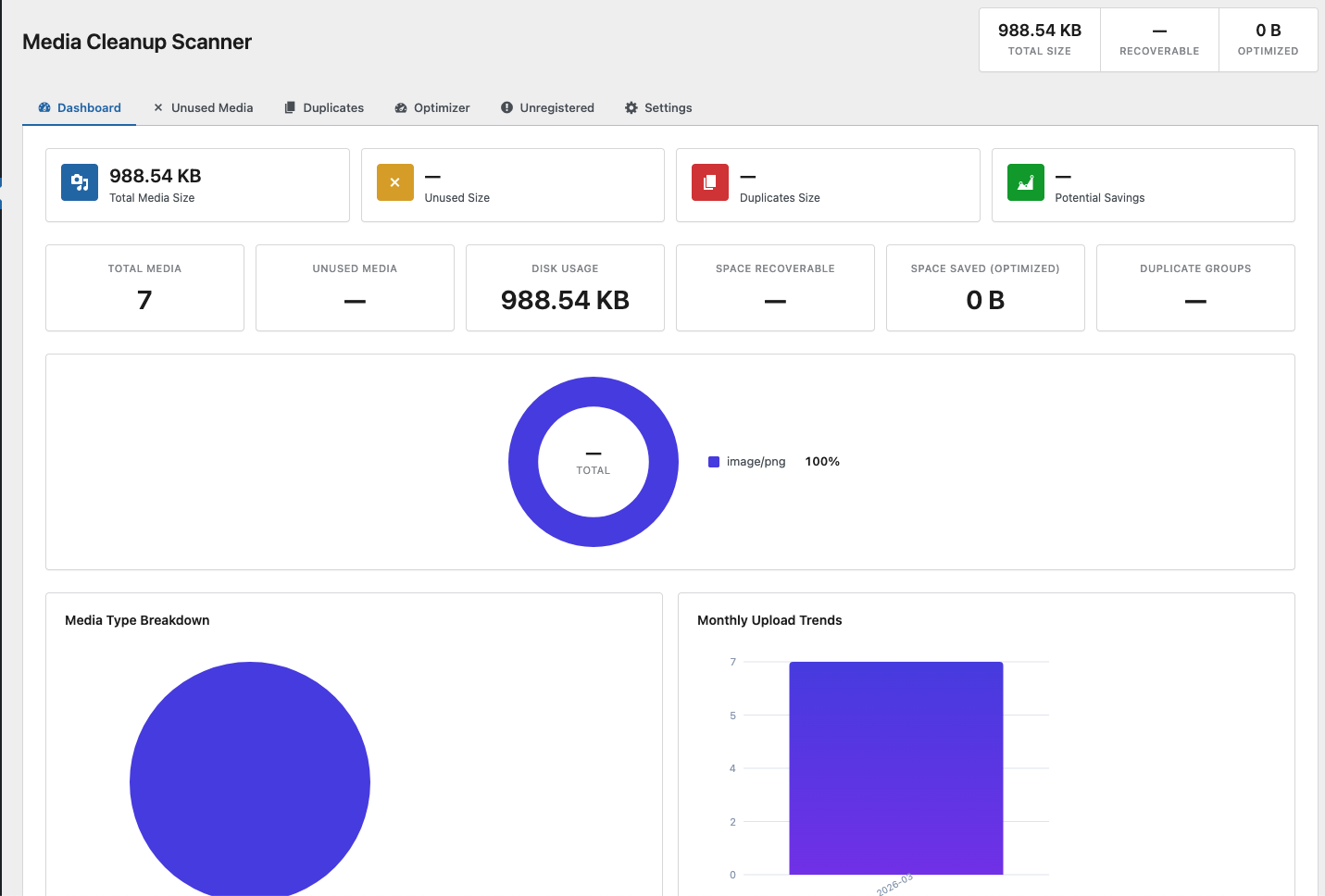 Dashboard with media stats, disk usage, type breakdown chart, and monthly upload trends
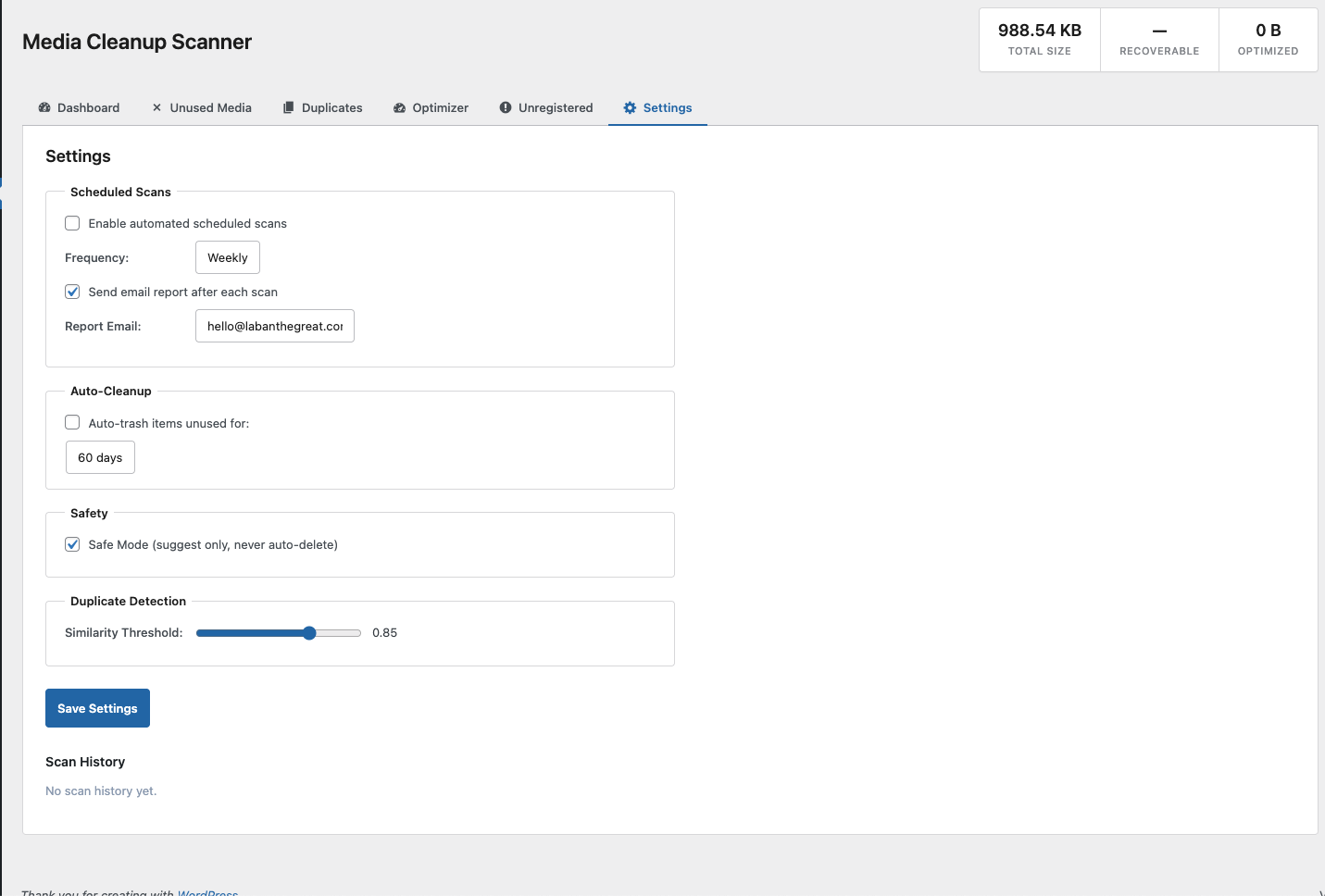 Settings with scheduled scans, auto-cleanup, safety mode, and duplicate detection threshold
Changelog
3.0.0
- Refactored to namespaced architecture (
Jestart\MediaCleanup) - Added AJAX-driven admin interface with tabbed layout
- Added broken media detection (missing files, missing thumbnails, zero-byte files, broken URLs)
- Separated AJAX handling into dedicated
Ajax_Handlerclass - Added PSR-4 style autoloader
2.1.0
- Added broken media detector
- Added safe delete mode (trash instead of permanent delete)
- Added stats cache invalidation on attachment changes
2.0.0
- Added WP-CLI commands (
scan,delete,duplicates,optimize,stats,unregistered) - Added duplicate detection (hash, size, filename, visual)
- Added smart merge for duplicates with reference rewriting
- Added image optimization with quality presets, WebP conversion, EXIF stripping
- Added scheduled scanning with email reports and auto-trash
- Added whitelist/ignore list
- Added undo support for trash operations
- Added CSV export for unused media
- Added retention policy settings
- Deep scanning for WooCommerce galleries, ACF fields, customizer, shortcodes
1.0.0
- Initial release
- Unused media scanning with batched queries
- Unregistered file detection
- Trash and permanent delete support
- Dry-run mode
- Admin page under Media menu
License
GPL-2.0-or-later
Author
Laban The Great