WP Manifestindependent plugin directory
manifest / content / kotlin-playground-wp-plugin

Kotlin Playground Plugin WP Registry grade B. Medium-severity findings · 1 findingWP RegistryMedium-severity findings · 1 findingOpen the reportB

WordPress plugin which allows to embed interactive Kotlin playground to any post via [kotlin] shortcode

★ 37stars
345release downloads
≈20active sites
v0.0.4latest · 8 years ago

Install

Download kotlin-playground-wp-plugin.zip From the v0.0.4 release on GitHub, Jul 26, 2018

Upload it under Plugins → Add New Plugin → Upload Plugin, then activate.

Install straight from GitHub with WP-CLI:

wp plugin install https://github.com/kotlin/kotlin-playground-wp-plugin/releases/download/v0.0.4/kotlin-playground-wp-plugin.zip
No built-in updater. New versions won't appear under Dashboard → Updates. Install new releases yourself, or let Git Updater track the repository.

Kotlin Playground Wordpress Plugin

Allows embedding interactive Kotlin playground to any post via [kotlin] shortcode.
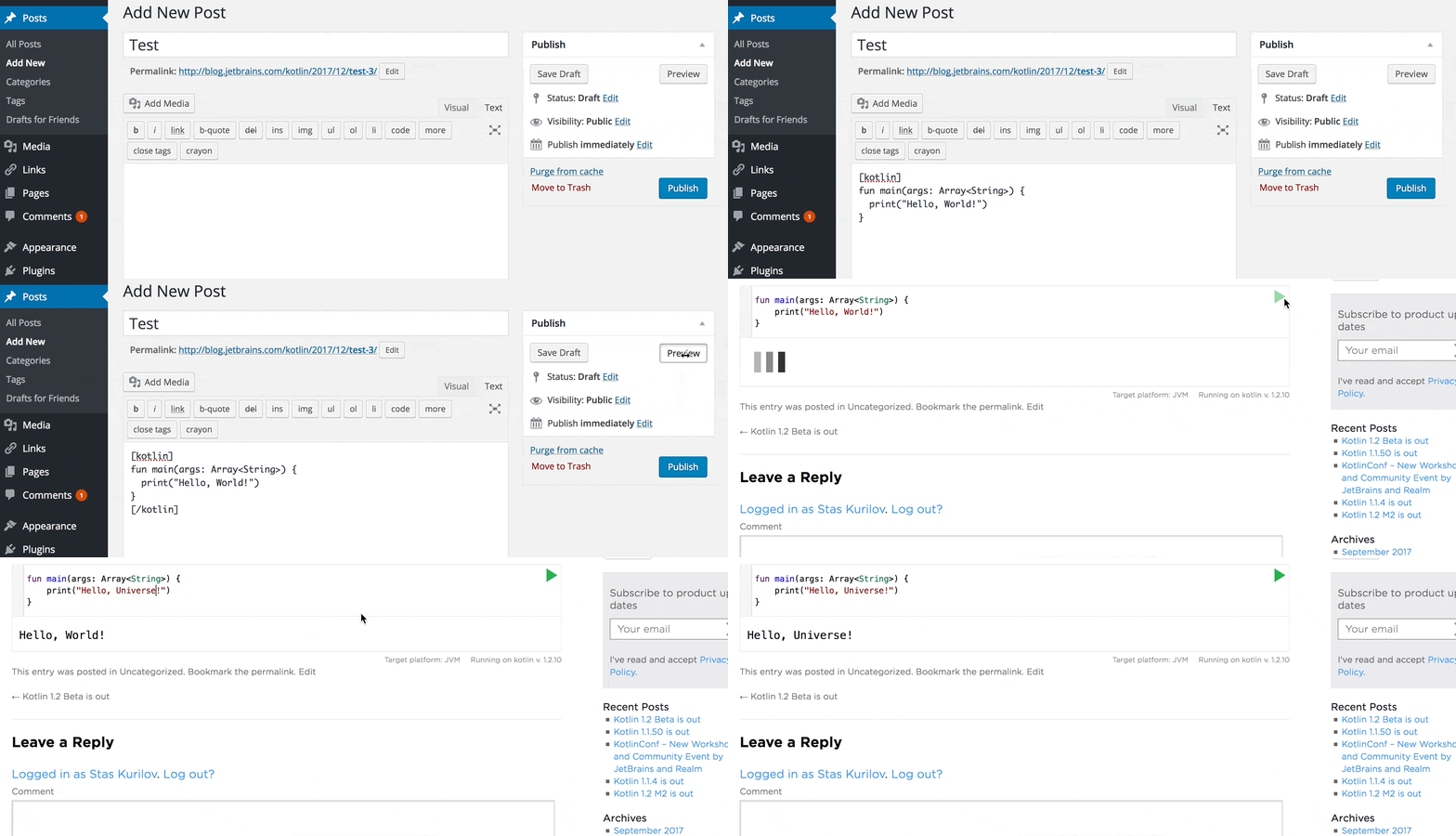
Preview

Installation

  1. Download latest release.
  2. Go to WordPress Admin Panel -> Plugins -> Add New, choose Upload Plugin, select file from your computer and press Install now.

Usage

Use [kotlin]code...[/kotlin] shortcode as usual. Example:

[kotlin]
fun main(args: Array<String>) {
  print("Hello, World!")
}
[/kotlin]

Options

runnable="true|false" (true by default)

Creates read-only playground without ability to edit and run code. Example [kotlin runnable="false"]code...[/kotlin].

folded-button="true|false" (true by default)

Hide code snippet with value false outside of markers //sampleStart and //sampleEnd.

platform="java|js|junit|canvas" (java by default)

Creates playground with different target platforms

min-version="1.2"

Minimum target Kotlin compiler version

auto-indent="true|false" (false by default)

Whether to use the context-sensitive indentation.

indent="2|4" (4 by default)

How many spaces a block should be indented.

theme="idea|darcula|default"

Editor IntelliJ IDEA themes.

version="1.0.7 (latest stable version by default)

Target Kotlin compiler version:

Releases

4 releases. Each count is every asset in that release; expand a row for the breakdown.

Tag
Published
Assets
Downloads
v0.0.4 latest
Jul 26, 2018 8 years ago
kotlin-playground-wp-plugin.zip
243
Apr 27, 2018 8 years ago
kotlin-playground-wp-plugin.zip
18
Apr 16, 2018 8 years ago
kotlin-playground-wp-plugin.zip
63
Dec 28, 2017 8 years ago
kotlin-playground-wp-plugin.zip
21

Active-site estimate ≈20 comes from the median of recent superseded releases. Method.

B grade

Security

Kotlin Playground Plugin 0.0.4 · audited by WP Registry

Medium-severity findings.

1 medium
Audited release
0.0.4
Findings
1
Worst severity
medium
Content hash
085a68c167c4859cfeccd644…

Findings

  • medium Contributor+ stored XSS via unescaped [kotlin] version and min-version attributes

    xss_stored

    doShortcode() runs shortcode_atts() then concatenates $attrs['version'] and $attrs['min-version'] directly into HTML attributes on the <pre class="kotlin-code"> it returns. Enclosed Kotlin source is passed through htmlspecialchars(), and platform/theme/indent are switch-allowlisted, but those two attributes are not esc_attr()'d. WordPress stores shortcodes as literal text; wp_kses_post (Contributor, and Author/Editor on multisite) only strips HTML tags, not values inside [kotlin version='…']. A payload with no '<' such as version='x" style="visibility:visible;position:fixed;inset:0;z-index:2147483647" tabindex="1" autofocus="autofocus" onfocus="alert(document.domain)"' closes data-version, injects style/tabindex/autofocus/onfocus, and relies on HTML duplicate-attribute rules so the plugin's later style="visibility: hidden" is ignored. the_content then emits that markup to every visitor of the published post (Authors self-publish; Contributors need an editor to preview or publish). KotlinPlayground('.kotlin-code') in the footer is not the executing consumer — the HTML parser is.

    kotlin-shortcode.php:66-107

    Recommendation

    Pass version and min-version through esc_attr() (and ideally allow-list a Kotlin version charset such as [0-9A-Za-z._-]). Keep the existing switch allow-lists for platform/theme/indent. Do not treat shortcode_atts() values as safe for HTML attribute context.

WP Registry hashes the installable build and reports on that exact bytes-for-bytes copy. Embargoed findings are withheld until they are disclosed, so a clean verdict means nothing public is outstanding. WP Manifest does not audit code itself.