Install
This is the repository archive. It installs, but the folder name will carry the branch suffix and updates will not flow.
Install straight from GitHub with WP-CLI:
wp plugin install https://github.com/kindermaenner/monatsblitz-wp-plugin/archive/refs/heads/main.zipMonatsblitz Plugin
A lightweight WordPress plugin to manage blitz chess tournaments through a REST API.
Motivation
We are both board members in different clubs. Balancing work, family, and volunteering means one thing: time is our most limited resource. At the same time, a well-maintained website is a key factor for attracting members and creating a strong public presence. In a chess club, activity is most visible through regular results and tournament reports.
This is exactly where the problem starts:
- Results are often only written on paper
- The sheet is somewhere, and someone took it home
- It gets shared in chat but is never found again
- Posting a photo in WordPress looks unprofessional
- Writing news posts manually takes unnecessary time every time
In our chess club, we have around two round-robin tournaments per month. Members care about the results, and they also show outsiders that the club is active. But maintaining everything manually is tedious and error-prone.
That led to a simple idea:
Why not capture results digitally right away and let WordPress generate the posts automatically?
The solution has two parts:
-
WordPress plugin It automatically creates news posts as soon as new results are available. No copy-paste work, no paper sheets, no lost information.
-
Mobile app All members can enter results directly on their phones. Paper is no longer needed, and the data goes straight where it belongs.
This solves several problems at once:
- No more paper sheets
- No searching for photos or chat messages
- Results are published immediately
- The website stays up to date and professional
- We save time without sacrificing content
- Members instantly see what is happening in the club
In short: We automate the boring parts so there is more time for what really matters in club life.
What the Plugin Does
- Creates the required tables on activation:
wp_monatsblitz_playerswp_monatsblitz_tournamentswp_monatsblitz_gameswp_monatsblitz_results
- Provides REST API endpoints for managing players, tournaments, games, and results.
- Creates a new published post from an existing
Template_Monatsblitzpost once a tournament is finalized. - Creates or updates a yearly static page (slug
blitz-YYYY) from a configured page template. - Replaces template placeholders such as
{{month_name}},{{year}},{{date}},{{winner_name}},{{winner_games}},{{winner_points}},{{table}}, and more.
Usage
- Place the plugin in
wp-content/plugins/monatsblitz. - Activate it in the WordPress admin.
- Create a post titled
Template_Monatsblitzand use it as a template.- The template can include HTML, Kadence blocks, and CSS.
- Placeholders are replaced during the finalize call.
- Your app or an external system uses the API to store tournament data.
- After all results are complete, call
POST /wp-json/monatsblitz/v1/finalize. - The plugin creates a new published post with the formatted results.
REST API
Base path: /wp-json/monatsblitz/v1
Players
-
POST /player-
Creates a new player or returns the ID if the player already exists.
-
Alternatively accepts a batch payload via
playersor a top-level array. -
Body (JSON):
forename: first namesurname: last name
-
Batch format:
players: array of objects withforename,surname- or a top-level array with the same objects
-
Behavior:
- Single JSON requests are still supported.
- Batch requests are validated and stored per player.
- Invalid batch data returns
WP_Errorwith HTTP 400.
-
Batch response:
success:truecount: number of processed playersitems: list of per-player responses
-
Example (anonymized):
-
[
  { "forename": "Alex", "surname": "Meyer" },
  { "forename": "Chris", "surname": "Schulz" }
]
{
"success": true,
"count": 2,
"items": [
{ "success": true, "player_id": 301 },
{ "success": true, "player_id": 302 }
]
}GET /players- Returns all players.
Tournaments
-
POST /tournament- Creates a new tournament.
- Body (JSON):
date: date in formatYYYY-MM-DDmode: tournament mode (for example3+5,5+0)round_count(optional): number of rounds, default1
-
GET /tournaments- Returns all tournaments.
-
GET /tournament/{id}- Returns tournament details for a given ID.
Games
-
POST /game-
Creates a game.
-
If
game_idis provided, updates an existing game. -
PUT /gameis also supported for updates. -
Alternatively accepts a batch payload via
games. -
Body (JSON):
game_id(optional): existing game ID for updatestournament_idplayer1_idplayer2_idleg_type(optional): round/leg number, default1result(1:0,0:1,0.5:0.5,+:-,-:+,offen)
-
Behavior:
- Player IDs are normalized before storing:
player1_id <= player2_id. - If IDs are swapped during normalization, the result is mirrored (for example
1:0becomes0:1).
- Player IDs are normalized before storing:
-
Batch format:
tournament_idgames: array of objects withplayer1_id,player2_id,result,leg_type
-
Behavior:
- Single JSON requests are still supported.
- Batch requests are validated and stored per game.
- Invalid batch data returns
WP_Errorwith HTTP 400.
-
Batch response:
success:truecount: number of processed gamesitems: list of per-game responses
-
Example (anonymized):
-
{
  "tournament_id": 3,
  "games": [
    { "player1_id": 1, "player2_id": 8, "result": "1:0", "leg_type": 1 },
    { "player1_id": 1, "player2_id": 8, "result": "0:1", "leg_type": 2 }
  ]
}
{
"success": true,
"count": 2,
"items": [
{ "success": true, "game_id": 201 },
{ "success": true, "game_id": 202 }
]
}GET /games/{tournament_id}- Returns all games for a tournament.
Results
-
POST /result-
Creates or updates a player's result in a tournament.
-
Alternatively accepts a batch payload via
results. -
Body (JSON):
tournament_idplayer_idpointsrank
-
Batch format:
tournament_idresults: array of objects withplayer_id,points,rank
-
Behavior:
- Single JSON requests are still supported.
- Batch requests are validated and stored per result.
- Invalid batch data returns
WP_Errorwith HTTP 400.
-
Batch response:
success:truecount: number of processed resultsitems: list of per-result responses
-
Example (anonymized):
-
{
  "tournament_id": 3,
  "results": [
    { "player_id": 5, "points": 8, "rank": 1 },
    { "player_id": 3, "points": 6, "rank": 2 },
    { "player_id": 1, "points": 3, "rank": 3 }
  ]
}
{
"success": true,
"count": 3,
"items": [
{ "success": true, "result_id": 101 },
{ "success": true, "result_id": 102 },
{ "success": true, "result_id": 103 }
]
}GET /results/{tournament_id}- Returns all results for a tournament.
Finalization
-
POST /finalize- Creates or updates a published post from the configured template post.
- Body (JSON):
tournament_id
-
POST /buildYearPage- Creates or updates the yearly static page for a given year.
- Body (JSON):
year
-
POST /recreatePosts- Recreates all tournament posts by iterating over all stored tournaments.
- For each tournament, it triggers the same finalize logic as
POST /finalize. - Body (JSON): none
- Response (JSON):
processed: number of tournaments foundsucceeded: number of successfully recreated postsfailed: number of tournaments that failed during finalizeerrors: per-tournament error details
-
Important:
- The post is published immediately.
- Existing monthly posts are updated if a post with meta key
blitz-YYYY-MM-DDalready exists. - The title is created in the format
Monatsblitz YYYY-MM-DD. - Template placeholders are replaced.
- If
round_count = 1,{{table}}contains the classic cross table including points and rank. - If
round_count > 1,{{table}}contains one cross table per round (without points/rank), followed by an overall table with player name, total points, and rank.
Database Schema
The project uses a relational data model specifically designed for Monatsblitz tournament requirements.
The database consists of four tables:
- monatsblitz_players: player management
- monatsblitz_tournaments: tournament metadata
- monatsblitz_games: all played games
- monatsblitz_results: final results per player and tournament
The full schema is shown in the following diagram:
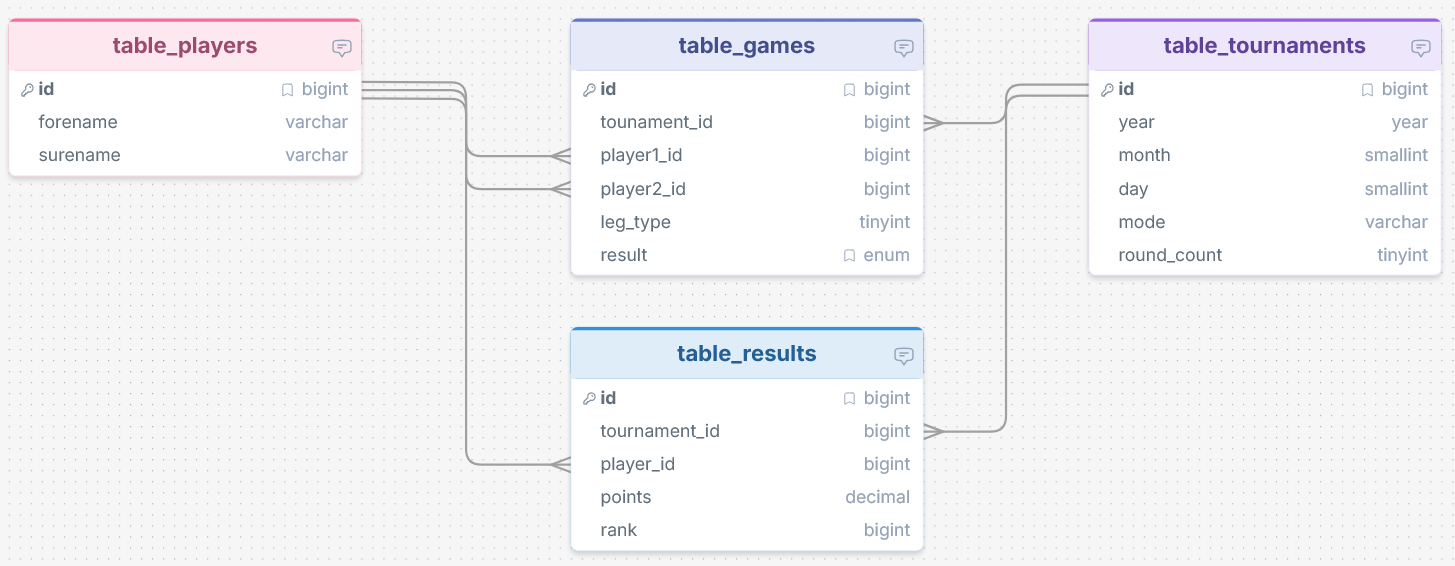
(Note: The diagram was created with drawSQL.)
Design Principles
Uniqueness via constraints
- monatsblitz_players: UNIQUE(forename, surname)
- monatsblitz_tournaments: UNIQUE(year, month, day)
- monatsblitz_games: UNIQUE(tournament_id, player1_id, player2_id, leg_type)
- monatsblitz_results: UNIQUE(tournament_id, player_id)
Flexible number of rounds
The round_count field in the tournament table supports any number of legs (1 = single round, 2 = home/away style double round, and so on).
Explicit round indicator
Each game has a leg_type field (1, 2, 3, ...) indicating which round/leg it belongs to.
WordPress compatibility
The schema is fully compatible with dbDelta() and intentionally avoids foreign keys.
Template Placeholders
In the Template_Monatsblitz post, you can use these placeholders:
{{month_name}}- full month name{{year}}- year{{date}}- date in formatDD.MM.YYYY{{winner_name}}- winner name{{winner_games}}- number of games played by the winner{{winner_points}}- winner points{{ranking_rows}}- HTML rows for the ranking table{{games_list}}- simple list of games{{table}}- full cross table in HTML format{{mode}}- tournament mode{{round_count}}- number of rounds
For yearly static pages, these placeholders are supported:
{{blitz_monthly_overview}}- HTML table for months 1-12 with participations and points per player{{blitz_ranking_year}}- yearly ranking table using the best 7 participations{{year}}- the year of the blitz tournament
Yearly overview behavior:
- Option
monatsblitz_hide_january_overview: if enabled, January (month1) is not shown in{{blitz_monthly_overview}}. - Month cells in
{{blitz_monthly_overview}}show only points when a player participated. - If a player did not participate in a month, the cell is empty (instead of
0/0).
Security
The API is protected by an API key that must be sent in the request header. The key can be generated in the plugin settings and must be configured in the related app.
Note
The domain https://kindermaenner.de is not hardcoded in the plugin. It works independently of the site address and uses WordPress internal paths and URLs.
Releases
9 releases.
These releases are tags only. The author does not attach a packaged zip, so there are no download counts to report.