TraceWP WP Registry grade A. No security issues foundWP RegistryNo security issues foundOpen the reportA
Give AI the context it needs to actually help with your WordPress site — export themes, plugins, server config, and page data in one click.
Install
Upload it under Plugins → Add New Plugin → Upload Plugin, then activate.
Install straight from GitHub with WP-CLI:
wp plugin install https://github.com/kesava500/tracewp/releases/download/v1.2.0/tracewp-1.2.0.zip



Give AI the context it needs to actually help with your WordPress site.
TraceWP packages your site's full technical context into a single AI-ready export — theme, plugins, server environment, customizer settings, menus, cron jobs, debug log, and more. Paste it into ChatGPT, Claude, or any LLM and skip the back-and-forth.
Also includes a built-in AI investigator (bring your own OpenRouter key) that can read your site files directly and suggest fixes from your dashboard.
The problem
When you ask AI for help with your WordPress site, it doesn't know anything about your setup:
"What theme are you using?" "What plugins do you have?" "What version of PHP?" "Can you show me the HTML?"
TraceWP eliminates that. One click gives the AI everything.
Features
Context export — no API key needed
- One-click site context with 15+ data points — theme, plugins, server environment, wp-config constants, .htaccess, customizer settings, menus, widgets, cron, debug log, and more
- Front-end inspector — click any element on your live site to capture its selector, classes, and context
- Markdown output with role instructions and table of contents — paste directly into any AI tool
- Safe export mode — redacts emails, phone numbers, and external URLs
- Token estimate so you know how much context window you're using
AI investigator — optional, requires OpenRouter key
- Built-in chat in admin dashboard and front-end inspector
- 7 read-only tools — read files, list directories, search code, check options, fetch HTML, trace templates, list theme files
- Streaming responses with tool-call transparency
- Image support — paste screenshots for visual diagnosis
- Free model support via OpenRouter's free tier
Screenshots
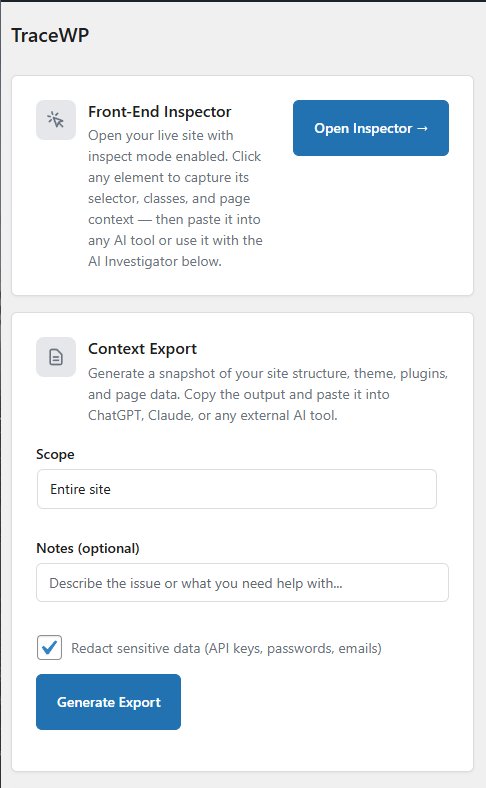 Inspector, Export, and AI — all from one page |
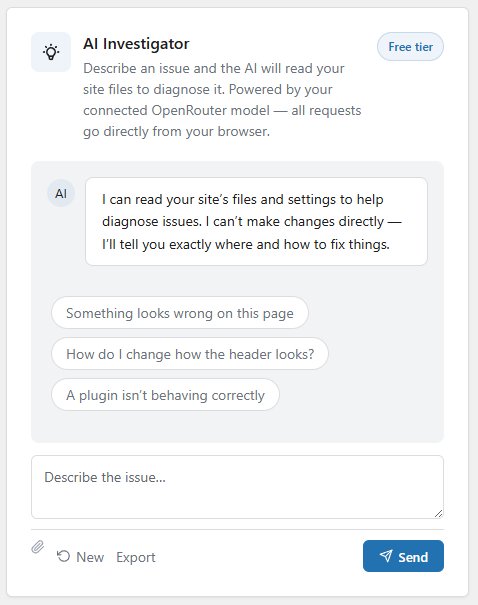 AI reads your site files and suggests fixes |
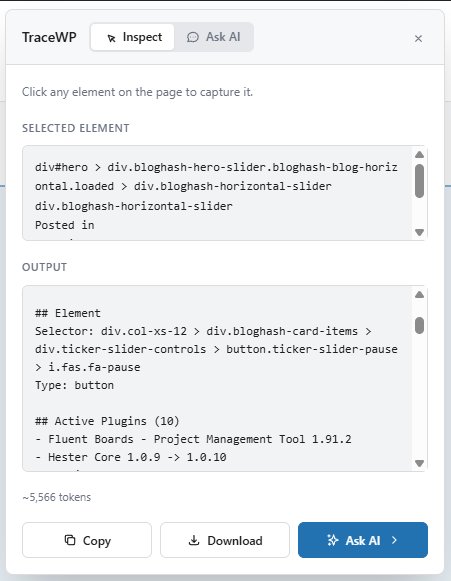 Click any element to capture it instantly |
What's in the export
The context export includes everything an AI needs to help without asking follow-up questions:
| Category | Data |
|---|---|
| Site | Name, WordPress version, PHP version, permalink structure |
| Theme | Name, version, type (classic/block), child theme status, pending updates |
| Customizer | Full theme_mods dump — colors, fonts, layout settings |
| Plugins | All active plugins with versions and pending updates |
| Server | Memory limit, max execution time, upload max, PHP extensions, SSL, object cache |
| Configuration | wp-config.php constants (WP_DEBUG, WP_CACHE, DISALLOW_FILE_EDIT, etc.) |
| Content | Post counts by type, page template, block inventory, front page type |
| Menus | Full menu structure with items, hierarchy, and location assignments |
| Widgets | Widget areas and their contents |
| Cron | Scheduled tasks with timing, overdue warnings, DISABLE_WP_CRON detection |
| Shortcodes | All registered shortcodes with source identification |
| Image sizes | Registered sizes with dimensions and crop settings |
| Hooks | Non-core callbacks on wp_head, wp_footer, init, wp_enqueue_scripts |
| Template overrides | WooCommerce/plugin templates overridden in the theme |
| .htaccess | Full file contents |
| Debug log | Last 30 lines if WP_DEBUG is on |
| REST API | Accessibility check |
Security
- Read-only — never writes to files or the database
- API keys encrypted with AES-256-CBC + HMAC-SHA256 (encrypt-then-MAC, constant-time verification)
- AI requests proxied server-side — your API key never reaches the browser
- File access jailed via
realpath()— no path traversal - Extension allowlist for
read_file— only text-based file types readable - Sensitive files blocked —
.env,.htpasswd, wp-config backups, etc. - SSRF protection —
fetch_page_htmlblocks private/internal IPs - Argument validation — length limits on all tool inputs (paths, URLs, patterns, option names)
- Request size limits — max 50 messages and 500KB content per chat request
- wp-config credentials automatically redacted
- Sensitive options blocked (passwords, secrets, tokens, keys, salts)
.envfiles blocked entirely- AI output HTML-escaped to prevent XSS
- Rate limited — 60 tool calls per minute
- Administrator only — all endpoints require
manage_options
Installation
- Download the latest release or clone this repository
- Upload the
tracewpfolder towp-content/plugins/ - Activate through the WordPress Plugins screen
- Open TraceWP in the admin sidebar
For the AI Investigator, add an OpenRouter API key in TraceWP → Settings. Free models are enabled by default.
Requirements
- WordPress 6.4+
- PHP 7.4+
- OpenSSL extension (required for API key encryption; AI investigator is disabled without it)
File structure
tracewp/
├── tracewp.php                        Main plugin file
├── assets/
│   ├── css/
│   │   ├── admin.css                  Admin dashboard styles
│   │   └── inspector.css              Front-end inspector styles
│   └── js/
│       ├── admin.js                   Admin page logic + settings
│       ├── inspector.js               Front-end element inspector
│       └── investigate.js             Reusable AI chat factory
├── includes/
│   ├── class-pt-admin.php             Admin pages and asset enqueuing
│   ├── class-pt-chat-proxy.php        Server-side OpenRouter proxy (key stays on server)
│   ├── class-pt-ai-controller.php     REST endpoints for AI tools
│   ├── class-pt-ai-tools.php          7 read-only tool implementations + input validation
│   ├── class-pt-settings-controller.php  REST endpoints for settings (key save/validate/models)
│   ├── class-pt-crypto.php            AES-256-CBC key encryption
│   ├── class-pt-detector.php          Theme/plugin type detection
│   ├── class-pt-environment-collector.php  Server, config, cron, debug log
│   ├── class-pt-formatter.php         Markdown output formatting
│   ├── class-pt-inspector.php         Front-end inspector bootstrap
│   ├── class-pt-page-collector.php    Page data (content, blocks, meta)
│   ├── class-pt-payload-builder.php   Context payload assembly
│   ├── class-pt-plugin.php            Plugin bootstrap
│   ├── class-pt-rest-controller.php   REST endpoints for export
│   ├── class-pt-security.php          Capability checks, rate limiting
│   ├── class-pt-settings.php          Settings registration + API key management
│   ├── class-pt-site-collector.php    Site data + extended collectors
│   └── class-pt-support.php           Sanitization, redaction, utilities
└── templates/
    ├── export.php                     Main plugin page
    ├── partials-investigate.php       AI investigator panel
    ├── partials-output.php            Export output panel
    └── settings.php                   Settings page
Changelog
1.2.0
- Security: AI requests now proxied server-side — your OpenRouter API key never reaches the browser
- Security: Server-side argument validation for all tool endpoints — path lengths, extension allowlists, blocked sensitive files, SSRF protection, content size limits
- Added server-side streaming proxy for AI chat (new
/pt/v1/chatendpoint) - Removed
pt_get_api_keyAJAX endpoint (key no longer exposed to browser) - Added image upload size validation (5MB max)
- CSRF protection: All settings actions (key save/validate, model fetch) moved to REST endpoints with
wp_restnonce — no more exposedtracewp_settings_noncein page HTML - File
read_filenow uses an extension allowlist (text types only) instead of a blocklist - Added SSRF protection to
fetch_page_html(private IP detection) - Added blocked file list (
.htpasswd, wp-config backups, etc.) - Added max messages (50) and max content length (500KB) to chat proxy
- Added search pattern length limit (200 chars) to prevent slow searches
- Request size limits on all endpoints: 1MB for chat, 256KB for tools, 10KB for settings
- Moved all settings AJAX handlers to REST endpoints (proper WP REST nonces, no exposed settings nonce in page HTML)
- Removed
ajax_get_api_key,ajax_save_api_key,ajax_validate_api_key, andajax_fetch_modelsAJAX handlers - Removed
ajaxUrlandsettingsNoncefrom all localized JS data - Switched API key encryption to encrypt-then-MAC (AES-256-CBC + HMAC-SHA256) with constant-time verification
- Removed fallback encryption key — AUTH_KEY must be properly set in wp-config.php
- Legacy keys auto-upgraded to new authenticated format on first decrypt
PT_Crypto::encrypt()anddecrypt()now returnWP_Erroron failure instead of empty string
1.1.1
- Bug fixes
1.1.0
- Design updates and bug fixes
1.0.0
- First stable public release
- Context export with 15+ data points and markdown output
- Front-end element inspector, AI investigator, and OpenRouter integration
- API keys encrypted with AES-256-CBC and AI output HTML-escaped
Contributing
See CONTRIBUTING.md for development setup, coding standards, and PR guidelines.
To generate translation files: wp i18n make-pot . languages/tracewp.pot
License
GPL v2 or later. See LICENSE.
Author
Built by Belletty Digital.
Releases
4 releases. Each count is every asset in that release; expand a row for the breakdown.