Install
This is the repository archive. It installs, but the folder name will carry the branch suffix and updates will not flow.
Install straight from GitHub with WP-CLI:
wp plugin install https://github.com/keoshi/mutelife-galeria/archive/refs/heads/master.zipGaleria mutelife — Gutenberg block
Automatically generate beautiful galleries with Gutenberg blocks! As seen on mutelife.com.
Every image in a row is presented at the same height regardless of its aspect ratio, so mixed portrait/landscape sets line up cleanly without cropping.
Supported galleries
Auto (default, any number of images)
Each image is given a flex-grow proportional to its aspect ratio and an explicit aspect-ratio, so a row keeps true proportions at any viewport width — and reserves its space before the images load.


Fortico (exactly 4 images)
One tall image on the left, three stacked on the right. Enabled automatically the first time you insert a 4-image gallery, and toggleable afterwards under Layout in the block sidebar.

How to use
- Add the mutelife Galeria block to a post, page, or CPT.
- Select the images you want on each row.
- Use Edit gallery in the block toolbar to change the selection later.
- With exactly 4 images, toggle Fortico in the sidebar.
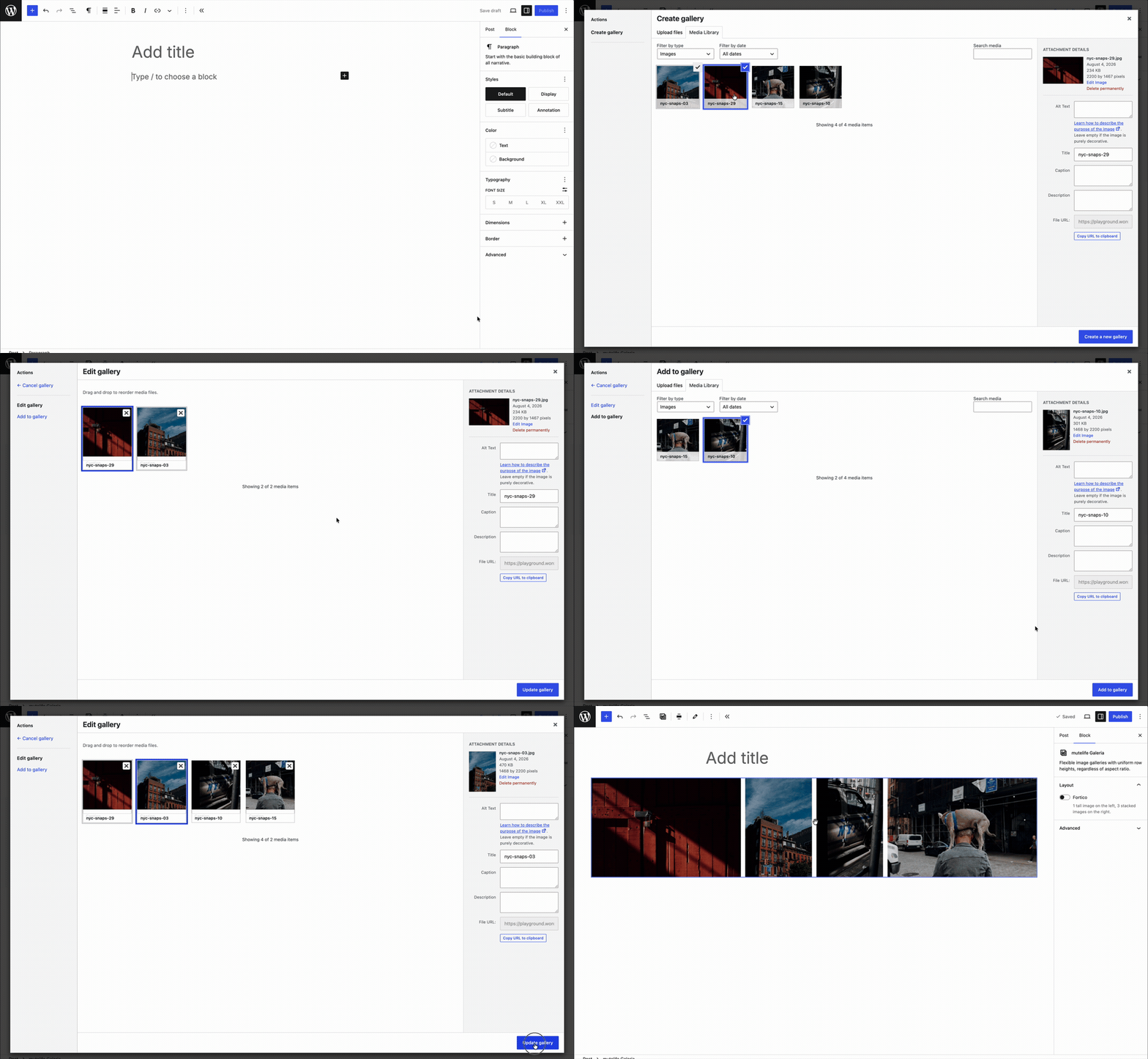
Galleries default to wide alignment; full is also supported.
Requirements
- WordPress 6.8+
- PHP 7.4+
Installation
Download 3.0.0.zip — or any version from Releases — and upload it through Plugins → Add New → Upload Plugin.
That archive unpacks to a folder named mutelife-galeria-3.0.0, so rename it to mutelife-galeria before installing. Otherwise each version installs alongside the previous one instead of replacing it, and two copies registering the same block will conflict.
To build from source instead:
npm install
npm run build
npm run plugin-zip
Development
npm start        # watch + rebuild
npm run build    # production build
npm run lint:js  # lint
npm run format   # format
The block lives in src/mutelife-galeria/. build/ is committed so the plugin can be installed straight from a checkout.
Upgrading from 2.x
3.0.0 is a rewrite on @wordpress/scripts, replacing the cgb-scripts plugin in place. The block name is unchanged, so it takes over existing galleries rather than orphaning them.
- Existing posts keep rendering exactly as before —
style.scsscarries the legacy selectors alongside the new ones. deprecated.jsrecognises the 2.x saved markup, so old galleries open without validation errors and migrate to the new markup when the post is next saved. Untouched posts are never rewritten.- Migrated images carry ratio-derived dimensions (
width: round(ratio × 1000),height: 1000) rather than their true pixel sizes. Only the ratio is used for layout. - The legacy
unveilclass is dropped in favour of nativeloading="lazy".
Note that 2.x registered the block without an apiVersion, which forced the editor out of its iframe and disabled iframe-dependent features (zoom out, accurate device previews) on any post containing a gallery. 3.0.0 declares apiVersion: 3 and restores them.
Credits
Props to Jorge Costa and Jon Surrell for all the help and pointers!
Releases
3 releases.
These releases are tags only. The author does not attach a packaged zip, so there are no download counts to report.