Migrate Plus
WordPress plugin that moves content between sites as JSON. Export posts, pages, custom post types and WooCommerce products with their ACF fields, then import them on another site with dry runs and rollback. Not stable yet.
Install
This is the repository archive. It installs, but the folder name will carry the branch suffix and updates will not flow.
Install straight from GitHub with WP-CLI:
wp plugin install https://github.com/kdbaustert/migrateplus/archive/refs/heads/master.zipNot ready for use yet. Migrate Plus hasn't had a stable release. Try it on a test site or a copy you can throw away, not a live one.
A WordPress plugin for moving content between sites as JSON. Export posts, pages, custom post types, media, WooCommerce products, comments and menus on one site, then drop the file on another site's Import page.
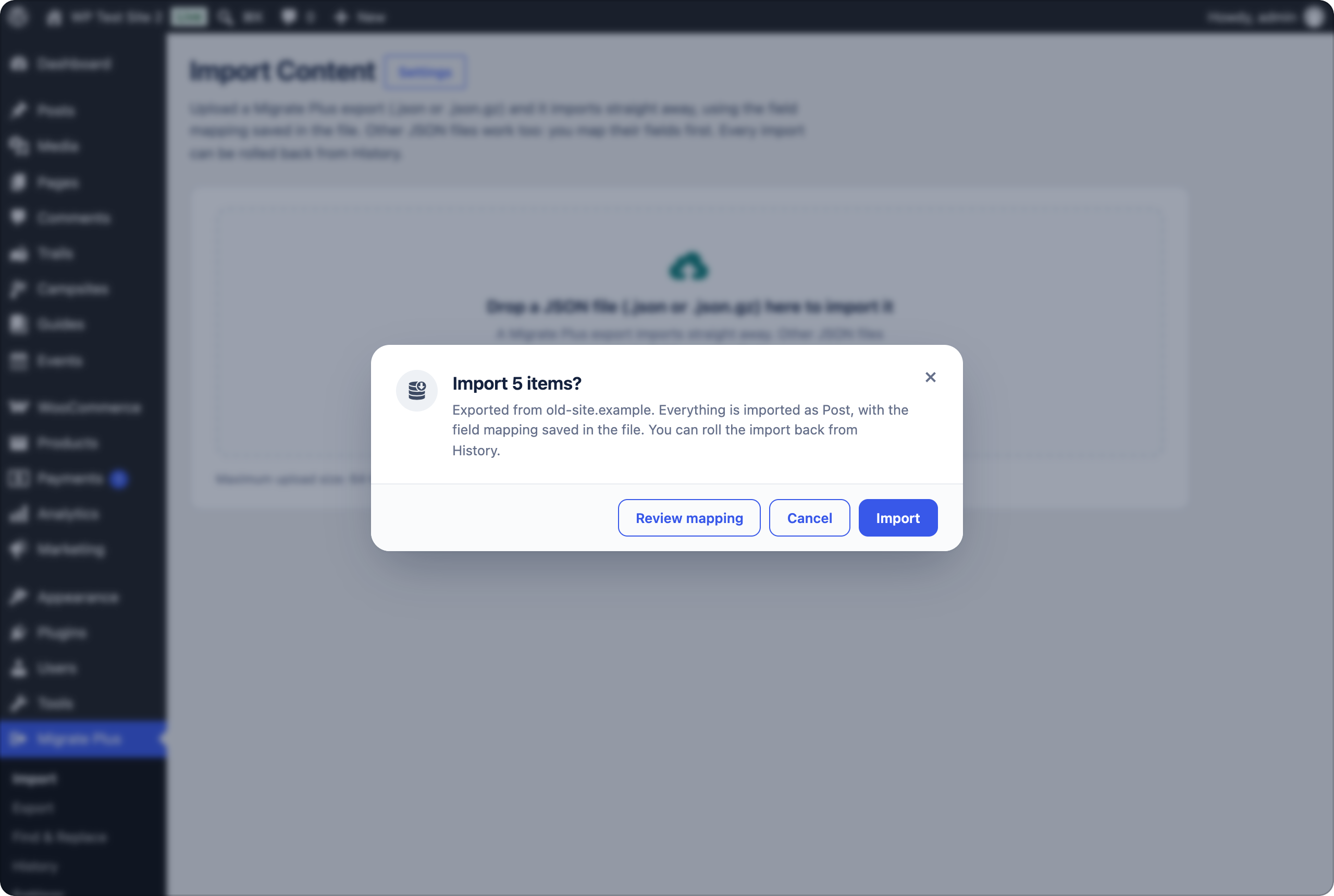
Migrate Plus exports carry their own field mapping, so importing one takes a single confirmation. Other JSON files work too: you map their fields once and can save the mapping. Every import can be dry-run first and rolled back afterwards.
Why
WordPress's own exporter copies custom fields as they are, but ACF fields often hold IDs (an image's attachment ID, a relationship's post IDs) that mean nothing on the new site. WooCommerce prices, stock and variations don't survive a plain post import either. Full-site migration plugins replace the whole destination, which doesn't help when it already has content of its own.
Migrate Plus is for moving some content into a site that already exists: staging to live, merging two sites, copying a product catalogue, or bringing in JSON from another system. Images and files are downloaded into the new Media Library, ACF fields point at the new IDs, and products are rebuilt through WooCommerce's API.
Features
- Export one or several post types into one file, with terms, featured images, custom fields, ACF, WooCommerce data, approved comments and navigation menus. Optionally gzip-compressed.
- Import with a preview, a dry run, batched progress with pause and resume, and a log.
- Re-imports are safe: records are tracked by their ID on the old site, so they're skipped or updated, not duplicated. Before importing you can review what would change on posts that already exist.
- References link up in any order: parents, related products and ACF relationships are connected when the item they point at arrives, in the same file or a later one.
- Rollback removes what an import created, including comments and menus.
- Saved field mappings for JSON from other systems.
- Find & Replace across the database, with serialized data kept valid, a dry run and rollback.
- WP-CLI commands for everything.
Requirements
WordPress 6.0+ and PHP 7.4+, on both sites.
Installation
Download migrateplus-<version>.zip from Releases and upload it under Plugins → Add New → Upload Plugin, or clone it:
cd wp-content/plugins
git clone https://github.com/kdbaustert/migrateplus.git migrateplus
Activate Migrate Plus on the site you're copying from and the one you're copying to.
Using it
Copy content between sites
- On the old site, open Migrate Plus → Export, tick the content types (Media, Pages, Posts…), pick statuses, switch on comments or menus if you want them, and click Export. The download link works for 24 hours.
- On the new site, open Migrate Plus → Import and drop the file on the page.
- Confirm. If some items are already on the site, you're asked whether to skip them, import them anyway or review the changes.
- If something looks wrong, open Migrate Plus → History and click Roll back.
To check the mapping or dry-run first, choose Review mapping instead of confirming. Files with several post types don't offer that; dry-run them with wp migrateplus import --dry-run.
Import JSON from somewhere else
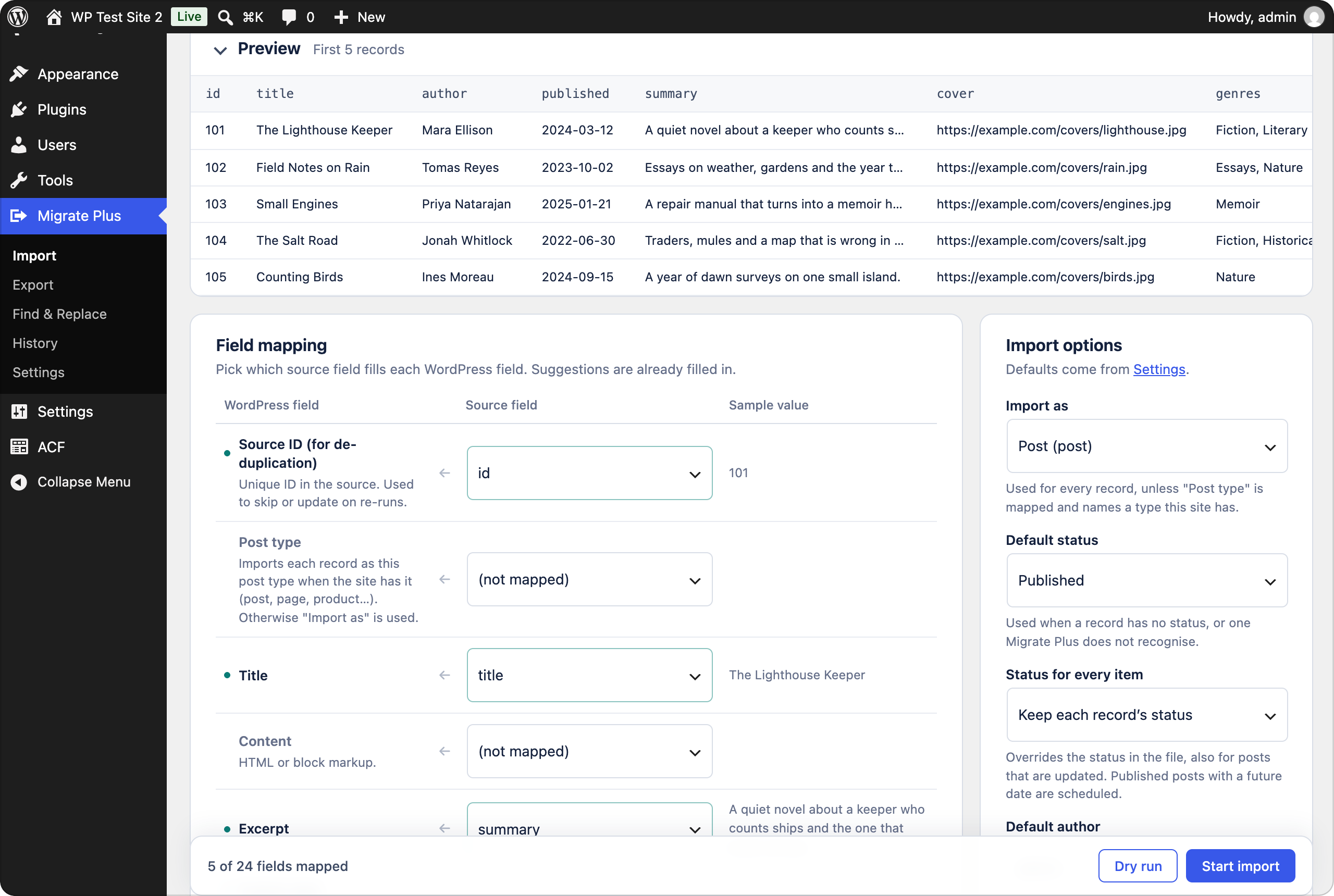
Drop any JSON file holding a list of records (a top-level array, or a list under items, data, posts or results). Map a source field to each WordPress field you need, run a Dry run, then Start import. Nested fields are flattened with dots, like authors.0.name.
Save the mapping under a name to reuse it. A later file with the same top-level fields gets it selected automatically; click Apply to use it. A site keeps up to 50 saved mappings.
Admin pages
| Page | What it's for |
|---|---|
| Import | Drop or choose a .json or .json.gz file. |
| Export | Export one or more content types to a file. |
| Find & Replace | Replace text across the database (administrators only; on multisite, network administrators). |
| History | Past imports and exports: logs, resume, run again, roll back, delete. Tick several rows to delete them together. |
| Settings | Import and export defaults, who can run imports, download limits, history cleanup, and a server check (administrators only). |
How imports behave
- Post type. A Migrate Plus export imports into the type it came from when this site has it. A multi-type file imports Media first, then the other types, then menus, as one job with one rollback.
- Status. Default status only fills in missing or unknown statuses. Status for every item overrides all of them, which is handy for importing everything as drafts on staging. Future-dated posts set to Published are scheduled.
- Authors are matched by email, then login, then display name. Missing ones are created if Create missing authors is on; otherwise the default author is used and the log says so.
- Comments. Only approved comments are exported. They're imported threaded, linked to local users by email, and never added twice.
- Menus are rebuilt after the posts. Items point at the imported post or term (or one with the same slug), links to the old site are rewritten, and theme locations are assigned only if the active theme has them. A menu with the same slug is filled rather than copied.
- Duplicates. Before starting, Migrate Plus looks for items imported before or with the same slug (SKU for products, file name for media) and asks what to do. Changed posts can be reviewed one by one; duplicate images are shown side by side. A dry run skips duplicates so its counts match a real run.
- Compressed files are detected by their bytes, not the extension, and may unpack to at most an eighth of PHP's memory limit (
migrateplus_max_json_sizechanges that). They need the zlib extension. - Permalinks are rebuilt once when an import finishes.
WP-CLI
wp migrateplus export page --status=publish,draft --output=pages.json
wp migrateplus export attachment,page,post --menus --comments --gzip
wp migrateplus import json --file=pages.json --duplicate=update
wp migrateplus import json --file=feed.json --map=mapping.json --post_type=page
wp migrateplus import json --file=feed.json --mapping="Books feed" --dry-run
wp migrateplus import --config=examples/migration-config.json
wp migrateplus mapping list|export|import|delete
wp migrateplus jobs
wp migrateplus resume <job-id>
wp migrateplus rollback <job-id> --yes
Import flags: --post_type, --status, --force-status, --author, --duplicate=skip|update|create, --duplicates=skip|import|update, --batch_size, --[no-]featured-images, --content-images, --create-authors, --[no-]create-terms, --[no-]rewrite-links, --[no-]comments, --[no-]menus, --dry-run, --mapping. Export also takes --after, --exclude-meta, --no-meta, --no-woo and --[no-]gzip. Anything left out uses the values from Settings.
On/off flags also take a value: --comments=no, --content-images=yes (yes, no, true, false, 1 or 0). When records are already on the site and --duplicates is left out, the import asks; with --yes, in a dry run or without a terminal it skips them instead, or imports them as copies if you passed --duplicate=create. An import with failed records ends with an error and a non-zero exit status, after the summary, so scripts can catch it. wp migrateplus resume only continues imports that were started.
Mapping file
{
  "fields": { "source_id": "id", "post_title": "title", "post_content": "content_html", "featured_image": "image" },
  "meta": [{ "key": "original_url", "source": "url" }],
  "taxonomies": [{ "taxonomy": "genre", "source": "genres" }],
  "acf": { "hero_image": "image_url", "ingredients": "recipe.ingredients" }
}
Fields: source_id, post_type, post_title, post_content, post_excerpt, post_date, post_name, post_status, post_author, post_author_login, post_author_name, menu_order, comment_status, comments, categories, tags, featured_image, featured_image_alt, and media_url/media_alt for Media.
ACF
When ACF (free or Pro) is active, the mapping screen lists the post type's fields and converts values by type:
| Field type | Accepts |
|---|---|
| Image, File, Gallery | URLs (downloaded), attachment IDs |
| Relationship, Post object, Page link | IDs, slugs, titles, URLs, or old-site IDs of posts imported earlier |
| Taxonomy | Term names (Parent > Child) or IDs |
| User | Email, login or ID |
| Choice fields | Values or labels |
| Date, time, true/false, link, map | Any reasonable format |
| Repeater, Group, Flexible content | Nested data or JSON (flexible rows need acf_fc_layout) |
Links inside repeater or group rows need the import run again once their target exists.
WooCommerce
With WooCommerce active, a product export also carries SKU, prices and sale dates, tax and stock settings, dimensions, shipping class, attributes, variations, downloadable files, and up-sells, cross-sells and grouped products (by SKU and old ID). The import rebuilds products through WooCommerce's API. Downloadable files are copied into the protected woocommerce_uploads folder through a private link that expires after 24 hours, so import within a day of exporting. Turn product data off with the export switch or --no-woo.
Find & Replace
Replaces text in the tables you choose, for example an old domain after a migration. It starts as a dry run with sample changes per table. URLs only match whole (http://old.test leaves http://old.test.example.com alone), serialized data stays valid, GUIDs and Migrate Plus's own data are skipped, and tables without a primary key are left out. Real runs can be rolled back from Past replacements; values edited since are kept. Back up the database before a big run anyway.
Hooks
| Hook | Type | Use |
|---|---|---|
migrateplus_sources |
filter | Register a custom source class |
migrateplus_record |
filter | Change a record before import, or return false to skip it |
migrateplus_post_data |
filter | Adjust the wp_insert_post() arguments |
migrateplus_after_import_record |
action | Runs after each post is saved |
migrateplus_capability |
filter | Capability needed to run imports |
migrateplus_acf_value |
filter | Adjust a converted ACF value |
migrateplus_export_item |
filter | Change an exported item |
migrateplus_max_json_size |
filter | Most bytes a .json.gz may unpack to |
migrateplus_remote_file_url |
filter | Rewrite a URL before a custom source downloads it |
File format
{
  "migrateplus": {
    "version": "0.1.0-beta.1",
    "site": "https://old-site.example",
    "post_types": ["attachment", "page", "post"],
    "count": 42,
    "mapping": { "fields": {}, "meta": [], "taxonomies": [], "acf": {} }
  },
  "items": [{ "id": 7, "post_type": "attachment", "title": "…" }],
  "menus": [{ "id": 3, "name": "Main", "slug": "main", "locations": ["primary"], "items": [] }]
}
Items are in import order, Media first. post_type appears in the header only when the file holds one type, and menus only when menus were exported. Imported content is tagged with _migrateplus_job_id, _migrateplus_source_id and _migrateplus_source_uid.
Upgrading from PressPort
Migrate Plus used to be called PressPort. The first time the renamed plugin loads it moves settings, history, saved mappings, tracking data and the uploads folder over, so re-imports still recognise earlier content. Files exported under the old name still import. The CLI command is now wp migrateplus and hooks start with migrateplus_.
Contributing
Issues and pull requests are welcome at github.com/kdbaustert/migrateplus. Open an issue first for anything bigger than a small fix.
You need PHP 7.4+, Composer, Node 22+, and MySQL or MariaDB.
composer install && npm ci
composer lint && composer phpcs && composer test
npm test
The PHP tests empty the database they run in, so give them their own: migrateplus_tests on 127.0.0.1 as root/root by default, or set WP_TESTS_DB_NAME, WP_TESTS_DB_HOST, WP_TESTS_DB_USER and WP_TESTS_DB_PASSWORD.
License
GPL v3.0 or later.