Install
This is the repository archive. It installs, but the folder name will carry the branch suffix and updates will not flow.
Install straight from GitHub with WP-CLI:
wp plugin install https://github.com/kasunwijethilaka/wp-featured-work-block/archive/refs/heads/main.zipFeatured Work: a dynamic WordPress Gutenberg block
An accessible, filterable grid of case studies, built as a single self-contained WordPress plugin. It's a dynamic Gutenberg block backed by a custom post type, taxonomy, and post meta. The block renders on the server in PHP, is configured through a React editor, and becomes interactive on the front end with framework-free JavaScript and CSS.
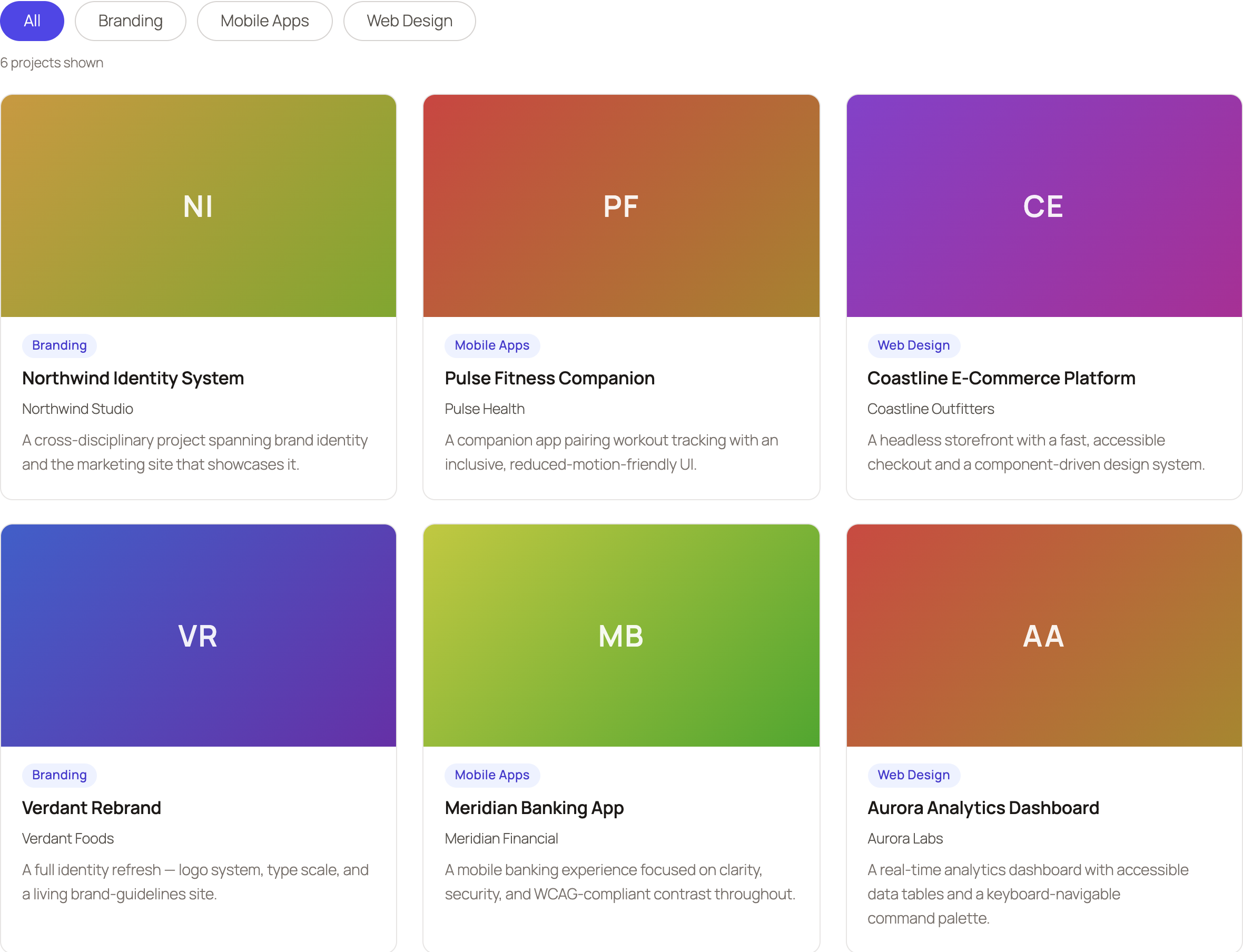
Built from scratch as a code sample to demonstrate a full-stack WordPress and Gutenberg workflow.
What it demonstrates
| Area | Where to see it |
|---|---|
| Semantic HTML | src/render.php: <article>, <figure>, <ul role="list">, proper headings |
| Custom CSS, no framework | src/style.scss: CSS Grid, container queries, design tokens |
| Design & QA | The card design, type scale, spacing, hover and focus states |
| JavaScript, no jQuery | src/view.js: the accessible filter (WAI-ARIA toolbar) |
| React | src/edit.js: InspectorControls plus a live ServerSideRender preview |
| WordPress / PHP | CPT, taxonomy, meta box, and the dynamic WP_Query renderer |
| Gutenberg block editor | block.json (API v3), dynamic block, editor controls |
| Accessibility | Roving-tabindex filter, aria-pressed and aria-live, focus-visible, reduced-motion |
Requirements
- Node.js 18+ and npm
- Docker, for the recommended
wp-envsetup. A Docker-freewp-nowpath is below.
Quick start (wp-env, recommended)
npm install
npm run build
npm run env:start
Then open:
- Front-end demo: http://localhost:8888/our-work/
- Editor and admin: http://localhost:8888/wp-admin, with user
adminand passwordpassword
On activation the plugin seeds 6 demo case studies across 3 project types and creates the "Our Work" page containing the block. Pretty permalinks are enabled automatically, so the demo URL works out of the box.
Stop the environment with npm run env:stop.
Quick start (wp-now, no Docker)
npm install
npm run build
npx @wp-now/wp-now start
wp-now boots WordPress with this plugin activated, so the seeding runs. Open the URL it prints and visit /our-work/. If that returns a 404, set Settings, Permalinks, Post name once.
What to look for
- A real dynamic block. The block saves no markup (
savereturnsnull); every render runs a freshWP_Queryinrender.php. - The editor experience. Insert or select the block and open the sidebar: change columns and count, pick a project type (loaded live from the taxonomy over REST), and watch the
ServerSideRenderpreview update. - The accessible filter. On
/our-work/, use the filter bar with a keyboard:Tabreaches the toolbar, arrow keys move between filters (roving tabindex), andEnterapplies one. The result count is announced through anaria-liveregion. - Whole-card link and focus. Each card is clickable anywhere (a single stretched link), and tabbing to it shows a visible focus ring.
- Responsiveness. The grid uses container queries, so it reflows to the block's own width (three columns down to one). Resize the window, or drop the block into a narrow column, to see it.
- Escaping and data flow.
render.phpescapes all output and resets the global query; the client name comes from a secured meta box.
Architecture and key decisions
- Dynamic, not static. A dynamic block (server-rendered via
render.php) reflects the live database on every request and never suffers block-validation errors, which suits content that changes independently of the page. - Self-contained data layer. The plugin registers its own
case_studyCPT,project_typetaxonomy, and client and URL post meta (with a nonce-protected meta box), then seeds demo content on activation, so the sample runs with no manual setup. ServerSideRenderfor editor parity. The editor preview calls the same PHP renderer as the front end, so what you see in the editor is what publishes.- No framework. The front-end filter is plain JavaScript and the styling is hand-written SCSS with design tokens, with no CSS or JS framework. The only React is Gutenberg's own editor layer.
- Accessibility first. The filter implements the WAI-ARIA toolbar pattern, the card link uses an accessible "stretched link", focus states are visible, and motion respects
prefers-reduced-motion.
Accessibility notes
- Filter bar is a
role="toolbar"with roving tabindex and arrow, Home, and End navigation. - Active filter reflected with
aria-pressed; result count announced viarole="status"andaria-live. - One meaningful link per card (stretched link) rather than several competing links.
- Visible
:focus-visiblerings on the card and the filter buttons. - Decorative gradient placeholders are
aria-hidden; images carry alt text. - Progressive enhancement: every card is visible with JavaScript disabled.
Project structure
featured-work.php        Plugin bootstrap: constants, requires, block and activation hooks
inc/
  post-types.php         Registers the case_study custom post type
  taxonomies.php         Registers the project_type taxonomy
  meta.php               Client and project URL meta, meta box, secure save
  seed.php               Seeds demo content and the "Our Work" page on activation
src/
  block.json             Block metadata (API v3), attributes, supports, assets
  index.js               Block registration
  edit.js                React editor: InspectorControls and ServerSideRender preview
  save.js                Returns null (dynamic block)
  render.php             Server render: WP_Query to semantic, escaped markup
  view.js                Front-end accessible filter (no jQuery)
  style.scss             Front-end and shared styles (grid, cards, tokens)
  editor.scss            Editor-only styles
docs/
  screenshot.png         Preview image used in this README
Compiled output is written to build/ by @wordpress/scripts and is not committed.
Available scripts
| Script | Description |
|---|---|
npm run build |
Compile src/ into build/ |
npm run start |
The same, in watch mode |
npm run env:start, npm run env:stop |
Start and stop the local WordPress (Docker) |
npm run lint:js |
Lint JavaScript (WordPress config) |
npm run lint:css |
Lint styles (WordPress config) |
npm run format |
Auto-format to WordPress standards |
Author
Built by Kasun Wijethilaka. Licensed under GPL-2.0-or-later.