Install
This is the repository archive. It installs, but the folder name will carry the branch suffix and updates will not flow.
Install straight from GitHub with WP-CLI:
wp plugin install https://github.com/kaptnik/wc-ticket-qr/archive/refs/heads/main.zipTurn any WooCommerce product into an event ticket with unique, single-use QR codes — no third-party services required.
✨ Features
- Unique QR code per ticket — cryptographically secure HMAC token, one per unit purchased
- Single-use enforcement — atomic database lock prevents double-scanning, even under concurrent requests
- PDF ticket attachment — professional landscape-format ticket PDF sent with the confirmation email
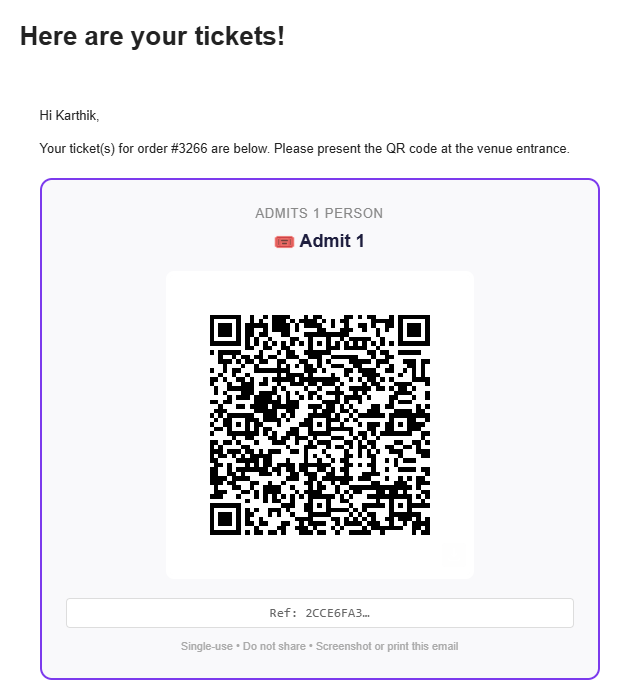
- Inline QR in email — QR code embedded directly in the email body as a hosted image (works in Gmail, Apple Mail, Outlook)
- Variable product support — works with ticket type variations (Adult/Child/VIP etc.)
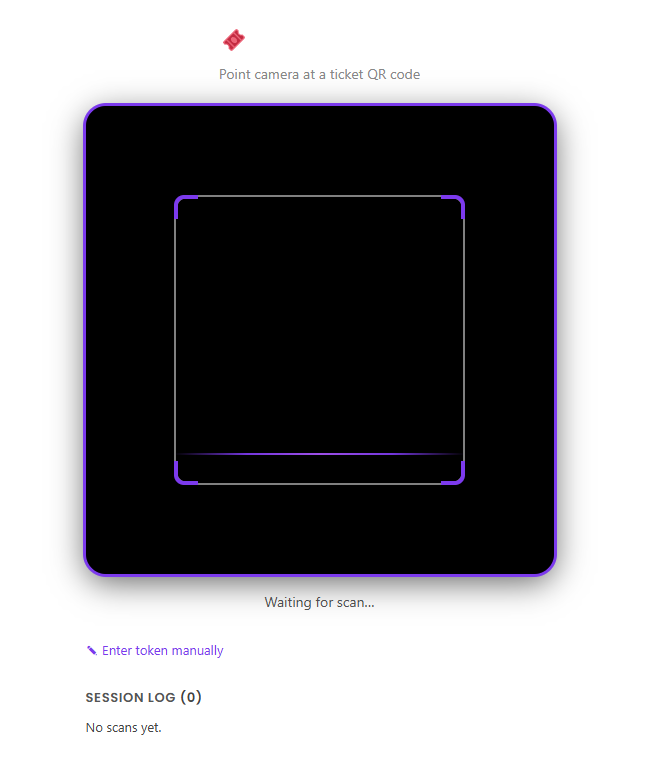
- Browser-based door scanner — staff open a page on any phone, scan QR codes with the camera
- Expandable scan log — last 10 scans kept with full attendee details, expandable on tap
- Retroactive sending — generate and resend tickets for any existing order from the order edit screen
- Bulk action — select multiple orders and send all ticket emails in one click (batched to avoid timeouts)
- Refund invalidation — full and partial refunds automatically void the corresponding tickets
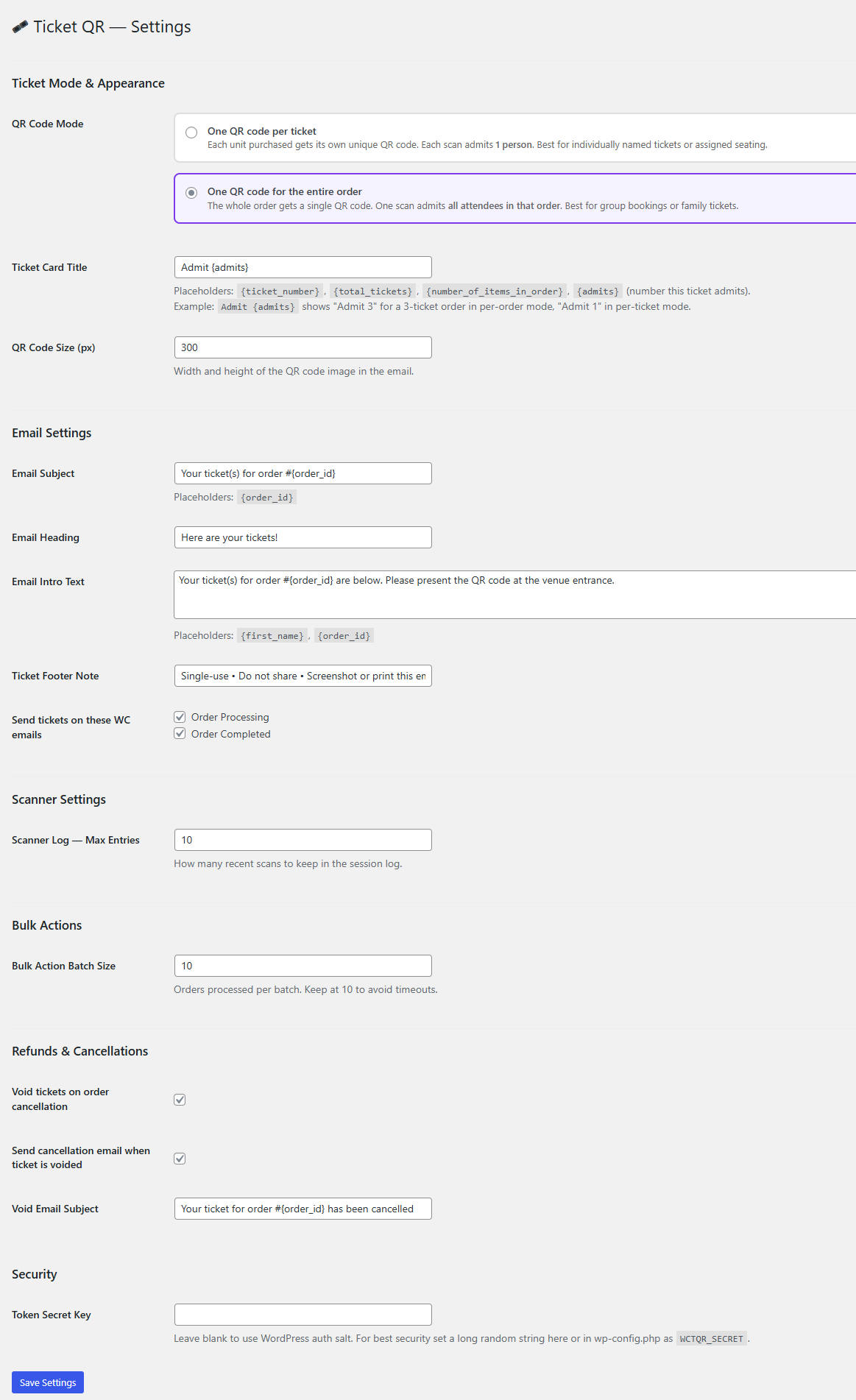
- Configurable settings — email content, ticket appearance, batch size, and more
📸 Screenshots
| Email with QR | Door Scanner | Admin Tickets |
|---|---|---|
|
 |
 |
🚀 Installation
From ZIP (manual)
- Download the latest release ZIP from the Releases page
- In WordPress admin go to Plugins → Add New → Upload Plugin
- Upload the ZIP and activate
- Install the FPDF library (see PDF Tickets below)
From WordPress.org (coming soon)
Search for WooCommerce Ticket QR in Plugins → Add New.
⚙️ Setup
1. Mark a product as a ticket
Edit any WooCommerce product → Product Data → General tab → check "This product is a ticket".
Optionally fill in Event Date and Event Venue — these appear on the PDF and in the scanner result.
2. Configure email (optional)
Go to WooCommerce → Ticket QR: Settings to customise:
- Email subject and heading
- Body text (supports
{first_name}and{order_id}placeholders) - Which WooCommerce order emails trigger ticket delivery
- QR code image size
3. Set up the door scanner
A Ticket Scanner page is created automatically on activation at yoursite.com/ticket-scanner/.
Staff members must be logged in with Shop Manager or Administrator role. Open the page on any smartphone, point at a ticket QR code, and the result appears instantly.
4. Bulk send tickets
In WooCommerce → Orders, select multiple orders, choose "Generate & Send Ticket QR" from the bulk actions dropdown, and click Apply. Orders are processed in configurable batches with a live progress screen.
📄 PDF Tickets
PDF generation requires the free FPDF library.
- Download from fpdf.org
- Place
fpdf.phpinwp-content/plugins/wc-ticket-qr/lib/fpdf/fpdf.php
If FPDF is not installed, tickets are still delivered with an inline QR code in the email body.
🔒 Security
- Tokens are HMAC-SHA256 signed — cannot be forged without the server secret
- The scanner endpoint requires WordPress authentication (
manage_woocommercecapability) - Scan validation uses an atomic
UPDATE WHERE scanned = 0query — concurrent duplicate scans are rejected at the database level - Voided tickets return HTTP 410 Gone
- QR image files are protected by
.htaccess— PHP execution is blocked in the upload directory
Recommended: set a secret key
Add to wp-config.php:
define( 'WCTQR_SECRET', 'your-long-random-secret-string' );🔌 REST API
The scanner endpoint can be used by any scanning app:
POST https://yoursite.com/wp-json/wctqr/v1/validate/{64-char-token}
Headers: X-WP-Nonce: {wp_rest_nonce}
Responses
| HTTP | Meaning |
|---|---|
200 OK |
Valid ticket — entry granted |
404 Not Found |
Token not recognised |
409 Conflict |
Ticket already scanned |
410 Gone |
Ticket voided (refunded/cancelled) |
Example 200 response
{
  "valid": true,
  "message": "Valid ticket — entry granted.",
  "order_id": 1234,
  "ticket_ref": "A1B2C3D4",
  "attendee": "Jane Smith",
  "email": "jane@example.com",
  "product_name": "Summer Gala 2026",
  "variation": "VIP",
  "event_date": "Saturday 4 July 2026, 7:00 PM",
  "event_venue": "The Grand Ballroom",
  "ticket_number": "Ticket 1 of 2",
  "scanned_at": "2026-07-04 18:45:32"
}
🛠 Requirements
- WordPress 6.0+
- WooCommerce 7.0+
- PHP 7.4+
- GD or Imagick PHP extension (for QR image generation)
- FPDF library (optional, for PDF attachments)
- HTTPS (required for camera access on the scanner page)
🤝 Contributing
Pull requests are welcome! Please:
- Fork the repository
- Create a feature branch (
git checkout -b feature/my-feature) - Commit your changes (
git commit -m 'Add my feature') - Push to the branch (
git push origin feature/my-feature) - Open a Pull Request
Development setup
git clone https://github.com/Kaptnik/wc-ticket-qr.git
cd wc-ticket-qr
# Place in wp-content/plugins/ of a local WordPress install
📋 Changelog
1.2.0
- Per-order QR mode — one QR code for the entire order; a single scan admits all attendees
- Itemized scan result — modal shows full ticket breakdown (e.g.
3× Adult - Vegetarian,2× Child - Kids Meal) - Modal popup on scan — result requires explicit acknowledgement before next scan is possible
{admits}placeholder — ticket card title resolves to number of people this ticket admits{ticket_number}/{total_tickets}placeholders — for per-ticket title customisation- QR mode setting — choose per-ticket or per-order in the settings panel
- DB schema — added
quantityandorder_item_summarycolumns - REST API — response includes
items[]array for per-order tickets,admitscount for all tickets - Simplified retro/bulk classes to delegate generation to
WCTQR_Generator - Updated Plugin URI to correct GitHub repository
1.1.0
- Added configurable settings panel
- Added bulk order action with batched processing and live progress
- Expandable scan log with full attendee details
- Settings-driven email content (subject, heading, body, footer)
- Configurable batch size, log length, and QR image size
1.0.0
- Initial release
- Unique HMAC QR token generation
- PDF ticket generation with FPDF
- REST API validation endpoint
- Retroactive QR generation and resend
- Full and partial refund invalidation
- Browser-based door scanner with ZXing
📜 License
GPL v2 or later — same as WordPress.
🙏 Credits
Built by Karthik Umashankar for Seattle Kannada Sangha.
QR image generation via QRServer API.
PDF generation via FPDF.
Scanner library: ZXing.