Install
This is the repository archive. It installs, but the folder name will carry the branch suffix and updates will not flow.
Install straight from GitHub with WP-CLI:
wp plugin install https://github.com/junaidbhura/gumponents/archive/refs/heads/master.zipNo built-in updater. New versions won't appear under Dashboard → Updates. Install new releases yourself, or let Git Updater track the repository.

Essential Gutenberg components for WordPress.
Gumponents offer some crucial missing Gutenberg components, essential to create advanced blocks. 🚀
Individual Gumponents aim to be deprecated over time, when components similar or better land in WordPress core.
They are not blocks, but rather, what you would use to build advanced blocks.
Quick Links
Components
PostRelationshipControl
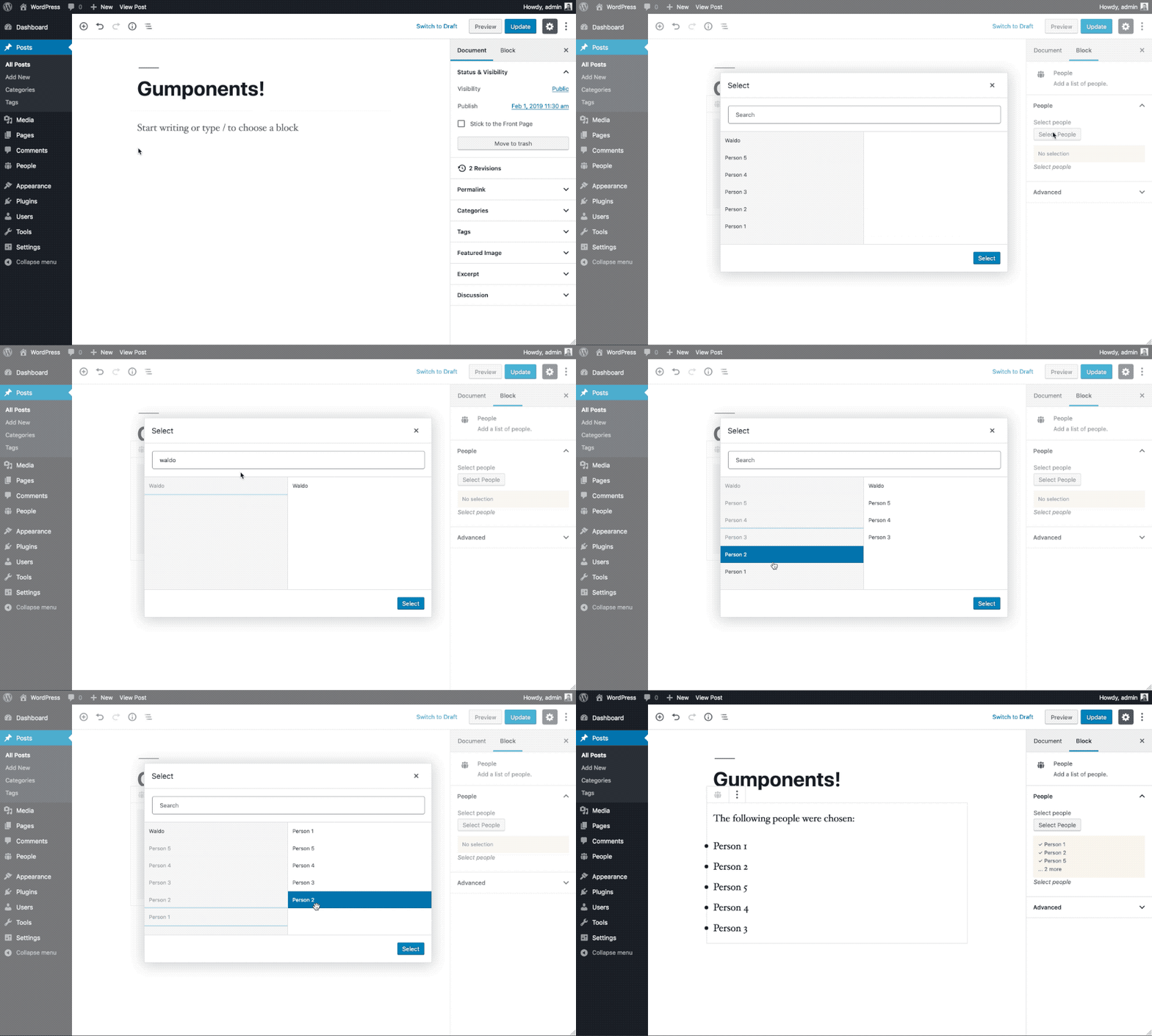
Example
const { PostRelationshipControl } = gumponents.components;

<PostRelationshipControl
    label="Select people"
    help="Select people"
    postTypes="people"
    taxonomies={ [ { people_roles: [ 'ceo', 'management' ] } ] }
    value={ people.map( person => person.ID ) }
    onSelect={ people => setAttributes( { people } ) }
    buttonLabel="Select People"
    filter="people_meta"
    max="1"
/>
TaxonomyRelationshipControl

Example
const { TaxonomyRelationshipControl } = gumponents.components;

<TaxonomyRelationshipControl
    label="Select people roles"
    taxonomies="people_roles"
    value={ taxonomy.map( tax => tax.term_id ) }
    onSelect={ taxonomy => setAttributes( { taxonomy } ) }
    buttonLabel="Select People Roles"
    filter="people_meta"
    max="1"
/>
ColorPaletteControl

Example
const { ColorPaletteControl } = gumponents.components;

...

attributes: {
    color: {
        type: 'object',
    },
},
...

<ColorPaletteControl
    label="Choose a color"
    value={ color ? color.color : null }
    onChange={ color => setAttributes( { color } ) }
/>
MultiSelectControl

Example
const { MultiSelectControl } = gumponents.components;

...

attributes: {
    simpsons: {
        type: 'array',
        default: [],
    },
},

...

const options = [
    { value: 'bart', label: 'Bart' },
    { value: 'homer', label: 'Homer' },
    { value: 'marge', label: 'Marge' },
];

<MultiSelectControl
    label="Choose Simpsons"
    help="Choose your favorite characters."
    options={ options }
    value={ attributes.simpsons }
    onChange={ ( simpsons ) => setAttributes( { simpsons } ) }
    placeholder="D'oh"
/>
LinkControl

Example
const { LinkControl } = gumponents.components;

...

attributes: {
    link: {
        type: 'object',
        default: {},
    },
},

...

<LinkControl
    label="Select URL"
    value={ attributes.link }
    onChange={ ( link ) => setAttributes( { link } ) }
    help="Enter a URL."
/>
FileControl
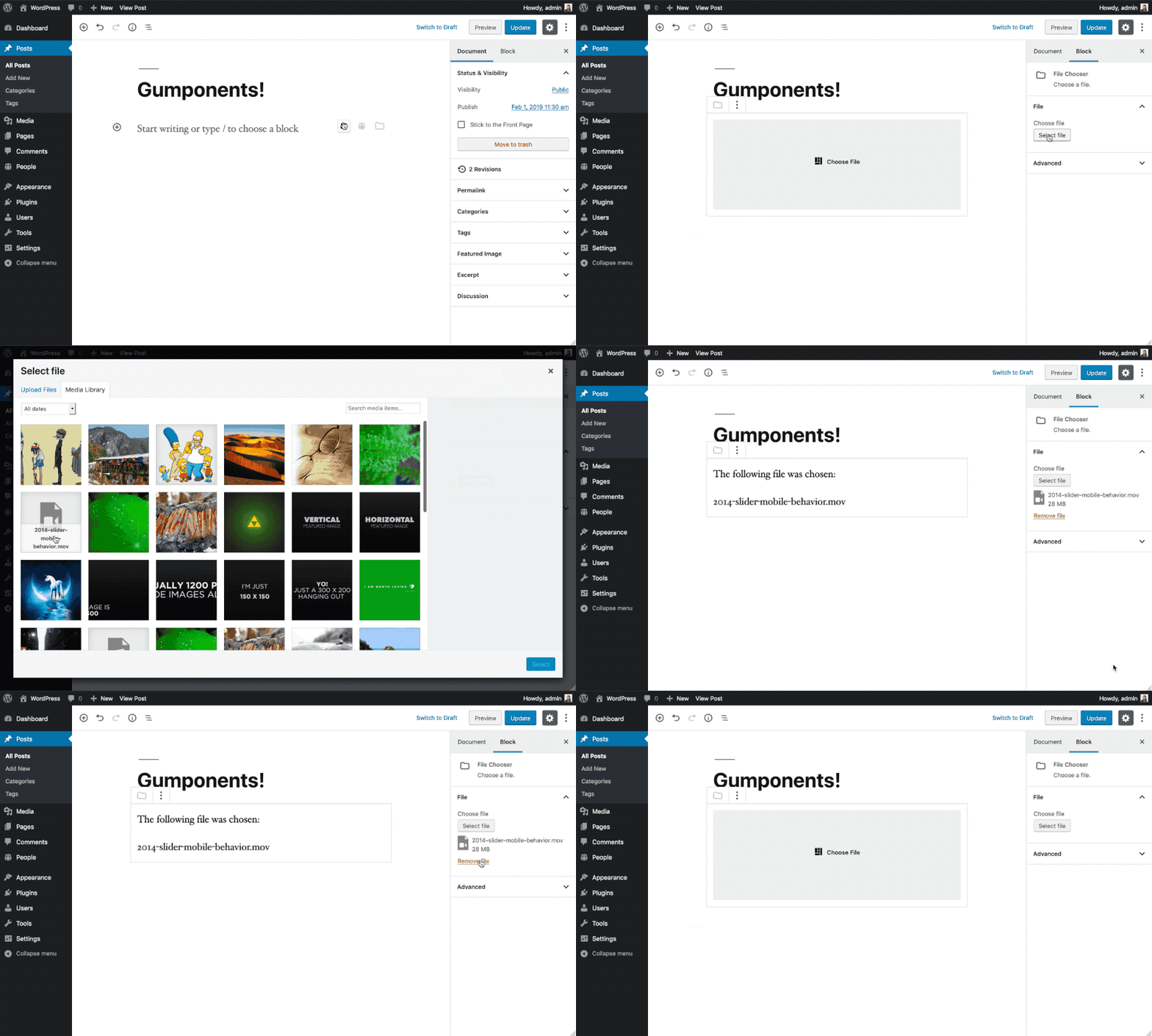
Example
const { FileControl } = gumponents.components;

...

attributes: {
    file: {
        type: 'object',
        default: null,
    },
},

...

<FileControl
    label="Choose file"
    selectLabel="Choose video"
    removeLabel="Remove this video"
    onChange={ file => setAttributes( { file: file ? { id: file.id, name: file.filename } : null } ) }
    value={ file ? file.id : null }
/>
ImageControl

Example
const { ImageControl } = gumponents.components;

...

attributes: {
    image: {
        type: 'object',
        default: null,
    },
},

...

<ImageControl
    label="Choose image"
    selectLabel="Choose image"
    removeLabel="Remove this image"
    size="thumbnail"
    value={ image }
    onChange={ ( image, media ) => setAttributes( { image } ) }
/>
FocalPointPickerControl

Example
const { FocalPointPickerControl } = gumponents.components;

...

attributes: {
    image: {
        type: 'object',
            default: {},
    },
    focalPoint: {
        type: 'object',
            default: {},
    },
},

...

<FocalPointPickerControl
    label="Focal Point"
    imageUrl={ attributes.image.src }
    value={ attributes.focalPoint }
    help="Choose a focal point"
    onChange={ ( focalPoint ) => setAttributes( { focalPoint } ) }
/>
GalleryControl

Example
const { GalleryControl } = gumponents.components;
...
attributes: {
gallery: {
type: 'array',
default: [],
},
},
...
<GalleryControl
size="medium"
onSelect={ ( gallery, media ) => {
setAttributes( { gallery: null } ); // The block editor doesn't update arrays correctly? 🤷♂️
setAttributes( { gallery } );
} }
value={ attributes.gallery }
/>LinkButton

Example
const { LinkButton } = gumponents.components;

...

attributes: {
    link: {
        type: 'object',
    },
},

...

<LinkButton
    className="btn btn--primary"
    placeholder="Select Link"
    value={ attributes.link }
    onChange={ ( link ) => setAttributes( { link } ) }
/>
SelectImage

Example
const { SelectImage } = gumponents.components;
...
attributes: {
image: {
type: 'object',
default: null,
},
},
...
<SelectImage
image={ image }
placeholder="Choose an image"
size="full"
onChange={ ( image, media ) => {
setAttributes( { image: null } ); // The block editor doesn't update objects correctly? 🤷♂️
setAttributes( { image } );
} }
showCaption={ false }
/>