Install
This is the repository archive. It installs, but the folder name will carry the branch suffix and updates will not flow.
Install straight from GitHub with WP-CLI:
wp plugin install https://github.com/juanma-wp/abilities-dashboard/archive/refs/heads/main.zipA WordPress plugin that provides a beautiful, interactive dashboard for viewing and managing WordPress Abilities with advanced data visualization and management capabilities.
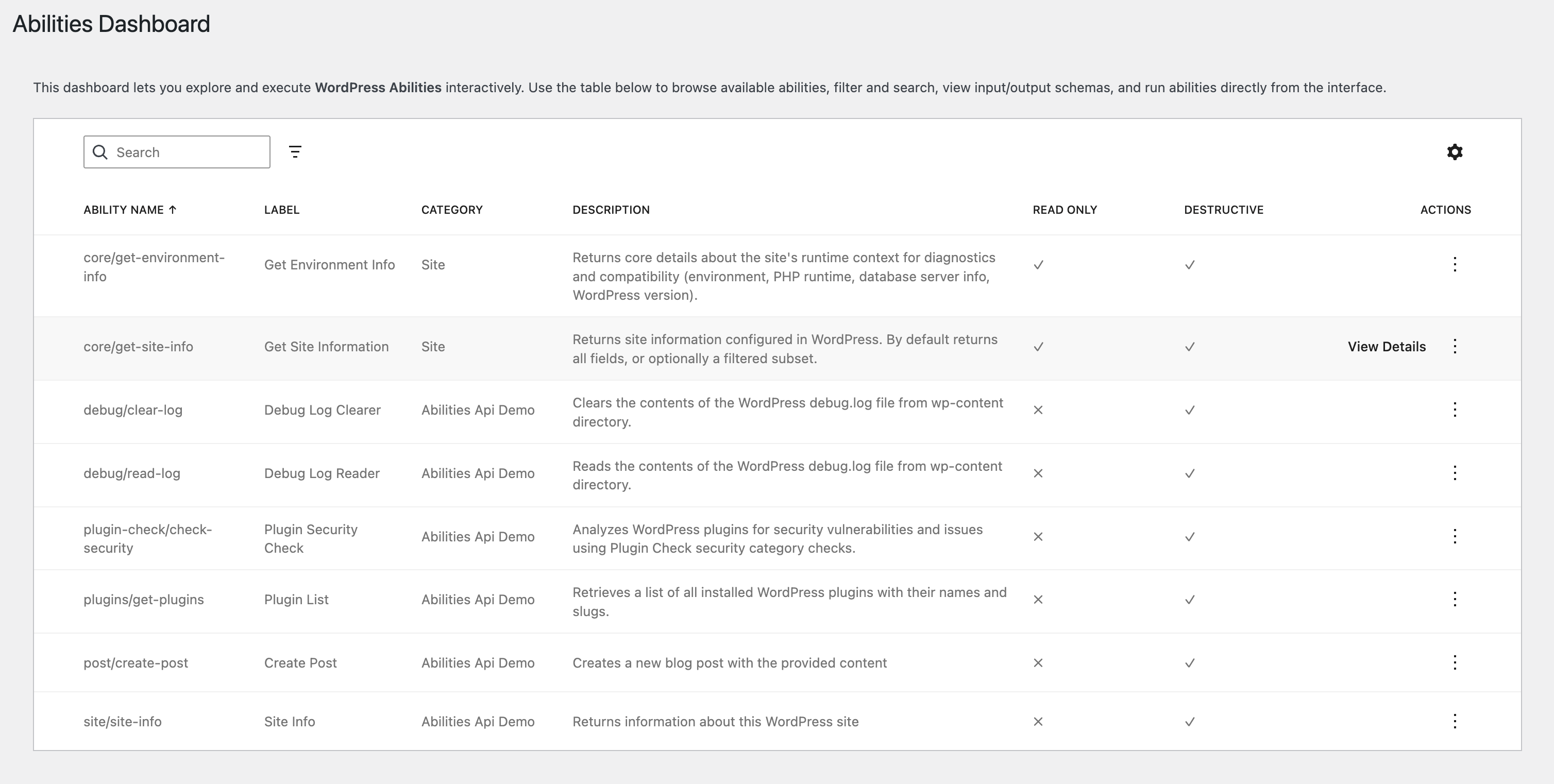
Overview
This plugin creates an admin page that displays all available WordPress Abilities in a searchable, sortable, and filterable table view. It leverages the WordPress DataViews component to provide a modern, responsive interface for exploring and executing abilities (see video).
Try it Now
Features
🔍 Smart Search & Filter
- Global search across ability names, labels, categories, and descriptions
- Dynamic category filtering based on available abilities
- Real-time filtering with instant results
📊 Rich Data Display
- Comprehensive ability information including:
- Name and label
- Category classification
- Detailed descriptions
- Input/output schema types
- Metadata (readonly, destructive, idempotent, REST API availability)
🎯 Interactive Actions
- View Details: See complete ability specifications including full input/output schemas
- Execute: Run abilities directly from the interface with:
- Dynamic input forms based on ability requirements
- Support for multiple input types (text, numbers, arrays, objects, booleans)
- Interactive multi-select for enum arrays
- Real-time validation
- Result display in formatted JSON
💡 Smart Input Handling
The Execute modal intelligently adapts to each ability's input schema:
- Text inputs for strings
- Number inputs with min/max validation
- Checkboxes for booleans
- Dropdown selects for enums
- Interactive button selection for array enums
- JSON editors for complex objects and arrays
- Automatic validation based on schema requirements
Installation
-
Clone or download this repository to your WordPress plugins directory:
cd wp-content/plugins/ git clone [repository-url] abilities-dataviews -
Install dependencies:
cd abilities-dataviews npm install -
Build the plugin:
npm run build -
Activate the plugin in WordPress Admin → Plugins
Development
Prerequisites
- Node.js (v14 or higher)
- npm or yarn
- WordPress development environment
- WordPress Abilities API enabled
Development Setup
-
Install dependencies:
npm install -
Start development build with watch mode:
npm run start -
For production build:
npm run build
Project Structure
abilities-dataviews/
├── src/
│   ├── index.js        # Main React application
│   └── style.scss      # Styles including DataViews imports
├── build/              # Compiled assets (generated)
├── abilities-dataviews.php  # Main plugin file
├── package.json        # Node dependencies
└── README.md          # This file
Technologies Used
- WordPress DataViews: Modern data table component
- React: UI framework
- WordPress Components: UI component library
- WordPress Scripts: Build tooling
- WordPress Abilities API: Data source
Key Components
DataViews Integration
The plugin uses @wordpress/dataviews with:
filterSortAndPaginateutility for efficient data processing- Dynamic field configuration
- Custom action renderers with modal interfaces
Dynamic Form Generation
Input forms are automatically generated based on ability schemas:
- Type detection and appropriate input rendering
- Schema-based validation
- Support for complex nested structures
Modern WordPress Integration
- Follows WordPress coding standards
- Uses WordPress build tools (@wordpress/scripts)
- Integrates with WordPress admin styles
- Enqueues dependencies properly
Usage
- Navigate to WordPress Admin → Abilities DataViews
- Browse available abilities in the table
- Use the search box to find specific abilities
- Filter by category using the dropdown
- Click "View Details" to see complete ability information
- Click "Execute" to run abilities with proper input
Executing Abilities
When executing an ability:
- The modal shows all required and optional parameters
- Each parameter displays its type, description, and default value
- For array enums (like the
fieldsparameter), click buttons to select values - Fill in required fields (marked with red asterisk)
- Click Execute to run the ability
- View results in the formatted output
Browser Support
- Chrome (latest)
- Firefox (latest)
- Safari (latest)
- Edge (latest)
Contributing
Contributions are welcome! Please feel free to submit a Pull Request.
License
This project is licensed under the GPL v2 or later.
Credits
Built using the WordPress DataViews component and WordPress Abilities API.