Install
This is the repository archive. It installs, but the folder name will carry the branch suffix and updates will not flow.
Install straight from GitHub with WP-CLI:
wp plugin install https://github.com/juanlentino/connector-for-typesafe-jev/archive/refs/heads/trunk.zipA WordPress connector for the TypeSafe System One API. It gives your themes and plugins a typed way to ask questions about content and get back values you can branch on: a probability, a named choice, or a score, each with a confidence figure.
No prose parsing. No prompt wrangling in your template files.
Status: 0.x, pending review for the WordPress plugin directory. The public API may still move before 1.0; changes are recorded in CHANGELOG.md.
In five lines
use JevConnector\Question;

$answer = JevConnector\ask(
    array( 'comment' => $comment->comment_content ),
    array( 'hostile' => Question::noul( 'Does this comment attack a person rather than an idea?' ) )
);

if ( ! is_wp_error( $answer ) && $answer->noul( 'hostile' ) >= 0.9 ) {
    wp_set_comment_status( $comment, 'hold' );
}
A probability you branch on, not prose you parse. For choice and score
answers the gate is is_confident(); for a noul the
probability is itself the confidence, so the threshold goes straight on the
value. This example is pinned by a test, so it cannot drift from the API.
Requirements
- WordPress 7.0 or later (the key is managed by core's Connectors API; there is no fallback field)
- PHP 7.4 or later
- A TypeSafe API key from the console
Why typed answers
Jev answers three kinds of question, and many of them in a single call:
| Primitive | Question | Answer |
|---|---|---|
noul |
"Does this comment attack a person?" | 0.94 |
choice |
"Which category fits?" | "essays" plus a distribution and confidence |
score |
"How severe is this?" | 1.3 on a scale you defined, plus confidence |
Common uses
Jev answers questions about meaning, so it fits wherever a site needs a judgement a rule cannot make. Spam is not one of them: leave that to Akismet, which sees signals from millions of sites. Jev answers what a spam filter does not ask.
| Use | Ask Jev | Shape | Then |
|---|---|---|---|
| Comment moderation | "Does this comment attack a person rather than an idea?" | noul |
Hold it for a human |
| Contact form routing | "Which team should answer this: billing, technical, sales, other?" | choice |
Send it to that inbox |
| Tags and categories | "Is this post about {term}?", one question per existing term, one call | noul |
Suggest the terms; an editor accepts |
| Pre-publish checks | "How well is the central claim supported?" | score |
Show it in the publish checklist |
| Policy and compliance | "Does this post make a health claim?" / "promise a financial return?" | noul |
Require review before publishing |
| Checking AI-written drafts | "Does the summary state anything the source does not?" | noul |
Flag the draft before it goes out |
| Product listings | "Is this a prohibited item under our policy?" plus "Which category fits?" | noul + choice |
Queue it for review, prefill the category |
| Reviews and feedback | "What is the tone?" and "Does this report a defect?" | choice + noul |
Route defects to support |
| Related posts and search | "How relevant is this post to the one being read?", per candidate | score |
Reorder the list |
| Lead qualification | "How well does this enquiry fit the customer we serve?" | score |
Answer the best fits first |
Anything that publishes, deletes or emails should gate on a high threshold or a human; see Confidence gating. TypeSafe keeps a longer use-case map.
Install
From a release zip
Download the latest zip from Releases and install it through Plugins → Add New → Upload Plugin.
From source
git clone https://github.com/juanlentino/connector-for-typesafe-jev.git wp-content/plugins/connector-for-typesafe-jevConfigure
Requires WordPress 7.0, because the key is managed by the core Connectors API rather than by anything this plugin invented.
Go to Settings → Connectors, find the TypeSafe Jev card, and paste a key from the TypeSafe console. Core stores it, masks it in the UI and in REST responses, and resolves it in this order:
TYPESAFE_API_KEYenvironment variableTYPESAFE_API_KEYconstant inwp-config.php- The stored option
Nothing is sent to TypeSafe until a key resolves, and then only when your own code makes a call.
No screens of its own
Like the Anthropic and Google provider connectors, this plugin adds no menu. The card is the whole UI. The default model and the REST capability are code-level choices:
add_filter( 'jevc_default_model', fn() => 'jev-1.13.0' );
add_filter( 'jevc_rest_capability', fn() => 'manage_options' );
Models
The default model is jev-latest, TypeSafe's alias for its newest stable release. When TypeSafe ships a new Jev, the alias moves and every site follows it with no plugin release, the same way the core Anthropic, Google and OpenAI connectors list models live instead of hardcoding them. $answer->model() names the versioned id that actually answered.
An alias moving can shift answers. If you tuned confidence thresholds against one version, pin it with the filter above and move when you are ready. jev-preview is the newest release, stable or not; it is never the default.
$models = JevConnector\models();        // name, description, release_date
$fresh  = JevConnector\models( true );  // skip the one-day cache
The list is informational. TypeSafe accepts versioned ids such as jev-1.14.0 whether or not they are listed, so nothing is validated against it.
What a site does with an answer (moderate a comment, tag a post, grade a draft) belongs to the plugin or theme that owns that content. Signal & Noise Tools is the first consumer built that way.
Not an AI provider, yet
Jev is not an LLM, and TypeSafe presents it that way: it returns a probability, a choice, or a score with a confidence figure, and generates no text. The PHP AI Client that WordPress ships describes models by capability (text, image, speech, video, embeddings), and none of those fits a model that answers typed questions.
That gap is the whole reason for the connector type. Core treats type => 'ai_provider' specially: when a key is saved, it asks the provider class registered under the same id in the AI Client whether it is configured, and clears the key unless the answer is exactly true. With no provider class there is nothing to ask, and the key is cleared. This plugin has no provider class, because there is no capability yet for one to declare. Registered as ai_decision, it keeps core's key storage and masking without that check.
The Core AI team's stated direction is to support decision models inside the AI Client, tracked in php-ai-client#296. When that lands, this plugin adds a provider class and switches to ai_provider. The setting names are declared explicitly, so the stored key does not move. The discussion, including how core treats a plugin-defined type, is on Core Trac #66146.
Screenshots
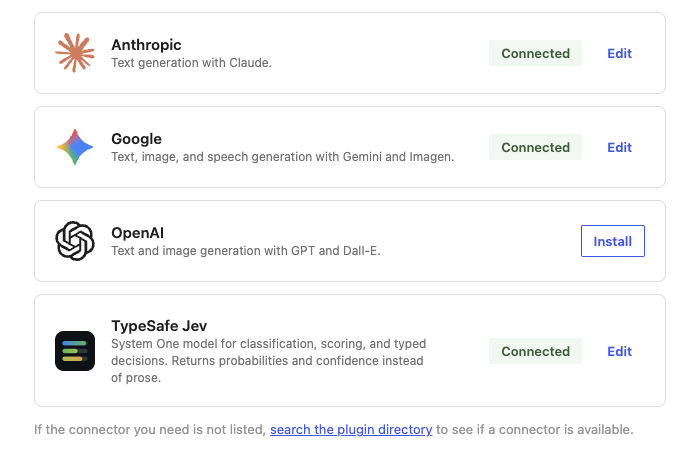
Settings → Connectors on a live WordPress 7.1 site. TypeSafe Jev sits among the AI providers without being one: core stores and masks the key, the card is the whole UI, and no AI Client validation runs against it. There is no key field here to screenshot, because the plugin never renders one.
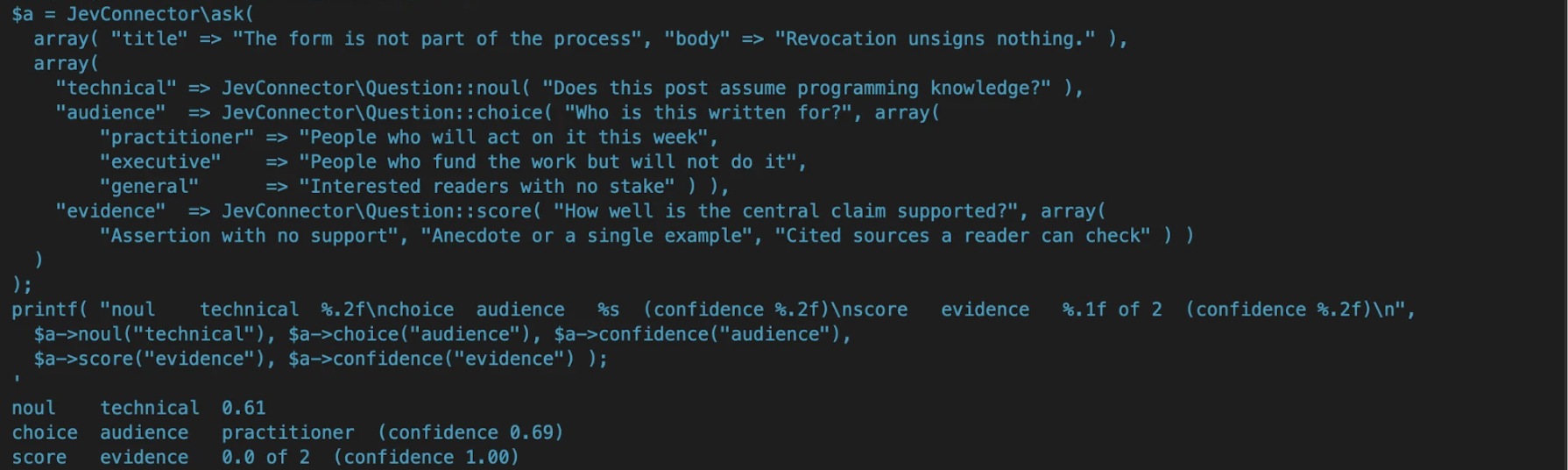
One real call on that site, through WP-CLI. Three questions, three typed
answers: a probability, a named choice with its confidence, and a position on
a rubric with its confidence. Note the last line. The body given here was a
single sentence, so "no support" at full confidence is the right answer, and
a caller gating on score >= 1 acts on it without parsing a word.
Use
use JevConnector\Question;

$answer = JevConnector\ask(
    array(
        'title' => get_the_title(),
        'body'  => wp_strip_all_tags( get_the_content() ),
    ),
    array(
        'is_technical' => Question::noul( 'Does this post assume programming knowledge?' ),
        'audience'     => Question::choice(
            'Who is this written for?',
            array(
                'practitioner' => 'People who will act on it this week',
                'executive'    => 'People who fund the work but will not do it',
                'general'      => 'Interested readers with no stake',
            )
        ),
        'evidence'     => Question::score(
            'How well is the central claim supported?',
            array(
                'Assertion with no support',
                'Anecdote or a single example',
                'Cited sources a reader can check',
            )
        ),
    )
);

if ( is_wp_error( $answer ) ) {
    error_log( $answer->get_error_message() );
    return;
}

$answer->noul( 'is_technical' );          // 0.91
$answer->choice( 'audience' );            // 'practitioner'
$answer->confidence( 'audience' );        // 0.74
$answer->probabilities( 'audience' );     // [ 'practitioner' => 0.74, ... ]
$answer->score( 'evidence' );             // 1.6
$answer->is_confident( 'audience', 0.9 ); // false — do not act automatically
$answer->usage();                         // [ 'input_tokens' => 412, ... ]
Confidence gating
Gate on consequences, not on a single global threshold. Reads and suggestions can run at 0.5; anything that deletes, publishes, or emails should want 0.9 or a human.
if ( $answer->is_confident( 'route', 0.9 ) ) {
    act( $answer->choice( 'route' ) );
} elseif ( $answer->is_confident( 'route', 0.6 ) ) {
    flag_for_review();
} else {
    leave_it_alone();
}
For a noul, is_confident() measures distance from 0.5, so 0.97 and 0.03 are both confident and 0.52 is not.
In production
juanlentino.com runs six typed readings over its published corpus through this connector, each one a request per note, each one gated on confidence and metered. Signal & Noise Tools is the consumer that owns those decisions; this plugin only carries the question and the answer.
What each reading asks, the rubric it scores against, what happens when Jev is unsure, and what it costs are written down in that plugin's AI.md.
REST
Full reference, with every error code, in docs/REST-API.md.
POST /wp-json/jev/v1/ask — same payload shape as the PHP helper. Requires a logged-in user with edit_posts by default (jevc_rest_capability filter).
await apiFetch( {
    path: '/jev/v1/ask',
    method: 'POST',
    data: {
        state: { body: content },
        questions: {
            headline: { type: 'noul', instructions: 'Does the headline match the body?' },
        },
    },
} );
GET /wp-json/jev/v1/models lists the models and aliases the account can send (?refresh=1 skips the cache). GET /wp-json/jev/v1/status reports whether the connector is ready.
Hooks
Full signatures and firing order are in docs/HOOKS.md.
| Hook | Type | Purpose |
|---|---|---|
jevc_default_model |
filter | The model id when a call passes none (default jev-latest) |
jevc_http_timeout |
filter | Request timeout in seconds (default 20) |
jevc_request_payload |
filter | Last look at the body before encoding |
jevc_request_args |
filter | Arguments handed to wp_remote_post() |
jevc_retry_delay |
filter | Backoff in seconds; return 0 to disable sleeping |
jevc_rest_capability |
filter | Capability required by the REST route |
jevc_cache_ttl |
filter | Response cache lifetime; return 0 to disable |
jevc_connector_type |
filter | Connector type (default ai_decision; see above before changing) |
jevc_connector_args |
filter | The whole connector definition before registration |
jevc_after_response |
action | Fires with the Response on success |
jevc_request_failed |
action | Fires with the WP_Error on final failure |
Caching
Identical requests are served from a transient keyed by a hash of the exact payload, so re-evaluating the same draft or comment costs nothing. Any change to the state, the questions, or the model is a miss. Failures are never cached.
add_filter( 'jevc_cache_ttl', fn() => 0 );              // disable globally
JevConnector\ask( $state, $questions, [ 'cache' => false ] ); // bypass once
Errors
Everything returns WP_Error rather than throwing. Codes: jevc_not_configured, jevc_invalid_question, jevc_invalid_response, jevc_encode_failed, and jevc_http_<status>. 429, 529 and 5xx are retried three times with backoff before giving up.
Development
composer install
composer check # lint + tests- CONTRIBUTING.md: setup, what CI runs, how to make a change
- CLAUDE.md: the design decisions that must not be quietly reversed, with reasons
- docs/ARCHITECTURE.md: file map and the request path end to end
- docs/RELEASING.md: version bump, tag, zip, and the directory's SVN
- SECURITY.md: what is sent where, and how to report a vulnerability
- SUBMITTING.md: the pre-submission checklist for the plugin directory
trunk is protected. Every change goes through a pull request with PHPUnit on PHP 7.4 to 8.5, WordPress Coding Standards, and the directory's own Plugin Check all green.
License
GPL-2.0-or-later. TypeSafe and Jev are trademarks of their owner; this plugin is an independent client and is not affiliated with, endorsed by, or sponsored by TypeSafe. It ships no TypeSafe logo: every image in a directory plugin must be GPL-compatible, so the Connectors card and the directory listing use the plugin's own icon (three confidence bars, assets/images/icon.svg, GPL).