WP Engine Sites Menu WP Registry grade C-. High-severity findings · 1 findingWP RegistryHigh-severity findings · 1 findingOpen the reportC-
WordPress plugin that interacts with the WP Engine API (using the test PHP SDK) to show list of users sites
Install
Upload it under Plugins → Add New Plugin → Upload Plugin, then activate.
Install straight from GitHub with WP-CLI:
wp plugin install https://github.com/jpollock/wp-engine-sites-menu/releases/download/v0.0.2/wp-engine-sites-menu-0.0.2.zipA WordPress plugin that adds a convenient dropdown menu to your admin bar for quick access to all your WP Engine sites and environments.
Description
This plugin integrates with the WP Engine API to provide easy navigation between your WP Engine sites directly from the WordPress admin bar. It's particularly useful for developers and agencies managing multiple WP Engine installations.
Key Features
- Quick Access Menu: Adds a dropdown menu to the WordPress admin bar for fast navigation between sites
- Current Site Display: Clearly shows your current site and its related environments (Production, Staging, Development)
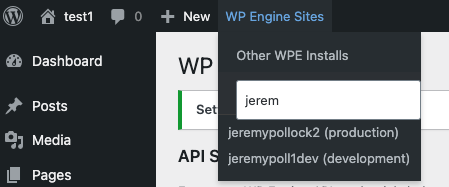
- Search Functionality: Instantly search through all your WP Engine sites and installations
- Smart Caching: Caches API responses to minimize API calls and improve performance
- Secure Storage: Encrypts API credentials using WordPress salts for secure storage
- Environment Labels: Clearly distinguishes between production, staging, and development environments
Requirements
- WordPress 5.0 or higher
- PHP 7.4 or higher
- WP Engine hosting account
- WP Engine API credentials
Installation
- Download the plugin zip file from the latest release
- Go to WordPress admin > Plugins > Add New
- Click "Upload Plugin" and select the zip file
- Click "Install Now"
- After installation, click "Activate"
Manual Installation
- Upload the
wp-engine-sites-menufolder to the/wp-content/plugins/directory - Activate the plugin through the 'Plugins' menu in WordPress
Configuration
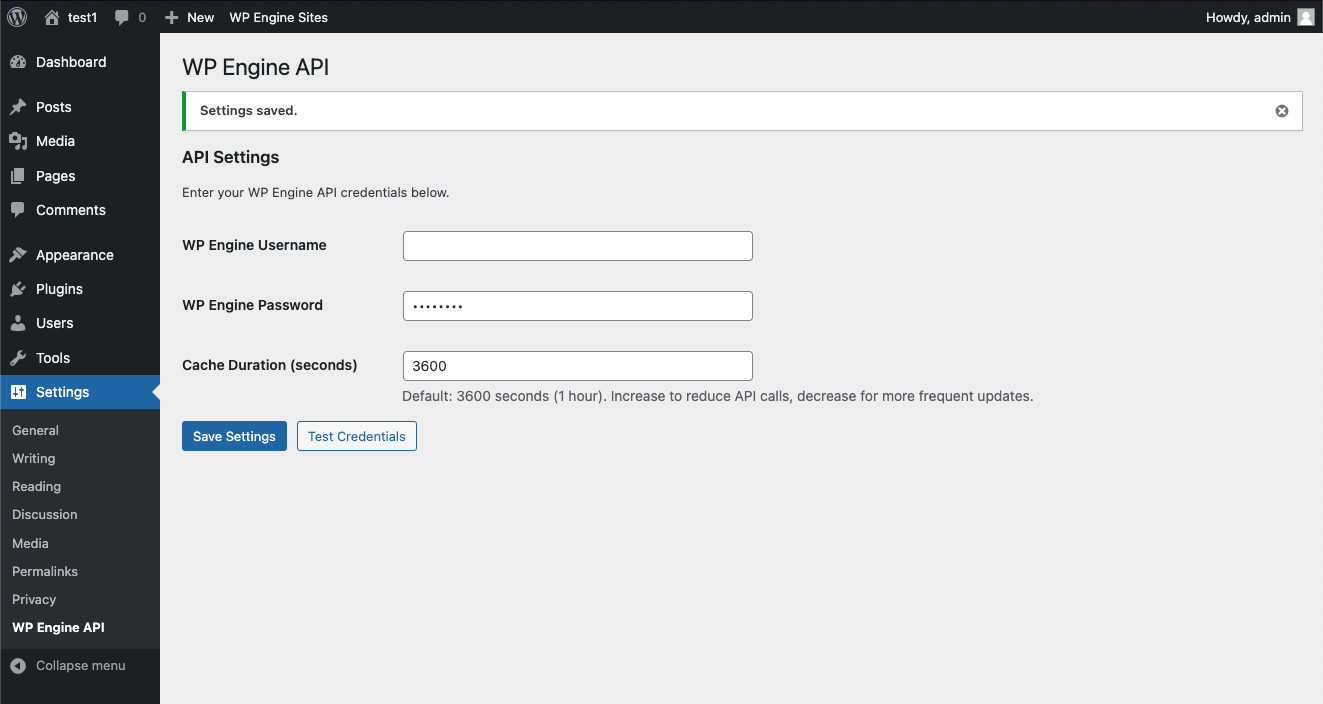
- Go to Settings > WP Engine API in your WordPress admin
- Enter your WP Engine username and password
- (Optional) Adjust the cache duration for API responses
- Click "Save Settings"
- Use the "Test Credentials" button to verify your API connection
Usage
Once configured, you'll see a "WP Engine Sites" menu in your WordPress admin bar. This menu provides:
-
Current Site Section:
- Shows your current site name
- Lists all environments (Production/Staging/Development) for quick access
-
Search Function:
- Use the search box to filter through all your WP Engine installations
- Search by site name, install name, or domain
-
Other Sites:
- Lists all other WP Engine sites you have access to
- Includes environment indicators for each installation
Security
The plugin implements several security measures:
- API credentials are encrypted using WordPress salts
- All API requests are made server-side
- Nonce verification for AJAX requests
- Capability checking for admin functions
Caching
The plugin caches WP Engine API responses to improve performance:
- Default cache duration: 1 hour (3600 seconds)
- Configurable through the settings page
- Cache is automatically cleared when testing credentials
- Reduces API calls and improves menu load time
Releases
This plugin follows Semantic Versioning:
- MAJOR version for incompatible API changes
- MINOR version for added functionality in a backward compatible manner
- PATCH version for backward compatible bug fixes
Creating a New Release
-
Update version numbers in:
wp-engine-sites-menu.php(Plugin header)- JavaScript files where version is specified
- Any other files referencing the version number
-
Update the CHANGELOG.md file:
- Add a new version section
- Document all notable changes under appropriate categories:
- Added
- Changed
- Deprecated
- Removed
- Fixed
- Security
-
Create and push a new version tag:
git add . git commit -m "Prepare for version X.Y.Z" git tag -a vX.Y.Z -m "Version X.Y.Z" git push origin main --tags -
The GitHub Actions workflow will automatically:
- Create a clean distribution package
- Remove development files
- Create a zip file
- Create a GitHub release
- Attach the zip file
- Add release notes from CHANGELOG.md
Support
For bug reports or feature requests, please use the GitHub issues page.
Contributing
Contributions are welcome! Please feel free to submit a Pull Request.
License
This plugin is licensed under the GPL v2 or later.
Screenshots
-
WP Engine Sites Menu: Quick access dropdown menu in the WordPress admin bar
-
Plugin Settings: Configure your WP Engine API credentials and cache settings
Releases
2 releases. Each count is every asset in that release; expand a row for the breakdown.