Install
This is the repository archive. It installs, but the folder name will carry the branch suffix and updates will not flow.
Install straight from GitHub with WP-CLI:
wp plugin install https://github.com/josipmestrovic/bht-dynamic-tables/archive/refs/heads/main.zipACF-driven shortcodes for rendering dynamic, collapsible pricing tables (with an optional extensions accordion) on any WordPress site.
Module version: 2.0.0
Upgrading from 1.x? This is a breaking release. See Upgrading to 2.0 at the bottom.
Install
This module is distributed as a standalone Git repo — the folder is the repo. Pick one install path:
Option A — Git clone (recommended, gives you updates)
From your theme folder:
cd wp-content/themes/<your-theme>
git clone https://github.com/josipmestrovic/ecom-dynamic-tables.git dynamic-tables
Option B — Manual copy (no version link)
Download the repo as a ZIP from GitHub and unzip it as
wp-content/themes/<your-theme>/dynamic-tables/. You won't be able to
git pull future updates — you'd have to re-download.
Activation (both options)
Add this single line to your child theme's functions.php:
require_once get_stylesheet_directory() . '/dynamic-tables/dynamic-tables.php';The module is a thin bootstrap — it just require_onces every file in
includes/. The shared CSS and the accordion JS are registered
globally but only enqueued when a shortcode actually renders, so pages
that don't use a shortcode incur zero asset cost.
Working with this component
The folder you just cloned has its own .git directory — it's a normal
git repo that happens to live inside a WordPress theme. Edit files
normally; sync with plain git commands.
Pull updates from GitHub
cd wp-content/themes/<your-theme>/dynamic-tables
git pull
Hard-refresh the browser. Asset cache-busting is automatic via
filemtime().
Push local improvements upstream
cd wp-content/themes/<your-theme>/dynamic-tables
git status
git add .
git commit -m "Fix chevron alignment on mobile"
git push
Releasing a new version
- Bump version in two places:
dynamic-tables.php→ECOM_DT_VERSIONconstant.README.md→ "Module version" line at top + new Changelog entry.
- Commit + tag + push:
git add .
git commit -m "Release 2.1.0: <one-line summary>"
git tag v2.1.0
git push
git push --tags
Other sites opt-in with their next git pull. To pin a site to an
exact version: git checkout v2.1.0.
Semver
| Change | Bump |
|---|---|
| Bug fix, no behavior change | patch (2.0.0 → 2.0.1) |
| New feature, backward compatible | minor (2.0.0 → 2.1.0) |
| Breaking change (removed shortcode arg, renamed CSS class consumers depend on, ACF field rename) | major (2.0.0 → 3.0.0) |
Nested .git warning?
If the parent theme is also a git repo, git will warn about the
nested .git inside dynamic-tables/. Add dynamic-tables/ to the
parent's .gitignore — the component still works, it's just versioned
separately (which is the goal).
File structure
dynamic-tables/
├── README.md                  ← you are here
├── dynamic-tables.php         ← thin bootstrap + constants
├── dynamic-tables.css         ← shared shortcode styles
├── dynamic-tables.js          ← accordion controller (vanilla, no deps)
└── includes/
    ├── assets.php             ← wp_register_style + wp_register_script
    ├── helpers.php            ← ecom_dt_format_price() + ecom_dt_render_wysiwyg() + filters
    └── shortcode-pricing.php  ← [ecom_dynamic_table]
Adding a new shortcode is a 2-step drop-in:
- Create
includes/shortcode-{name}.phpcontaining a render function +add_shortcode()call. require_onceit fromdynamic-tables.php.
No other file needs to change.
Constants
Defined by the bootstrap (dynamic-tables.php) with defined() guards
so they're safe to override from wp-config.php if ever needed:
| Constant | Default | Purpose |
|---|---|---|
ECOM_DT_DIR |
__DIR__ |
Absolute filesystem path to the module root. Used by includes/*.php to resolve sibling files. |
ECOM_DT_VERSION |
'2.0.0' |
Module version. Available for cache-busting / debugging. (Per-asset cache-busting uses filemtime() — see below.) |
Asset loading strategy
- Register on
wp_enqueue_scripts, enqueue inside the shortcode callback.ecom_dynamic_tables_enqueue_assets()callswp_register_*for bothecom-dynamic-tables-cssandecom-dynamic-tables-js; the actualwp_enqueue_*calls live insideecom_dt_render_dynamic_table(). Pages without a shortcode never pull either asset. - Cache-busting via
filemtime()— every deploy bumps the version string automatically; no manual version juggling. - JS loads in the footer, with no dependencies (no jQuery).
- No admin-side enqueue — the module is front-end only.
Shortcodes
[ecom_dynamic_table]
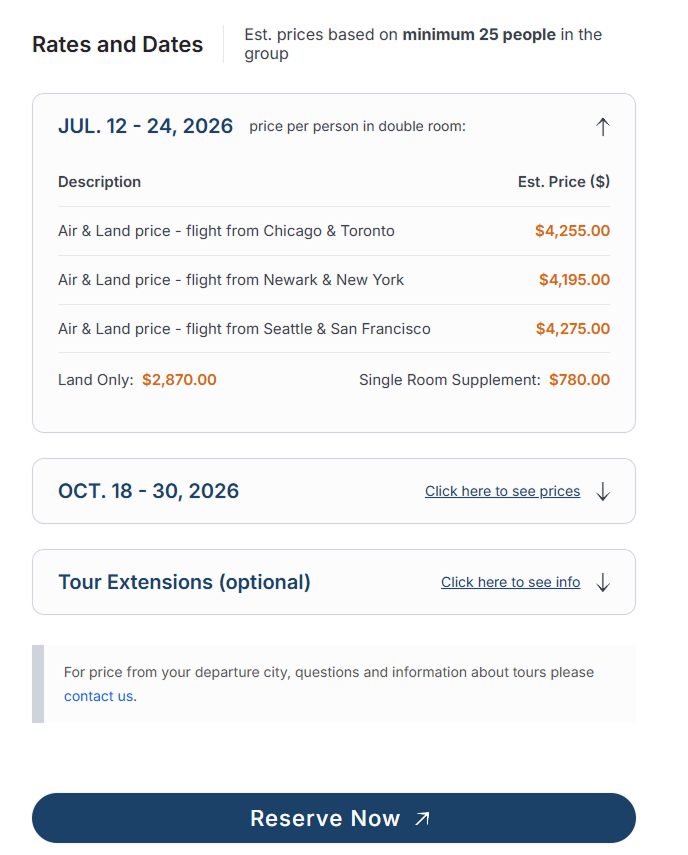
Renders pricing for the current post as an accordion of rows, optionally followed by a single Extensions accordion and a disclaimer footer. The first row renders open by default; the rest start collapsed and expand on click / Enter / Space.
Reads the following ACF fields on the current post. The field names below are the default schema the shortcode expects — mirror these in your own ACF field group:
| ACF field | Type | Required | Use |
|---|---|---|---|
tour_pricing_note |
Text | No | Note shown right of the "Rates and Dates" heading. |
tour_departures |
Repeater | Yes (or no output) | One accordion block per row. |
└ departure_label |
Text | Yes | Label / heading shown left of the toggle row (e.g. "July 12 - 24, 2026"). |
└ departure_note |
Text | No | Caption shown right of the label — only visible when the row is open (e.g. "Est. price per person in double room:"). |
└ prices |
Sub-repeater | No | Description + amount rows. |
└ price_description |
Text | Yes | Row label. |
└ price_amount |
Number | Yes | Numeric value. Formatted via ecom_dt_format_price. |
└ land_only_price |
Number | No | "Land Only" line under the table. |
└ single_room_supplement |
Number | No | Supplement line under the table. |
pricing_footer |
Textarea | No | Disclaimer block. Sanitized with wp_kses_post. |
tour_extensions_boolean |
True/False | No | Master switch for the optional Extensions accordion below the pricing block. |
tour_extension_info |
WYSIWYG | When extensions on | First section inside the extensions accordion body. Sanitized with wp_kses_post. |
tour_extension_itinerary |
WYSIWYG | When extensions on | Second section inside the extensions accordion body. Sanitized with wp_kses_post. |
Why are some field names still prefixed
tour_/departure_? They're the historical schema this module was extracted from and they are kept verbatim so existing installs upgrading from 1.x don't have to migrate ACF data. Treat them as opaque field keys — they have no semantic meaning to the renderer.
Bails silently outside is_singular() (returns an empty string on
archives / search / 404 / multi-post listings).
The Extensions block renders only when tour_extensions_boolean is
true AND at least one of the two WYSIWYG fields has content
(defensive guard — avoids an empty toggle). It uses the same
.ecom-row-block / .ecom-row-toggle / .ecom-row-body classes as
the pricing accordion, so it inherits all visual styling and the
accordion JS automatically. It ships collapsed by default with a
"Click here to see info" CTA.
Behavior
- First row open, rest collapsed — handled in PHP (
.is-collapsedshipped on the body element from the renderer) so there's no flash of expanded content. - Toggle row is a real
<button class="ecom-row-toggle">witharia-expanded/aria-controls— keyboard activation is native. When collapsed it shows the label + a "Click here to see prices" CTA; when expanded it shows the label +departure_notecaption (if any). The chevron stays anchored to the right edge in both states and rotates 180° when open. - Animation —
dynamic-tables.jsmeasuresscrollHeightand animatesmax-height+opacityon.ecom-row-body. The collapsed state is driven by a.is-collapsedclass (not the nativehiddenattribute) so transitions stay smooth. - Print — all rows render fully expanded; chevron + CTA hidden.
- Reduced motion —
prefers-reduced-motion: reduceskips the height / opacity transitions.
Accessibility
- Toggle is a real
<button type="button">— Enter / Space and focus order come for free, no JS keyboard handlers needed. aria-expandedandaria-controlsare kept in sync by the JS controller; ID pairing useswp_unique_id( 'ecom-row-' )so multiple shortcode instances on one page don't collide.- Visible focus ring: 2px solid
#1C4168, inset. - Chevron is
aria-hidden="true"(decorative). - Print + reduced-motion media queries are honored (see Behavior).
Public PHP surface
| Function | File | Purpose |
|---|---|---|
ecom_dynamic_tables_enqueue_assets() |
includes/assets.php |
Hooked to wp_enqueue_scripts. Registers the shared stylesheet and the accordion script (does not enqueue — shortcodes pull them on render). |
ecom_dt_format_price( $amount ) |
includes/helpers.php |
Returns a localized currency string ($1,250.00-style). |
ecom_dt_render_wysiwyg( $value ) |
includes/helpers.php |
Runs a WYSIWYG value through the_content with wptexturize disabled for that single call, then restores it. Provided to avoid no-glyph "tofu" boxes when the rendering font lacks U+2018 / U+2019 / U+201C / U+201D / U+2013 / U+2014 / U+2026 — see Limitations. |
ecom_dt_render_dynamic_table() |
includes/shortcode-pricing.php |
[ecom_dynamic_table] callback. |
Filters
| Filter | Args | Purpose |
|---|---|---|
ecom_dt_currency_symbol |
$symbol |
Change $ to €, £, etc. |
ecom_dt_format_price |
$rendered, $amount, $symbol |
Override the entire price string (e.g. for symbol-after-amount locales). |
JavaScript module
dynamic-tables.js — vanilla, IIFE-scoped, zero dependencies.
- Single delegated
clicklistener ondocument— handles every current and future.ecom-row-togglewithout rebinding when the DOM changes. TRANSITION_MS = 220matches the CSStransition-durationon.ecom-row-body.- Expand: measures
scrollHeight, setsmax-height: 0→requestAnimationFrame→ animates to the measured pixel height, then clears the inlinemax-heightafter the transition so the body can grow freely if its content changes later (responsive WYSIWYG images, etc.). - Collapse: locks the current height inline → forces a reflow →
re-applies
.is-collapsedandmax-height: 0to animate back down. - Toggles
aria-expandedon the button and.is-openon the parent.ecom-row-blockso CSS hooks (chevron rotation, caption / CTA visibility) stay in sync.
Styling tokens
Re-use these across any future shortcode so the visual language stays
consistent. Defined in dynamic-tables.css:
| Token | Value | Where |
|---|---|---|
| Surface | #FCFCFD |
Block background, table cells. |
| Border | #CED3DC |
Block outline (1px, 12px radius). |
| Divider | #CED3DC80 |
Table row borders, extras separator. |
| Label / heading | #1C4168 |
.ecom-row-label, focus ring, CTA link. |
| Body / table strings | #384049 |
Cells, captions, extras labels. |
| Price | #D36815 |
Price column values, Land Only / Single Supplement amounts. |
| Radius | 12px |
.ecom-row-block. |
| Label typography | Inter 600 / 20px | .ecom-row-label. Falls back to system-ui, sans-serif if Inter isn't loaded by the parent theme. |
The optional CSS custom property --ecom-font-body is read by
.ecom-pricing-title and .ecom-pricing-note if defined — set it on
:root (or any ancestor) in your theme to override the body font for
the heading row.
Bold rules inside the table:
- Column titles (
Description,Est. Price ($)) — semibold,#384049. - Price values — semibold,
#D36815. - Everything else (descriptions, extras labels) — regular weight.
CSS class reference
All classes are prefixed ecom- (with is-collapsed / is-open as
the only state classes). If you write custom CSS in your child theme,
target these:
| Class | Element |
|---|---|
.ecom-pricing-section |
Outer wrapper. |
.ecom-pricing-header |
Header row (heading + note). |
.ecom-pricing-title |
"Rates and Dates" heading. |
.ecom-pricing-note |
Pricing-note slot in header row. |
.ecom-pricing-footer |
Footer disclaimer block. |
.ecom-rows |
Wrapper around the row blocks. |
.ecom-row-block |
One accordion item (also used by extensions). |
.ecom-row-toggle |
The <button> header. |
.ecom-row-label |
Label text inside the toggle. |
.ecom-row-toggle-caption |
Caption shown when row is OPEN. |
.ecom-row-toggle-cta |
CTA shown when row is COLLAPSED. |
.ecom-row-chevron |
Chevron SVG wrapper. |
.ecom-row-body |
Expandable body. |
.ecom-prices-table |
Inner pricing table. |
.ecom-extras |
Land-only / supplement footer. |
.ecom-extras-land-only / .ecom-extras-single-supplement |
Individual extras lines. |
.ecom-extras-price |
Bold price value inside extras. |
.ecom-extensions-section |
Wrapper for the optional extensions accordion. |
.ecom-extensions-body |
Body of the extensions accordion. |
.ecom-extension-info / .ecom-extension-itinerary |
The two WYSIWYG slots inside the extensions body. |
.is-open |
On .ecom-row-block while expanded. |
.is-collapsed |
On .ecom-row-body while collapsed. |
Troubleshooting
| Symptom | Likely cause / fix |
|---|---|
| Accordion doesn't animate (rows snap open/closed). | ecom-dynamic-tables-js isn't being enqueued. The script is only enqueued from inside the shortcode — confirm the shortcode actually rendered (i.e. is_singular() returned true and tour_departures had rows). |
| First row renders briefly expanded then collapses. | The PHP renderer is emitting .is-collapsed on the wrong body, or the CSS file is loading after a long delay. Check that ecom-dynamic-tables-css is enqueued in <head>. |
| Caption shows when collapsed (or CTA shows when open). | Stale CSS — aria-expanded toggling isn't matching the .ecom-row-toggle-caption / .ecom-row-toggle-cta rules. Hard-refresh; filemtime() should have busted the cache automatically on deploy. |
| Extensions accordion never appears. | Either tour_extensions_boolean is false, or both tour_extension_info and tour_extension_itinerary are empty (defensive guard suppresses the empty toggle). |
| Currency symbol is wrong. | Hook the ecom_dt_currency_symbol filter; for symbol-after-amount locales, hook ecom_dt_format_price and rebuild the string. |
| Garbage / box "tofu" glyphs appear in a WYSIWYG block. | See Limitations — straight " / ' / -- get auto-converted to typographic Unicode by wptexturize(), and the rendering font may lack those glyphs. |
Known limitations
-
No-glyph ("tofu") boxes from typographic punctuation in
tour_extension_itinerary(and any other WYSIWYG field rendered throughwp_kses_post()/the_content). When an editor types a straight ASCII quote", apostrophe', or double-dash--into thetour_extension_itineraryWYSIWYG (custom-rendered inside the[ecom_dynamic_table]extensions accordion), WordPress'swptexturize()filter rewrites them into typographic equivalents —“ ” ‘ ’ – —— on render. If the page's rendering font doesn't ship glyphs for those codepoints (U+2018, U+2019, U+201C, U+201D, U+2013, U+2014, U+2026), the browser shows a NO GLYPH "tofu" box instead.Status: the helper
ecom_dt_render_wysiwyg()exists inincludes/helpers.phpto render WYSIWYG values withwptexturizedisabled for exactly that single call, but[ecom_dynamic_table]currently renderstour_extension_infoandtour_extension_itinerarythroughwp_kses_post()directly, so the helper isn't applied — the tofu still appears. Two ways to fix:- Swap the two
wp_kses_post( $extension_* )calls inincludes/shortcode-pricing.phpforecom_dt_render_wysiwyg( $extension_* )(re-sanitize after if needed). This is the surgical fix. - Load a webfont in the parent theme that includes the missing codepoints. This fixes every WYSIWYG site-wide, not just this shortcode.
Tracked here so the next maintainer doesn't rediscover it.
- Swap the two
-
Single currency / locale per site. The two filters (
ecom_dt_currency_symbol,ecom_dt_format_price) are global; there's no per-row currency switch. -
No admin-side preview. The shortcode bails outside
is_singular(), so it won't render in the block editor preview.
Upgrading to 2.0
Version 2.0.0 strips the original brand-specific naming and switches
to a generic ecom- prefix throughout. Everything in the public
surface was renamed. Update consumer code as follows:
Shortcode
| Before | After |
|---|---|
[tour_pricing] |
[ecom_dynamic_table] |
There is no backward-compat alias — find-and-replace in your post content.
PHP constants, functions, hooks, namespace
| Before | After |
|---|---|
BHT_DT_DIR |
ECOM_DT_DIR |
BHT_DT_VERSION |
ECOM_DT_VERSION |
bht_dynamic_tables_enqueue_assets() |
ecom_dynamic_tables_enqueue_assets() |
bht_dt_format_price() |
ecom_dt_format_price() |
bht_dt_render_wysiwyg() |
ecom_dt_render_wysiwyg() |
bht_dt_render_tour_pricing() |
ecom_dt_render_dynamic_table() |
bht_dt_currency_symbol filter |
ecom_dt_currency_symbol filter |
bht_dt_format_price filter |
ecom_dt_format_price filter |
BHT\DynamicTables namespace |
Ecom\DynamicTables |
'bht' text domain |
'ecom-dynamic-tables' text domain |
Enqueue handles
| Before | After |
|---|---|
dynamic-tables-css |
ecom-dynamic-tables-css |
dynamic-tables-js |
ecom-dynamic-tables-js |
CSS classes
The full markup is now ecom--prefixed. Update any custom CSS in your
child theme:
| Before | After |
|---|---|
.tour-pricing-section |
.ecom-pricing-section |
.tour-pricing-header |
.ecom-pricing-header |
.tour-pricing-title |
.ecom-pricing-title |
.tour-pricing-note |
.ecom-pricing-note |
.tour-pricing-footer |
.ecom-pricing-footer |
.tour-extensions-section |
.ecom-extensions-section |
.tour-extensions-body |
.ecom-extensions-body |
.tour-extension-info |
.ecom-extension-info |
.tour-extension-itinerary |
.ecom-extension-itinerary |
.departure-block |
.ecom-row-block |
.departure-toggle |
.ecom-row-toggle |
.departure-label |
.ecom-row-label |
.departure-toggle-caption |
.ecom-row-toggle-caption |
.departure-toggle-cta |
.ecom-row-toggle-cta |
.departure-chevron |
.ecom-row-chevron |
.departure-body |
.ecom-row-body |
.departure-prices-table |
.ecom-prices-table |
.departure-extras |
.ecom-extras |
.departure-extras-price |
.ecom-extras-price |
.land-only |
.ecom-extras-land-only |
.single-supplement |
.ecom-extras-single-supplement |
The CSS custom property --bht-font-body is now --ecom-font-body.
ACF fields — unchanged
Field names (tour_pricing_note, tour_departures, departure_*,
tour_extension_*, etc.) are kept as-is. No ACF-side migration is
required.
Changelog
2.0.0
- Breaking rename: stripped brand-specific
bht/BHT/ Blue Heart Travel naming throughout. New genericecom-prefix on PHP constants, functions, filters, namespace, text domain, enqueue handles, ARIA id prefix, CSS classes, and the CSS custom property. - Shortcode renamed:
[tour_pricing]→[ecom_dynamic_table](no backward-compat alias). - Function renamed: shortcode callback
bht_dt_render_tour_pricing()→ecom_dt_render_dynamic_table(). - CSS classes renamed:
.tour-*→.ecom-*,.departure-*→.ecom-row-*(state classes.is-open/.is-collapsedunchanged). - ACF field names retained unchanged for data backwards compatibility.
- README +
docs/documentation.mdrewritten for generic, public-facing use.
1.1.0
- Rows now render as an accordion (first row open, rest collapsed)
with a real
<button>toggle, ARIA wiring, animatedmax-height+opacitytransitions, print and reduced-motion fallbacks. - Added optional Extensions accordion below the pricing block,
gated by
tour_extensions_boolean+ presence of eithertour_extension_info/tour_extension_itinerary. - Added
dynamic-tables.js(vanilla, footer-loaded, registered with the same lazy-enqueue pattern as the CSS). - Added
ecom_dt_render_wysiwyg()helper forwptexturize-free WYSIWYG rendering (see Limitations for current usage gap). - Documented
ECOM_DT_DIR/ECOM_DT_VERSIONconstants.
1.0.0
- Initial pricing-table shortcode (static tables, no accordion).
ecom_dt_format_price()helper +ecom_dt_currency_symbol/ecom_dt_format_pricefilters.ecom_dynamic_tables_enqueue_assets()registers shared CSS lazily.