Install
This is the repository archive. It installs, but the folder name will carry the branch suffix and updates will not flow.
Install straight from GitHub with WP-CLI:
wp plugin install https://github.com/jorgearaya474/post-bulk-actions-plugin/archive/refs/heads/main.zipOpen multiple posts or pages in separate browser tabs using WordPress bulk actions.
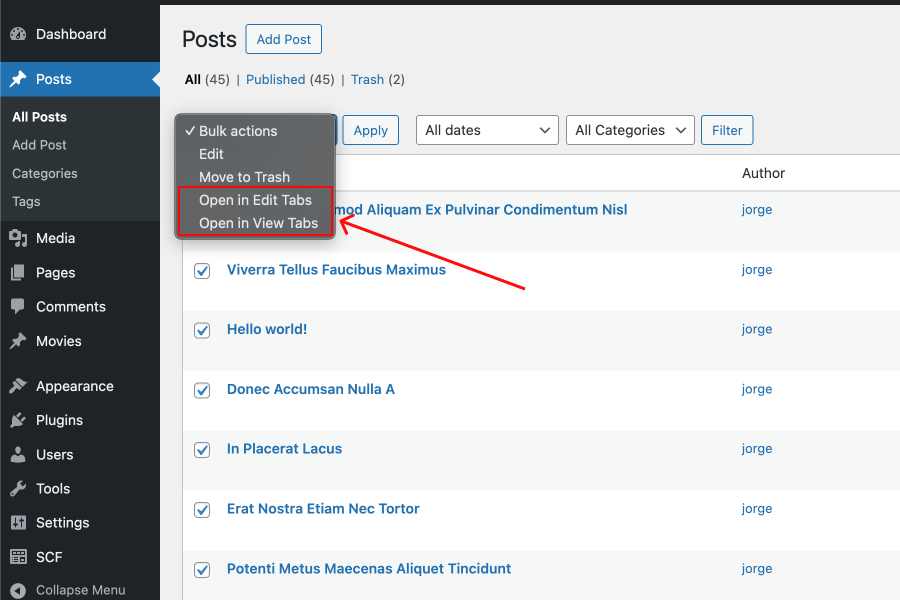
This lightweight plugin adds two new bulk actions to the WordPress admin interface:
- ✅ Open in Edit Tabs – Opens each selected post in edit mode, in a new tab.
- ✅ Open in View Tabs – Opens each selected post in view mode (front-end), in a new tab.
Supports all public post types, including custom post types.
🧩 Features
- Works with Posts, Pages, and any Custom Post Type
- Open selected posts in edit mode tabs
- Open selected posts in view mode tabs
- Simple, fast, and no configuration required
📦 Installation
- Download or clone this repository
- Copy the plugin folder to your WordPress site's
/wp-content/plugins/directory. - Log in to your WordPress dashboard and activate Post Bulk Actions from the Plugins page.
Or download the ZIP from the Releases page and upload it through the WordPress admin.
🚀 Usage
- Go to the WordPress admin.
- Navigate to Posts, Pages, or your Custom Post Type list.
- Select multiple items using the checkboxes.
- Choose either “Open in Edit Tabs” or “Open in View Tabs” from the bulk actions dropdown.
- Click Apply – the selected items will open in new browser tabs.
Here’s how the bulk action appears in the WordPress post list:
🌍 Localization
This plugin is translation-ready. You can contribute translations or use tools like Loco Translate.
Text domain: post-bulk-actions
🤝 Contributing
Pull requests are welcome. If you encounter a bug or have a feature request, please open an issue.
📜 License
This plugin is licensed under the GPLv2 or later.
✨ Author
Developed by Jorge Araya.
Releases
1 release.
These releases are tags only. The author does not attach a packaged zip, so there are no download counts to report.