Dublin Core Meta Tags WP Registry grade A. No security issues foundWP RegistryNo security issues foundOpen the reportA
WordPress plugin to add Dublin Core meta data (Element Set v1.1) to wp_head()
Install
This is the repository archive. It installs, but the folder name will carry the branch suffix and updates will not flow.
Install straight from GitHub with WP-CLI:
wp plugin install https://github.com/joostkiens/dc-meta-tags/archive/refs/heads/master.zipWordPress plugin for adding Dublin Core meta tags to wp_head on pages, posts & custom post types. Outputs XHTML, HTML4 or HTML5 syntax.
- Contributors: Joost Kiens, Júlio Reis
- Tags: Dublin Core, meta tags, metadata, RDF
- Requires at least: 3.3.0
- Tested up to: 3.8.1
- Stable tag: 0.4.1
- License: GPLv3
- License URI: http://www.gnu.org/licenses/gpl-3.0.html or see the included
LICENSE.txtandLICENSE.md
Description
This WordPress plugin adds Dublin Core Metadata Element Set v1.1 meta tags to the head of your site. Dublin Core elements are a subset of RDF and help with the discoverability of your site.
Supported elements
The complete Dublin Core Metadata Element Set v1.1 is supported.
Settings
On the settings page (Settings > DC Meta Tags) you can configure the meta tags:
- Select which elements should be included with a default value only, and which should allow editing in the post’s meta box: the field mode
- Select the type of default value you want, and enter a default text value, for any fields
- Select on which post types the meta tags should appear
- Indicate if you want HTML4, XHTML, or HTML5 syntax
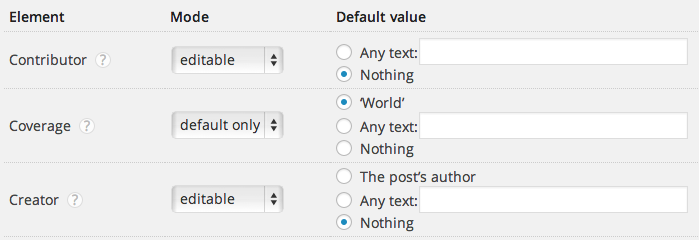 Field modes
Meta box on posts
On the add/edit post screens a meta box is available to override the default meta values.
All the elements in the meta box are multivalue, e.g. you may indicate more than one language, more than one description etc.
Only for documents
Since the Dublin Core Metadata Element Set v1.1 describes documents, it is only added to attachments, pages, posts and custom post types. No metadata is added to non-editable pages like the home page, archives, etc.
Installation
- Upload
dc-meta-tagsfolder to the/wp-content/plugins/directory - Activate the plugin through the ‘Plugins’ menu in WordPress
- Go to Settings > DC Meta Tags to configure it if necessary
Updates
This plugin works with github-updater: turn it on to get automatic update notices when a new version is published on GitHub.
Translations
This plugin’s translations are managed via Transifex. To help out, please go to https://www.transifex.com/projects/p/dc-meta-tags/. Thank you!
Frequently Asked Questions
How is the metadata generated?
The metadata is automatically generated based on the post title, author, excerpt, categories, tags, etc.
Can I override the generated metadata for specific posts?
Yes, a meta box is available on the add/edit post screens.
Where is the meta box? I don't see it.
Go to ‘Screen options’ and make sure ‘Dublin Core Metadata’ is checked.
I don't like the unnessary closing slash in the HTML5 output. Can I remove it?
Add define ('DCM_HTML5_CLOSING_SLASH', false); to your wp-config.php and you’re good to go.
What happens to data that’s no longer needed?
It’s deleted. When a field goes from ‘Editable’ to ‘Default only’, the values entered on it are no longer needed, and are therefore removed. Be careful!

Likewise, if the plugin is removed, all the metadata is removed from the database.
Changelog
See CHANGES.md
Releases
5 releases.
These releases are tags only. The author does not attach a packaged zip, so there are no download counts to report.