StrataWP SEO #2 in SEO & Metadata
Four SEO products in one free WordPress plugin: an AI content engine on your own key (Claude, GPT, Gemini, Grok), a complete technical SEO suite, an AEO layer that tracks whether AI answer engines cite you, and automation with budget caps. Replaces Yoast or Rank Math, or coexists with them.
Install
Upload it under Plugins → Add New Plugin → Upload Plugin, then activate.
Install straight from GitHub with WP-CLI:
wp plugin install https://github.com/jonimmswordpressdev/stratawp-seo/releases/download/v4.32.4/stratawp-seo.zip

One-click download of the latest production-ready zip. Always points to the most recent release — rebuilt automatically on every push.
All releases · Install instructions · How-to guide
AI-powered SEO that knows your WordPress site — and knows how AI search works. Generate site-aware blog posts, run your technical SEO (sitemaps, redirects, schema @graph, audits, a full site crawler), get cited by AI answer engines (AEO scoring, llms.txt, AI citation tracking, AI referral analytics), and let the automation layer watch your budget, your decaying posts, and your topic pipeline while you sleep.
Table of Contents
- What This Plugin Does
- Feature Tour
- Installation
- Quick Start
- How-To Guide: Page by Page
- Configuration Guide
- Admin Pages
- WP-CLI Commands
- REST API
- Developer Reference (Hooks)
- Architecture
- How Each Subsystem Works
- Privacy & Data
- FAQ
- Changelog
- License
What This Plugin Does
StrataWP SEO is four products in one plugin:
- An AI content engine — site-aware blog posts (Anthropic, OpenAI, Google, xAI) with internal linking, FAQ schema, key takeaways, TOC, featured/in-content images, reusable voice profiles, content scoring, and a review-first Auto-Optimize loop for the posts you've already published.
- An AI visibility & AEO layer — the differentiator. Every post is scored on 4 AI-citeability dimensions (including a live question-coverage checklist), robots.txt access and a dynamic
llms.txtare managed for 15 known AI crawlers, and three analytics surfaces close the loop: which AI bots crawl you, which AI assistants send you human visitors, and whether ChatGPT, Claude, Gemini, and Grok actually cite you — all joined into one crawl → visit → citation funnel. - A complete technical SEO suite — XML sitemaps, redirect manager, breadcrumbs, a unified schema.org
@graphwith author E-E-A-T entities, per-post meta editor, search appearance templates, archive SEO, a 10-module audit, a politeness-capped site crawler with one-click fixes, keyword cannibalization detection, verified search-bot analytics with spoof detection, Local SEO, Image SEO, and one-click migration from Yoast / Rank Math. - An automation & insight layer — the Autopilot Guardian keeps AI spend under a monthly budget cap and retries transient failures, the white-label email digest reports to you (or your clients), the content decay watchdog flags posts losing clicks and queues reviewed AI refreshes, the data-driven Topic Autopilot proposes what to write next from your own Search Console data, and Machine Access exposes 13 governed abilities to AI agents via the WP Abilities API and REST.
It's designed to replace Yoast/RankMath/AIOSEO if you want to, or coexist with them (schema and meta output auto-disable when those plugins are detected).
Feature Tour
The AI Content Engine
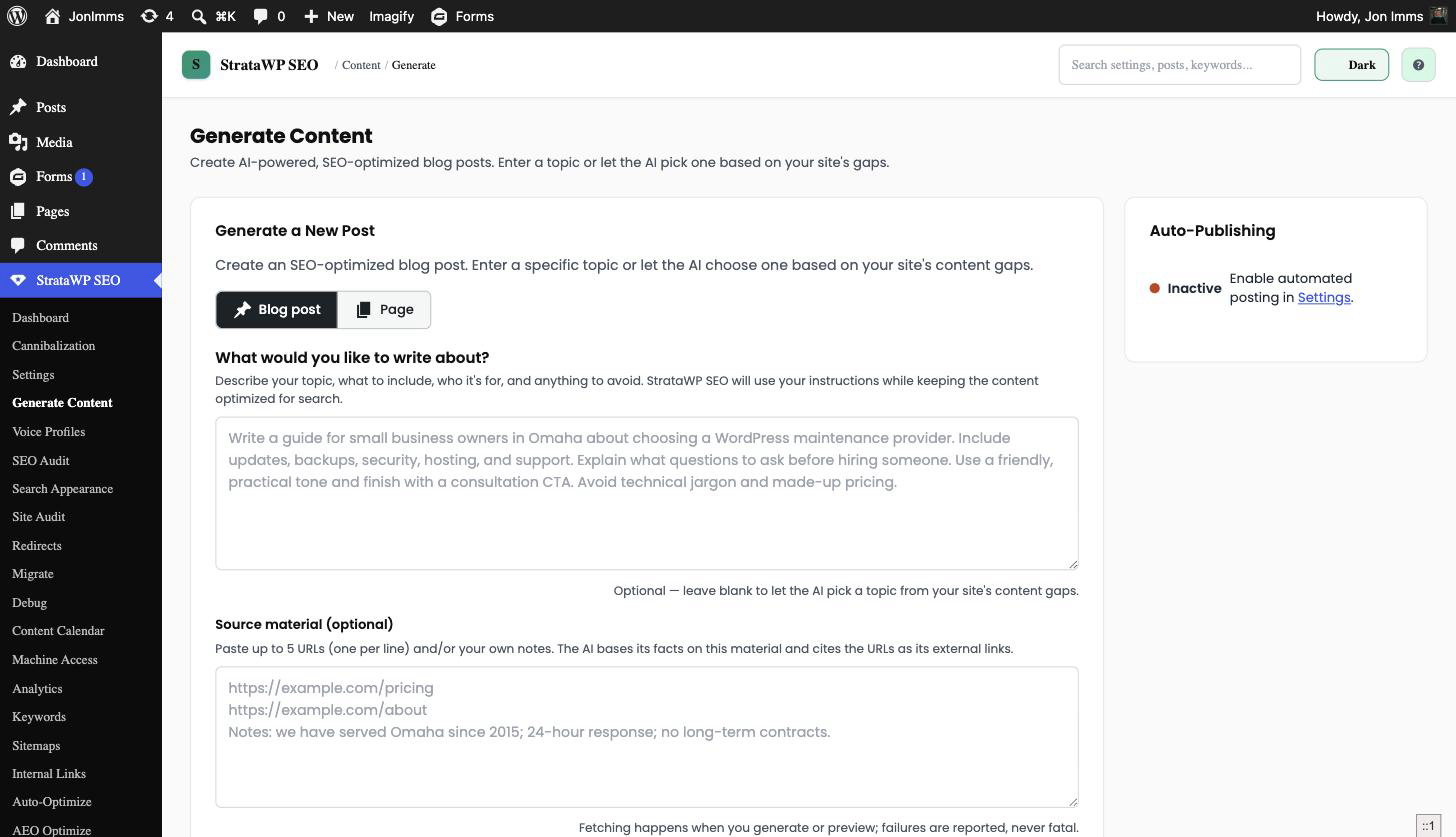
AI Content Generation
- Multi-provider AI — Anthropic (Claude), OpenAI (GPT), Google (Gemini), xAI (Grok); model lists are discovered live from each provider's API and refreshed daily, with dynamic labels (Most powerful, Cheapest, Costs most, Best value) and a dismissible new-model alert
- Site-aware generation — analyzes existing posts, categories, and internal links before writing
- Custom content brief ★ v4.30 — describe exactly what to write, include, emphasize and avoid; an optional "Help me write my brief" helper (audience, goal, key points, tone, facts, things to avoid, CTA) and an "Improve my brief" review step, all applied within the existing SEO structure
- Pages, per-run images and source material ★ v4.31 — generate service, landing, about and location pages with a parent picker; toggle the featured image and set 0-4 in-content images per run; paste URLs and notes as source material the AI grounds facts in and cites; tone selector moved onto the main form
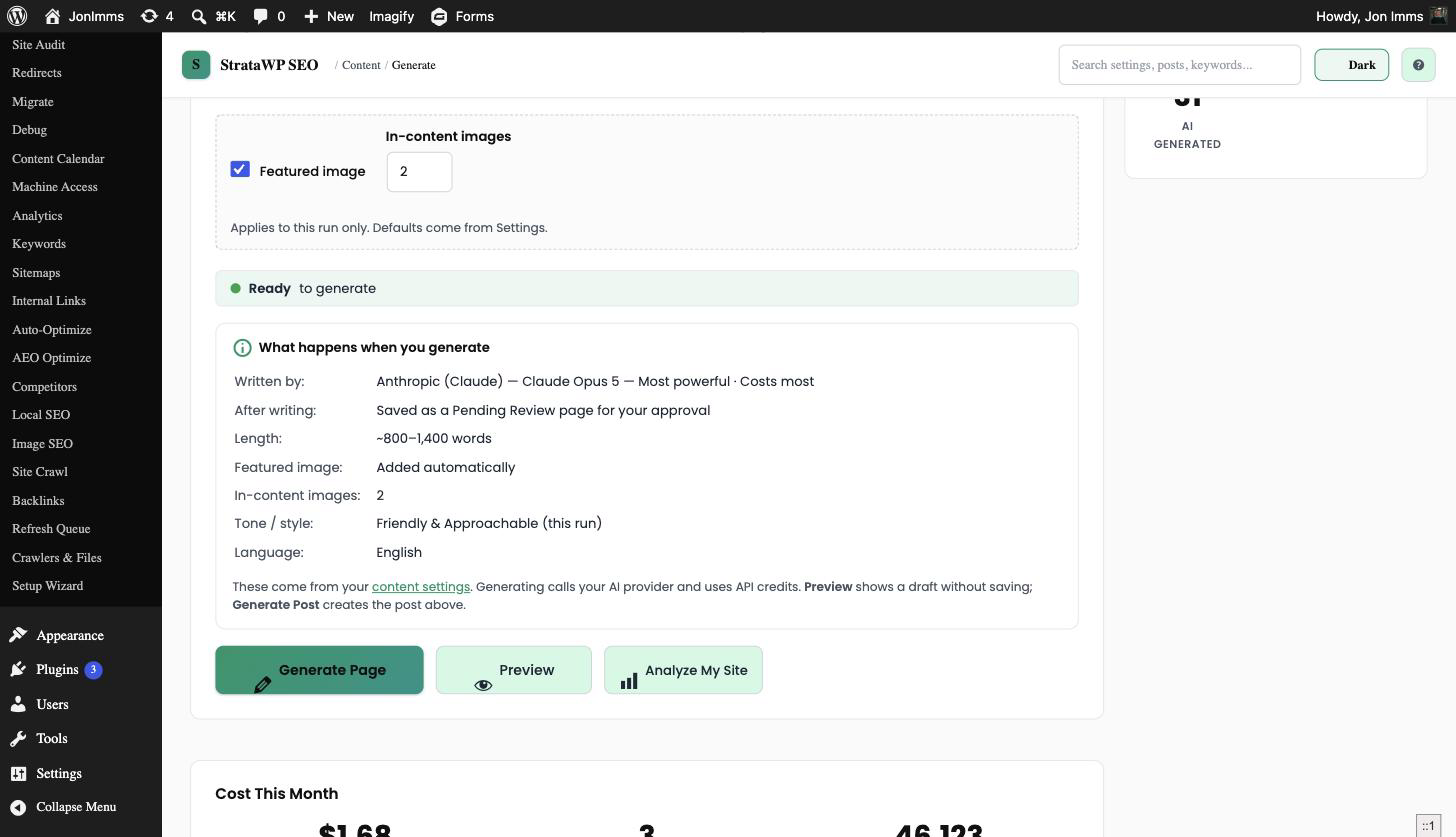
- Know before you spend — a live "What happens when you generate" summary shows the model, where the result lands (post or page, and its status), the word range for the selected template, featured and in-content image choices, tone and language before you click Generate Post / Generate Page, Preview (no save), Bulk Generate (posts only) or Analyze My Site
- 8 post templates, 5 page templates: posts get Auto, Informational, Listicle, How-To Guide, Comparison, Case Study, News Analysis and Tutorial; pages get Auto, Service page, Landing page, About / Team and Location / area page
- Voice profiles — reusable writing personas (tone, formality 1-10, sentence length, vocabulary, person, avoid/preferred phrases, sample text)
- FAQ, Key Takeaways, TOC — generated with
FAQPage/ItemListschema and an auto-linked table of contents - Quality gates built in — duplicate detection, content scoring with an optional draft-hold floor, rate limiting, and per-provider/model token + USD cost tracking (new models auto-priced via family heuristics)
Featured & In-Content Images
- 4 image providers — Unsplash, Pexels, Pixabay (free stock), Gemini (AI-generated; image model auto-discovered)
- Auto featured image plus 0-4 in-content images with derived alt text and configurable max width
- Settings are the defaults ★ v4.31: Generate Content's Featured image checkbox and In-content images count start from these settings, and can be turned on/off or changed per run without touching Settings. Posts from Bulk Generate, cron and autopilot always follow Settings
- Background image jobs — each image runs as its own background job (Action Scheduler, WP-Cron fallback), so scheduled posts get their images reliably; failures appear in Recent Activity
Automated Publishing
- Flexible scheduling — daily through monthly cadences, with a topic queue and a visual content calendar
- Bulk generation — up to 5 posts in one click; long-running work runs through the background processor
- Proposed topics on the calendar — Topic Autopilot proposals arrive as a distinct "proposed" status with approve/dismiss controls (see the automation layer)
AI Auto-Optimize
- Re-score all published posts in chunks with live progress; posts below your threshold (default 75) queue up
- AI proposals with diff review — concrete find/replace edits, optional new meta title/description/focus keyword, and a projected score; check/uncheck each edit before applying
- One-click apply with automatic re-score, plus per-row dismiss
The AI Visibility & AEO Layer
This is the part Yoast doesn't have: a full pipeline for getting your content cited by AI answer engines — and proof of whether it's working.
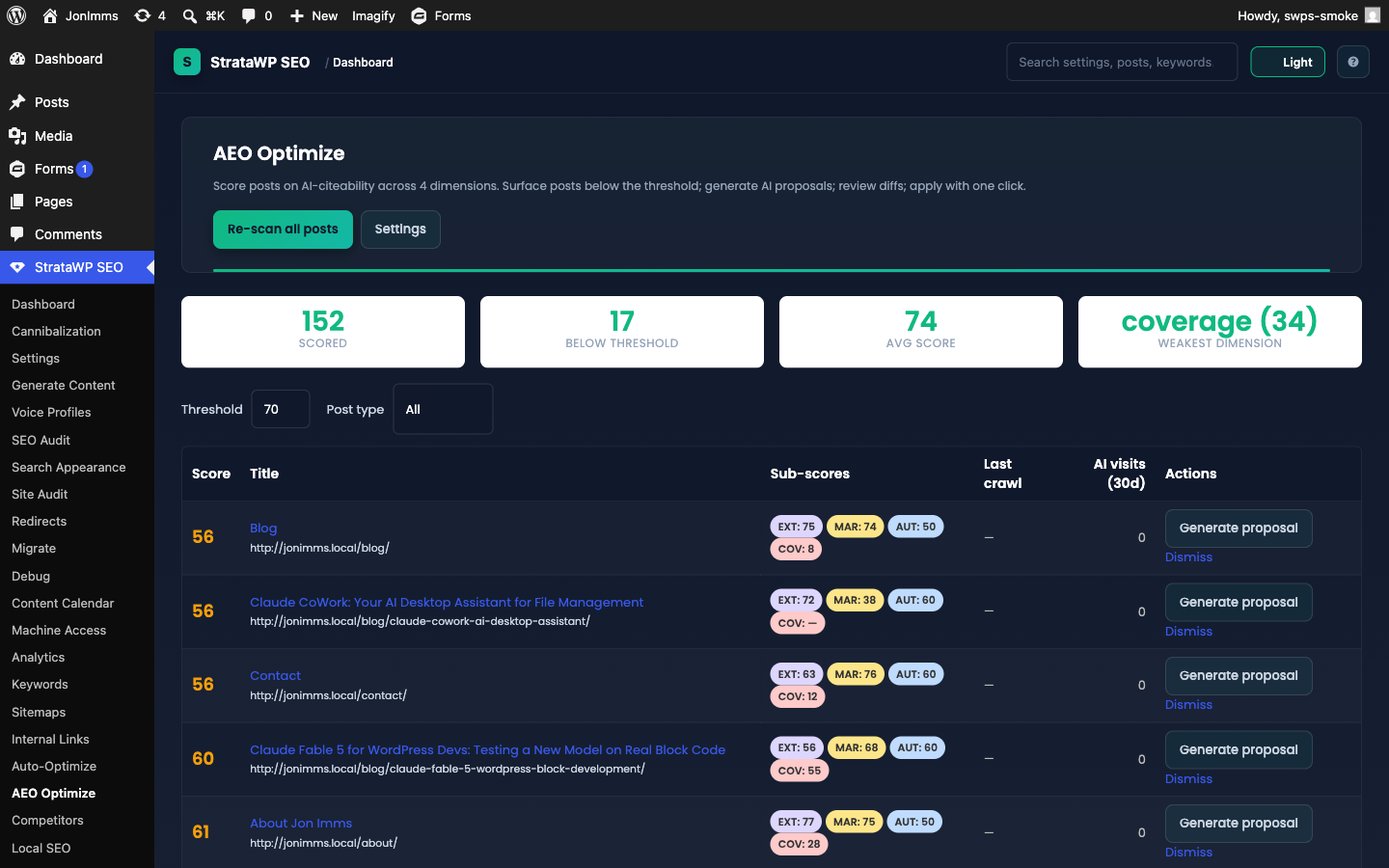
AEO Optimize
- AEO Score with 4 dimensions — Extractability, Markup, Authority, and a live Coverage dimension: one AI call builds a query fan-out checklist (the 5-10 sub-questions an answer engine would decompose your topic into, marked answered / partial / missing, cached by content hash)
- Bulk AEO Optimize page — chunked re-scan, threshold filter, per-row AI proposal with diff review, apply with snapshot/undo
- Live editor panel — Gutenberg sidebar + classic metabox with the score, sub-scores, your per-post crawl→visit funnel, unanswered searcher questions, and lost-citation context
- Dynamic schema generation — HowTo, Recipe, Product, Review, FAQPage JSON-LD, validated before output; defers to Yoast / RankMath / AIOSEO
- Question demand mining — a weekly GSC cron finds real question queries your pages get impressions for but don't answer, feeds Q&A inserts into AEO proposals, and queues uncovered questions as topic suggestions
AI Crawler Access & llms.txt
- AI bot allowlist — robots.txt
Allow/Disallowrules for 15 known AI crawlers (GPTBot, ClaudeBot, PerplexityBot, Google-Extended, Applebot-Extended, CCBot, Bytespider, …) - Dynamic llms.txt at
/llms.txt, built from your posts/pages/categories with one-line summaries — plus an in-admin editor for both/llms.txt(Auto/Custom) and/robots.txt(Auto/Append/Replace) - IndexNow integration — auto-generated verification key served at
/{key}.txt; auto-submit on the post/term lifecycle with a 60-second debounce, per-post "Submit now" and bulk "Resubmit all", a dedicated panel on the Sitemaps screen, and a recent-activity log (auto-paused on non-production; Google does not participate in IndexNow)
AI Bot Analytics, AI Referrals & the Visibility Funnel
- AI Bot Analytics — server-side hit tracking for the 15 AI crawlers: per-bot dashboards, top crawled pages, recent bot 404s, and an AEO gap report sortable by AEO score (high-quality-but-uncrawled posts first)
- AI referral attribution — human visits from ChatGPT, Perplexity, Claude, Gemini, Copilot, Grok, DeepSeek, Meta AI, and You.com are classified at capture; the AI Referrals analytics section shows engine trends, landing posts, and engagement vs organic
- Crawl → visit funnel — AI-bot crawl data joined to AI referral visits per post, with crawl-recency and AI-visit columns on the AEO queue and a dashboard funnel tile (posts crawled → posts receiving AI visits over 30 days, with stage conversion rates)
AI Citation Tracker
- Search-grounded citation checks — asks ChatGPT, Claude, Gemini, and Grok your tracked prompts (bring your own keys) and records whether your site is cited in the answer
- Per-engine state badges (cited / lost / never / mixed), share-of-voice bars vs competitors, and a cited-domains breakdown showing who is getting cited
- Seed prompts from your keywords or GSC queries, a monthly call cap (default 200) so spend stays bounded, a dashboard tile, and lost-citation context surfaced in the AEO editor panel and proposals
The Technical SEO Suite
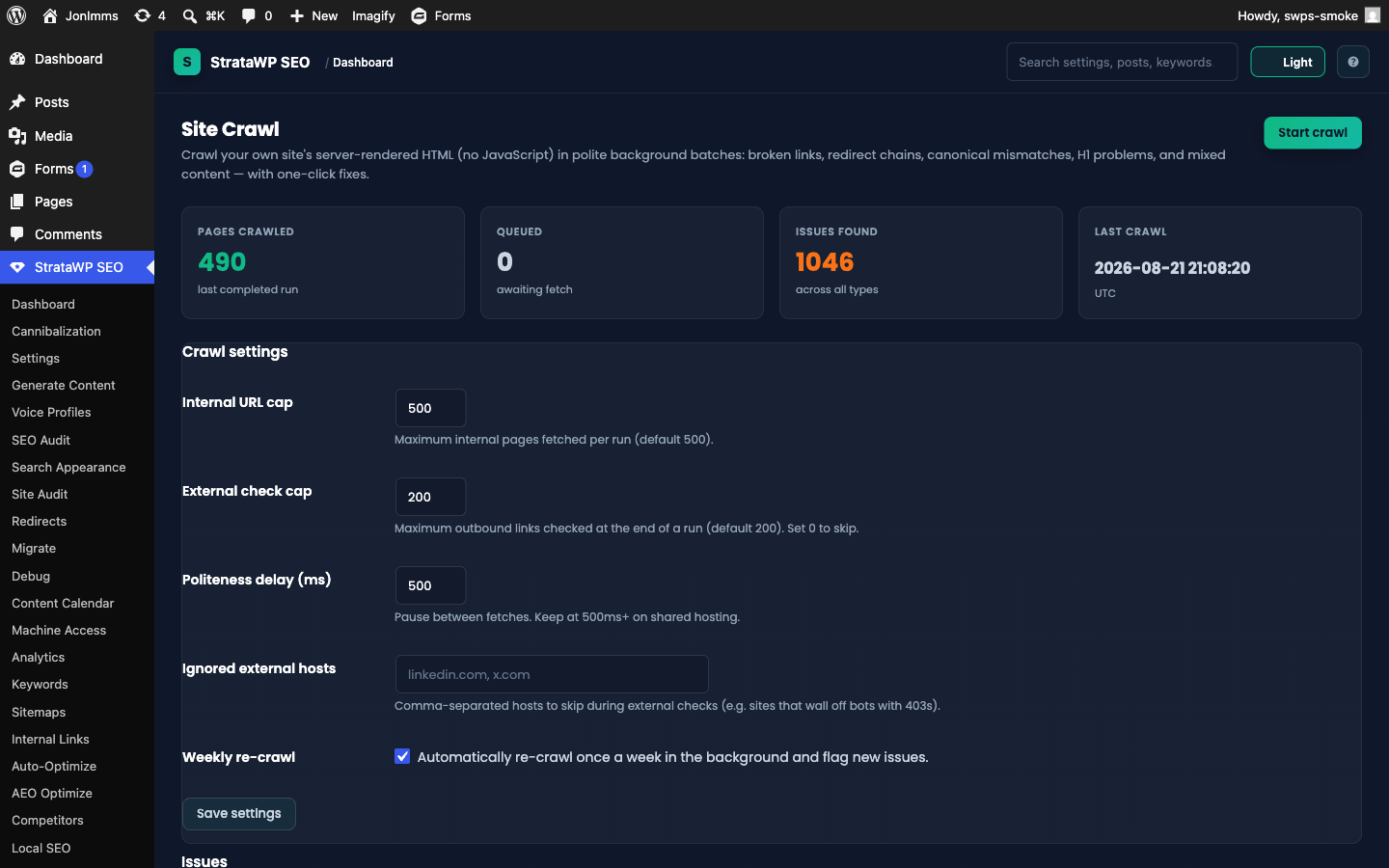
Technical SEO Audit
- 10 audit modules — Canonical URLs, XML Sitemap, Open Graph, Twitter Cards, Robots.txt, Meta Robots, Image SEO, Page Speed Hints, Schema Validation (live-page JSON-LD checks), and Site Crawl results
- Auto-fix for canonical/OG/Twitter/sitemap issues, scheduled runs, dashboard health score, CSV export
Site Crawler
- Politeness-capped self-crawl — page caps (default 500 internal / 200 external link checks) and a configurable delay, run in chunks from the admin, with an optional weekly re-crawl
- 8 issue types — broken links, redirect chains, redirect loops, canonical mismatches, missing H1, duplicate H1s, mixed content, and noindexed URLs still in the sitemap
- One-click fixes — create a redirect, exclude from sitemap, or ignore an external host, right from the issue row
Keyword Cannibalization Detector
- GSC-driven findings — surfaces queries where multiple posts split impressions and clicks, with a winner/loser per finding and an estimated impact
- Three resolutions — Consolidate (creates an undoable 301 to the winner), Differentiate (re-target the loser), or Canonicalize — plus dismiss
- Dashboard tile with the open-findings count
Schema / Structured Data
- Unified
@graph— Organization, WebSite, WebPage, Article, BreadcrumbList, Person, and ProfilePage emitted as one interlinked JSON-LD block with stable@ids - Author E-E-A-T entities — per-user profile fields (job title, credentials, sameAs links) feed Person schema and a ProfilePage on author archives
- Schema validation audit module — samples live pages and checks required fields, orphaned
@idreferences, and date consistency - FAQPage + ItemList from generated content, LocalBusiness via Local SEO, HowTo/Recipe/Product/Review via AEO
- Conflict detection — defers automatically when Yoast / RankMath / AIOSEO is active
Verified Crawler Analytics & Crawl Budget
- Search-bot tracking — Googlebot, Googlebot-Image, bingbot, Applebot, YandexBot, and DuckDuckBot tracked alongside the AI bots (search bots are analytics-only and never written to robots.txt or llms.txt)
- Spoof detection — every search-bot hit is verified against the engines' published CIDR ranges (refreshed by cron) with a reverse-DNS fallback; verdicts: verified / spoofed / unverifiable
- Daily reconciliation notices when spoofing spikes, and an opt-in, fail-open 403 enforcement for verified-spoofed bots (unverifiable hits always pass through — Googlebot can never be blocked by a stale IP list)
- Crawl budget report — Analytics-page breakdown of crawl activity by post type (30d) so you can see where bots spend their time
Sitemaps, Redirects & the Meta Layer
- Full sitemap system —
/sitemap_index.xmlwith post type / taxonomy / author sub-sitemaps, image entries, per-sitemap exclusion toggles, auto-submitting IndexNow panel - Redirect manager — 301/302/307/410 with exact + regex matching, 404 monitoring with one-click redirect creation, auto-redirect on slug change
- Internal links engine — keyword and AI engines with an accept/skip review UI
- SEO meta editor — per-post title/description/canonical/robots/OG/Twitter with live SERP preview, SEO checklist, and an AI Generate button
- Search appearance templates, per-term taxonomy meta, frontend breadcrumbs with schema, RSS before/after content, wp_head cleanup
Local SEO & Image SEO
- Local SEO — LocalBusiness JSON-LD with 30+ business types, NAP, opening hours, geo coordinates, area served, Google Place ID, and a live schema preview
- Image SEO — auto-alt on upload (free heuristic or AI mode), device-prefix filename sanitization, lazy-loading enforcement, and a bulk fix tool for the existing library
Research & Off-Site
- Keywords — AI keyword suggestions, GSC rank tracking, striking-distance opportunities (positions 8-20)
- Competitor watch — up to 10 sites with daily diffs of new posts, schema types, and title/H1 changes, plus content velocity
- Backlinks — manual/CSV tracker (GSC "Top linking sites" exports auto-detected) with daily live/lost/broken verification — no paid index required
- Analytics — cookie-free on-site tracking (views, time, scroll depth, bounce) + GSC OAuth in one dashboard
Migration Tool
- One-click import from Yoast SEO (incl. Premium) and Rank Math (incl. Pro) — per-post meta, global settings, and redirects, with a dry-run preview, skip/overwrite conflict policy, and one-click undo
The Automation & Insight Layer
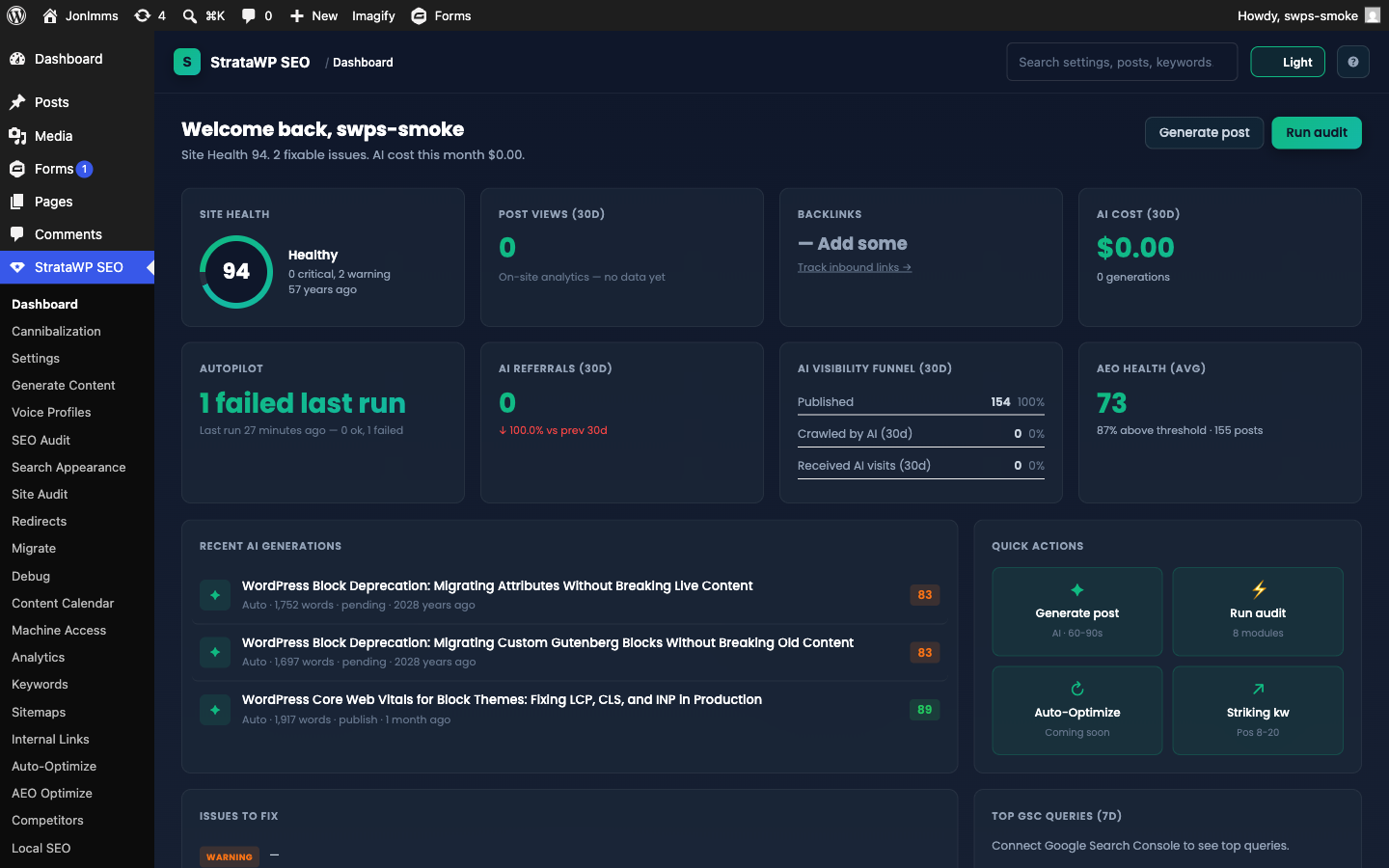
Autopilot Guardian
- Monthly AI budget cap (USD) with an 80% warning notice and a hard stop at the cap
- Transient-error retry with exponential backoff — a single failed generation no longer abandons the rest of a scheduled batch
- Failed-topic auto-requeue (max 3 attempts per topic) and a dashboard autopilot tile showing enabled state, last-run health, and spend vs cap
White-Label Email Digest
- Daily / weekly / monthly report of generations, failures, keyword movers, backlinks, competitors, AI-bot trends, and AI spend — led by a needs-attention triage section
- Agency branding (logo, accent color, footer text), multiple recipients, a test-send button, and an optional AI executive summary
Content Decay Watchdog & Refresh Queue
- Weekly GSC scan compares rolling 28-day windows per post and flags decays past your threshold (default 20% click decline) with a heuristic cause — position drop, demand drop, CTR drop, or staleness
- Metric + AEO-score history with sparklines, a minimum-impressions floor, per-post cooldowns, and a one-email summary alert when top posts decay
- Refresh Queue ranked by traffic at risk, with one-click AI refresh proposals that always go through the reviewed AEO apply/undo flow
Data-Driven Topic Autopilot
- Weekly scout mines GSC question queries, striking-distance keywords, and orphan pages into ranked, deduplicated topic proposals — each with a plain-English rationale
- Approve or dismiss on the Content Calendar (proposals are a distinct "proposed" status), or enable auto-promote to queue the top proposal automatically
Machine Access (WP Abilities API)
- 13 governed abilities — queue topics, generate posts, run audits, AEO scan/propose/apply/undo, add/delete redirects, and read stats — registered with the WP Abilities API (WordPress 6.9+) and exposed via REST (
/swps/v1/abilities) - Write abilities are off by default — every ability has its own toggle, and every call (allowed or denied) lands in an activity log
- Standard WordPress auth — application passwords work out of the box for external agents
5-Minute Onboarding
- Setup Wizard — migrate from Yoast/Rank Math, validate your AI key with a live test call, AI-suggest your site description, run the first audit, and generate a preview post
- Dashboard setup checklist that persists until every step is done (dismissible)
Admin Shell & Developer Features
- Branded admin shell — top bar with breadcrumb, search, help, and a per-user dark/light theme toggle; Emerald & Teal design system
- 50+ filters and actions, WP-CLI commands, REST API, encrypted secret storage (authenticated AES-256-GCM), a Debug page for failed AI responses, and an opt-in clean uninstall (your data survives delete + reinstall by default)
Installation
From WordPress Admin
- Download the plugin ZIP file
- Go to Plugins → Add New → Upload Plugin
- Upload the ZIP and click Install Now
- Click Activate
Manual Installation
- Upload the
stratawp-seofolder to/wp-content/plugins/ - Activate through the Plugins menu
Requirements
- WordPress 6.0 or higher
- PHP 8.0 or higher
- An API key from at least one AI provider (Anthropic, OpenAI, Google, or xAI)
Quick Start
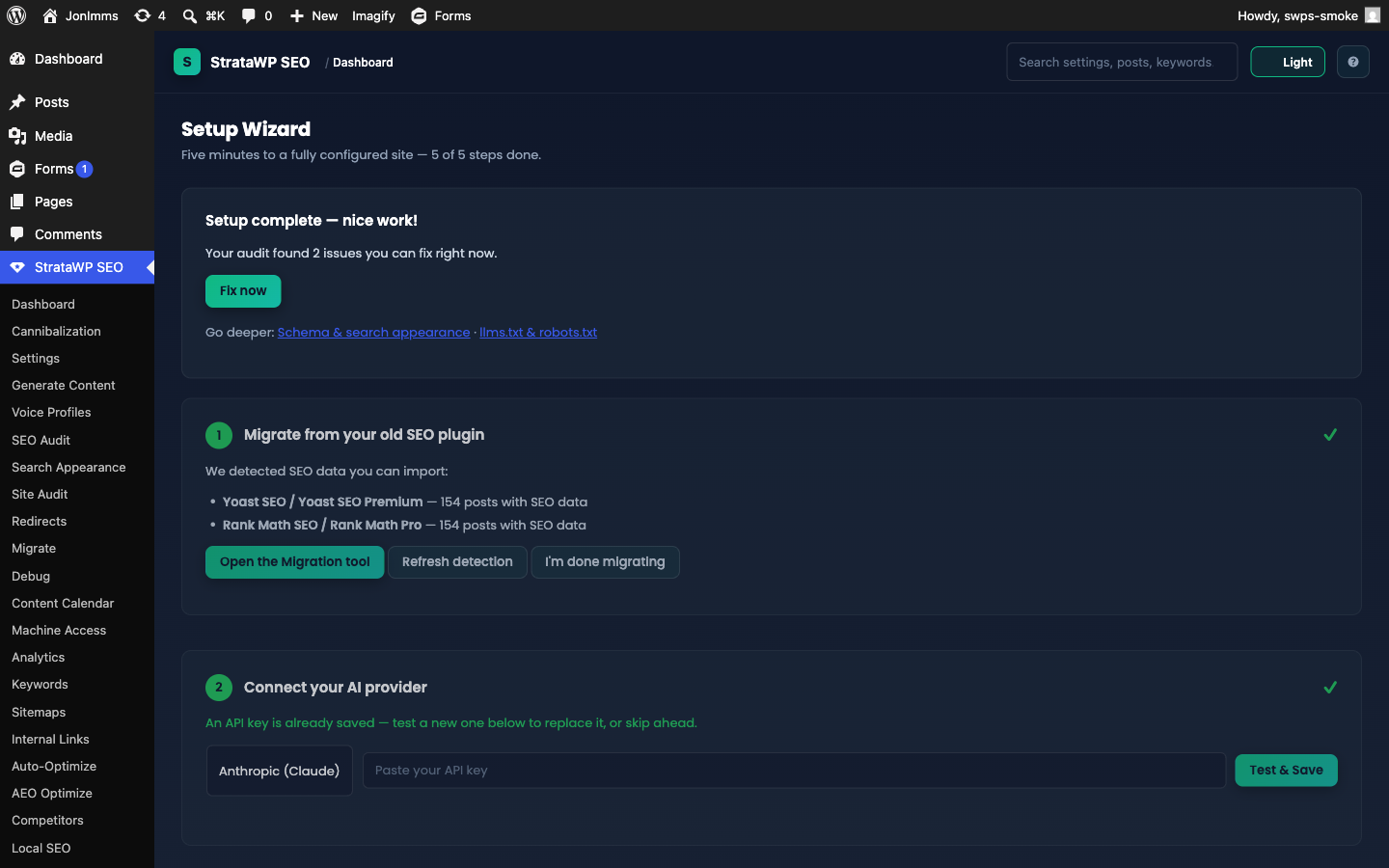
The fastest route is the Setup Wizard (StrataWP SEO → Setup Wizard) — it launches on first activation and takes about five minutes:
- Migrate — if Yoast or Rank Math data is detected, import it (or skip)
- API key — pick an AI provider, paste your key, and validate it with a live test call
- Site info — describe your site and audience, or let the AI suggest a description for you
- First audit — run the 10-module technical SEO audit
- Preview post — generate a sample post so you can judge the output before enabling anything automatic
A setup checklist stays on the dashboard until every step is complete (dismiss it any time).
Prefer to do it by hand? The manual route:
- Add your API key — StrataWP SEO → Settings, enter your AI provider API key (Anthropic recommended)
- Describe your site — fill in Site Niche and Site Description so the AI understands your audience
- Set your preferences — Tone of Voice, word count range, Post Status: Draft (recommended)
- (Optional) Allow AI crawlers — the AI Crawlers section is enabled by default; visit
/llms.txtto see your generated index - Generate your first post — StrataWP SEO → Generate Content, enter a topic, click Generate
- Review & publish — edit the generated draft in WordPress, then publish
How-To Guide: Page by Page
Every admin page in the plugin, what it does, and exactly how to use it. Pages are listed in the order they appear in the StrataWP admin sidebar.
Dashboard (StrataWP SEO)
The landing page. Shows site health score, recent generations, AI cost (30d), post views, top GSC queries, top issues, the Auto-Optimize queue preview, the Competitor watch widget, and the newer tiles: Autopilot status (enabled state, last-run health, budget spend vs cap), the AI visibility funnel (posts crawled → posts receiving AI visits, 30d), AI citations (share of voice), and Keyword cannibalization (open findings). Until onboarding is finished, a setup checklist sits at the top. Each tile links to its source page — click "Manage →" on Competitor watch to jump straight to managing tracked sites.
How to use it: load it daily as a temperature check. The welcome line summarizes site health, fixable issues, and 30-day AI spend in one sentence. The KPI tiles use the brand emerald gradient for the four primary numbers. The modules grid at the bottom lets you toggle features on/off — turn off Sitemaps if you're using Yoast/RankMath's sitemap, for example.
Setup Wizard (StrataWP SEO → Setup Wizard) ★ v4.13
Guided 5-step first-run flow: detect + migrate Yoast/Rank Math data, validate your AI API key with a live test call, describe your site (with an AI-suggest button), run the first audit, and generate a preview post.
How to use it: it opens automatically after activation; you can re-run it any time from the sidebar. Each step can be completed or skipped — progress is tracked per step, and the dashboard shows a setup checklist until all five are done (or you dismiss it). The preview post is created as a draft so nothing goes live.
Settings (StrataWP SEO → Settings)
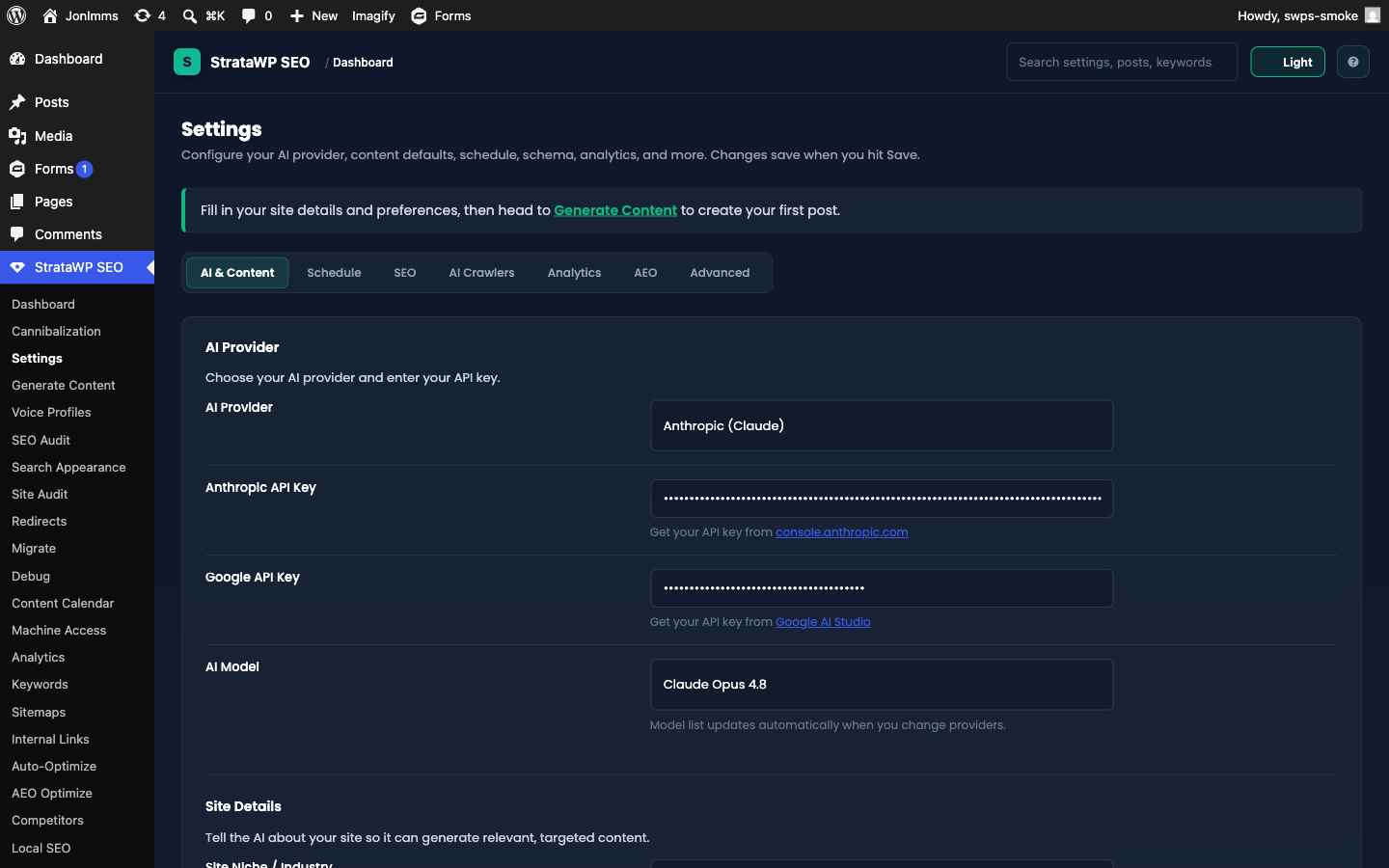
The control panel — split into 7 tabs:
- AI & Content: AI provider + API keys, model (auto-discovered daily since v4.9.0), site niche/description, writing preferences (tone, voice profile, style notes, target keywords), content settings (post status, word count, FAQ/TOC/Key Takeaways, internal links), featured & in-content images
- Schedule: auto-publishing frequency, day of week, time, posts per run, the monthly AI budget cap (Autopilot Guardian), and Topic Autopilot (weekly scout + auto-promote)
- SEO: audit auto-fixes + schedule, schema/structured data, SEO meta editor, head cleanup, RSS feed header/footer
- AI Crawlers: allowlist of 15 known bots, llms.txt toggle, Crawler Verification (proxy header, spoofed-crawler 403 enforcement), and AI Citations (check frequency, monthly call cap, engines)
- Analytics: on-site tracking, retention, exclude admins, GSC OAuth client ID/secret (stored encrypted), keyword sync frequency, the Email Digest (frequency, recipients, branding, AI summary, test-send), and the Content Decay Watchdog (threshold, minimum impressions, email alert)
- AEO: score threshold, coverage scoring (1 AI call/post), dynamic schema types, post types to score, dimension weights
- Advanced: default template, rate-limit cooldown, duplicate detection, cost tracking, minimum content score
Generate Content (StrataWP SEO → Generate Content)
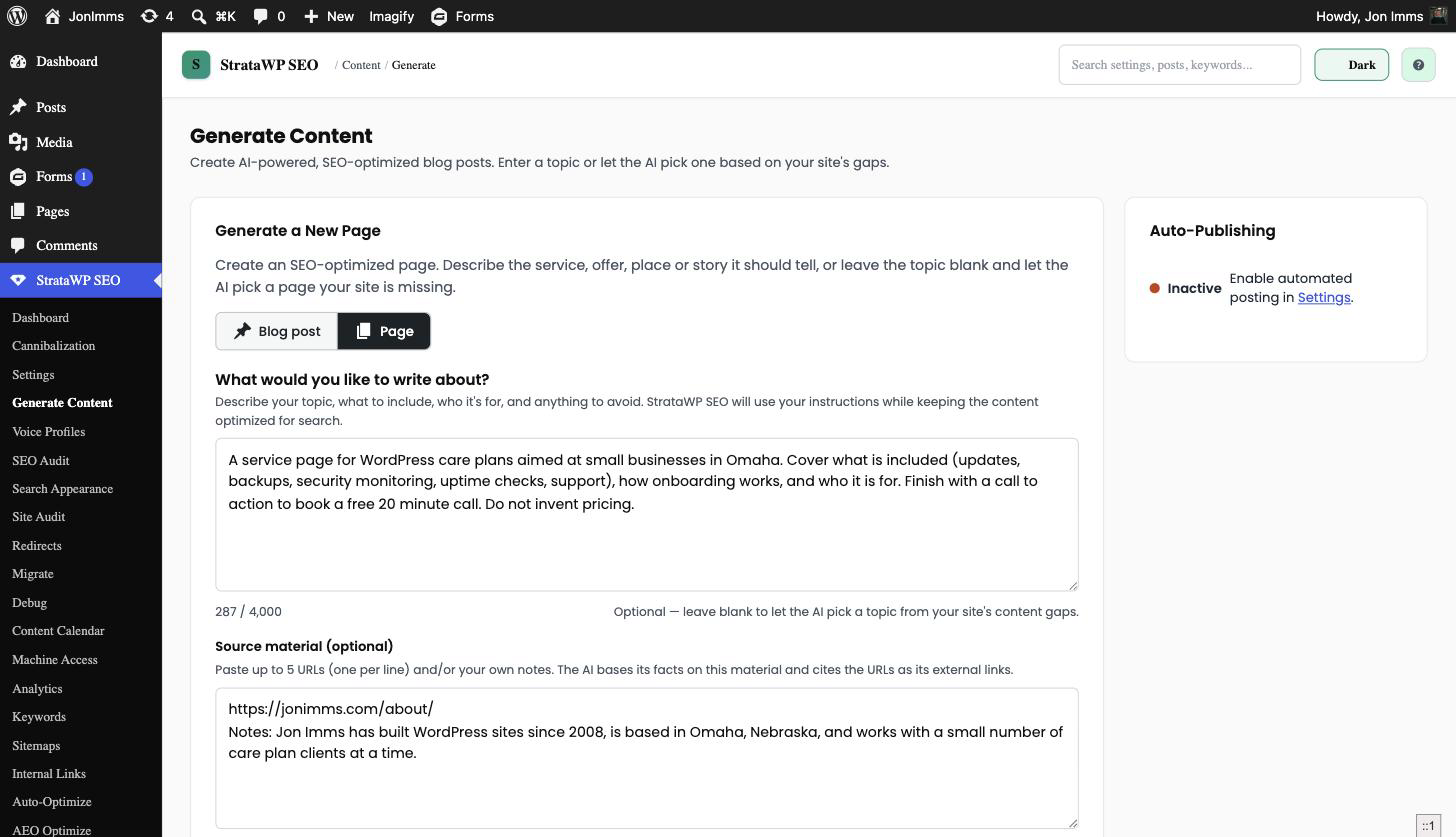
The main AI content generator. It writes blog posts or pages ★ v4.31.
-
Pick Blog post or Page ★ v4.31 in the "What are you creating?" toggle. The rest of the form adapts to your choice.
-
Describe it in What would you like to write about? ★ v4.30: the topic, who it's for, what to include, tone, real business facts, anything to avoid, and the call to action. Multiline is fine. It's optional, and a blank brief runs the classic topic-or-auto-pick flow.
-
Optionally expand Help me write my brief for structured prompts:
- Target audience
- Content goal
- Key points or sections
- Facts or business details
- Things to avoid
- Desired call to action
Anything you fill in is added to the brief.
-
Optionally click Improve my brief — one extra AI request rewrites the brief for clarity, keeps your intent and facts, never invents details (it inserts
[placeholders]instead), and shows the proposal for review. Nothing changes until you click Use this version; it never writes the article. -
Optionally paste Source material (optional) ★ v4.31: up to 5 URLs and/or your own notes. See Source material below for the fetch rules and limits.
-
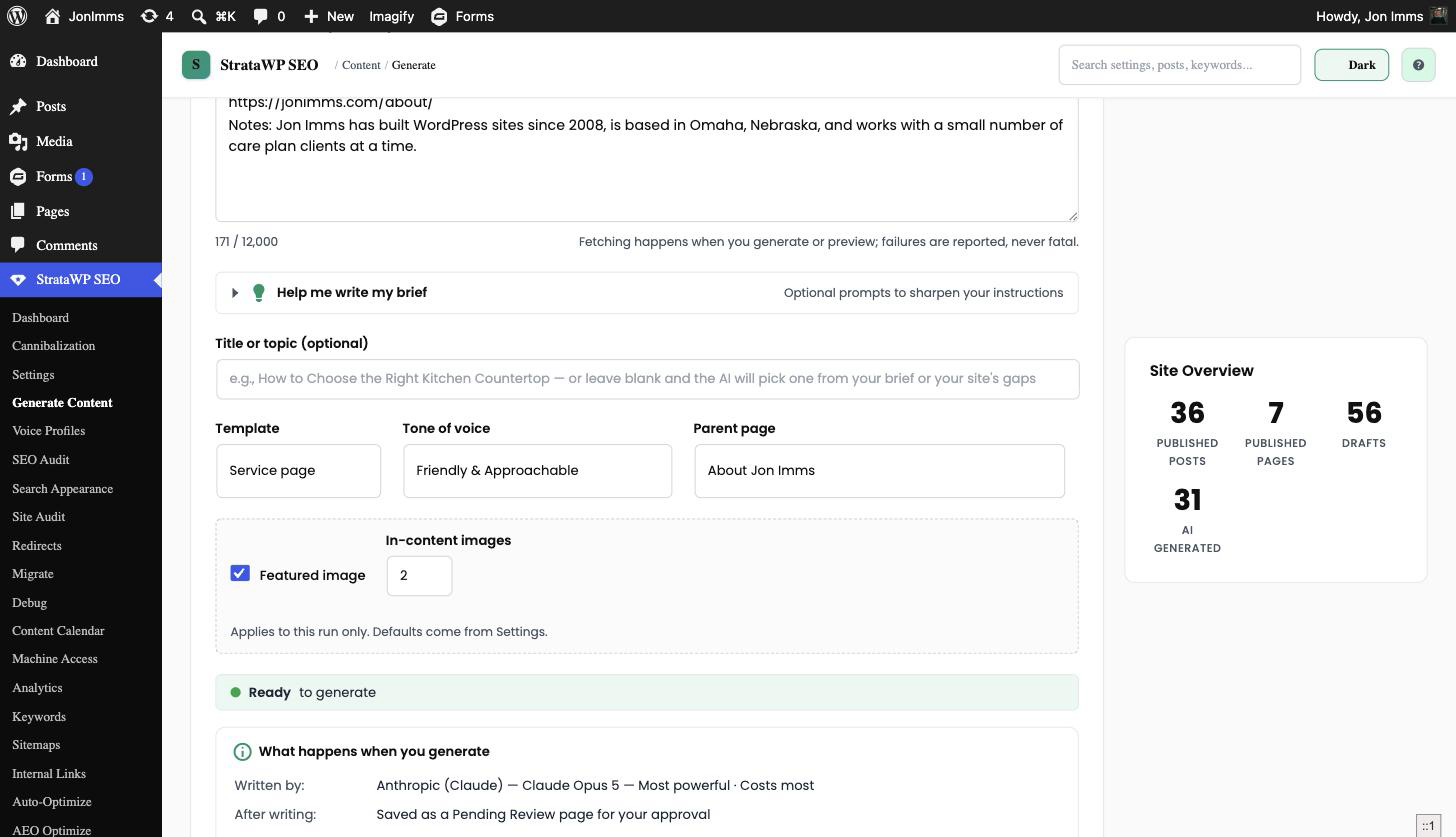
Optionally fill in Title or topic (optional). With a brief, leaving it blank lets the AI derive the title from the brief.
-
Pick a Template, a Tone of voice, and either a Parent page or a Bulk Count:
- Template: 8 options for posts, 5 for pages. The list swaps automatically with the content type. See Pages vs posts.
- Tone of voice ★ v4.31: sits next to Template now, not inside the brief helper. Blank keeps your Settings default.
- Parent page ★ v4.31: pages only. "None (top level)" or any published/draft page.
- Bulk Count: posts only, hidden when Page is selected. Generates up to 5 posts, each on its own AI-chosen topic, ignoring the brief.
-
Set Images ★ v4.31: a Featured image checkbox and an In-content images count (0-4) for this run only. See Images per run.
-
Check "What happens when you generate". It mirrors your live choices: where it lands, length, images, tone.
-
Click Preview (no save), Generate Post / Generate Page, Bulk Generate (posts only), or Analyze My Site.
The brief steers subject, angle, examples, requested sections, tone and CTA. Precedence is fixed: the response format and app rules first, then the required SEO structure and your generation settings, then the brief, source material and helper fields, then default writing preferences. Briefs are capped at 4,000 characters (1,000 per helper field), HTML is stripped, and the prompt forbids invented facts, statistics, testimonials, pricing or URLs not supplied in the brief or source material.
Tip: if generation takes >2 min, the post is being processed in the background. Check the Calendar to see status.
Pages vs posts
| Posts | Pages | |
|---|---|---|
| Templates | 8: Auto, Informational, Listicle, How-To, Comparison, Case Study, News Analysis, Tutorial | 5: Auto, Service page, Landing page, About / Team, Location / area page |
| Word range | From Settings (default 1,200-2,000) | Per template, 500-900 (About) up to 800-1,400 (Service, Location) |
| FAQ | Follows the Settings FAQ toggle | Only Service and Location templates request one |
| TOC / Key Takeaways | Follow their Settings toggles | Never included |
| Category / tags | Category (fixed or AI-decided) plus tags | None |
| Parent page | N/A | Optional; "None (top level)" by default |
| Bulk Generate | Yes, up to 5 per click | Not available |
| Cron / autopilot | Yes | Not available |
Source material
Paste up to 5 URLs (one per line) and/or your own notes, up to 12,000 characters in total. Generating or previewing fetches each URL in turn through WordPress' safe HTTP API:
- 8-second timeout per URL, 25-second budget for the whole batch
- Private and local addresses are rejected, including on redirects
- Each response is capped at 1.5 MB and reduced to readable text (the article, main or body content, with scripts and navigation stripped)
- Extracted text is trimmed to 6,000 characters per source, 20,000 for the combined block
- Successful fetches are cached for an hour, failures for five minutes, so a quick retry doesn't refetch everything
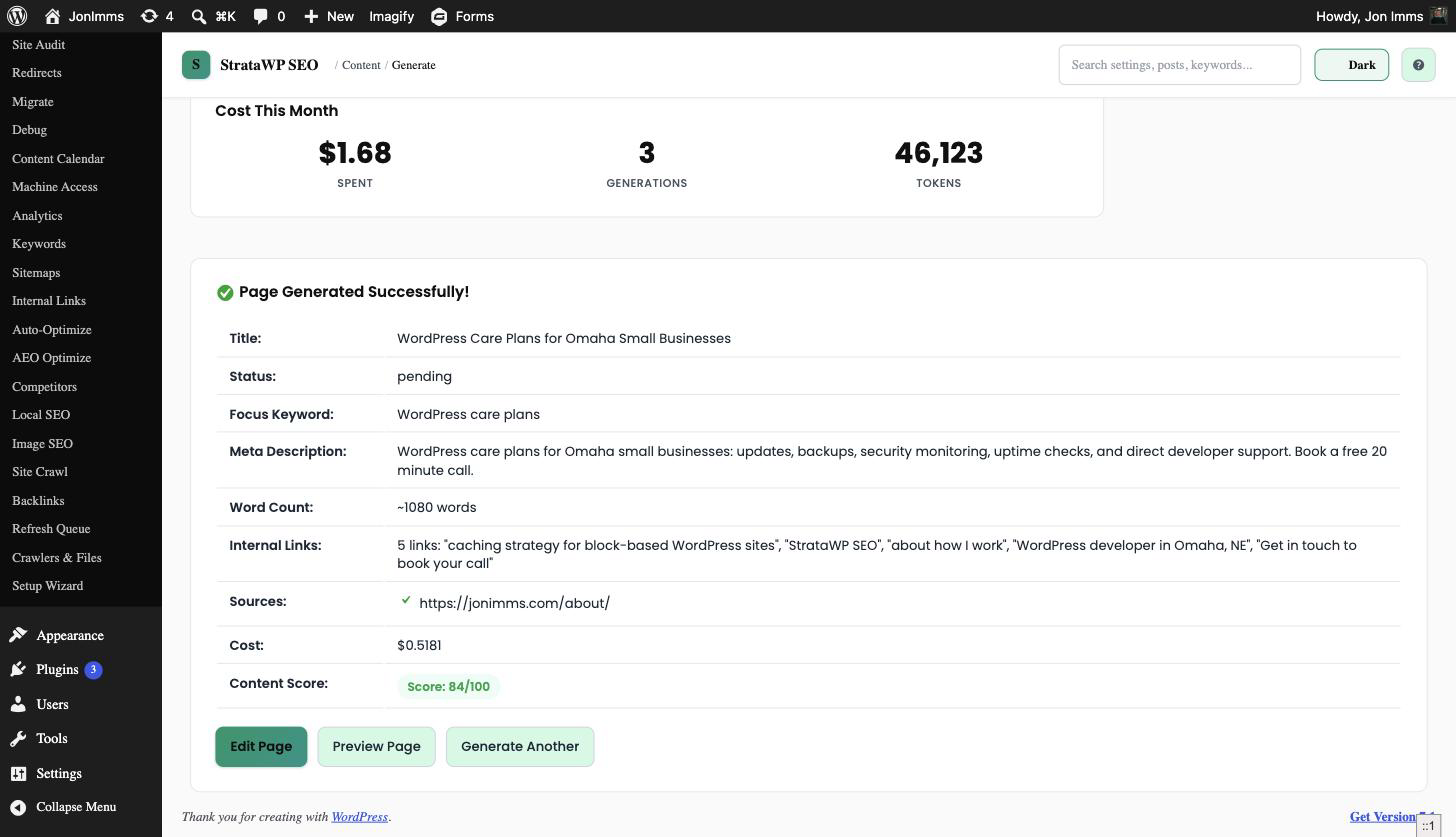
The AI is told to base its facts on this material, paraphrase rather than copy, cite each source URL as an external link, and never invent facts the material doesn't contain. Fetch failures are non-fatal: generation proceeds with whatever was fetched, or with the notes alone, and the result panel lists a Sources row reporting which URLs were fetched and which failed.
Images per run
The Featured image checkbox and In-content images count (0-4) default from your Settings but apply to that run only; changing them here never changes Settings. If your configured image provider needs an API key and none is set, both controls are disabled with a link to add one. Posts created by Bulk Generate, cron, or autopilot always follow Settings.
Voice Profiles (StrataWP SEO → Voice Profiles)
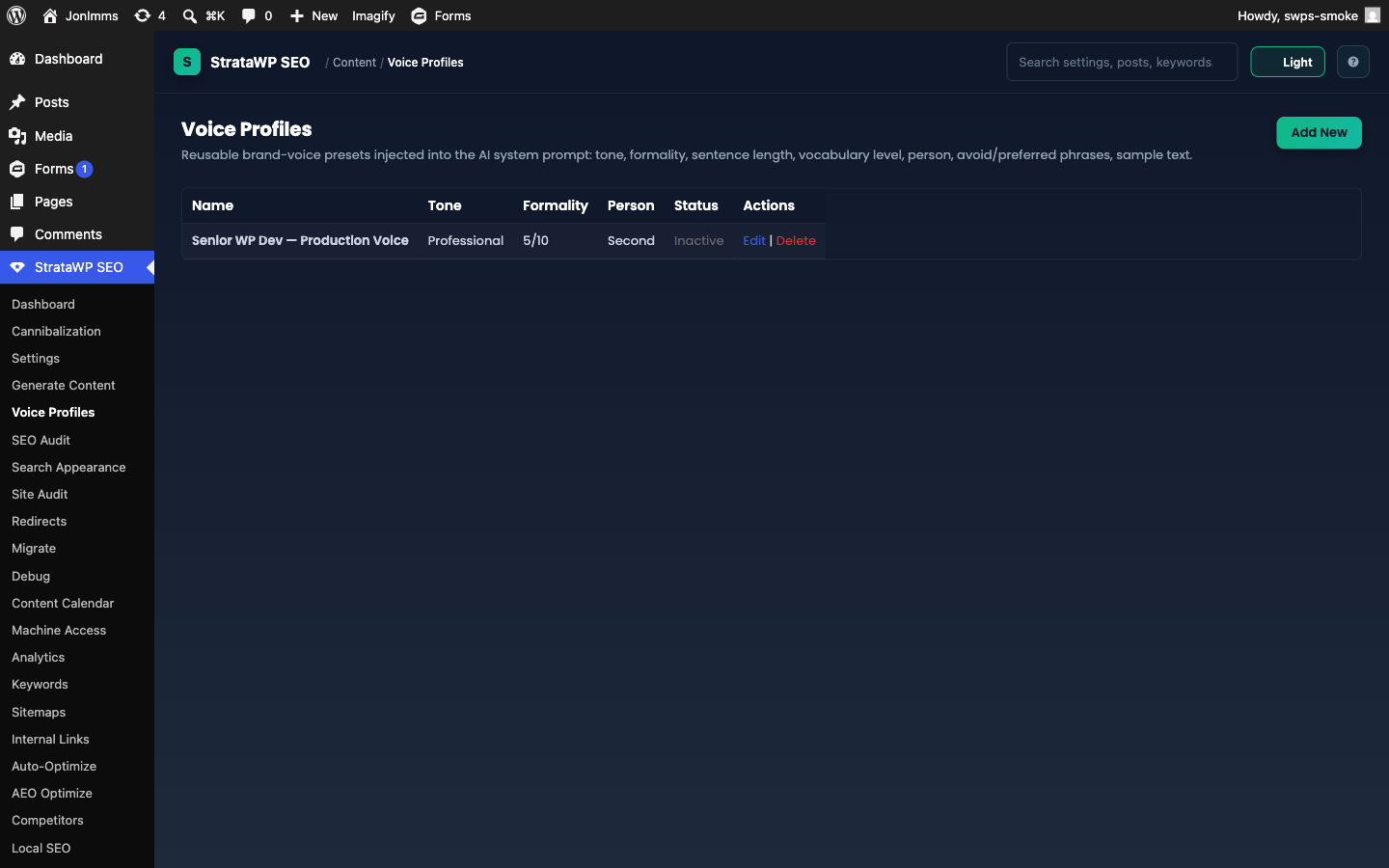
Reusable writing personas. Each profile sets tone, formality (1-10), preferred sentence length, vocabulary level, point of view, avoid/preferred phrases, and a sample text the AI emulates.
How to use it:
- Add new → name it (e.g., "Friendly authority", "Conversational developer")
- Paste a sample paragraph that matches the tone you want
- Mark it Default if it should apply to every Generate without picking explicitly
- In Generate Content, the dropdown lets you override per-post
SEO Audit (StrataWP SEO → SEO Audit)
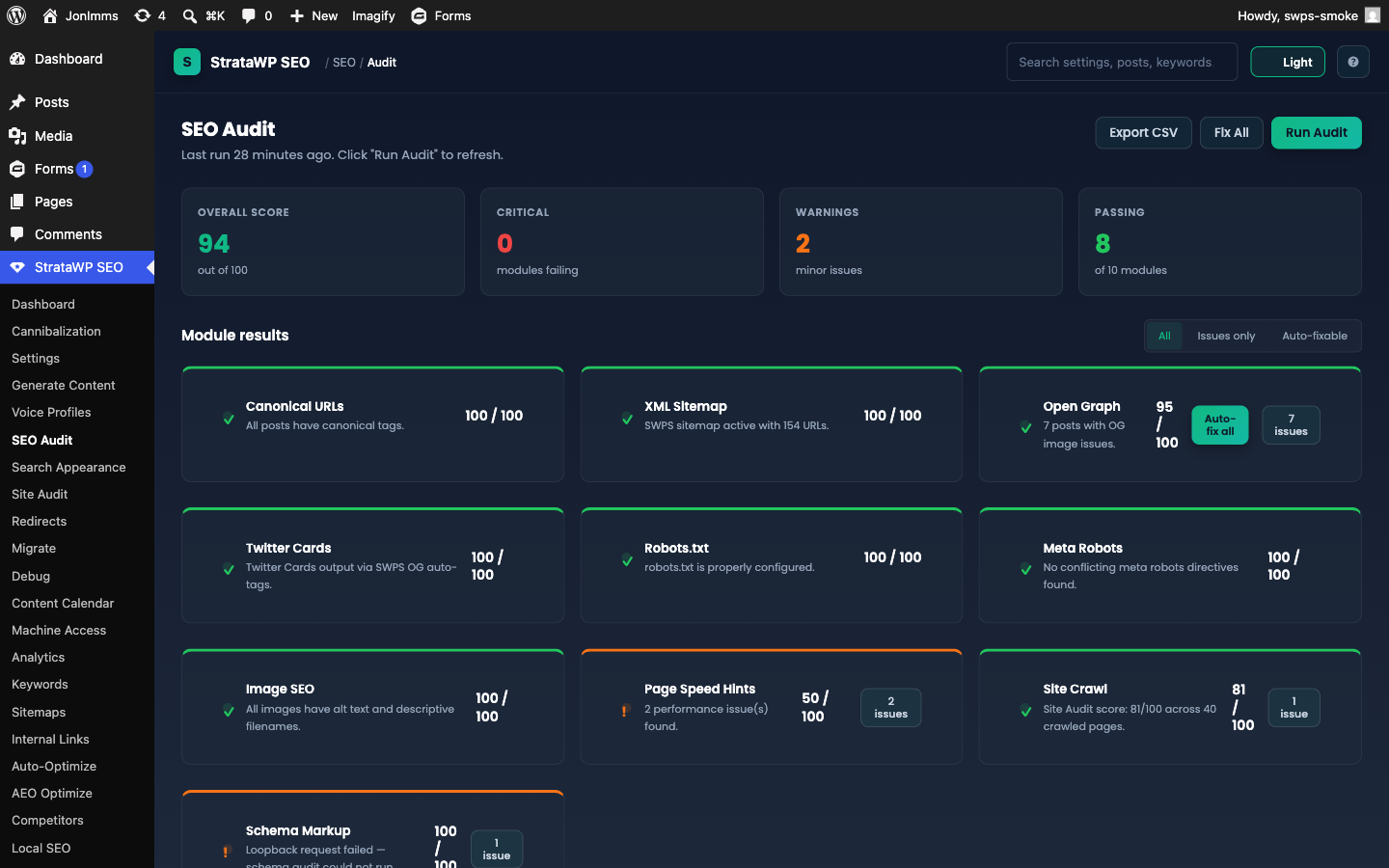
10-module technical SEO check. Each module reports pass/warn/critical with auto-fix where possible.
How to use it:
- Click Run audit now — takes 2-10 seconds
- Each module card shows status; click Auto-fix on any module that has it (canonical, OG, Twitter, sitemap)
- CSV export for client reporting
Schedule daily/weekly/monthly runs from Settings → SEO tab. The dashboard widget shows the latest health score.
Site Crawl (StrataWP SEO → Site Crawl) ★ v4.19
Crawls your own site the way a search engine would and queues fixable issues.
How to use it:
- Check the settings card — internal page cap (default 500), external link-check cap (default 200), politeness delay, and the weekly re-crawl toggle
- Click Start crawl — runs in AJAX chunks with live progress; you can leave the tab open while it works
- Review the issues table — 8 issue types: broken links, redirect chains, redirect loops, canonical mismatches, missing H1, duplicate H1s, mixed content (http assets on https pages), and noindexed URLs still in the sitemap
- Use the one-click fixes on each row: Create redirect (broken internal links), Exclude from sitemap (noindexed pages), or Ignore host (external false positives)
- The latest run also appears as a read-only Site Crawl module inside the SEO Audit, so crawl health counts toward your site score
Site Audit (StrataWP SEO → Site Audit) ★ v4.27
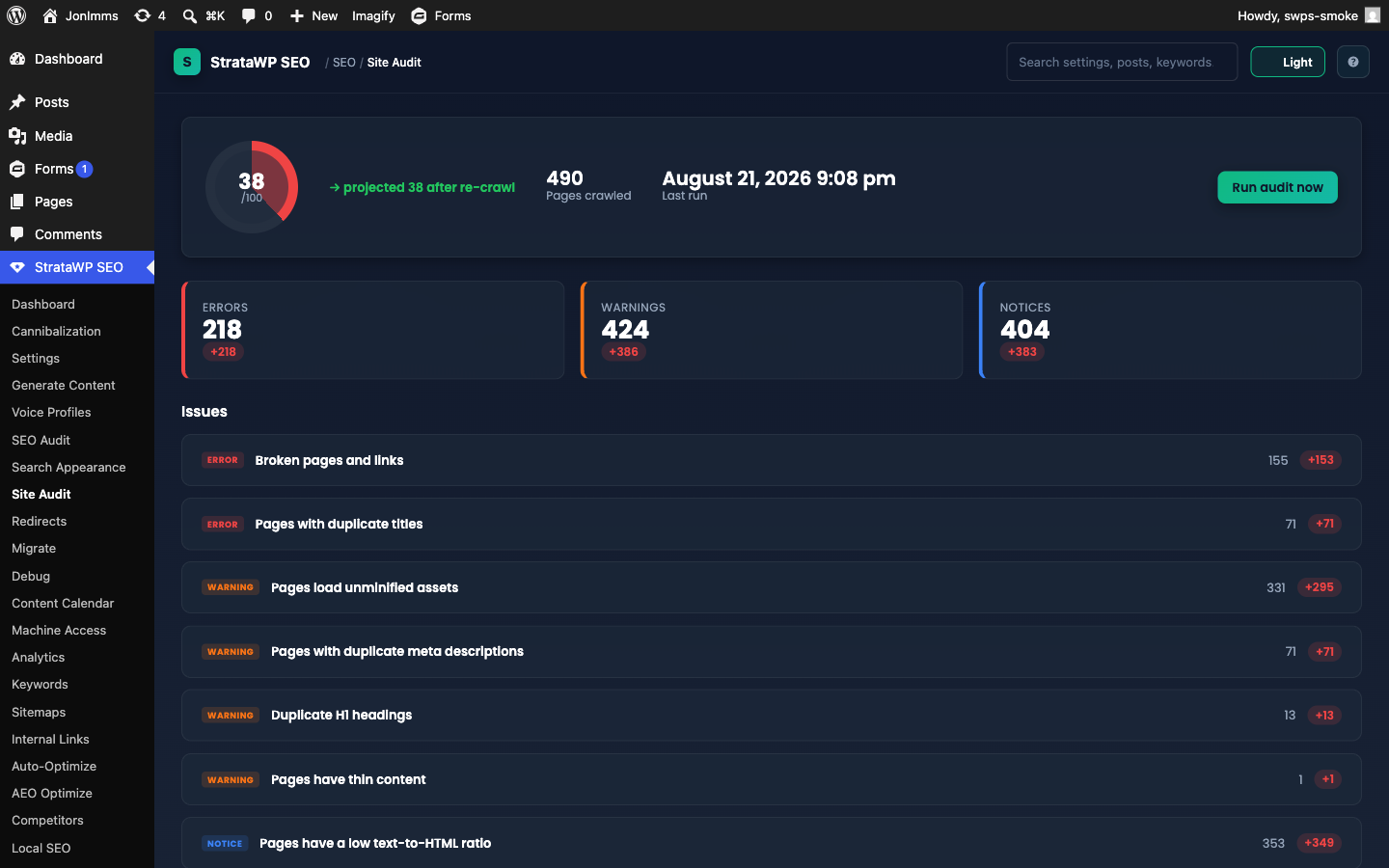
A crawl-based audit of your rendered site — ~25 checks (missing/duplicate titles and descriptions, viewport/doctype/charset/lang, bot-challenge detection, unminified assets, word count, hreflang, orphan pages, mixed content, internal nofollow links, missing image alt text, noindexed-but-sitemapped pages, and more) rolled up into a 0-100 health score, with error/warning/notice triage and crawl-over-crawl trends.
How to use it:
- Click Run audit now — the crawler covers every public URL, including term archives and pagination, and audits noindexed pages for head integrity
- Each issue group shows its severity, affected page count, and a How to fix note; every affected row records which post, term, or author archive it belongs to
Fix-It: fix issues without leaving the dashboard
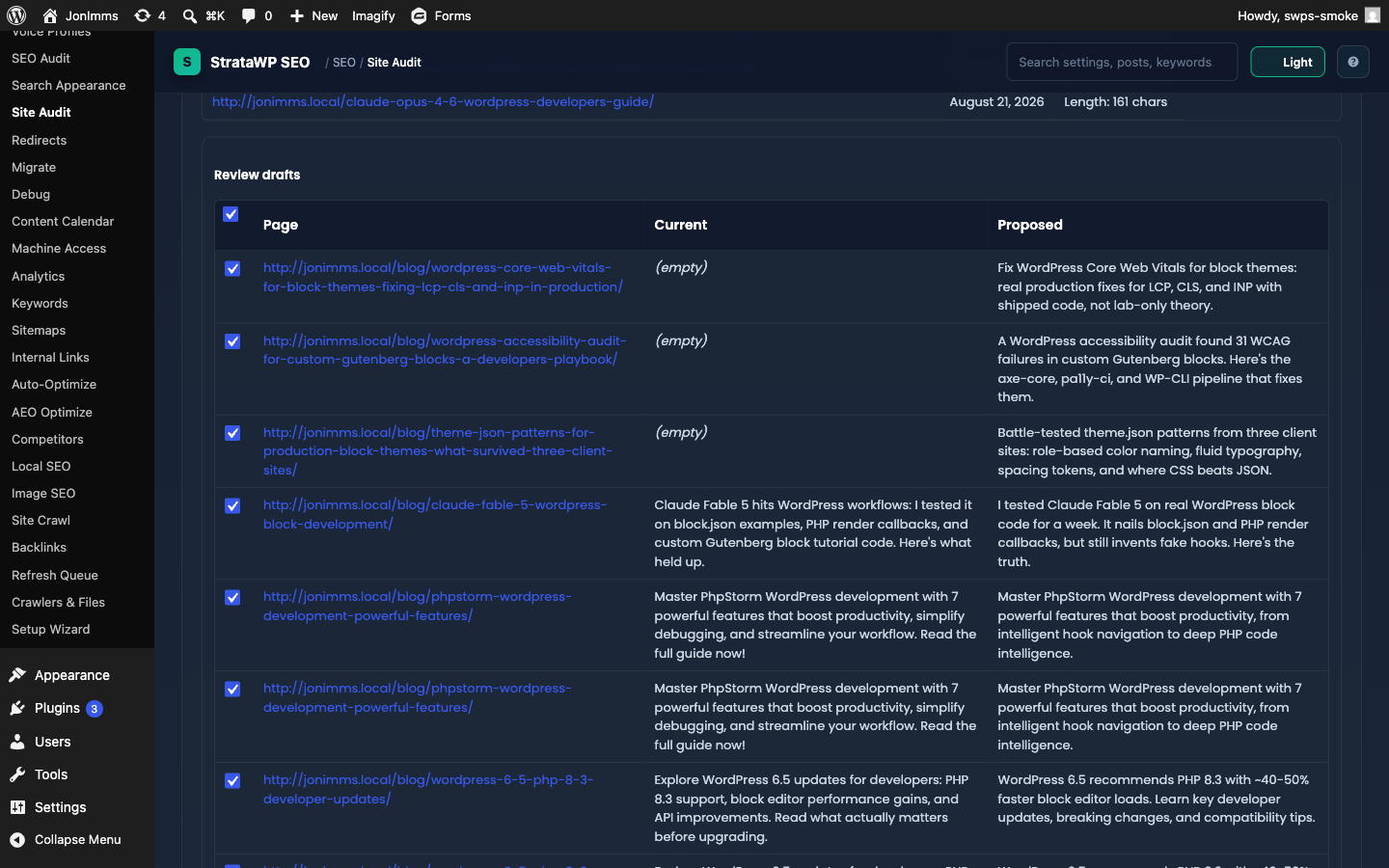
Fixable issue groups get a one-click path from "found" to "fixed," right on the audit dashboard:
- AI-drafted fixes — for missing, duplicate, too-long, and too-short meta titles and descriptions, click ✨ Fix with AI. It drafts replacements for the whole group in chunks (you'll see a live "Drafting… (n)" count), then opens a review table listing each page's current value next to the proposed one, with a checkbox per row (all checked by default)
- Uncheck anything you don't want, then click Apply selected to write the accepted drafts — or Dismiss all to discard the batch without applying it
- Mechanical fixes — mixed-content URLs, internal nofollow links, missing image alt text, and noindexed-but-sitemapped pages don't need review; click Fix now on the group and it applies to every fixable row in the group immediately
- Every applied fix snapshots the previous value first: fixed rows show a ✓ marker with an Undo button that restores the previous value, so nothing is destructive
- Once a group has fixes applied, the dashboard shows a projected health score for the next crawl; click Run audit now again to re-crawl and confirm the real score
- Rows with no linked post or term (e.g. a category archive issue with nothing to edit) are called out as not auto-fixable — fix those by hand using the issue's How to fix note
Search Appearance (StrataWP SEO → Search Appearance)
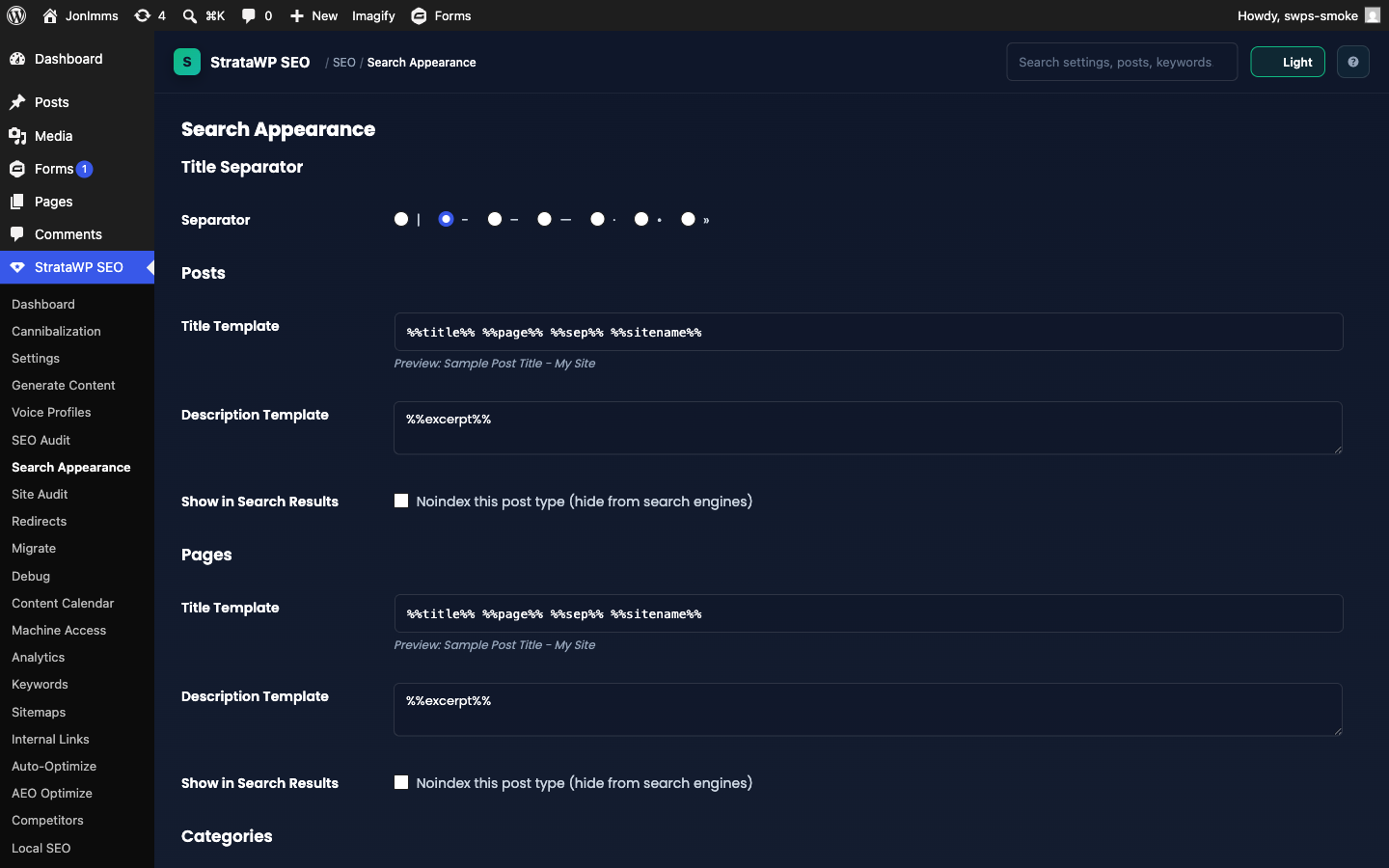
Controls how titles and descriptions appear in search results.
How to use it:
- Set separator (
|,–,·, etc.) - Edit per-content-type templates with variables:
%title%,%sitename%,%sep%,%category%,%author%,%date%, etc. - Per-post overrides are still available in the post editor's SEO Meta Editor metabox
Redirects (StrataWP SEO → Redirects)
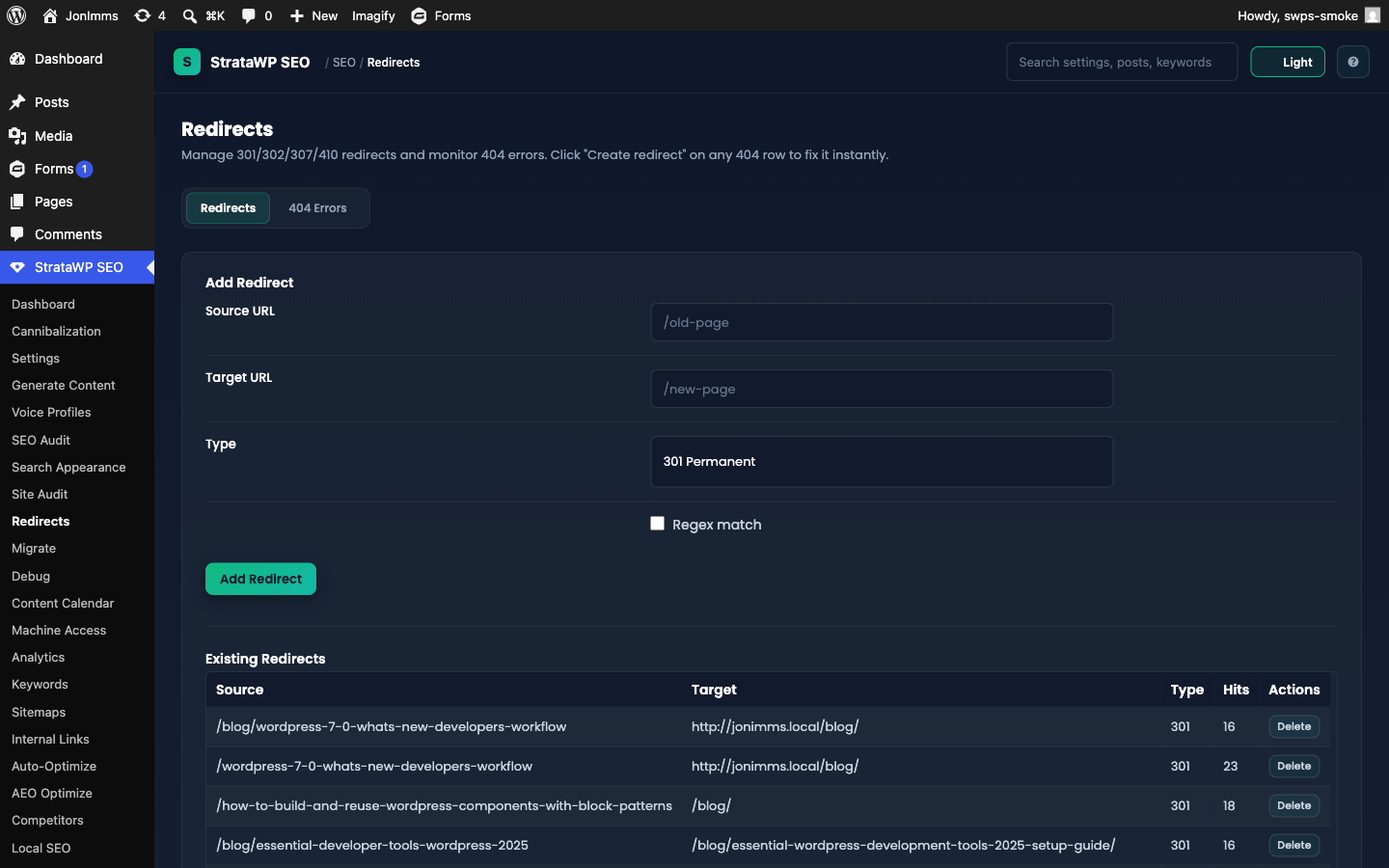
Manages 301/302/307/410 redirects and 404 monitoring.
How to use it:
- Add a redirect: From URL → To URL → pick status code → Save
- Regex tab for pattern-based redirects (
^/old/(.*)$ → /new/$1) - 404 Log tab: every unhandled 404 shows up here; click Create redirect to fix it in one click
- Auto-redirect on slug change: enabled by default — when you change a post's slug, a redirect from the old slug is created automatically
Migrate (StrataWP SEO → Migrate) ★ v4.4
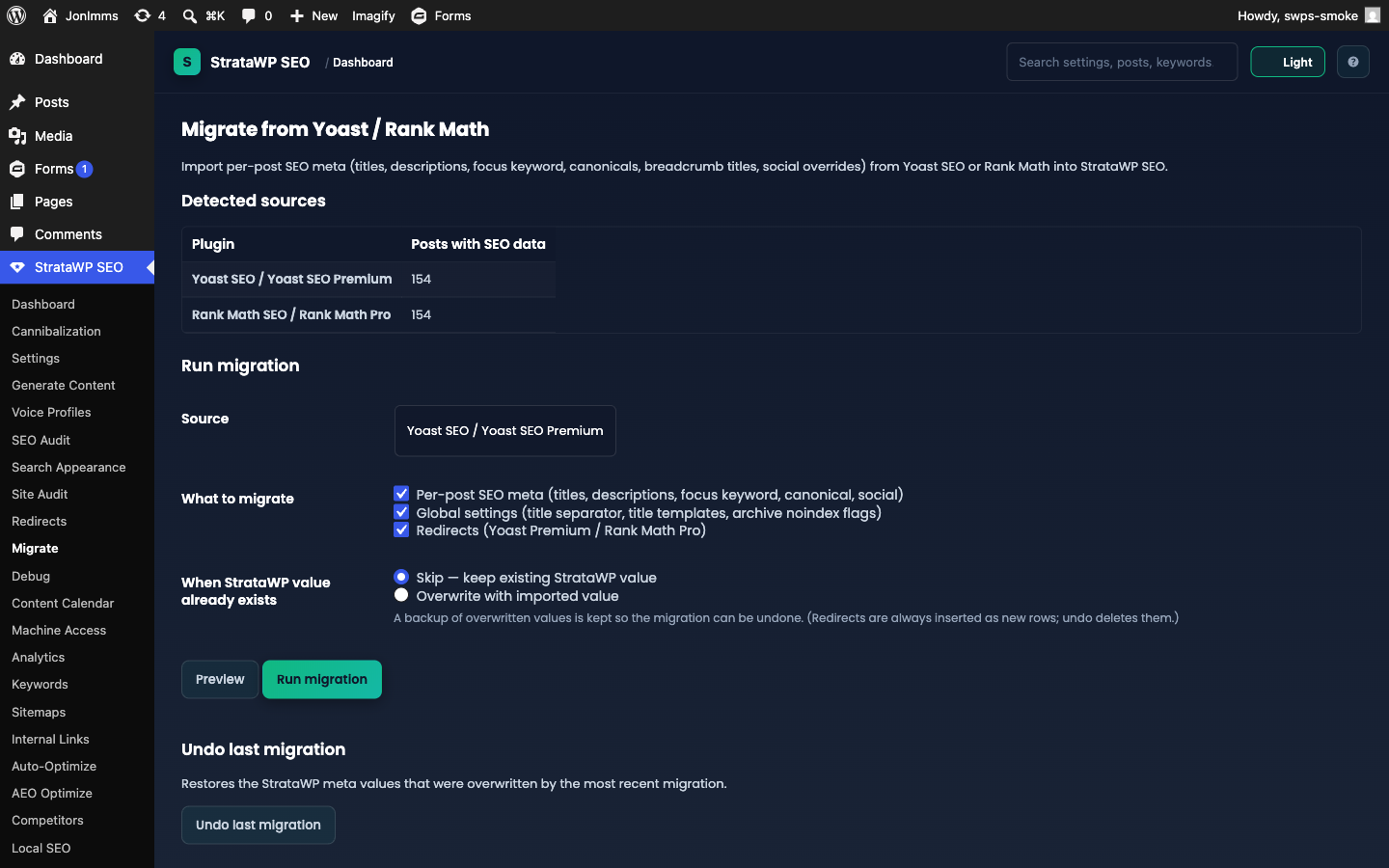
One-click import from Yoast SEO or Rank Math. Lives at admin.php?page=swps-migration.
How to use it:
- The page auto-detects installed sources and shows how many posts have SEO data for each (if neither plugin left data behind, it says there is nothing to migrate).
- Pick the Source, then tick what to migrate: per-post SEO meta (titles, descriptions, focus keyword, canonical, breadcrumb title, social overrides), global settings (title separator, title templates, archive noindex flags), and redirects (Yoast Premium / Rank Math Pro — 301/302/307/410, regex sources kept as regex).
- Choose the conflict policy — Skip (keep existing StrataWP values, default) or Overwrite (a backup of overwritten values is kept).
- Click Preview for a dry run (posts scanned, fields/settings/redirects that would be written), then Run migration.
- Undo last migration restores overwritten values; imported redirects are deleted on undo.
Debug (StrataWP SEO → Debug)
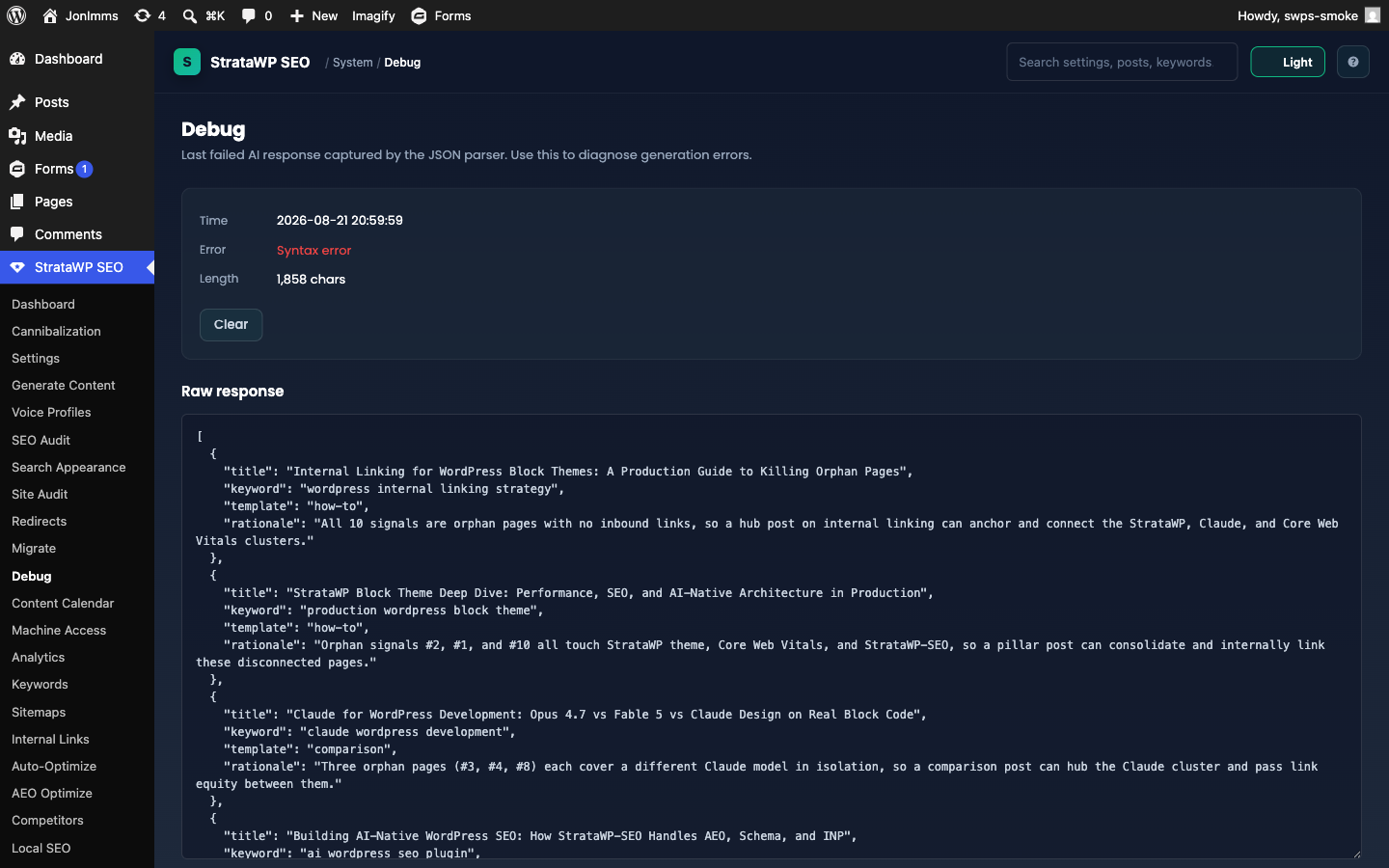
Shows the last failed AI response captured by the JSON parser (the page title is "Debug — Last AI Failure"). If a generation errored, this is the first place to look.
How to use it: the page shows the most recent failure automatically — Time, Error, and response Length, plus the full Raw response in a read-only textarea. If nothing has failed recently you'll see "No recent failures." Click Clear to discard the stored failure once you've diagnosed it.
Content Calendar (StrataWP SEO → Content Calendar)
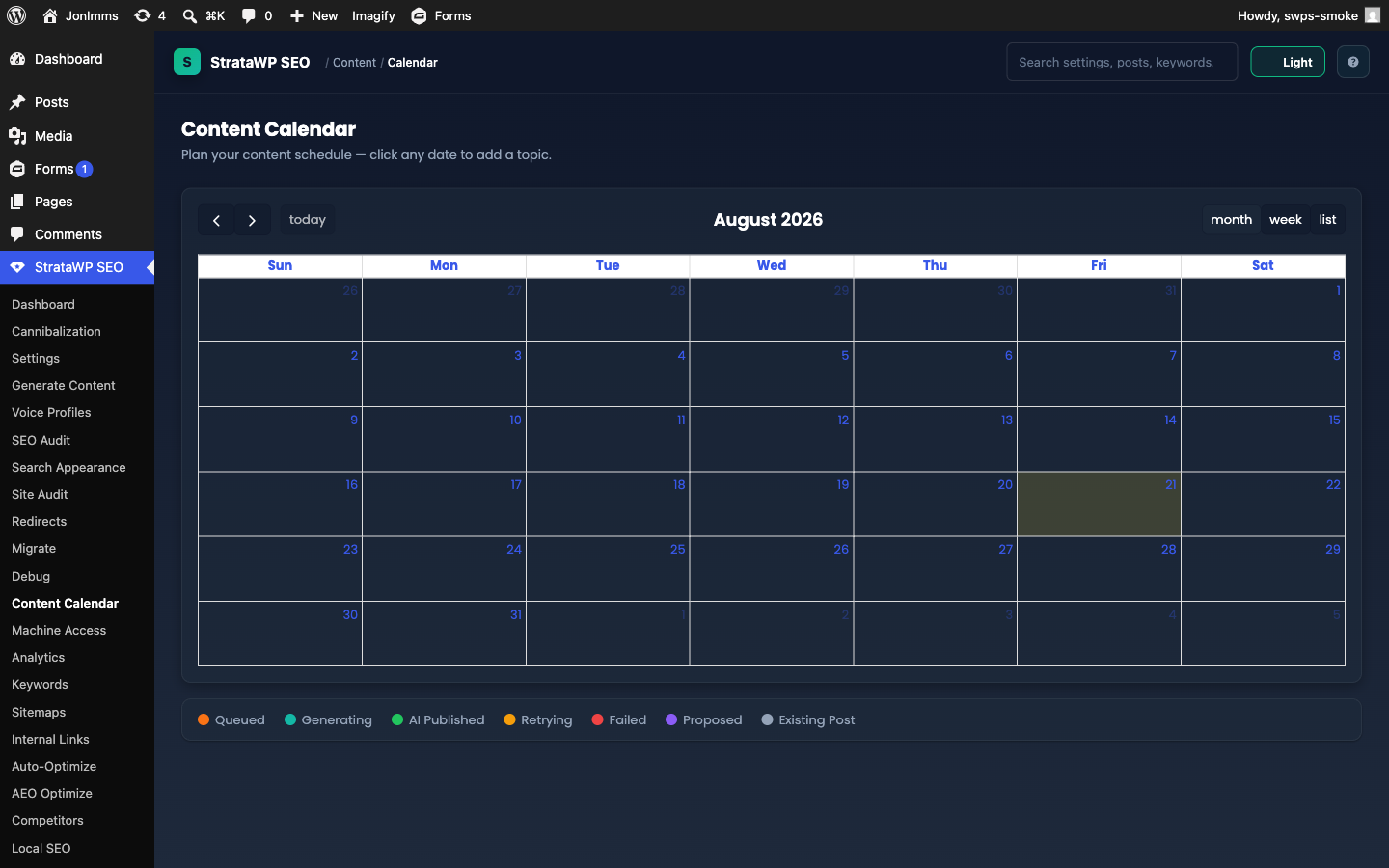
Visual month-view of every scheduled and generated post. Color-coded by status (draft, scheduled, published). Click any cell to see the post detail or jump to the editor.
How to use it: click any date to open the topic form (Topic/Headline, Scheduled Date, Content Template, Notes) — entries become the auto-publish queue. Add 10-20 topics with target dates, set Settings → Schedule to Daily/Weekly/etc., and the cron generates posts automatically, marking each queue entry as used. You can also manage the queue with wp swps queue list|add|remove|clear or the REST /queue endpoints. Drag-and-drop is not supported (yet) — to reschedule, edit the post and change its date.
Proposed topics (Topic Autopilot) ★ v4.19: when the weekly scout is enabled (Settings → Schedule → Topic Autopilot), data-backed topic proposals appear on the calendar in their own "proposed" color with the rationale that produced them (an unanswered GSC question, a striking-distance keyword, or an orphan page). Click a proposal to Approve it (it becomes a normal queued topic) or Dismiss it. With auto-promote enabled, the top proposal each week is queued automatically.
Analytics (StrataWP SEO → Analytics)
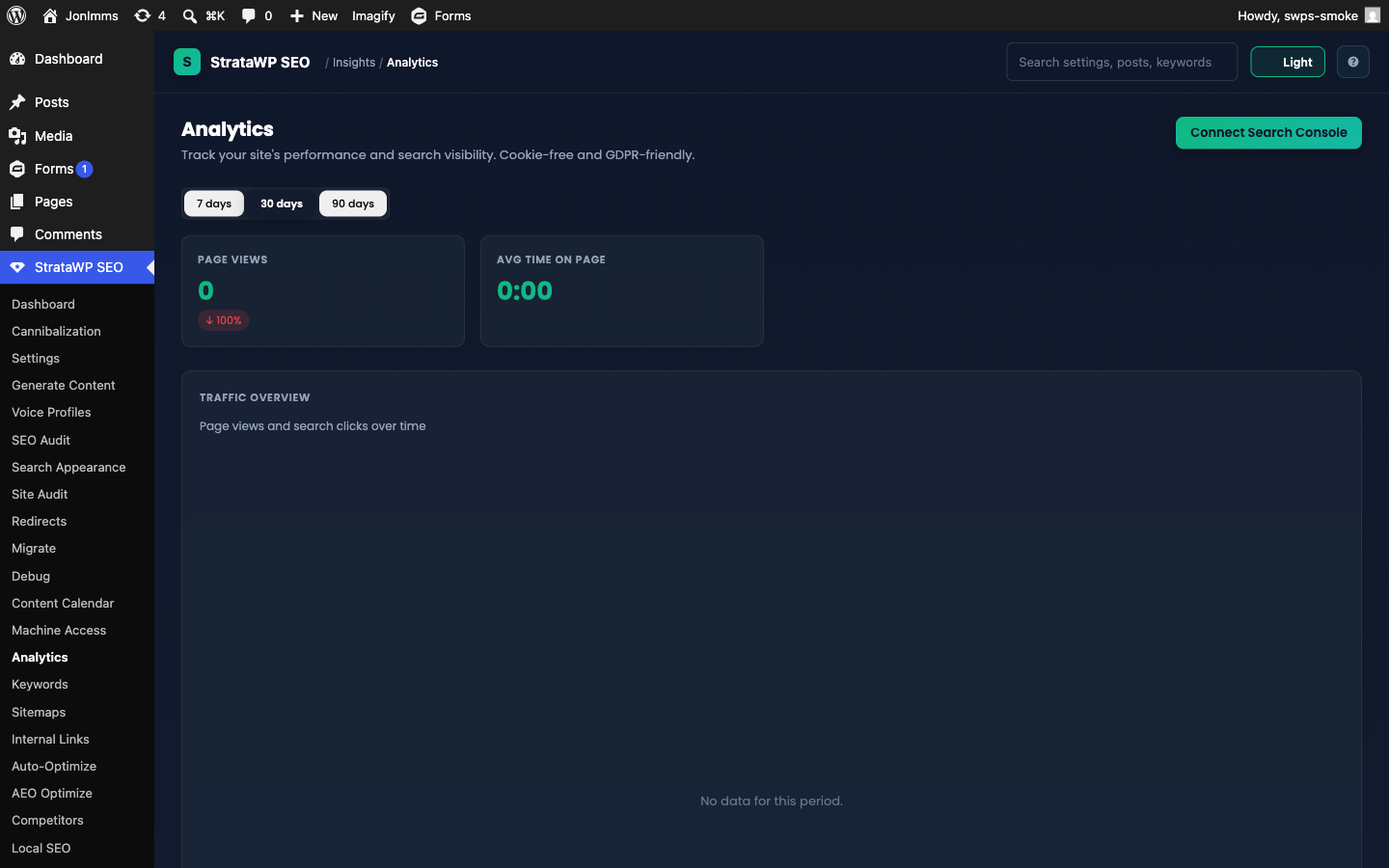
Cookie-free on-site analytics + GSC dashboard.
How to use it:
- Date range filter at the top: 7 / 30 / 90 days
- Top stats: Pageviews, Unique visitors, Avg time, Bounce rate
- Charts: Pageviews over time, top posts, top referrers
- GSC tab: clicks, impressions, CTR, position (requires OAuth setup — see below)
- AI Crawlers section: total bot hits with delta, per-bot breakdown, top crawled pages, AEO gap report, recent bot 404s. Search bots (Googlebot, bingbot, Applebot, YandexBot, DuckDuckBot) are tracked here too, each hit verified against published IP ranges — spoofed hits are flagged, and daily reconciliation notices appear when spoofing spikes
- AI Referrals section ★ v4.14: human visits arriving from ChatGPT, Perplexity, Claude, Gemini, Copilot and others — engine trend chart, top landing posts, and engagement vs organic comparison
- Crawl Budget by Post Type (30d) ★ v4.19: where verified search bots actually spend their crawl budget, broken down by post type, so you can spot over-crawled archives and under-crawled money pages
Connecting Google Search Console:
- Settings → Analytics tab: paste GSC OAuth client ID + secret (redirect URI shown in the field description)
- Analytics page: click Connect Search Console in the page header → sign into Google → confirm scope → you land back on Settings with a connected notice
- Back on the Analytics page, a notice lists your verified GSC properties — pick one from the dropdown and click Save
This README is longer than the copy stored here. Read the rest on GitHub →
Releases
Newest 25 of 60 recorded releases. Each count is every asset in that release; expand a row for the breakdown.
v4.32.4
latest
Oct 22, 2026 11d ago
stratawp-seo.zip
+1 asset
13
Oct 21, 2026 12d ago
stratawp-seo.zip
+1 asset
8
Oct 9, 2026 24d ago
stratawp-seo.zip
+1 asset
cohort
18
Oct 9, 2026 24d ago
stratawp-seo.zip
+1 asset
2
Oct 8, 2026 25d ago
stratawp-seo.zip
+1 asset
7
Sep 12, 2026 1mo ago
stratawp-seo.zip
+1 asset
17
Active-site estimate ≈20 comes from the v4.32.2 cohort. Method.