Install
This is the repository archive. It installs, but the folder name will carry the branch suffix and updates will not flow.
Install straight from GitHub with WP-CLI:
wp plugin install https://github.com/jimrarras/wc-acs-courier/archive/refs/heads/master.zip
Open source WooCommerce plugin for integrating with ACS Courier (Greece's largest courier service).
It is a class-based, unit-tested plugin built for and running on a production Greek WooCommerce store.
Features
Voucher Management
- Create vouchers manually (per-order button) or automatically (on order status change)
- Print vouchers in PDF: both A4 laser (3 labels/page) and thermal receipt formats
- Delete vouchers that haven't been added to a pickup list yet
- Bulk actions: create vouchers for multiple orders at once from the orders list
- Issue & print pickup lists: mandatory step to finalize daily shipments
- COD support: automatically includes Cash on Delivery amount when payment method is COD
- Multipart shipments: supports multiple parcels per order
Shipment Tracking
- Auto-tracking via WP Cron: checks shipment status hourly/twice daily/daily
- Custom order statuses: "Delivered (ACS)" and "Delivery Denied (ACS)"
- Tracking details viewable in the order metabox with full checkpoint history
- Email notifications: automatically emails the tracking number to customers
- Tracking info in order emails: appends tracking link to all WooCommerce order emails
- Frontend tracking shortcode:
[acs_tracking]for a customer-facing tracking page
Shipping Cost Calculation
- Real-time API rates based on your ACS contract pricing
- Flat rate option as an alternative
- Free shipping threshold: configurable minimum order amount
- Handling fee and COD surcharge support
- Fallback cost when API is unavailable
- Caching: rates and zip code lookups are cached to minimize API calls
ACS Points
- "Pickup from ACS Point" shipping method for your zones, with cost, free-delivery threshold and a weight cap
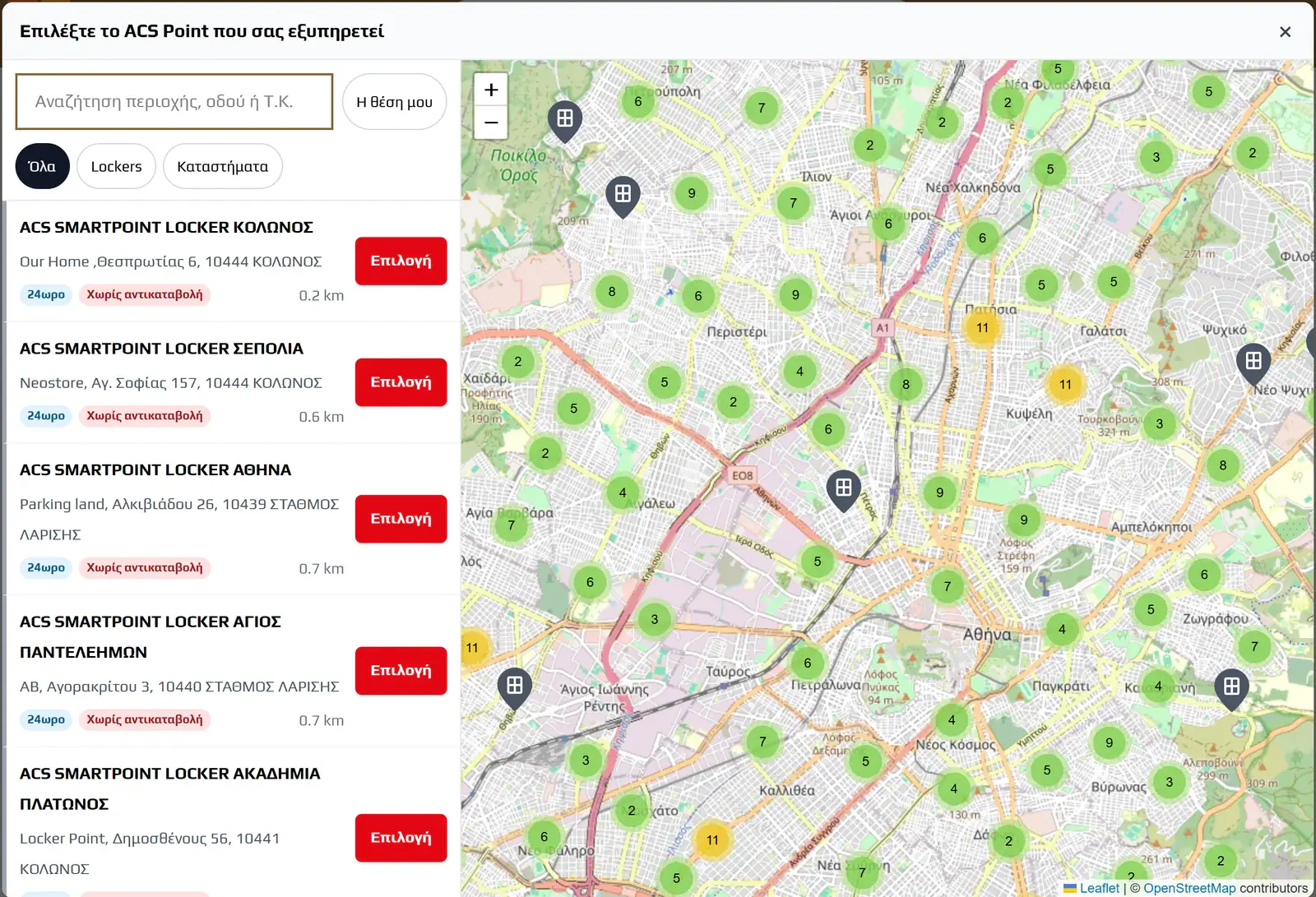
- Map picker at checkout (OpenStreetMap, no API key): every ACS Smartpoint locker and ACS store, searchable, clustered, with opening hours and card-on-collection badges
- Vouchers routed to the chosen point through the ACS station codes
- Cash on delivery offered only at points with a card terminal
- Change the point from the order screen until a voucher exists
- Point shown on the thank-you page, in My Account and in order emails
Requirements
- WordPress 5.8+
- WooCommerce 6.0+
- PHP 7.4+
- ACS Courier API credentials (request from your local ACS branch or call 210-8190000)
Installation
- Download or clone this repository
- Upload the
wc-acs-courierfolder to/wp-content/plugins/ - Activate the plugin in WordPress → Plugins
- Go to WooCommerce → ACS Courier to enter your API credentials
Configuration
1. API Credentials
Navigate to WooCommerce → ACS Courier → API Credentials and enter:
- API Key: provided by ACS
- Company ID and Company Password: your ACS account credentials
- User ID and User Password: your ACS user credentials
Use the Test Connection button to verify.
2. Shipping Settings
- Billing Code: your ACS credit/billing code (e.g.,
2ΑΘ999999) - Sender Name: appears on the voucher label
- Origin Station Code: your local ACS station in Greek uppercase (e.g.,
ΑΘfor Athens,ΘΣfor Thessaloniki) - Default Weight: used when products don't have weight set (minimum 0.5 kg)
- Charge Type: sender pays or recipient pays
3. Automation
- Auto-create Voucher: enable and select which order status triggers automatic creation
- Auto Tracking: enable automatic shipment status checking
- Tracking Frequency: how often to check (hourly, twice daily, daily)
- Email Tracking Code: send tracking email to customer when voucher is created
4. Shipping Zones
Go to WooCommerce → Settings → Shipping and add "ACS Courier" as a shipping method to your desired zones. Configure:
- Rate type (API calculation or flat rate)
- Free shipping minimum
- Handling and COD fees
- Fallback cost
Compatibility
- WooCommerce HPOS: Full support for High-Performance Order Storage
- WooCommerce Blocks: Basic compatibility
- WordPress Multisite: Compatible
Debugging
Enable debug logging in ACS Courier → API Credentials → Debug Logging. Logs appear in WooCommerce → Status → Logs under the wc-acs-courier source.
Reference
ACS API endpoints used
| Method | ACS Alias | Purpose |
|---|---|---|
| Create Voucher | ACS_Create_Voucher |
Create a shipping voucher |
| Print Voucher | ACS_Print_Voucher |
Get PDF for printing |
| Delete Voucher | ACS_Delete_Voucher |
Cancel a voucher |
| Issue Pickup List | ACS_Issue_Pickup_List |
Finalize daily shipments |
| Print Pickup List | ACS_Print_Pickup_List |
Print the pickup list PDF |
| Get Pickup Lists | ACS_Get_Pickup_Lists |
List all pickup lists for a date |
| Tracking Summary | ACS_Trackingsummary |
Get latest shipment status |
| Tracking Details | ACS_TrackingDetails |
Get full tracking history |
| Price Calculation | ACS_Price_Calculation |
Calculate shipping cost |
| Address Validation | ACS_Address_Validation |
Validate delivery address |
| Find by Zipcode | ACS_Area_Find_By_Zip_Code |
Lookup areas and stations |
| ACS Stations | ACS_Stations |
Get store/locker locations |
Order meta data
The plugin stores the following meta data on orders:
| Meta Key | Description |
|---|---|
_acs_voucher_no |
ACS voucher/tracking number |
_acs_voucher_date |
Date the voucher was created |
_acs_pickup_list_no |
Pickup list number |
_acs_tracking_status |
Latest tracking status text |
_acs_shipment_status |
Numeric shipment status code |
_acs_tracking_final |
Final status (delivered/denied) |
_acs_point_id |
Selected ACS Point ID |
_acs_point_type |
Point type, locker or store |
_acs_point_name |
Selected ACS Point name |
_acs_point_address |
Selected ACS Point address |
_acs_point_station |
ACS station code used to route the voucher |
_acs_point_branch |
ACS branch code used to route the voucher |
_acs_point_cod |
Whether the point accepts cash on delivery |
Hooks and filters
Actions
wc_acs_tracking_cron: Fired by WP Cron for auto-tracking
Filters
woocommerce_shipping_methods: Registers the ACS shipping methodwc_order_statuses: Adds custom ACS delivery statuses
Development and tests
composer install
vendor/bin/phpunit -c phpunit.xml               # unit tests
cp .env.example .env                            # add ACS test-account credentials
vendor/bin/phpunit -c phpunit-integration.xml   # integration tests, real ACS API calls
./build.sh                                      # release zip
Manual front-end checks are listed in docs/testing-checklist-ui.md.
Issues and pull requests are welcome. Report security problems privately, as described in SECURITY.md.
Credits
Built with the ACS REST API Web Services documentation (April 2021).
ACS Courier is a trademark of its owner. This plugin is not affiliated with or endorsed by ACS Courier.
Support
If this plugin saves you time, you can buy me a coffee.

License
GPL-2.0-or-later. See LICENSE.