MWE EtchWP Enhancements WP Registry grade B. Medium-severity findings · 1 findingWP RegistryMedium-severity findings · 1 findingOpen the reportB #6 in Page Builder Addons
Enhances Etch page builder with improved image handling and focus position support for responsive images.
Install
Upload it under Plugins → Add New Plugin → Upload Plugin, then activate.
Install straight from GitHub with WP-CLI:
wp plugin install https://github.com/jehu/mwe-etchwp-enhancements/releases/download/v1.2.12/mwe-etchwp-enhancements.zip
A WordPress plugin that enhances the Etch page builder with improved image handling and focus position support.
Features
🖼️ Automatic Image Enhancement
Automatically enhances images in Etch blocks with essential attributes:
- Responsive Images: Adds
srcsetattributes for different screen sizes - Dimensions: Extracts
widthandheightfrom filename or metadata - Accessibility: Adds
alttext from attachment metadata - Decorative Images: Use
alt="-"(hyphen) to mark images as decorative - Performance: Generates
sizesattributes for optimal image loading - Smart Detection: Only adds missing attributes, never overwrites existing ones
- Optimized: Early-exit for images with complete attributes (minimal overhead)
- Efficient: Runtime cache prevents duplicate database queries
🎯 Focus Position Support
Integrates with focus point plugins to control image focal points:
- Applies CSS
object-positionbased on focus point data - Per-page overrides: Set custom focus points in Etch editor that override global Media Library values
- Visual editor: Click-to-set focus point UI in Etch's element settings panel
- Dynamic Data integration: Access focus points via
{this.image.focusPoint}in Etch templates - Compatible with:
Visual Focus Point Editor in Etch
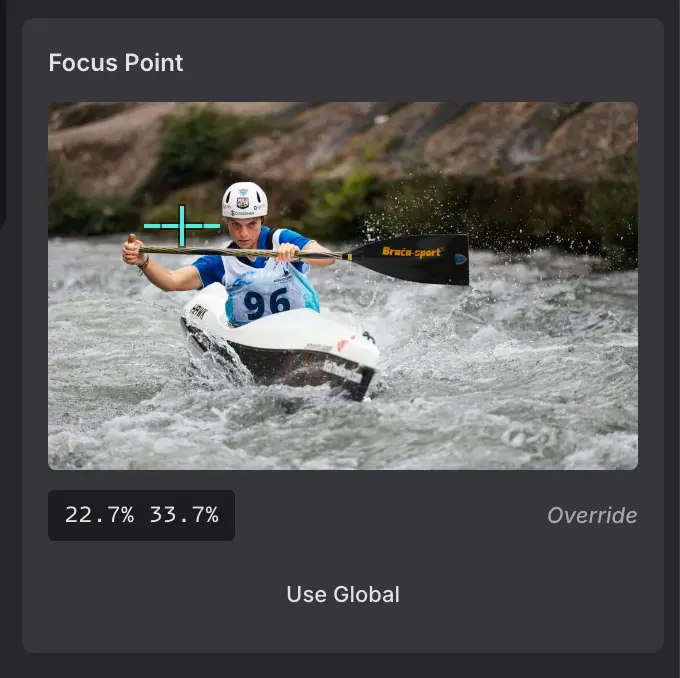
The Focus Point Editor appears automatically when you select an image in the Etch canvas. It provides:
- Interactive Preview: Click anywhere on the image thumbnail to set the focus point
- Visual Marker: A crosshair marker shows the current focus position
- Position Display: Shows exact percentage values (e.g., "30.5% 45.2%")
- Override Indicator: Clearly shows whether you're using a page-specific override or the global Media Library value
- Reset Button: One click to remove the override and revert to the global focus point
Requirements
Required
- Etch page builder (v1.0.0 or higher recommended)
- PHP 8.1 or higher
- WordPress 5.9 or higher
Optional
For focus position features, install one of:
- Image Background Focus Position plugin
- Media Focus Point plugin
Installation
- Ensure Etch page builder is installed and activated
- Upload the
mwe-etchwp-enhancementsfolder to/wp-content/plugins/ - Activate the plugin through the WordPress 'Plugins' menu
- (Optional) Install a focus position plugin for focal point features
Configuration
Disable Features via Filters
Add to your theme's functions.php:
// Disable image enhancement
add_filter( 'mwe_etchwp_enable_image_enhancement', '__return_false' );

// Disable focus position
add_filter( 'mwe_etchwp_enable_focus_position', '__return_false' );
Disable Features via Constants
Add to wp-config.php:
// Disable image enhancement
define( 'MWE_ETCHWP_IMAGE_ENHANCEMENT', false );

// Disable focus position
define( 'MWE_ETCHWP_FOCUS_POSITION', false );
How It Works
Image Enhancement Process
- Hooks into
render_blockfilter (priority 15) after Etch processes blocks - Detects
<img>tags in supported Etch blocks - Performance check: Skips images that already have all attributes (early-exit)
- Cache check: Returns cached attachment ID if image was previously processed
- Attempts to find attachment ID from image URL using multiple strategies
- Checks which attributes are missing
- Adds only the missing attributes without modifying existing ones
- Caches result: Stores attachment ID for future lookups within the same request
Supported Blocks
Full processing (image enhancement + focus position):
etch/element- Standard HTML elementsetch/dynamic-element- Dynamic HTML elementsetch/raw-html- Raw HTML blocksetch/component- Component blocks
Focus position only:
etch/dynamic-image- Dynamic Image element (Etch 1.0.0-beta-15+)
The Dynamic Image element in Etch already handles responsive image attributes (srcset, sizes, width, height) internally. This plugin only applies focus position styling to these images to avoid conflicts and duplicate processing.
In the Etch builder, selecting a Dynamic Image shows the focus point picker when a fixed WP Media ID is set. When the image source is dynamic (e.g. a loop expression), the focus point cannot target a single attachment, so a notice points you to the Media Library to set it per image instead.
Focus Position Process
- Reads focus point data from compatible plugins
- Adds data to attachment metadata via
wp_get_attachment_metadatafilter - Checks for per-page overrides stored in post meta
- Applies CSS
object-positionduring block rendering (override > global > default) - Automatically applies image enhancements as well (except for
etch/dynamic-image)
Per-Page Focus Point Overrides
Focus points can be customized per-page in the Etch editor:
- Select an image in the Etch canvas
- Find the "Focus Point" section in Element Settings
- Click on the preview image to set the focus point
- The override is saved automatically for this page only
- Click "Use Global" to remove the override and use the Media Library value
Priority order:
- Per-page override (set in Etch editor)
- Media Library focus point (global)
- Default:
50% 50%(center)
Developer Documentation
Available Filters
mwe_etchwp_enable_image_enhancement
Control whether image enhancement is enabled.
/**
 * @param bool $enabled Default: true
 * @return bool
 */
apply_filters( 'mwe_etchwp_enable_image_enhancement', true );
mwe_etchwp_enable_focus_position
Control whether focus position feature is enabled.
/**
 * @param bool $enabled Default: true
 * @return bool
 */
apply_filters( 'mwe_etchwp_enable_focus_position', true );
mwe_etchwp_processable_blocks
Customize which Etch block types are processed for image enhancement and focus position.
/**
 * @param array $processable_blocks Default: ['etch/element', 'etch/dynamic-element', 'etch/raw-html', 'etch/component', 'etch/dynamic-image']
 * @return array
 */
apply_filters( 'mwe_etchwp_processable_blocks', $processable_blocks );
Example usage:
// Add a custom block type to processing
add_filter( 'mwe_etchwp_processable_blocks', function( $blocks ) {
    $blocks[] = 'etch/custom-block';
    return $blocks;
} );

// Remove a specific block from processing
add_filter( 'mwe_etchwp_processable_blocks', function( $blocks ) {
    return array_diff( $blocks, array( 'etch/raw-html' ) );
} );
mwe_etchwp_skip_responsive_blocks
Customize which blocks should skip responsive image processing (srcset, sizes, width, height). These blocks still receive focus position processing.
/**
 * @param array $skip_blocks Default: ['etch/dynamic-image']
 * @return array
 */
apply_filters( 'mwe_etchwp_skip_responsive_blocks', $skip_blocks );
Example usage:
// Add another block that handles its own responsive images
add_filter( 'mwe_etchwp_skip_responsive_blocks', function( $blocks ) {
    $blocks[] = 'etch/custom-responsive-block';
    return $blocks;
} );
mwe_etchwp_disable_auto_sizes
Restore the pre-1.2.12 behaviour of disabling WordPress core's sizes="auto, …" (WP 6.7+) for all lazy-loaded images. By default the plugin now keeps core's layout-aware sizing and only strips auto from small, attribute-sized images (see the next filter).
add_filter( 'mwe_etchwp_disable_auto_sizes', '__return_true' );mwe_etchwp_auto_sizes_min_width
Width attribute (in px) below which an image is treated as attribute-sized: the plugin writes no srcset/sizes attributes for it and it loses core's auto sizes keyword (via the wp_content_img_tag guard). Small images with no CSS sizing (icons, slider arrows) would otherwise be laid out at container width. Default 150.
add_filter( 'mwe_etchwp_auto_sizes_min_width', function () {
    return 200;
} );
Available Constants
MWE_ETCHWP_IMAGE_ENHANCEMENT
Enable/disable image enhancement feature.
define( 'MWE_ETCHWP_IMAGE_ENHANCEMENT', false );MWE_ETCHWP_FOCUS_POSITION
Enable/disable focus position feature.
define( 'MWE_ETCHWP_FOCUS_POSITION', false );MWE_ETCHWP_GITHUB_TOKEN
GitHub Personal Access Token to avoid API rate limits when checking for updates. Without a token, GitHub limits requests to 60/hour which can cause "Could not determine if updates are available" errors.
define( 'MWE_ETCHWP_GITHUB_TOKEN', 'ghp_your_token_here' );To create a token:
- Go to GitHub → Settings → Developer settings → Personal access tokens → Tokens (classic)
- Generate new token with
public_reposcope (for public repositories, no scope is actually needed) - Add the constant to your
wp-config.php
Class Architecture
MWE\EtchWP_Enhancements\
├── Plugin                    # Main plugin class with dependency checks
├── Image_Enhancement         # Handles image attribute enhancement
├── Focus_Position            # Handles focus point integration
├── Focus_Dynamic_Data        # Exposes focus points in Etch Dynamic Data
├── Focus_Ajax                # AJAX handlers for focus point overrides
├── Focus_Editor_UI           # Loads focus point editor UI in Etch canvas
└── Helper                    # Shared utility functions
All classes use the Singleton pattern and are autoloaded.
Hook Priorities
render_block: Priority 15 (runs after Etch at priority 10)wp_get_attachment_metadata: Priority 10plugins_loaded: Plugin initialization
File Structure
mwe-etchwp-enhancements/
├── mwe-etchwp-enhancements.php       # Main plugin file
├── README.md                          # This file
├── readme.txt                         # WordPress.org readme
├── includes/
│   ├── class-plugin.php              # Main plugin class
│   ├── class-image-enhancement.php   # Image enhancement feature
│   ├── class-focus-position.php      # Focus position feature
│   ├── class-focus-dynamic-data.php  # Etch Dynamic Data integration
│   ├── class-focus-ajax.php          # AJAX handlers for overrides
│   ├── class-focus-editor-ui.php     # Editor UI asset loading
│   └── class-helper.php              # Shared utilities
├── assets/
│   ├── js/
│   │   └── focus-point-editor.js     # Visual focus point editor
│   └── css/
│       └── focus-point-editor.css    # Editor UI styles
└── languages/
    └── mwe-etchwp-enhancements.pot   # Translation template
WordPress Coding Standards
This plugin follows:
- WordPress PHP Coding Standards
- WordPress Documentation Standards
- PSR-4 autoloading with namespace
MWE\EtchWP_Enhancements - Strict typing with
declare(strict_types=1)
Changelog
1.2.12 - 2026-09-04
- Changed: WordPress core
sizes="auto, …"is no longer disabled site-wide; layout-aware image sizing stays enabled and a per-image guard stripsautoonly from small attribute-sized images (#8) - Added:
mwe_etchwp_disable_auto_sizesfilter to restore the previous global disable (#8) - Added:
mwe_etchwp_auto_sizes_min_widthfilter controlling the attribute-sized threshold; invalid values are clamped to at least 1 (#8) - Changed: attribute-sized images (width below the threshold) no longer receive
srcset/sizesfrom the plugin; the browser sizes them from their width attribute (#10) - Fixed: over-fetching on lazy-loaded content images (e.g. a lazy header logo fetched 2048w instead of 768w on large viewports) (#8)
1.2.11 - 2026-08-11
- Fixed: AJAX request deduplication in focus point editor - concurrent requests for the same image now share a single request instead of firing duplicates
- Fixed: Combobox selector compatibility with Etch 1.6.x (updated from
.etch-combobox__inputto.etch-combobox__native-input) - Improved: Code style in promise caching functions
- Verified: Compatibility with Etch 1.6.7 (block names, HTML output, sidebar/properties/combobox selectors, WP Media ID label, plugin detection, iframe title, hook priorities)
1.2.10 - 2026-05-29
- Added: Focus point editor support for the Etch Dynamic Image element (
etch/dynamic-image) - Added: Picker is shown when a Dynamic Image has a fixed WP Media ID, reusing the etch:img focus point flow
- Added: Explanatory notice for Dynamic Images with a dynamic source (e.g. loop expressions), directing users to set focus points per image in the Media Library
- Verified: Regular image and etch:img pickers remain unaffected; no false detection of dynamic image panels
1.2.9 - 2026-05-29
- Fixed: Focus point editor tag detection in Etch 1.4.x (the
.etch-combobox__inputclass was renamed to.etch-combobox__input-wrapper) - Added: Support for the new Etch 1.4.x combobox markup while remaining backward compatible with Etch 1.3.x and earlier
- Verified: Compatibility with Etch 1.4.19 (block names, etch:img rendering, sidebar/properties selectors, iframe title, plugin detection)
1.2.8 - 2026-02-26
- Fixed: AutomaticCSS styles not rendering in Etch builder canvas when plugin was active
- Fixed: Focus point editor assets no longer injected into Etch canvas iframe (only loads on outer builder page)
- Improved: Focus point editor JS now exits early if running inside an iframe
- Improved: Config polling now times out after 10 seconds instead of polling indefinitely
1.2.7 - 2026-02-09
- Fixed: Focus points now work for external image URLs (not just wp-content/uploads)
- Fixed: PHP 8.5 deprecation warnings in test suite (removed unnecessary setAccessible calls)
- Added: Tests for external URL focus point handling
1.2.6 - 2026-02-09
- Improved: Consolidated attachment ID lookups into central
Helper::get_attachment_id_from_url()method with caching - Improved: Consolidated duplicate
get_current_post_id()methods intoHelperclass - Improved: Added type declarations for
get_instance()methods (PHP 8.1+) - Added: Comprehensive test coverage for
HelperandImage_Enhancementclasses (52 tests total) - Code quality: Reduced ~50 lines of duplicate code, better maintainability
1.2.5 - 2026-01-28
- Added: Support for GitHub Personal Access Token (
MWE_ETCHWP_GITHUB_TOKENconstant) to avoid API rate limits - Fixed: "Could not determine if updates are available" error caused by GitHub API rate limiting (403 errors)
1.2.4 - 2026-01-28
- Added: Focus Point Editor now supports
etch:imgelements (Etch's native Image element) - Improved: Significantly faster panel switching when selecting different images (debounced DOM observers)
- Fixed: Theme filters for disabling features now work correctly when added in
functions.php - Changed: Plugin initialization moved to
after_setup_themehook for better filter compatibility
1.2.3 - 2026-01-28
- Tested: Full compatibility with Etch 1.0.0-rc-7
- Confirmed: All expected blocks (element, dynamic-element, raw-html, component, dynamic-image) are still registered
- Verified: HTML output format unchanged (standard img tags, no wrapper elements)
- Note: No code changes required - plugin works with both beta-15 and rc-7
1.2.2 - 2026
- Added: Support for new
etch/dynamic-imageblock (Etch 1.0.0-beta-15+) - Added: New filter
mwe_etchwp_skip_responsive_blocksto control which blocks skip responsive image processing - Note:
etch/dynamic-imagereceives focus position only (no srcset/sizes changes as Etch handles these)
1.2.1 - 2025
- Fixed: Portrait images now display fully in Focus Point preview (no more clipping)
- Fixed: Focus Point UI now updates when image src is changed in panel
- Fixed: Height jump when Saving/Saved status appears
1.2.0 - 2025
- Added: Automatic updates from GitHub Releases
- Added: One-click upgrade support via WordPress admin
1.1.0 - 2025
- Added: Per-page focus point overrides in Etch editor
- Added: Visual focus point editor UI with click-to-set functionality
- Added: Dynamic Data integration (
{this.image.focusPoint}in Etch templates) - Added: AJAX endpoints for saving/retrieving focus point overrides
- Added: Focus overrides stored in post meta (
_mwe_etchwp_enhancements_focus_overrides) - Added: New classes:
Focus_Dynamic_Data,Focus_Ajax,Focus_Editor_UI - Changed: Focus points now use priority: per-page override > Media Library > default
1.0.7 - 2025
- Fixed: Decorative images were being overwritten by Focus_Position filter
- Added:
data-decorative="true"attribute to prevent re-processing
1.0.6 - 2025
- Fixed: Sizes attribute was not added when srcset already existed (inverted logic)
- Changed: New decorative image handling - use
alt="-"(hyphen) to mark images as decorative - Changed: Empty
alt=""now loads alt text from media library (previously kept empty)
1.0.5 - 2025
- Fixed: Substring matching bug in attachment lookup that caused wrong srcset URLs (e.g., "Lang.webp" incorrectly matching "franz-jascha-lang.webp")
- Improved: Performance optimization - images with complete attributes are now skipped (no database queries)
- Improved: Runtime cache prevents duplicate database lookups for the same image within a request
- Improved: More precise attachment ID matching with exact filename comparison
1.0.2 - 2025
- Fixed: Focus Position feature now initializes correctly regardless of plugin detection timing
- Fixed: Removed dependency check that prevented Focus Position from working in some cases
- Improved: Feature detection now happens at runtime instead of during initialization
1.0.1 - 2025
- Fixed: Updated block type detection for Etch compatibility
- Changed: Now supports
etch/element,etch/dynamic-element,etch/raw-html, andetch/componentblocks - Added: New filter
mwe_etchwp_processable_blocksto customize which block types are processed - Removed: Support for legacy
etch/block(no longer exists in current Etch versions) - Improved: Better code documentation and centralized block detection logic
1.0.0 - 2025
- Initial release
- Image enhancement with automatic srcset, dimensions, alt, and sizes
- Focus position integration for compatible plugins
- Dependency checking with admin notices
- Filters and constants for feature control
Credits
Author: Marco Michely Website: www.michelyweb.de Email: email@michelyweb.de
License
This plugin is licensed under the GPL v3 or later.
Copyright (C) 2025 Marco Michely

This program is free software: you can redistribute it and/or modify
it under the terms of the GNU General Public License as published by
the Free Software Foundation, either version 3 of the License, or
(at your option) any later version.

This program is distributed in the hope that it will be useful,
but WITHOUT ANY WARRANTY; without even the implied warranty of
MERCHANTABILITY or FITNESS FOR A PARTICULAR PURPOSE. See the
GNU General Public License for more details.

You should have received a copy of the GNU General Public License
along with this program. If not, see <http://www.gnu.org/licenses/>.
Support
For bug reports and feature requests, please contact:
- Email: email@michelyweb.de
- Website: https://www.michelyweb.de
Made with ❤️ by Marco Michely
Releases
21 releases. Each count is every asset in that release; expand a row for the breakdown.
Active-site estimate ≈20 comes from the median of recent superseded releases. Method.