Install
Upload it under Plugins → Add New Plugin → Upload Plugin, then activate.
Install straight from GitHub with WP-CLI:
wp plugin install https://github.com/jeffcaldwellca/muldoon/releases/download/v2.0/muldoon.zip
Muldoon
The Multi Domain Name Mapper
Point any extra domain or subdomain at a WordPress page, post, or archive without redirects. The mapped domain always stays in the visitor's address bar.
Website & docs · Download latest
What it does
Point any extra domain or subdomain at a specific WordPress path and the plugin handles the rest transparently. Visitors see the mapped domain in their address bar; WordPress serves content normally from the underlying path. All internal links (navigation, pagination, archives) are rewritten to use the mapped domain.
Example:
| Visitor accesses | Served from |
|---|---|
www.product-a.com/ |
www.mainsite.com/product-a/ |
www.product-a.com/faq/ |
www.mainsite.com/product-a/faq/ |
Screenshot
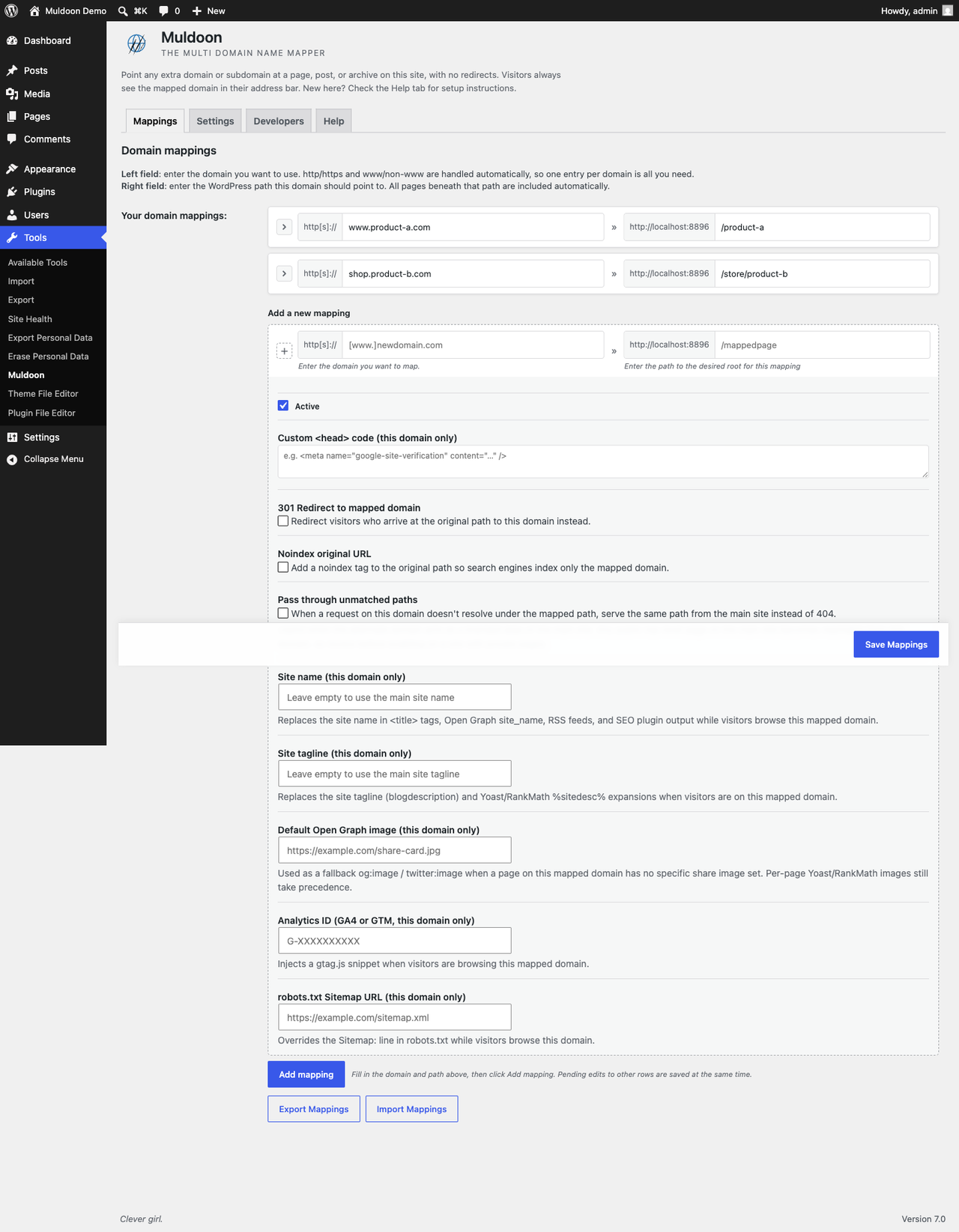
The Muldoon admin screen at Tools → Muldoon, showing domain mappings and their per-mapping advanced options.
Requirements
- WordPress 4.5+
- PHP 7.4+ recommended
- DNS: each additional domain's A-record must point to the same IP as your main domain
- Hosting: each additional domain must be routed to the same WordPress root directory (virtual host / domain alias / parked domain)
Test before configuring: place a
test.txtfile in your WordPress root and confirm it is reachable from bothyourmain.com/test.txtandyouraddon.com/test.txtwithout redirects. Only proceed once this passes.
Installation
- Upload the plugin folder to
/wp-content/plugins/. - Activate through the WordPress Plugins menu.
- Navigate to Tools → Muldoon.
- Enter the additional domain in the left field and the WordPress path in the right field.
- Save.
nginx users: change the PHP Server-Variable setting to
HTTP_HOSTin the Settings tab.
Features
Core mapping
- Domain-stays-in-bar mapping, with no redirect and no iframe
- Rewrites all standard WordPress permalink functions (pages, posts, CPTs, archives, categories, feeds, nav menus)
- Keeps the home link and search-form action on the mapped domain while a visitor is browsing it (filterable via
muldoon_filter_rewrite_home_url) - Handles
http/httpsandwww/non-wwwautomatically, so one entry per domain is sufficient - Multiple mappings supported; all descendant URIs are mapped automatically
- Core, Yoast SEO, and RankMath XML sitemap compatibility
- Elementor preview URL compatibility
Per-mapping options (advanced panel)
| Option | Description |
|---|---|
| Active / Inactive toggle | Disable a mapping without deleting it |
| 301 redirect | Sends visitors arriving at the original path to the mapped domain |
| Noindex on original path | Injects <meta name="robots" content="noindex,follow"> on the original WordPress path so search engines index only the mapped domain |
| Pass through unmatched paths | When a request on the mapped domain doesn't resolve under the mapping's subtree, serves the same path from the main site instead of returning 404. Use when the mapped domain is a branded alias of the main site (e.g. root maps to a landing page, other paths mirror the main site). Off by default; review before enabling on sites with private/unlinked pages, since all public top-level content becomes reachable from the mapped domain. |
| Site name | Overrides bloginfo('name') / get_option('blogname') while visitors are on this mapped domain. Flows through to <title> tags, og:site_name, RSS feed channel, Yoast %%sitename%%, RankMath, etc. Leave empty to inherit the main site's name. |
| Site tagline | Overrides bloginfo('description') / get_option('blogdescription') while on this mapped domain. Used by Yoast %%sitedesc%%, RankMath, RSS, and themes that surface the tagline. |
| Default Open Graph image | Fallback og:image / twitter:image URL used when a page on this mapped domain has no per-page share image. Per-page Yoast/RankMath images still take precedence. |
Custom <head> code |
HTML injected into wp_head only when the mapped domain is active (Google Site Verification tags, etc.) |
| GA4 / GTM ID | Outputs a gtag.js snippet in wp_head only on the mapped domain. Accepts G-XXXXXXXXXX or GTM-XXXXXXX format |
| robots.txt sitemap URL | Replaces the Sitemap: directive in robots.txt when the mapped domain is active |
| Test connection | Performs a live HTTP check and displays the response code |
SEO
- Canonical tag: a single
<link rel="canonical">using the mapped domain on every mapped page. When Yoast SEO or RankMath is active, their canonical is rewritten instead (no duplicate tag); otherwise core'srel_canonicalis replaced with one mapped-domain tag. - Open Graph URL replacement: patches
og:urlfor Yoast SEO and RankMath - XML sitemaps: mapped-domain URLs in the core WordPress sitemap (
wp-sitemap.xml), Yoast, and RankMath sitemaps - REST API domain replacement: rewrites domain references in REST API JSON responses
Administration
- Admin bar badge: shows the active mapped domain when browsing the frontend while logged in
- Export Mappings: downloads all mappings as a JSON file
- Import Mappings: uploads a previously exported JSON file and merges it with existing mappings through the sanitizer, reporting how many were added vs. skipped (duplicate/invalid)
- Drag-to-reorder: drag mapping rows to set a custom sort order
- Cache flush: automatically purges WP Super Cache, W3 Total Cache, WP Rocket, LiteSpeed Cache, WP Engine, and the object cache when mappings or settings change
Settings tab options
| Setting | Description |
|---|---|
| PHP Server-Variable | SERVER_NAME (default) or HTTP_HOST (recommended for nginx) |
| Enhanced compatibility mode | Disables URI replacement inside wp-admin to resolve page-builder conflicts |
| Excluded domains | One domain per line; requests from these domains are not processed (useful for WPML / Polylang language domains) |
Developer hooks
All action hooks are prefixed muldoon_action_ and all filter hooks are prefixed muldoon_filter_. Search for those prefixes in the plugin source to see every available hook.
Key hooks:
| Hook | Type | Description |
|---|---|---|
muldoon_filter_uri_match |
filter | Override or extend the URI matching logic |
muldoon_filter_request_uri |
filter | Modify the rewritten REQUEST_URI |
muldoon_filter_filtered_uri |
filter | Modify a replaced URI before it is returned |
muldoon_filter_rewrite_home_url |
filter | Return false to stop rewriting home_url() to the mapped domain |
muldoon_filter_save_mapping |
filter | Modify a single mapping before it is saved |
muldoon_filter_save_mappings |
filter | Modify the full mappings array before it is saved |
muldoon_filter_save_settings |
filter | Modify the settings array before it is saved |
muldoon_filter_mapping_sort |
filter | Change the default sort key (domain) |
muldoon_filter_mapping_class |
filter | Add CSS classes to mapping article elements |
muldoon_action_settings_tab |
action | Add content to the Settings tab |
muldoon_action_after_mapping_body |
action | Add fields to each mapping's advanced panel |
Frequently asked questions
Does it work with caching plugins? WP Fastest Cache works out of the box. W3 Total Cache requires enabling "Cache alias hostnames" in Page Cache settings (leave "Additional home URLs" empty). CSS/JS minification in W3TC works on the main domain only. The plugin automatically flushes supported caches when mappings change.
Does it work with page builders? Yes, including Elementor. If a page builder fails to load mapped pages in the editor, enable Enhanced Compatibility Mode in the Settings tab.
Does it work with Yoast SEO?
Yes. XML sitemaps list the mapped domains, og:url is patched, and the canonical is rewritten to the mapped domain (no duplicate tag).
Does it work with RankMath?
Yes. XML sitemaps list the mapped domains, og:url is patched, and the canonical is rewritten to the mapped domain.
What about the default WordPress sitemap?
The core wp-sitemap.xml entries that fall under a mapped path are rewritten to the mapped domain too.
What about SEO / duplicate content? Enable the "Noindex on original path" option per mapping, or enable the "301 redirect" option. The plugin also automatically outputs a canonical tag on mapped pages.
Does it support international domain names (IDN)?
Yes, but use punycode format. For example, www.küche.at should be entered as www.xn--kche-0ra.at.
Does it support HTTPS? Yes. All domains must share the same SSL setup.
Is it compatible with WooCommerce? Not reliably. WooCommerce uses many non-standard link-generation functions that cannot be intercepted consistently.
Is it compatible with WPML / Polylang? Partially. If those plugins manage domains of their own, add them to the Excluded Domains list in the Settings tab to prevent conflicts.
Is it compatible with WordPress Multisite? No. Multisite has built-in domain mapping. This plugin targets single-site installations only.
License
GPLv3. See https://www.gnu.org/licenses/gpl-3.0.html
Releases
1 release. Each count is every asset in that release; expand a row for the breakdown.