Ask First Analytics WP Registry grade A. No security issues foundWP RegistryNo security issues foundOpen the reportA
Wordpress Plugin to empower site users to consent first to GA4 analytics
Install
Upload it under Plugins → Add New Plugin → Upload Plugin, then activate.
Install straight from GitHub with WP-CLI:
wp plugin install https://github.com/jaykarr/ask-first-analytics/releases/download/v1.2.1/ask-first-analytics-1.2.1.zipConsent-first Google Analytics 4 for WordPress.
Ask First Analytics keeps the Google tag out of the initial document, asks visitors before optional analytics loads, stores the choice only in that browser's first-party storage, and suppresses analytics on configured sensitive pages.
It does not claim legal compliance. Each site owner remains responsible for provider configuration, sensitive-page classification, public policy language, and release testing.
Screenshots
| Consent prompt | Preference panel |
|---|---|
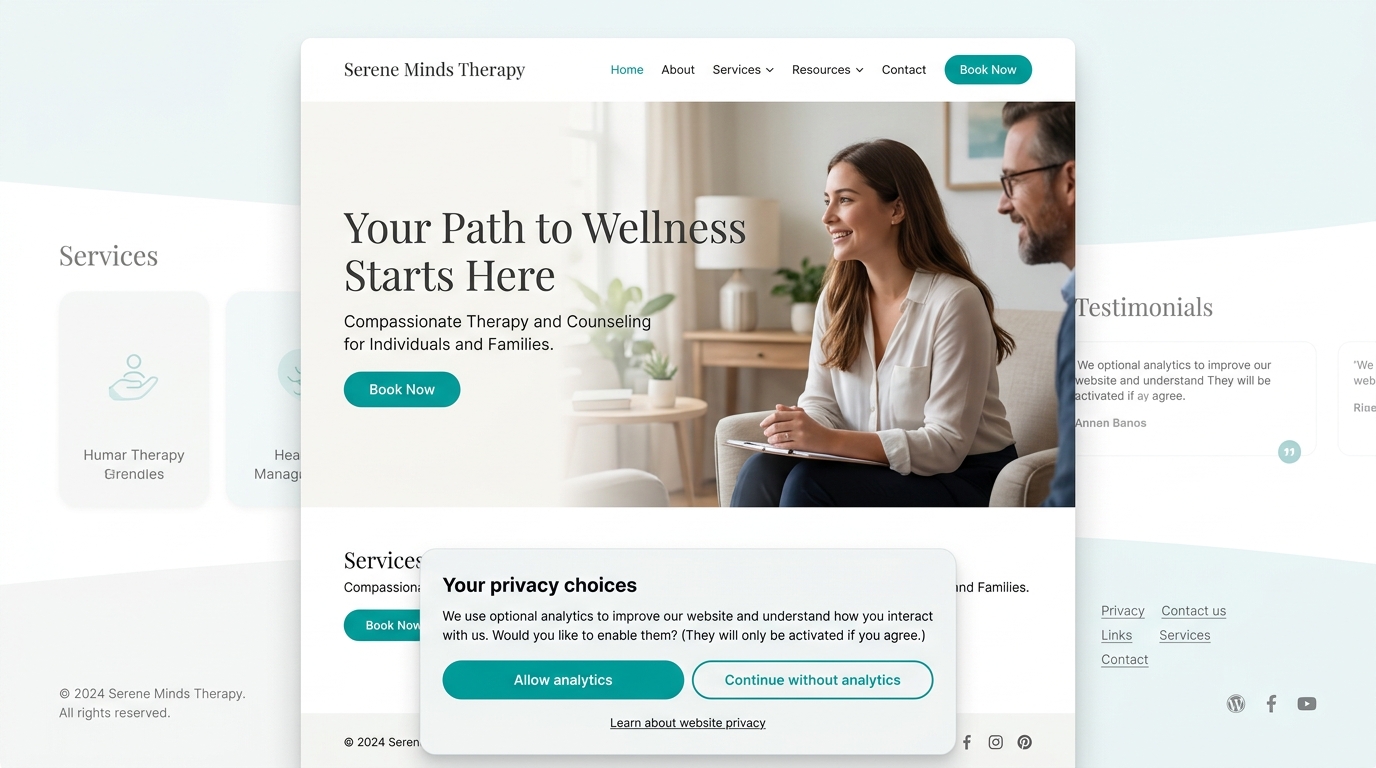 |
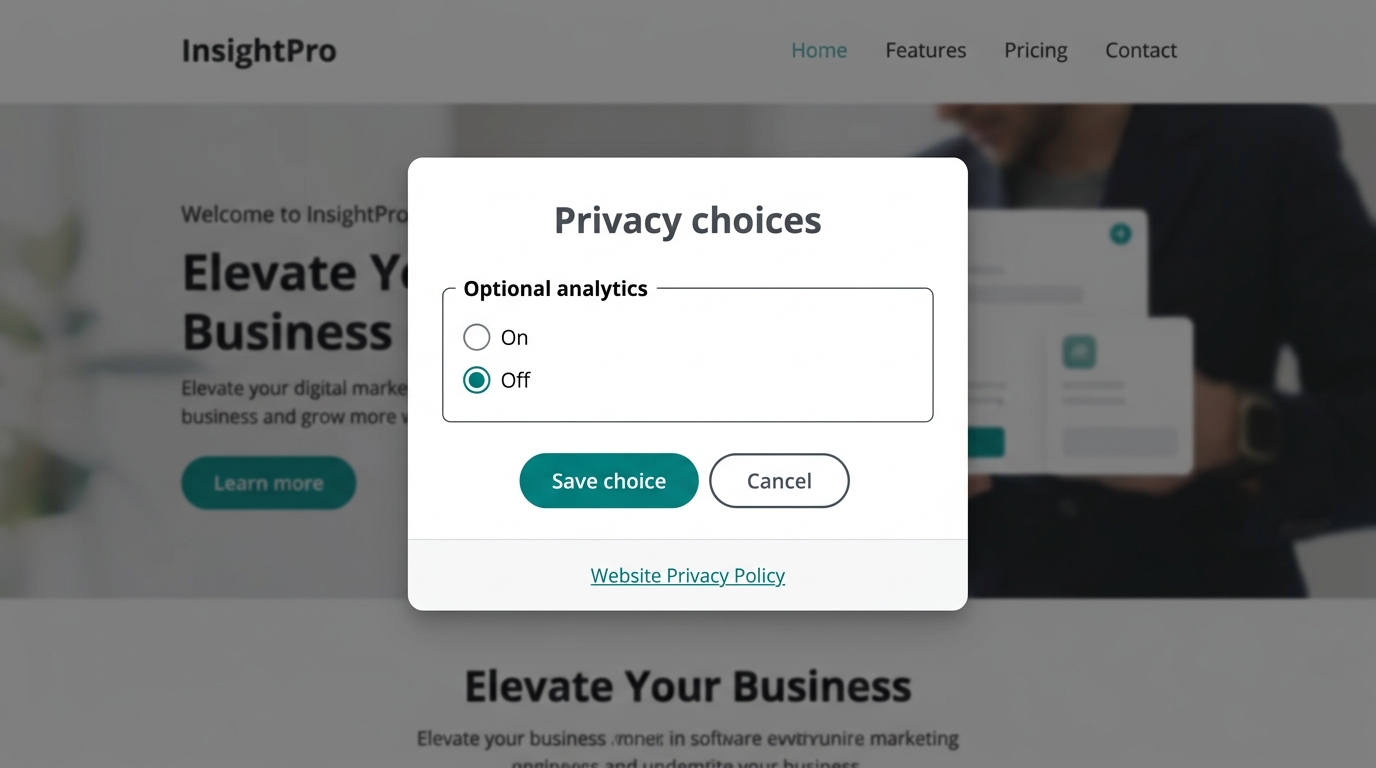 |
| Admin settings | Content inventory |
|---|---|
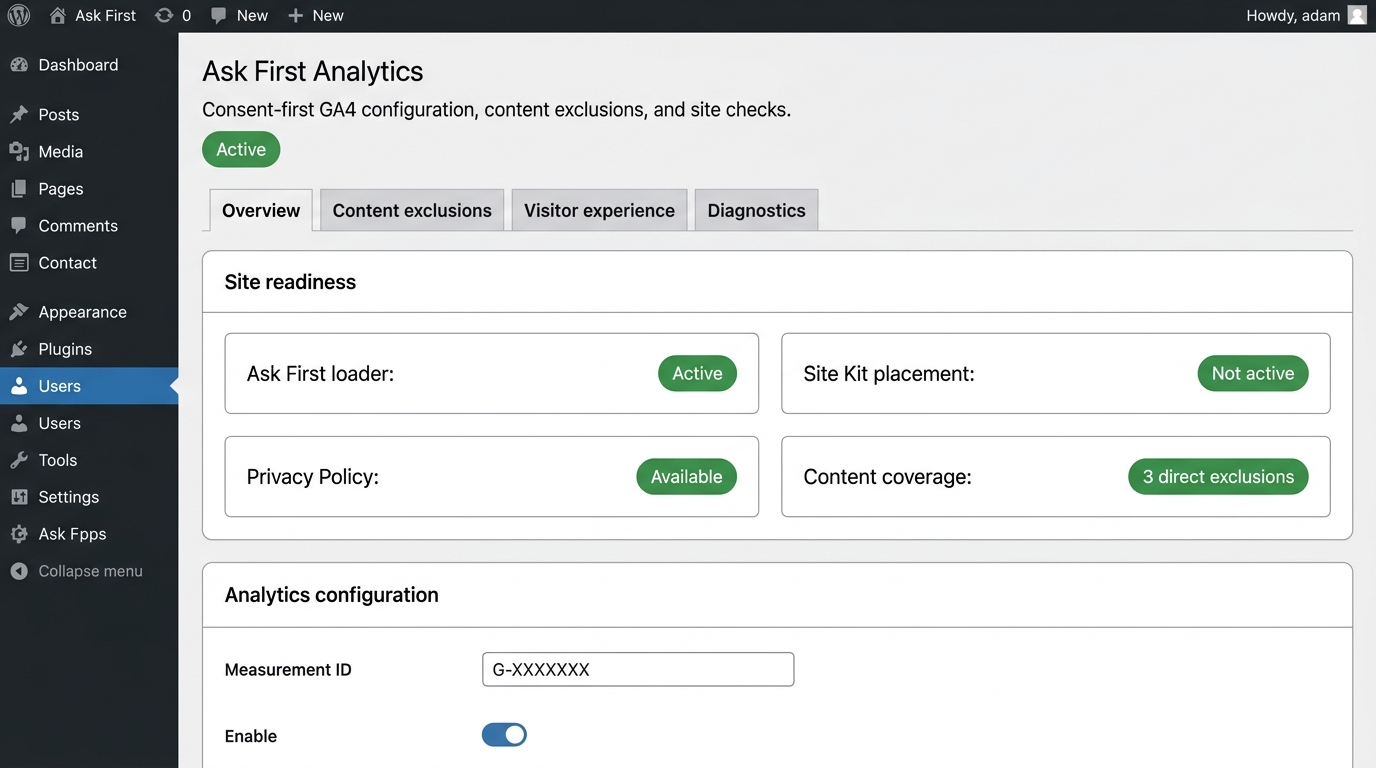 |
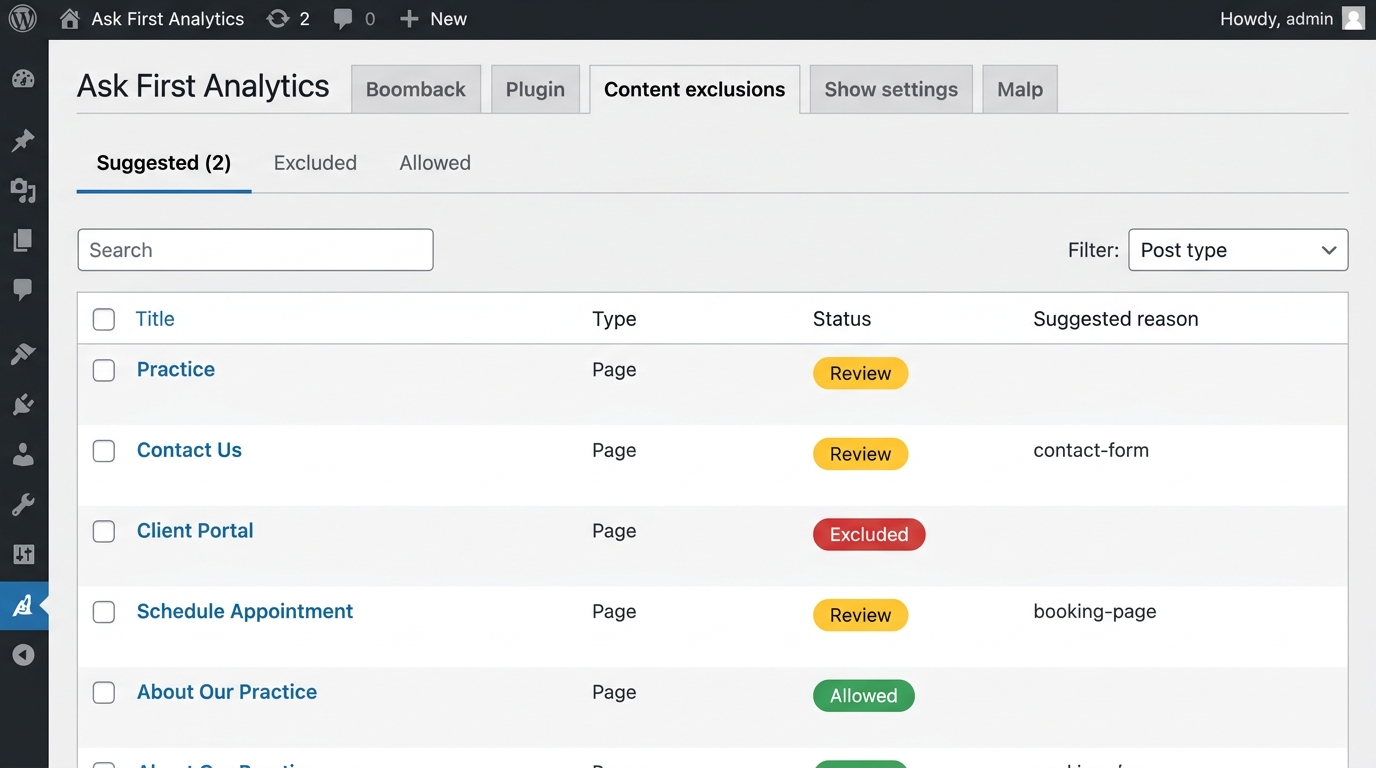 |
Why Ask First Analytics?
Most consent plugins are designed for advertising networks and retargeting — they manage dozens of cookie categories, load external vendor scripts, and add visual complexity. Ask First Analytics is different:
| Ask First Analytics | Typical consent plugins | |
|---|---|---|
| Purpose | Ethical site analytics only | Multi-vendor ad/tracking consent |
| External requests before consent | Zero | Vendor scripts load immediately |
| Storage | Browser localStorage only | Cookies + vendor cloud |
| Dependencies | None | jQuery, vendor SDK, external CSS |
| Consent categories | One: optional analytics | Dozens: necessary, functional, performance, targeting… |
| Configuration | One measurement ID | Cookie audits, vendor mapping, legal templates |
| Sensitive page protection | Built-in | Not available |
| WP Consent API | Built-in (provider + listener) | Varies |
| Designed for | Therapists, healthcare, any privacy-focused site | E-commerce, advertising-driven sites |
If you run a therapy practice, healthcare office, or any site where visitor privacy is paramount and you just want to understand which pages people visit — this plugin is built for you.
Requirements
- WordPress 6.8 or newer
- PHP 8.1 or newer
- A GA4 web-stream measurement ID beginning with
G- - (Optional) WP Consent API for interoperability with other consent-aware plugins
Install
- Inventory every existing source of Google Analytics or Google Tag Manager code.
- Install the versioned ZIP through Plugins -> Add Plugin -> Upload Plugin.
- Activate Ask First Analytics.
- Open Settings -> Analytics Privacy.
- Add the site's GA4 measurement ID and review the automatically suggested content exclusions.
- Add the persistent control to the site's footer.
- Disable every other tag source. If Site Kit is connected, turn off Place Google Analytics code while leaving reporting connected.
- Run the rendered-page check and resolve any competing tag evidence.
- Enable the plugin's analytics switch.
- Purge page and CDN caches.
- Run the unknown, denied, granted, sensitive-page, and withdrawal tests in a private browser before production use.
Persistent control
In a block theme, add the Analytics privacy choices block to a footer or other persistent template part. Its sidebar settings provide a label and button-or-link presentation without code.
The equivalent shortcode is:
[ask_first_analytics_privacy_choices]Themes may render the same button directly:
<?php
if (function_exists('ask_first_analytics_render_privacy_choices_button')) {
    ask_first_analytics_render_privacy_choices_button([
        'label'   => 'Cookie preferences',
        'class'   => 'site-footer__privacy-link',
        'element' => 'a',
    ]);
}
?>
The function echoes by default and also returns the generated HTML. Pass
'echo' => false to return without echoing. Supported arguments are label,
class (a string or array), element (button or a), and an optional
anchor href. Existing no-argument calls remain compatible. The final markup
passes through ask_first_analytics_launcher_html with the normalized
arguments as the second filter parameter.
If analytics is configured and the theme does not place a control, the plugin
adds a fixed fallback button at wp_footer. Its corner is selectable under
Visitor experience and filterable per site:
add_filter(
    'ask_first_analytics_fallback_position',
    static fn (): string => 'bottom-left'
);
The initial prompt defaults to a full-width bottom banner (banner) that reserves page space. Alternate floating card layouts (card-right, card-center, card-left) float above the page without altering the page layout. Preferences always open in the centered panel.
Sensitive pages
Analytics is always disabled for:
- administration, REST, feeds, previews, error pages, and other non-public requests;
- logged-in users when that setting is enabled;
- configured page IDs, path prefixes, post types, and block names;
- content marked Sensitive page: disable analytics; and
- requests denied by the site filter.
The filter is deny-only:
add_filter(
    'ask_first_analytics_allowed',
    static function (bool $allowed, array $context): bool {
        if (str_starts_with($context['path'], '/private-area')) {
            return false;
        }

        return $allowed;
    },
    10,
    2
);
It cannot override a built-in denial.
Theme design system
The plugin's stylesheet lives in the ask-first-analytics cascade layer.
Normal, unlayered site CSS therefore wins without specificity escalation. Only
visibility, fixed positioning, stacking, and visually hidden live-status rules
retain deliberate !important safeguards.
The plugin ships accessible neutral styles and inherits the active theme's
typography. Map a theme's semantic tokens through --afa-* custom properties:
:root {
  --afa-font-body: var(--site-font-body, inherit);
  --afa-font-heading: var(--site-font-display, inherit);
  --afa-text: var(--site-text, #1d2327);
  --afa-muted: var(--site-muted, #50575e);
  --afa-surface: var(--site-surface, #fffdf8);
  --afa-border: var(--site-border, #8c8f94);
  --afa-link: var(--site-link, #135e96);
  --afa-primary-bg: var(--site-action, #1d2327);
  --afa-primary-text: var(--site-on-action, #ffffff);
  --afa-focus: var(--site-focus, #2271b1);
  --afa-radius: var(--site-radius, 0.375rem);
  --afa-shadow: var(--site-shadow, 0 0.75rem 2.5rem rgb(0 0 0 / 18%));
  --afa-prompt-shadow: var(--site-prompt-shadow, 0 -0.5rem 1.5rem rgb(0 0 0 / 12%));
  --afa-control-height: 2.75rem;
  --afa-control-padding: 0.75rem 1rem;
  --afa-control-font-size: 0.9375rem;
  --afa-launcher-height: var(--afa-control-height);
  --afa-launcher-padding: var(--afa-control-padding);
  --afa-launcher-font-size: var(--afa-control-font-size);
}
Use the --afa-control-* values for all controls, then override only the
--afa-launcher-* subset when a footer launcher needs different physical
dimensions. Use --afa-prompt-shadow to customize top-edge elevation on full-width
banners. The theme owns appearance only. Do not hide either choice or
change the component's behavior.
[!NOTE] Cascade Layers & Theme Typography Resets: Because the plugin stylesheet lives in
@layer ask-first-analytics, any unlayered CSS rules in active themes win over layered rules regardless of selector specificity. Consumer themes with global unlayered tag selectors (e.g.h1, h2, p { color: ... }) will override the plugin's--afa-text/--afa-mutedcolor mapping on bare heading or paragraph elements inside the prompt unless explicitly scoped or re-asserted on.ask-first-analytics-root.
Stable styling parts
data-afa-component and data-afa-part are the semver-stable integration
selectors. Class names are implementation details and may change in a major
release. Current parts are:
[data-afa-component="prompt"],preferences, andlauncherfor complete components;[data-afa-part="title"],description,actions,choice,policy,status, andlauncherfor styling component regions.
Site adapter pattern
Keep brand and site policy outside the reusable plugin. A minimal adapter enqueues unlayered token mappings and adds only reviewed site-specific denials:
add_action('wp_enqueue_scripts', static function (): void {
    $path = get_stylesheet_directory() . '/ask-first-analytics.css';

    if (file_exists($path)) {
        wp_enqueue_style(
            'site-ask-first-analytics',
            get_stylesheet_directory_uri() . '/ask-first-analytics.css',
            ['ask-first-analytics-consent'],
            (string) filemtime($path)
        );
    }
}, 110);

add_filter(
    'ask_first_analytics_allowed',
    static function (bool $allowed, array $context): bool {
        if (is_page_template('template-intake.php') || is_page('client-portal')) {
            return false;
        }

        return $allowed;
    },
    10,
    2
);
The companion CSS should primarily map tokens. Unlayered selector overrides are appropriate for site-specific typography or interaction details:
:root {
  --afa-font-body: var(--site-font-body, system-ui, sans-serif);
  --afa-surface: var(--site-surface, #fff);
  --afa-primary-bg: var(--site-action, #1d2327);
  --afa-primary-text: var(--site-on-action, #fff);
}

.site-footer {
  --afa-launcher-height: 2.25rem;
  --afa-launcher-padding: 0.625rem 1.125rem;
  --afa-launcher-font-size: 0.6875rem;
}
Hooks and filters
| Hook | Type | Purpose |
|---|---|---|
ask_first_analytics_allowed |
Filter | Deny-only page policy extension. Receives bool $allowed and array $context. Cannot override built-in denials. |
ask_first_analytics_launcher_html |
Filter | Modify the final launcher button/link markup. Receives string $html and array $args. |
ask_first_analytics_consent_config |
Filter | Modify the JSON config passed to the browser script. Receives array $config, array $settings, array $decision. |
ask_first_analytics_settings_defaults |
Filter | Override default settings from a must-use plugin or managed host. Receives array $defaults. |
ask_first_analytics_footer_priority |
Filter | Change the wp_footer priority for the consent component. Default 1. Also configurable via the ASK_FIRST_ANALYTICS_FOOTER_PRIORITY constant. |
ask_first_analytics_fallback_position |
Filter | Change the fallback launcher corner. Returns bottom-left or bottom-right. |
Theme adapter examples
The examples/ directory contains complete adapter templates for three
common WordPress setups:
| Directory | Theme type | Approach |
|---|---|---|
examples/theme-adapter-block/ |
Block themes (Twenty Twenty-Five, etc.) | Maps --wp--preset--* tokens |
examples/theme-adapter-classic/ |
Classic PHP themes | Direct hex/font-family values |
examples/theme-adapter-builder/ |
Divi, Elementor, Beaver Builder | Adds defensive rules for builder CSS resets |
Each adapter includes a README.md with step-by-step setup instructions and
an adapter.css you can copy into your child theme. The adapter pattern
keeps brand and site-policy decisions out of the reusable plugin.
Data behavior
- Consent key:
ask_first_analytics_consent - Consent stays in
localStorageon the current browser origin. - No consent choice is posted to WordPress or a consent vendor.
- Unknown, malformed, unavailable, or outdated storage blocks analytics.
- The consent generation advances automatically after material changes to the analytics destination, visitor wording, policy, or eligibility rules.
- The Google tag is not present in initial HTML.
- Basic Consent Mode v2 grants only
analytics_storage; all advertising purposes remain denied. - Automatic page views and Google Signals are disabled.
- The plugin sends one reviewed
page_viewcontaining title, origin plus path, and a minimized referrer. Query strings and fragments are removed. - Withdrawal disables the measurement ID, updates consent when possible,
removes accessible
_gacookies, and reloads into a tag-free document.
Development
From the repository root:
php tests/page-policy-test.php
php tests/admin-contract-test.php
php tests/launcher-api-test.php
bash bin/build-zip.sh
The dependency-free PHP suite exercises the server-side deny policy without changing a WordPress site. A separate staging smoke test should confirm one approved view in GA4 Realtime.
Changelog
1.2.0
- Moved public component CSS into a cascade layer and removed blanket armor
- Added shared control and launcher-specific physical-dimension tokens
- Added a configurable launcher API with link, label, class, return, and filter support
- Added bottom-banner and corner-card prompt layouts plus fallback-corner controls
- Added a dynamic Privacy Choices block for block-theme footers
- Documented stable component parts and the reusable site-adapter pattern
- Added extensibility filters for consent config, settings defaults, and footer priority
- Added generic theme adapter examples for block, classic, and builder themes
1.1.0
- Added a four-tab administration screen with an at-a-glance readiness summary
- Added read-only Site Kit configuration detection and same-origin HTML checks
- Added a searchable content inventory with explainable exclusion suggestions
- Automated consent-generation renewal after material configuration changes
- Prevented enabling the loader while known duplicate-tag blockers remain
1.0.0
- Initial consent-first GA4 loader
- Versioned browser-local preference
- Sensitive-page policy and editor override
- Accessible prompt, preference panel, shortcode, and fallback control
- Theme-token adapter contract
- Deterministic browser and release-package tests
Releases
2 releases. Each count is every asset in that release; expand a row for the breakdown.