Install
This is the repository archive. It installs, but the folder name will carry the branch suffix and updates will not flow.
Install straight from GitHub with WP-CLI:
wp plugin install https://github.com/jacckisback/gustinai-multilingual/archive/refs/heads/main.zip
🌐 English · Français · Español · Italiano · Deutsch · Português







Turn any WordPress site into a multilingual site translated by AI: real pages, translated URLs, SEO and GEO done right. No subscription and no word quota: you only pay for the AI you use, directly to Anthropic or OpenAI.
⬇️ Download the plugin (.zip) · 🚀 Quick start · 💸 Costs · 📊 Comparison · 🧠 How it works · ❓ FAQ
📑 Contents
- ✨ Why GustinAI Multilingual?
- 🌍 Why make your site multilingual?
- 📸 See it in action
- 🚀 Quick start in 5 minutes
- 💸 What does it really cost?
- 📊 Comparison with paid translation plugins
- 🧠 How it works
- 🔎 Multilingual SEO, by the book
- 🤖 GEO: being visible in AI answers
- 🧩 Page builders
- ⚙️ Under the hood
- 🔐 Security and privacy
- 🛠️ For developers
- ⚠️ Known limitations
- ✅ Quality and tests
- ❓ FAQ
- 👋 About
✨ Why GustinAI Multilingual?
| 💸 No subscription, no word quota | The plugin is free and open source (GPL). Translation is billed by the AI provider at cost, with your own key: about $0.06 per page and per language with Claude Opus 5.5, the most natural model, and less than $0.002 with Claude Haiku 5.5 (see costs). |
| 🏠 Your translations belong to you | Each translation is a real WordPress page stored in your database. No third-party server sits between your visitors and your content. |
| 🧱 Your layout never breaks | The AI never sees your HTML: only the texts are sent, the markup is replaced by numbered markers and then rebuilt exactly as it was. Gutenberg blocks, Elementor data and Divi modules stay intact. |
| 🔎 SEO done by the book | One URL per language, no automatic redirect, hreflang + x-default on every page, translated slugs and categories: exactly what Google recommends.[^g-multi][^g-hreflang] |
| 🤖 Ready for AI search engines (GEO) | One llms.txt per language[^llms], structured data linking each page to its translations[^schema], and a translation prompt written for SEO and GEO. |
| ⚡ Zero AI during visits | Translations are generated once, in the admin. Visitors get static pages: compatible with every cache and CDN, with no JavaScript added. |
🌍 Why make your site multilingual?
- 🛒 People buy in their own language. In a survey of 8,709 consumers in 29 countries, CSA Research found that 66% would choose a similar product that has information in their language, and 75% are more likely to buy the same brand again when customer care speaks their language.[^csa]
- 🧭 Google needs one URL per language. Google recommends a separate URL for each language version and
hreflangtags so it can show the right version to each user.[^g-multi][^g-hreflang] A translation that only appears in the browser, or that depends on a cookie, cannot be indexed. - 🌐 WordPress is everywhere. WordPress powers 39.5% of all websites and 58.2% of sites whose CMS is known.[^w3techs] GustinAI Multilingual adds languages to the site you already have, without rebuilding it.
[!TIP] In plain words: a multilingual site is not a widget that translates on the fly. It is one page per language, at its own address (
/en/…,/es/…), that Google can read and that a visitor can share. This is exactly what the plugin creates.
📸 See it in action
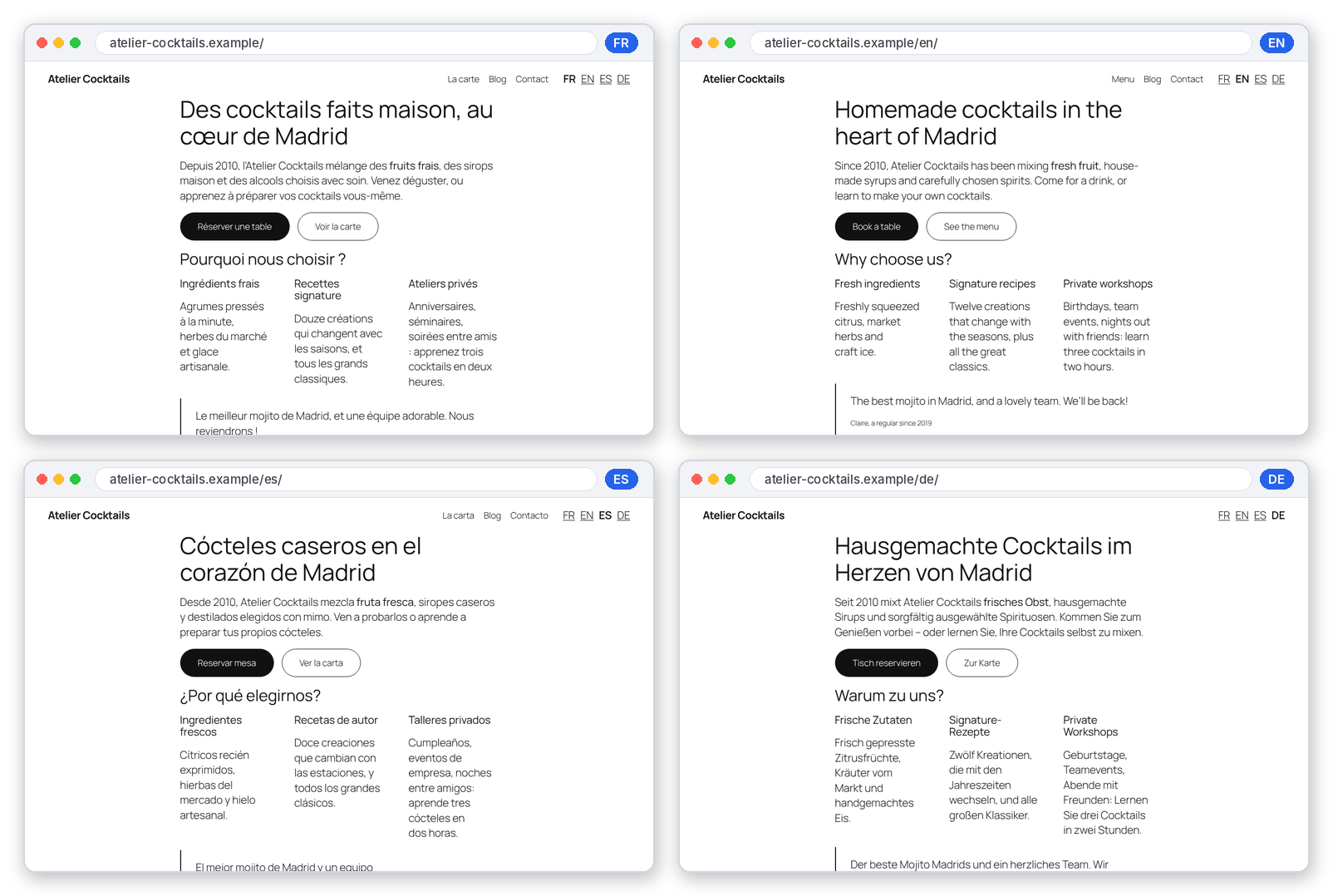
The same page in 4 languages. Each one has its own URL, its translated menu and a language switcher (simple HTML links, no flags). Demo site.
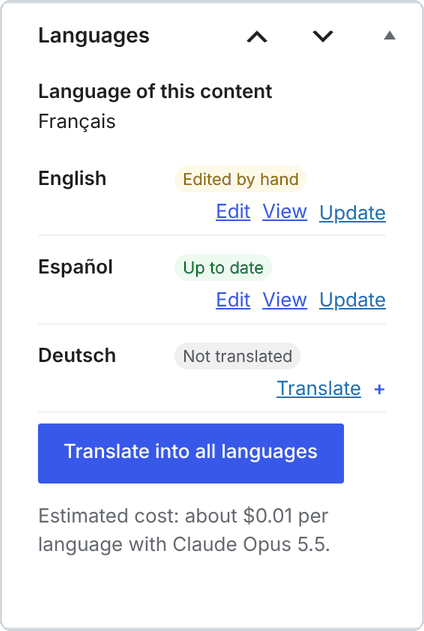
In the editor: the status of each language (Up to date, Edited by hand, Not translated), one-click translation and the estimated cost. |
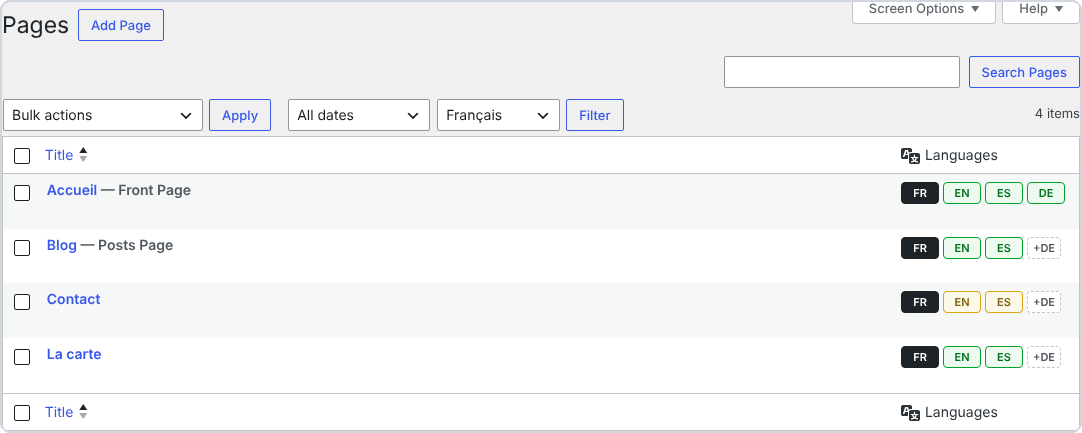
In your page lists: 🟩 up to date, 🟨 original changed since the translation, 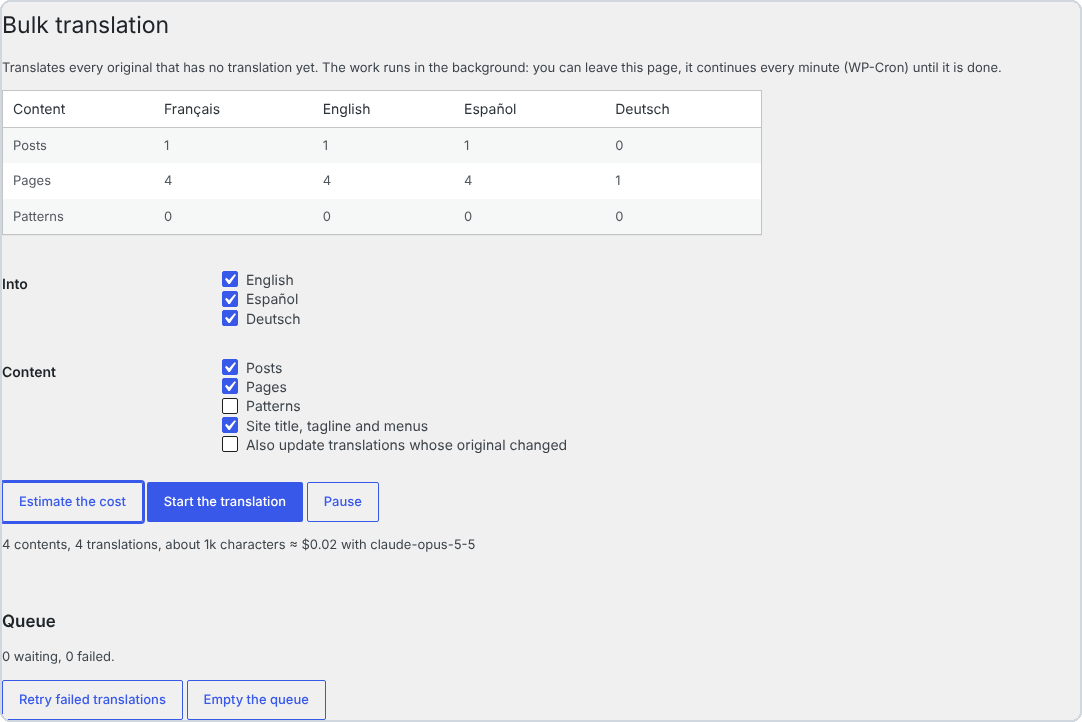
Bulk translation: estimate the cost, then translate the whole site in the background. |
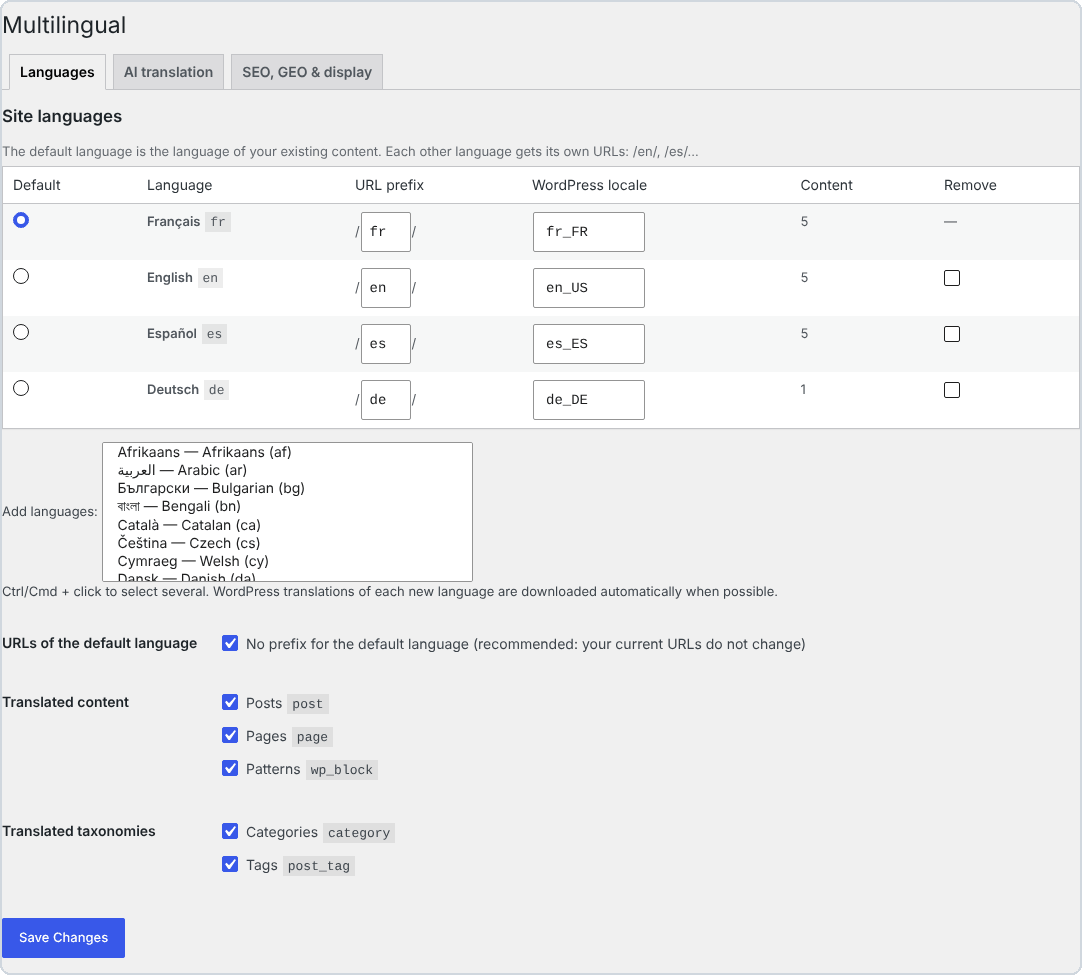
Languages: 57 languages, editable URL prefix, default language without prefix (your current URLs don't change).
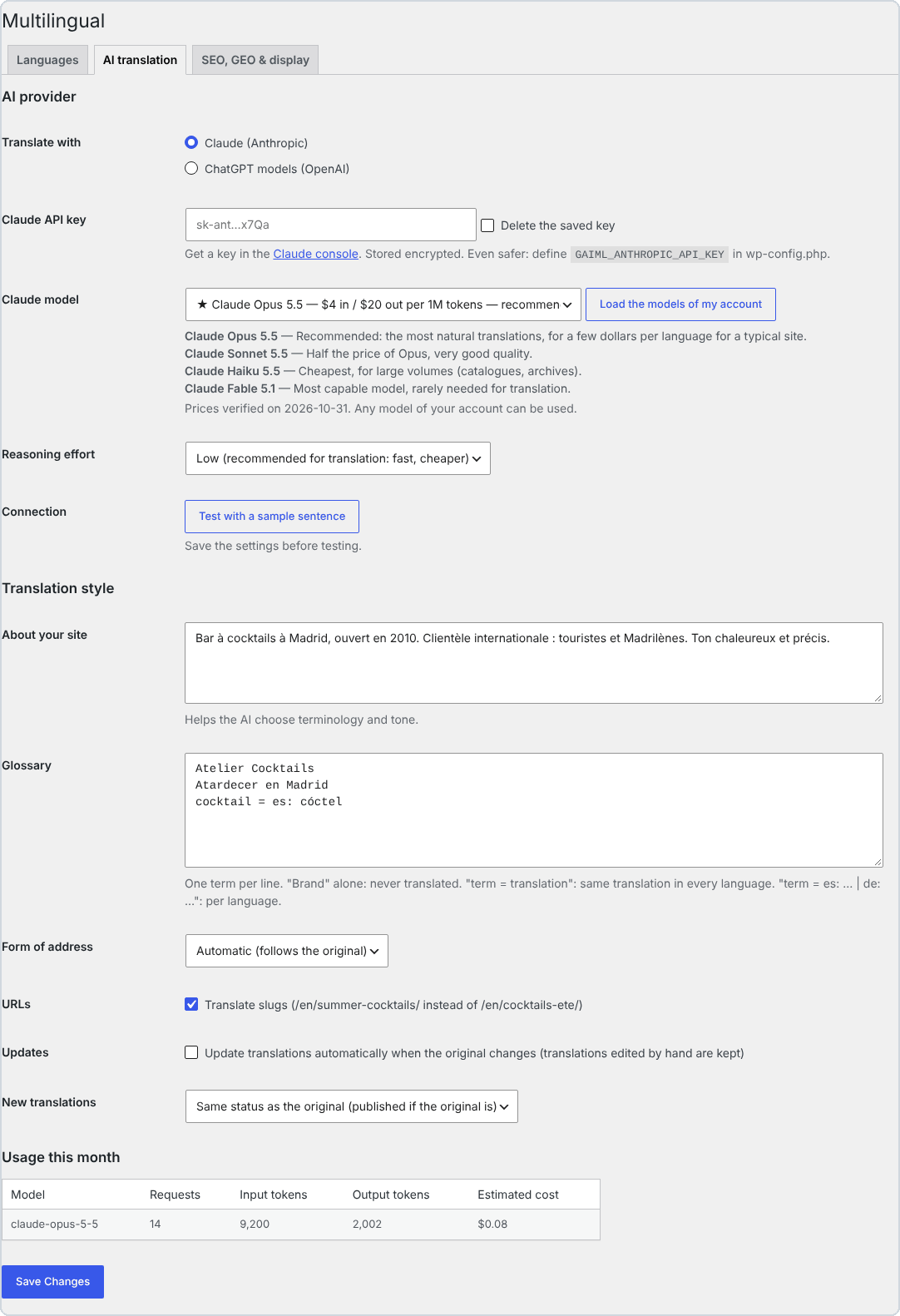
AI translation: Claude or OpenAI, recommended model with prices, site description, glossary, form of address, monthly usage.
🚀 Quick start in 5 minutes
Requirements: WordPress 6.5+, PHP 8.1+, “pretty” permalinks, and a Claude (Anthropic) or OpenAI API key.
- Install. Download the zip, then go to Plugins → Add New → Upload Plugin and activate it.
- Choose your languages. Go to Multilingual → Settings → Languages. Your site's current language becomes the default language. WordPress translations for each new language are downloaded automatically.
- Get an API key.
- Claude: create a key on the API keys page of the Claude Console.[^a-key]
- OpenAI: create a key on the OpenAI platform.
- Configure the AI. In Multilingual → Settings → AI translation:
- paste the key and keep the recommended model;
- describe your site in 2 or 3 sentences, and add your brand names to the glossary;
- click Test with a sample sentence.
- Translate.
- Click +EN next to a page and check the result.
- Then go to Multilingual → Bulk translation: Estimate the cost, then Start the translation.
- Add the language switcher. Use the Language switcher block, the
[gaiml_switcher]shortcode, or let the plugin add it to a menu automatically.
[!IMPORTANT] Claude keys and workspaces: when you create the key, pick the “Default” workspace. The Claude API refuses requests made with a key that is not scoped to a workspace unless they carry an extra
anthropic-workspace-idheader, which the plugin does not send.[^a-key]
[!TIP] Even safer: declare your keys in
wp-config.phprather than in the database. They then never appear in the admin.define( 'GAIML_ANTHROPIC_API_KEY', 'sk-ant-...' ); define( 'GAIML_OPENAI_API_KEY', 'sk-...' );
[!NOTE] Want to proofread before publishing? Set New translations to Draft, to review before publishing. Google rewards quality content “however it is produced”.[^g-ai] Proofreading your key pages is the best guarantee.
💸 What does it really cost?
The plugin is free. You only pay the AI provider for the texts you send, with your own key. Prices were checked on the official pages on 2 November 2026:
| Provider | Model | Price per million tokens (input / output) | ≈ Cost per 100 pages of ~800 words, per language* |
|---|---|---|---|
| Claude | Claude Opus 5.5 ⭐ recommended | $4 / $20[^a-pricing] | ≈ $5.80 |
| Claude | Claude Sonnet 5.5 | $2 / $10[^a-pricing] | ≈ $2.90 |
| Claude | Claude Haiku 5.5 | $0.10 / $0.50[^a-pricing] | ≈ $0.15 |
| OpenAI | GPT-6.1 Sol ⭐ recommended | $2 / $10[^o-pricing] | ≈ $2.90 |
| OpenAI | GPT-6.1 Terra | $1 / $5[^o-pricing] | ≈ $1.45 |
| OpenAI | GPT-6 Luna | $0.10 / $0.50[^o-pricing] | ≈ $0.15 |
* Estimate calculated by the plugin from the public prices: about 1 token per 3.5 characters, plus the instructions and JSON wrapping of each request, with a low reasoning effort. The plugin shows its own estimate for your content before you translate anything.
[!TIP] What is a token? It is the unit the AI providers bill: roughly ¾ of an English word. A page of 800 words is about 1,000 to 1,500 tokens.
Three mechanisms keep the bill low:
- 🧠 Translation memory. An identical sentence is only paid for once, and an edited page only sends the sentences that changed.
- 🗜️ Prompt caching. On Claude, the instructions shared by every request are cached. Cache reads cost 5% of the input price on Opus 5.5 and Sonnet 5.5.[^a-cache]
- 🎚️ Low reasoning effort by default. Translating does not need long reasoning, so it is faster and cheaper.
📊 Comparison with paid translation plugins
Worked example: a site of 100 pages (~80,000 words) translated into 5 languages
That is 400,000 words to translate, because WPML and Weglot count words once per target language.[^wpml-words][^weglot-words]
| Solution | What you pay in year 1 | And after that? |
|---|---|---|
| GustinAI Multilingual | $0 plugin + ≈ $29 of AI, once (Claude Opus 5.5) ≈ $14.50 with Sonnet 5.5 or GPT-6.1 Sol, ≈ $0.75 with Haiku 5.5 |
$0 of licence. Only new or changed texts are sent to the AI. |
| Weglot | €2,990 / year: the Advanced plan (1,000,000 words, 10 languages), because Pro stops at 200,000 words[^weglot][^weglot-words] | Same amount every year. If you cancel, the translations disappear from your site.[^weglot-cancel] |
| WPML | ≈ €614: the CMS plan at €99 (22,500 AI words included) + ≈ €515 of extra words at the public pay-as-you-go rates[^wpml][^wpml-words] | Yearly renewal for updates, plus words for new content. |
| TranslatePress | ≈ €195 to €349 / year: Personal (€99, 50,000 AI words) + 100,000-word packs at €24, or Developer (€349, 500,000 words)[^tp] | Yearly licence. The AI word quota is topped up at renewal.[^tp] |
| GTranslate | $350 / year: the Business plan, the first one with translated URLs (unlimited words)[^gtranslate] | Yearly subscription. Translations are served by GTranslate's proxy.[^gtranslate] |
| Polylang Pro | €99 / year (1 site) + the DeepL API, billed separately with your own key[^polylang] | No one-click “translate everything” feature, according to the vendor.[^polylang] |
Public list prices excluding VAT, checked on the vendors' pages on 2 November 2026; they can change. Our calculations are shown in each cell. For TranslatePress, we assume that words are counted per target language, as WPML and Weglot do. Each competitor offers features that GustinAI Multilingual does not have, such as professional human translation, translation management, multisite and WooCommerce. Compare against your own needs.
How each one works
| GustinAI Multilingual | WPML | Polylang Pro | TranslatePress | Weglot | GTranslate (paid plans) | |
|---|---|---|---|---|---|---|
| Business model | Free (GPL), AI paid at cost | Licence €39–€199 (1 year of updates) + AI words[^wpml] | Yearly licence from €99[^polylang] | Yearly licence €99–€349[^tp] | Monthly subscription €15–€699[^weglot] | Monthly subscription $12–$50[^gtranslate] |
| Translation engine | Claude or OpenAI, the model of your choice, with your key | WPML AI words, DeepL, Google, Microsoft[^wpml-words] | DeepL with your key[^polylang] | TranslatePress AI (quota), Google or DeepL with your key[^tp] | Included in the word quota[^weglot] | Included[^gtranslate] |
| Where the translations live | Your database, as real WordPress pages | Your database, one post per language[^wpml-tables] | Your database, content duplicated per language[^polylang] | Your server, kept after the licence expires[^tp] | Weglot's service[^weglot-cancel] | GTranslate's cloud proxy[^gtranslate] |
| Translated URLs | ✅ included | ✅ | ✅ | ✅ all paid plans[^tp] | from Pro (€79/month)[^weglot] | from Business ($35/month)[^gtranslate] |
WordPress, WPML, Polylang, TranslatePress, Weglot, GTranslate, Claude, OpenAI, ChatGPT, Elementor and Divi are trademarks of their respective owners. GustinAI Multilingual is an independent project, not affiliated with them.
🧠 How it works
flowchart LR
    A["📄 Your page<br/>Gutenberg · Elementor · Divi"] --> B["✂️ Extraction<br/>HTML replaced by markers ⟨g1⟩"]
    B --> C{"🧠 Translation memory<br/>already translated?"}
    C -- "yes: free" --> F
    C -- "no" --> D["🤖 Claude or OpenAI<br/>answer in strict JSON"]
    D --> E["✅ Validation<br/>markers · variables · shortcodes"]
    E --> F["🧱 Rebuild<br/>identical markup, localized links"]
    F --> G["🌍 Real WordPress page<br/>/en/translated-slug/"]
Example. Here is what happens to a sentence from your page:
| Step | Content |
|---|---|
| 1. Your original HTML | <p>Réservez <strong>aujourd’hui</strong> dans <a href="/contact/">notre bar</a>.</p> |
| 2. What the AI receives | Réservez <g1>aujourd’hui</g1> dans <g2>notre bar</g2>. |
| 3. What the AI returns | Book <g1>today</g1> at <g2>our bar</g2>. |
| 4. What gets saved | <p>Book <strong>today</strong> at <a href="/en/contact/">our bar</a>.</p> |
- The AI only ever sees text and markers. It cannot break a tag or a block, or inject HTML.
- The link was localized automatically, from
/contact/to/en/contact/, because that page has an English translation.
When a visitor arrives:
sequenceDiagram
    participant V as 👤 Visitor or Googlebot
    participant W as WordPress + GustinAI Multilingual
    V->>W: GET /en/menu/
    Note over W: Language read from the URL (en)<br/>English page already saved
    W-->>V: English page + hreflang + canonical + lang="en-US"
    Note over V,W: No AI call · no JavaScript added · compatible with page caches
🔎 Multilingual SEO, by the book
Each recommendation from Google and the W3C, and what the plugin does about it:
| Recommendation | What GustinAI Multilingual does |
|---|---|
| Use different URLs for each language.[^g-multi] | Sub-directories /en/, /es/… The default language can keep its current URLs, without a prefix. |
| Avoid automatically redirecting users based on their language.[^g-multi] | The language comes only from the URL: no cookie, no detection. Googlebot sees every version. |
Each language version must list itself as well as all the other versions (hreflang), plus x-default.[^g-hreflang] |
hreflang tags are generated on every page, both ways, only towards translations that are actually published. |
| Translate the main content, not just the boilerplate around it.[^g-multi] | Everything is translated: content, page-builder data, SEO title and description, image alt texts, slugs, categories, tags and menus. |
Declare the language of the page (accessibility).[^wcag] Add dir="rtl" for right-to-left languages.[^w3c-dir] |
<html lang="en-US"> on every page and dir="rtl" for Arabic, Hebrew, Persian and Urdu. |
| Don't use flags to indicate languages.[^w3c-flags] | The switcher shows names or codes (EN, Español…), as plain HTML links that search engines can crawl. |
| XML sitemaps (built into WordPress since 5.5).[^wp-sitemaps] | Every active language is listed in /wp-sitemap.xml. Yoast SEO and Rank Math pick up the right URLs. |
Also included:
- Translated slugs (
/en/summer-cocktails/), or the same slug in every language if you prefer (/contact/and/en/contact/). - Fields translated for Yoast SEO, Rank Math, SEOPress, The SEO Framework and AIOSEO.
- No duplicate content: an
/en/URL never shows an untranslated page, and a wrong URL redirects to the translation in the requested language.
[!TIP] What is
hreflang? It is a tag in the page code that tells Google: “this page also exists in Spanish, here is its address”. Google then shows the right version to each user.
🤖 GEO: being visible in AI answers
GEO (Generative Engine Optimization) means optimizing your content for answer engines such as ChatGPT, Claude, Perplexity and Google's AI Overviews. A 2024 paper presented at the KDD conference showed that suitable optimizations can boost visibility by up to 40% in these answers.[^geo]
- 📄
llms.txtin every language (/llms.txt,/en/llms.txt…). This format, proposed in 2024, gives AI models a clean Markdown index of your site.[^llms] - 🧬 Structured data.
inLanguage,workTranslationandtranslationOfWork[^schema] tell AI models that two pages are translations of each other. They are added to the Yoast SEO or Rank Math graph, or emitted alone if you don't use an SEO plugin. - ✍️ A translation prompt written for SEO and GEO. It asks for the vocabulary people actually search for in the target language and explicit headings, and forbids invented information.
- 🔗 Internal links that stay in the language. An English page links to English pages, so the AI models that read it stay in the right language.
🧩 Page builders
| Builder | What is translated |
|---|---|
| Gutenberg (block editor) | Texts, block attributes (buttons, search, navigation…) and synced patterns, whose blocks then point to the translated pattern. Translated blocks stay valid in the editor. |
| Elementor | Every text widget (heading, text editor, button, tabs, accordions, forms, carousels…), links and images. The CSS is regenerated, and Elementor templates (header, footer, popup) are replaced by their translation. |
| Divi 4 (shortcodes) and Divi 5 (blocks) | Module texts, titles, buttons and links. The Code module is never translated. |
| Classic editor | Texts, custom HTML and form shortcodes, which are left untouched. |
🛡️ Never translated: <code>, <pre>, `