Install
This is the repository archive. It installs, but the folder name will carry the branch suffix and updates will not flow.
Install straight from GitHub with WP-CLI:
wp plugin install https://github.com/inaayakhatri/ai-product-namer-wordpress-plugin/archive/refs/heads/main.zipWooCommerce AI Product Name Suggester (Gemini)
An AI-powered WordPress/WooCommerce plugin that automatically generates on-brand product names from product images — built for Khwaabkaari.com, a fashion brand.
Instead of manually naming every new product listing, this plugin looks at the product photo, checks it against the brand's naming history, and suggests a short, brand-consistent name in Roman Urdu/Hindi — with a full human-in-the-loop review flow.
Why this exists
Fashion brands list new products constantly, and every one needs a name that fits the brand's aesthetic and doesn't repeat what's already out there. That's a small task multiplied hundreds of times — exactly the kind of repetitive work that should be automated instead of manually done for every SKU.
This plugin turns that into a one-click workflow inside the normal WooCommerce product editor.
Features
🎯 AI-powered name generation
- Sends the product image to Google Gemini 2.5 Flash (vision-enabled)
- Builds a context-aware prompt using:
- the current product image
- existing published product titles
- pending (saved-for-later) names
- previously rejected names
- Generates a single short Roman Urdu/Hindi product name that matches the brand's tone
- Validates output automatically — empty, generic, or low-quality names are rejected and retried (up to 3 attempts)
🖼️ Product edit meta box
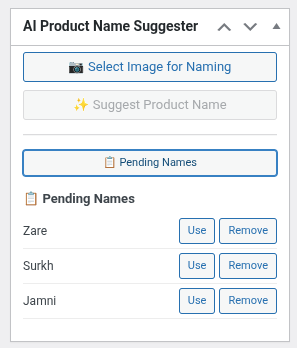
- Adds a sidebar box to the WooCommerce product edit screen
- Select an image from the Media Library, see a live preview
- One-click "Suggest Product Name" button
✅ Human-in-the-loop review
- Suggested names appear inline with:
- Use this name — applies it directly as the product title
- Add to Pending — saves it for later reuse
- Clear loading and error states in the UI
📋 Pending names management
- Inline pending names list inside the product editor (loaded via AJAX, no page reload)
- Dedicated Pending Names admin page under the Products menu
- Each name can be used, copied, or removed from either location
🔒 Security & validation
- WordPress nonces on all AJAX requests
- Capability checks (
edit_products,edit_post) - Verifies the selected image is a real media attachment owned by the current product or its featured image
- Restricted to
image/jpeg,image/png, andimage/webp
Tech Stack
| Layer | Tech |
|---|---|
| AI / Vision | Google Gemini 2.5 Flash |
| Backend | PHP (WordPress plugin API, AJAX handlers) |
| Frontend | JavaScript (Media Library integration, dynamic UI rendering) |
| Platform | WordPress + WooCommerce |
How It Works
- Admin adds a free Gemini API key under Settings → AI Product Namer.
- On a product edit page, the user selects an image (or uses the featured image).
- The plugin sends the image + naming history (published, pending, rejected names) to Gemini.
- Gemini returns one suggested name in Roman Urdu/Hindi.
- The user applies the name directly or saves it to the pending list.
- Pending names can be reused or removed anytime — from the product screen or the dedicated admin page.
AJAX Endpoints
| Action | Purpose |
|---|---|
wcans_suggest_name |
Request a new AI-generated name |
wcans_get_names |
Load pending names |
wcans_save_name_status |
Save name state (pending/used/rejected) |
wcans_use_pending_name |
Apply a pending name to the product title |
wcans_remove_pending_name |
Delete a pending name |
wcans_remove_rejected_name |
Delete a rejected name entry |
File Structure
wc-ai-product-namer.php   # Core plugin: admin menu, AJAX handlers, Gemini integration, validation, storage
wcans-admin.js            # Admin UI: media picker, AJAX calls, pending name rendering, title insertion
Setup
- Install and activate the plugin in your WordPress site.
- Go to Settings → AI Product Namer and add your Gemini API key (free from aistudio.google.com/app/apikey).
- Open any WooCommerce product edit screen, select an image, and click Suggest Product Name.
Roadmap / Ideas for Improvement
This is a live project and open to contributions. Some directions being considered:
- Improve prompt engineering for even tighter brand-tone matching
- Support additional languages beyond Roman Urdu/Hindi
- Batch naming for multiple products at once
- Configurable naming style/tone per product category
- Analytics on suggestion acceptance rate to tune prompting over time
Feedback, issues, and PRs are genuinely welcome.