DocuThèques WP Registry grade D+. High-severity findings · 2 findingsWP RegistryHigh-severity findings · 2 findingsOpen the reportD+
An alternative & document oriented organization for your WordPress media
Install
Upload it under Plugins → Add New Plugin → Upload Plugin, then activate.
Install straight from GitHub with WP-CLI:
wp plugin install https://github.com/imath/docutheques/releases/download/1.0.1/docutheques.zip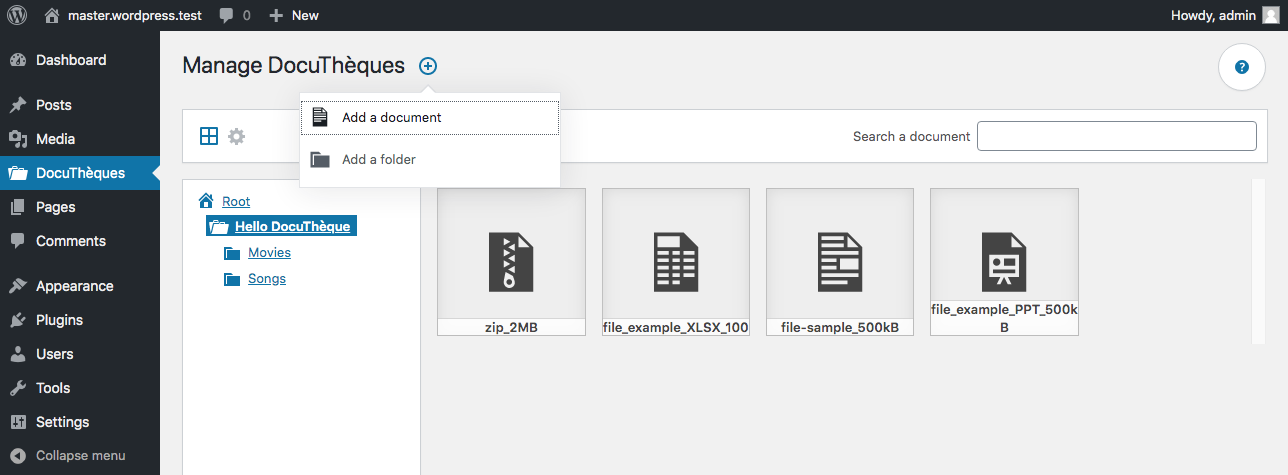
English
An alternative & document oriented organization for your WordPress media.
Description
Thanks to DocuThèques, you can enjoy an alternative organization for your WordPress media. This plugin was inspired by the file exploration features of the softwares included into the computer operating systems and it lets you create folder trees to organize your media like documents.
DocuThèques adds a new interface to your WordPress administration from which you can create one or more DocuThèques for your site, attach folders to it, upload documents to it or organize the existing media of your WordPress site.
To help you do your first steps, this interface comes with an integrated user guide so that you can familiarize yourself with how you can create, update and delete your DocuThèques, your folders and your documents.
Each document in your DocuThèques has a unique and permanent download link, no matter its position in the tree structure of your DocuThèques. You can safely update the file associated with your documents, change the name of each of the folders that compose their tree structure: visitors or site members will always find the latest version of your document using their unique and unchanging download link.
Docuthèques is also tracking the number of document downloads made by your visitors or site members.
To make a DocuThèque available to them, simply create or update a WordPress page to insert it using the DocuThèques block. Note that you can insert one and only one DocuThèque into a WordPress page.
Required configuration
- WordPress 5.4.0 or newer.
- The Block Editor is needed to insert a DocuThèque into a WordPress page.
Français
Une organisation des media de WordPress plus orientée vers des besoins documentaires.
Présentation
Grâce à DocuThèques, vous bénéficiez d'une organisation alternative pour vos media dans WordPress. L'extension s'inspire des fonctionnalités des logiciels d'exploration de fichiers proposés par les systèmes d'exploitation des ordinateurs en vous proposant de créer des arborescences de dossiers pour y organiser vos media comme des documents.
DocuThèques équipe l'administration de votre site WordPress d'une nouvelle interface depuis laquelle vous pourrez créer la ou les DocuThèque(s) de votre site, y attacher des dossiers, y téléverser des documents ou y classer les media existants de votre site WordPress.
Pour faciliter vos premiers pas, cette interface propose un guide d'utilisation intégré grâce auquel vous pourrez vous familiariser avec les opérations à réaliser pour créer, mettre à jour et supprimer vos DocuThèques, vos dossiers et vos documents.
Chaque document de vos DocuThèques bénéficie d'un lien de téléchargement unique, permanent et indépendant de sa position dans l'arborescence de sa DocuThèque. Vous pouvez, à tout moment et en toute sérénité, mettre à jour le fichier associé à vos documents, changer le nom de chacun des dossiers qui forment leur arborescence : les visiteurs ou les membres de votre site retrouveront toujours la dernière version de votre document à l'aide de son lien de téléchargement unique et invariable.
Chaque document fait également l'objet d'un suivi du nombre de ses téléchargements par les visiteurs ou les membres de votre site.
Pour mettre une DocuThèque à leur disposition, il suffit de créer ou de mettre à jour une page WordPress pour l'y insérer grâce au bloc des DocuThèques. Notez qu'une page de votre site WordPress peut contenir une et une seule DocuThèque.
Configuration requise
- WordPress 5.4.0 ou toute version ultérieure.
- L'éditeur de blocs est nécessaire pour attacher une DocuThèque à une page du site WordPress.
Releases
4 releases. Each count is every asset in that release; expand a row for the breakdown.
Active-site estimate ≈100 comes from the median of recent superseded releases. Method.