Install
This is the repository archive. It installs, but the folder name will carry the branch suffix and updates will not flow.
Install straight from GitHub with WP-CLI:
wp plugin install https://github.com/iamshimantadas/acf-relationship-migrator/archive/refs/heads/main.zip📋 Description
ACF Relationship Migrator is a powerful WordPress plugin that allows you to batch migrate ACF relationship fields between websites without relying on WordPress post IDs. This plugin uses stable migration keys (post type + slug) to maintain relationships across different environments.
📋 Required JSON file download extension
Please download this extension from chrome webstore: https://chromewebstore.google.com/detail/json-beautifier-and-edito/lpopeocbeepakdnipejhlpcmifheolpl?pli=1
Supported ACF Field Types
- Post Object - Single or multiple post references
- Relationship - Multiple post relationships
- Page Link - Page URL references
- Taxonomy - Term relationships
🚀 Features
- ID-Free Migration - Uses migration keys (post_type:slug) instead of fragile WordPress IDs
- Batch Processing - Handles large datasets with configurable batch sizes
- Export/Import Workflow - Simple two-step migration process
- Post Type Mapping - Map source post types to destination post types
- Duplicate Detection - Identifies duplicate migration keys to prevent conflicts
- Progress Tracking - Real-time progress bars and status updates
- Fallback Resolution - Intelligent fallback system for missing relationships
- ACF Integration - Works seamlessly with Advanced Custom Fields
📦 Installation
- Upload
acf-relationship-migrator.phpto the/wp-content/plugins/directory - Activate the plugin through the 'Plugins' menu in WordPress
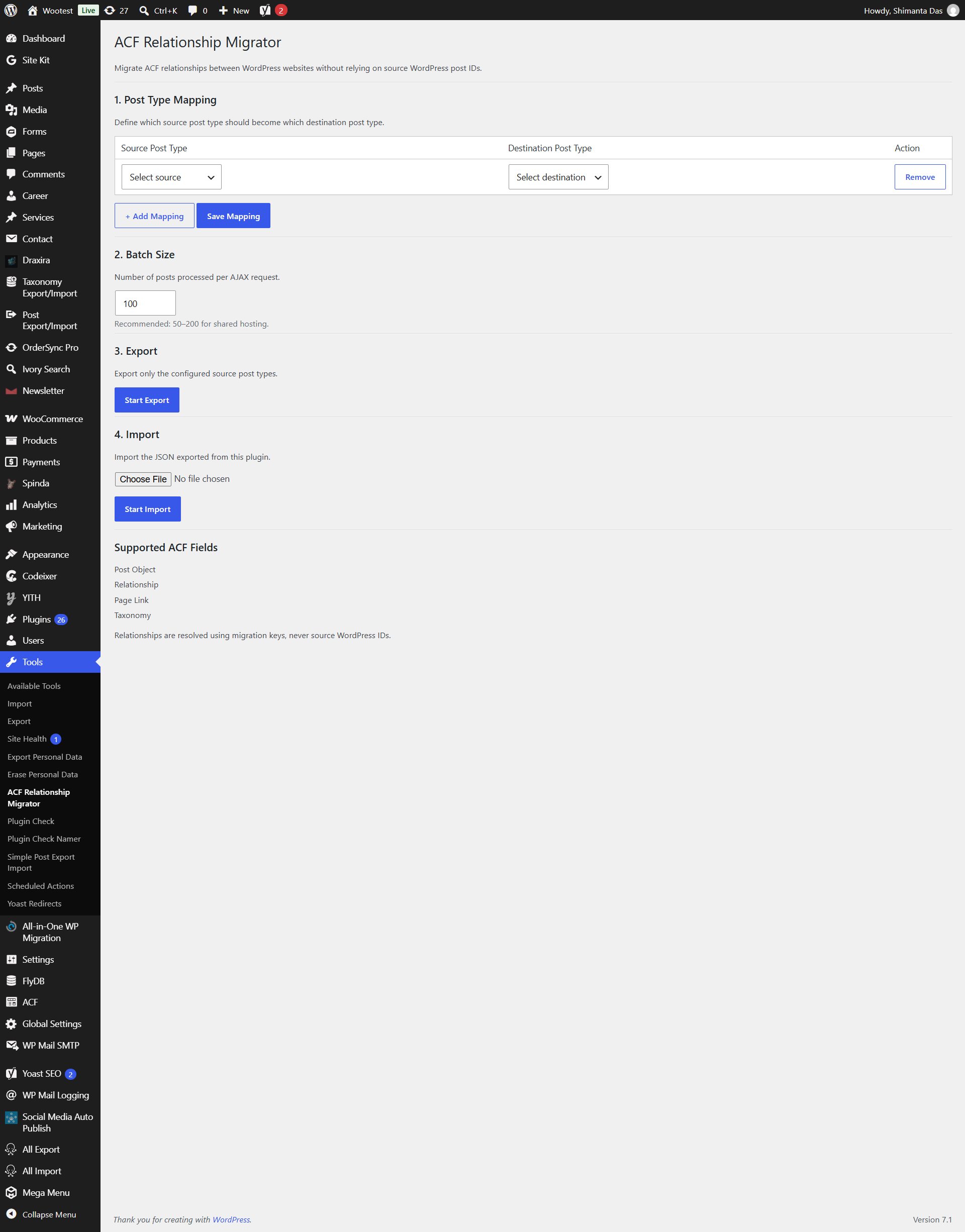
- Navigate to Tools → ACF Relationship Migrator to access the interface
🔧 Usage
Step 1: Configure Post Type Mappings
Define which source post types should map to which destination post types:
- Select a Source Post Type from the dropdown
- Select a Destination Post Type from the dropdown
- Click Save Mapping to store your configuration
- Add multiple mappings as needed
Note: If no mapping is configured for a post type, the plugin will use the same post type on the destination site.
Step 2: Set Batch Size
Configure the number of posts processed per AJAX request:
- Recommended: 50-200 for shared hosting environments
- Range: 10-1000 posts per batch
- Default: 100 posts per batch
Step 3: Export Content
- Click Start Export to begin the export process
- Monitor the progress bar and status updates
- Once complete, click Download Migration JSON to save the export file
- Transfer the JSON file to your destination WordPress site
Step 4: Import Content
- On the destination site, select the exported JSON file
- Click Start Import to begin the import process
- The plugin will:
- Create new posts based on the export data
- Store migration keys for future reference
- Update relationship fields using migration keys
- Monitor the progress bar for completion status
🔒 Security
- All AJAX requests are protected with nonce verification
- Only users with
manage_optionscapability can access the plugin - Exported JSON files are stored in a secure WordPress uploads directory
- File access is restricted and authenticated
💡 How It Works
Export Process
During export, the plugin:
- Reads all posts from configured source post types
- Generates unique migration keys:
{post_type}:{post_slug} - Extracts ACF relationship field values
- Converts WordPress IDs to migration keys
- Creates a JSON file with all data
Import Process
During import, the plugin:
- Parses the JSON migration file
- Creates destination posts using slugs and titles
- Stores migration keys as post meta (
_acfrm_migration_key) - Builds an internal ID map:
migration_key → destination_post_id - Resolves all relationships using the ID map
- Updates ACF fields with resolved relationships
Relationship Resolution
The plugin resolves relationships using this priority:
- Direct Map Lookup - Check if the migration key exists in the ID map
- Fallback Search - Find the post using
destination_type + slug - Missing Tracking - Log unresolved relationships for review