DiceBar — Mobile Bottom Bar, Click to Call & Chat WP Registry grade A. No security issues foundWP RegistryNo security issues foundOpen the reportA
WordPress click to call button and mobile bottom bar. A sticky footer bar for phones with call, WhatsApp chat, directions and social icons. Free, no tracking, works with any theme, Elementor, Divi and Bricks.
Install
Upload it under Plugins → Add New Plugin → Upload Plugin, then activate.
Install straight from GitHub with WP-CLI:
wp plugin install https://github.com/iamramgarhia/dicebar-wordpress-click-to-call-footer-bar/releases/download/v1.9.1/dicebar.zip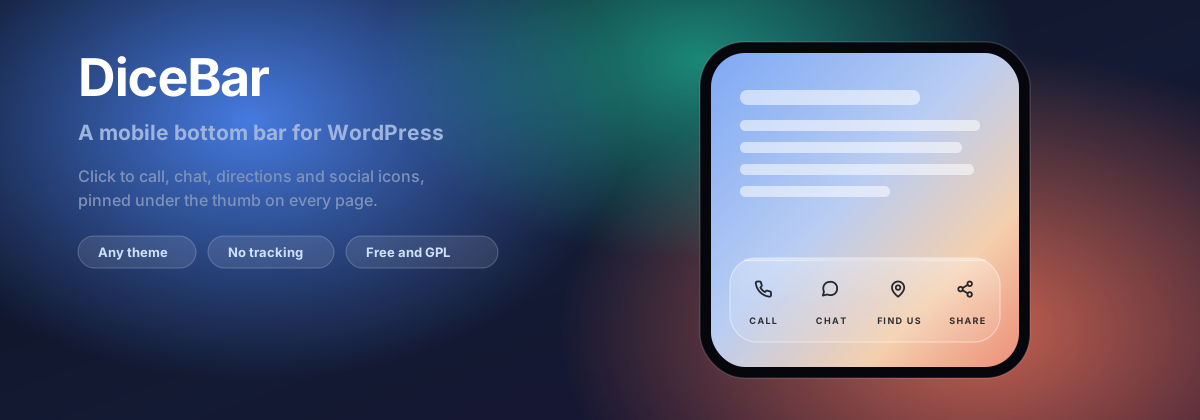
DiceBar — Mobile Bottom Bar & Click to Call Button for WordPress
A sticky footer bar for phones with a click to call button, a WhatsApp chat button, directions and social icons. Free, no tracking, works with any theme.


Documentation · Report a bug · Releases
What DiceBar does
DiceBar is a WordPress plugin that adds a mobile bottom bar, also called a sticky footer bar, across the bottom of the screen on phones and tablets. It holds a click to call button, a WhatsApp chat button, directions, email, social media icons, or a link to anywhere on your site.
Most visitors arrive on a phone. On a phone, a phone number in the footer is four scrolls away and a contact form is a wall. A footer bar puts the action under the thumb on every page, which is the whole idea behind a call now button.
Every feature listed here is in the free plugin. There is no locked tier, no advert in your dashboard, and no tracking of any kind.
Features
| Click to call button | Taps straight into the phone's dialler |
| WhatsApp chat button | Opens a chat, optionally with a message already written |
| SMS and email buttons | With a prefilled body or subject |
| Directions button | Opens the map app with your address searched |
| Social media icons | Thirty networks, optionally in their own brand colours |
| Link, page, anchor, share, back to top | The rest of what a footer bar needs |
| Four looks | Glass, solid, minimal and bold, with adjustable blur and transparency |
| Icons, words, or both | A whole-bar choice, for the reason given below |
| Nine starter kits | Restaurant, clinic, trade, shop, blog, portfolio, social |
| Live preview | The real bar, on a photograph, light or dark, at 320, 375 and 414 px |
| Shortcode and Elementor widget | Put the same row inside any page |
| Cache-safe | Designed for full-page caching rather than patched for it afterwards |
Installing
From your dashboard, go to Plugins, then Add New, and search for DiceBar. Or download the archive from the latest release and upload it.
With WP-CLI:
wp plugin install dicebar --activateRequires WordPress 6.0 or newer and PHP 7.4 or newer. No other dependencies, and no external requests at any point.
Putting the bar inside a page
Most sites need none of this. Install, add your buttons, and the bar is live. This section is only for showing the same row inside your content too.
The bar appears by itself on every page you allow it on. To also show the same row of buttons inside your content, use the shortcode:
[dicebar]To show only some of the buttons, name them by id:
[dicebar items="itm_a1b2c3d4, itm_e5f6a7b8"]The shortcode works in the block editor, in widgets, in theme templates, and in Elementor, Divi, Beaver Builder, Bricks and Oxygen. Elementor users also get a DiceBar widget in the panel, registered only when Elementor is actually loaded.
Adding it to a theme template
Only needed for a template file, where a shortcode in the editor cannot reach. Edit a child theme, or the next update overwrites it.
<?php echo do_shortcode( '[dicebar]' ); ?>Guard it if the plugin might ever be deactivated, so the template does not print the raw shortcode text:
<?php
if ( shortcode_exists( 'dicebar' ) ) {
    echo do_shortcode( '[dicebar]' );
}
?>
Frequently asked questions
Does a mobile bottom bar work with any WordPress theme?
Yes. DiceBar attaches to the wp_footer hook, which every theme the WordPress
directory accepts is required to call. The realistic conflict is stacking order,
and there is a z-index setting on the Behaviour tab for exactly that.
How do I add a click to call button in WordPress?
Install DiceBar, open it in the dashboard menu, press Add an item, choose
Call as the type, and enter your phone number. The button becomes a tel:
link, so tapping it opens the dialler with the number already entered. No page
load happens in between.
Can I add a WhatsApp chat button to the footer bar?
Yes. Choose WhatsApp as the type and enter your number including the country code. You can also write a message that is prefilled when the chat opens, which noticeably raises how many people actually send one.
How many buttons fit in a mobile footer bar?
Four. At 320 pixels wide, the narrowest phone still in real use, the bar has 288 pixels of usable width. Four labelled buttons is 72 pixels each, which fits a word of about eight characters. A fifth button does not shrink the words, it cuts them off, so the plugin caps the list at four and explains why.
Does a sticky footer bar slow a site down?
Not measurably. DiceBar loads nothing at all on any page where the bar does not appear, not even a stylesheet. Where it does appear it adds one small stylesheet and one small script, with no jQuery and no external requests.
Does it work with WP Rocket, LiteSpeed or other caching plugins?
Yes, and it was designed for caching rather than patched for it. Rules that depend on which page you are on run on the server and cache correctly. Rules that differ between two visitors at the same address, such as whether they are signed in, run in the browser instead. The script also carries the opt-out attributes those plugins respect, so it is never deferred or combined.
Can I show the bar only on some pages?
Yes. Choose everywhere, only on the pages you list, or everywhere except those pages. Individual buttons can also have their own screen and visitor rules, so one button can appear where another does not.
Can I show icons only, without labels?
Yes: icons and words, icons only, or words only. It applies to the whole bar rather than one button, because an unlabelled icon centres itself while a labelled one lifts to make room. Mixing them leaves one mark sitting lower than its neighbours for no reason anybody can see.
Does DiceBar track visitors?
No. Nothing is collected, nothing is sent anywhere, and the plugin contacts no external service at any point. A tap does fire an event inside the page so your own analytics can listen for it, and what happens next is entirely your own code.
Is it really free?
Yes. Every feature described on this page is in the free plugin, under the GPL.
Tracking taps, without the plugin tracking anything
document.addEventListener( 'dicebar:click', function ( event ) {
    window.dataLayer = window.dataLayer || [];
    window.dataLayer.push( {
        event: 'footer_bar_click',
        button: event.detail.type
    } );
} );
Every button also carries stable data attributes, so a tag manager can target one with a selector instead.
Why it works with page caching
A full-page cache stores one copy of a page and serves it to everybody, which quietly breaks any rule that differs between two visitors at the same address. DiceBar splits its rules by kind:
| Rule | Worked out | Why |
|---|---|---|
| Which page | On the server | Varies with the address, so a cache keyed on the address is correct |
| Screen width | In CSS | The browser re-evaluates it on rotation for free |
| Signed in or out | In the browser | Differs between two visitors at the same address |
Extending it
| Filter | Changes |
|---|---|
dicebar_item_types |
Register your own button type |
dicebar_icons |
Add or replace icons |
dicebar_presets |
Add your own starter kits |
dicebar_will_render |
Decide whether the bar renders on a request |
dicebar_z_index |
Change the stacking order in code |
add_filter( 'dicebar_item_types', function ( $types ) {
    $types['booking'] = array(
        'label' => 'Booking',
        'icon'  => 'calendar',
        'value' => array( 'kind' => 'url', 'label' => 'Booking address' ),
        'extra' => array(),
    );

    return $types;
} );
Every value is also a CSS custom property on the wrapper, so a theme can override
anything without an !important:
.dicebar {
    --dicebar-radius: 24px;
    --dicebar-accent: #e11d48;
}
A few decisions, and why
Five link schemes, and no others. Web, secure web, telephone, email and text message. Everything else is rejected on save, including for administrators, because administrator accounts get compromised and a script link inside a button is stored cross-site scripting.
Dark colours are chosen, not derived. An automatically inverted brand colour is almost always wrong, so the dark palette is set separately.
Nothing renders on an AMP request. The AMP plugin rejects custom script outright, so shipping markup that fails its validation would be worse than shipping none.
Development
npm install && composer install
npm run env:rebuild     # Docker WordPress, from nothing, with retries
npm run test:php        # PHPUnit against a real WordPress
composer lint           # PHPCS, WordPress standards, PHP 7.4 compatibility
npm run check           # the official Plugin Check
npm run build:zip       # the distributable archive
npm run verify:zip      # unpack it the way WordPress does
npm run version:set -- 1.7.0 writes the version to all four places that have to
agree. A test asserts they match, because a plugin header and a readme stable tag
that disagree ship the wrong code with no warning.
See CONTRIBUTING.md before opening a pull request, and SECURITY.md to report a vulnerability privately.
License
GPL-2.0-or-later. See LICENSE.
Built and maintained by Dice Codes, who also make DiceStack.
Releases
3 releases. Each count is every asset in that release; expand a row for the breakdown.