Install
This is the repository archive. It installs, but the folder name will carry the branch suffix and updates will not flow.
Install straight from GitHub with WP-CLI:
wp plugin install https://github.com/humanmade/modal-block/archive/refs/heads/main.zipOn Packagist as humanmade/modal-block:
composer require humanmade/modal-blockSimple modal block for the WordPress block editor.
Description
This plugin provides a modal component with two blocks:
- Modal Trigger: Container block where you add your trigger element (button, image, etc.)
- Modal Content: Renders the modal overlay with your content
Features
- Accessible keyboard navigation with focus trapping
- Auto-pause videos/iframes when modal closes
- Overlay click and Escape key to close
- Customizable trigger and content using any WordPress blocks
Installation
For Development
- Clone or download to
/wp-content/plugins/modal-block/ - Run
npm install && npm run build - Activate the plugin in WordPress
For Production
- Download a release bundle or clone the
releasebranch - Upload to
/wp-content/plugins/modal-block/ - Activate the plugin in WordPress
Usage
- Add the Modal Trigger block to your page
- Inside it, you'll see:
- A placeholder paragraph (replace this with your trigger: button, image, text, etc.)
- A Modal Content block (automatically added)
- Add your modal content inside the "Modal Content" block
- On the front-end, clicking the trigger opens the modal overlay
Tip: Add the class modal-trigger to your trigger element for explicit targeting, or the first block before Modal Content will automatically become the trigger.
Development
If you have nvm installed you can run nvm use in the repository root to activate the correct version of Node.
Setup
npm install
composer install
Build
npm run buildDevelopment Mode
npm startRequirements
- WordPress 5.8+
- PHP 7.4+
- Node.js 24+
Release Process
Merges to main will automatically build to the release branch. A project may be set up to track the release branch using composer to pull in the latest built beta version.
Commits on the release branch may be tagged for installation via packagist and marked as releases in GitHub for manual download using a manually-dispatched "Tag and Release" GH Actions workflow.
To tag a new release,
- Review the unreleased features in the Changelog and choose the target version number for the next release using semantic versioning
- Checkout a
prepare-v#.#.#branch. In that branch,- Add a new header into CHANGELOG.md for any unreleased features
- Bump the version number in the modal-block.php file's PHPDoc header
- Open a pull request from your branch titled "Prepare release v#.#.#"
- Review and merge your "Prepare release" pull request
- Wait for the
releasebranch to update with the build that includes the new version number - On the "Tag and Release" GH Action page],
- Click the "Run workflow" button in the "workflow_dispatch" notification banner (see screenshot below)
- Fill out the "Version tag" field with your target version number
- This version must match the version in
modal-block.phpand your newest Changelog section - Use the format
v#.#.#for your version tag
- This version must match the version in
- Leave the "Branch to tag" field as
release(we will add the tag on the release branch containing the latest built code) - Click "Run workflow"
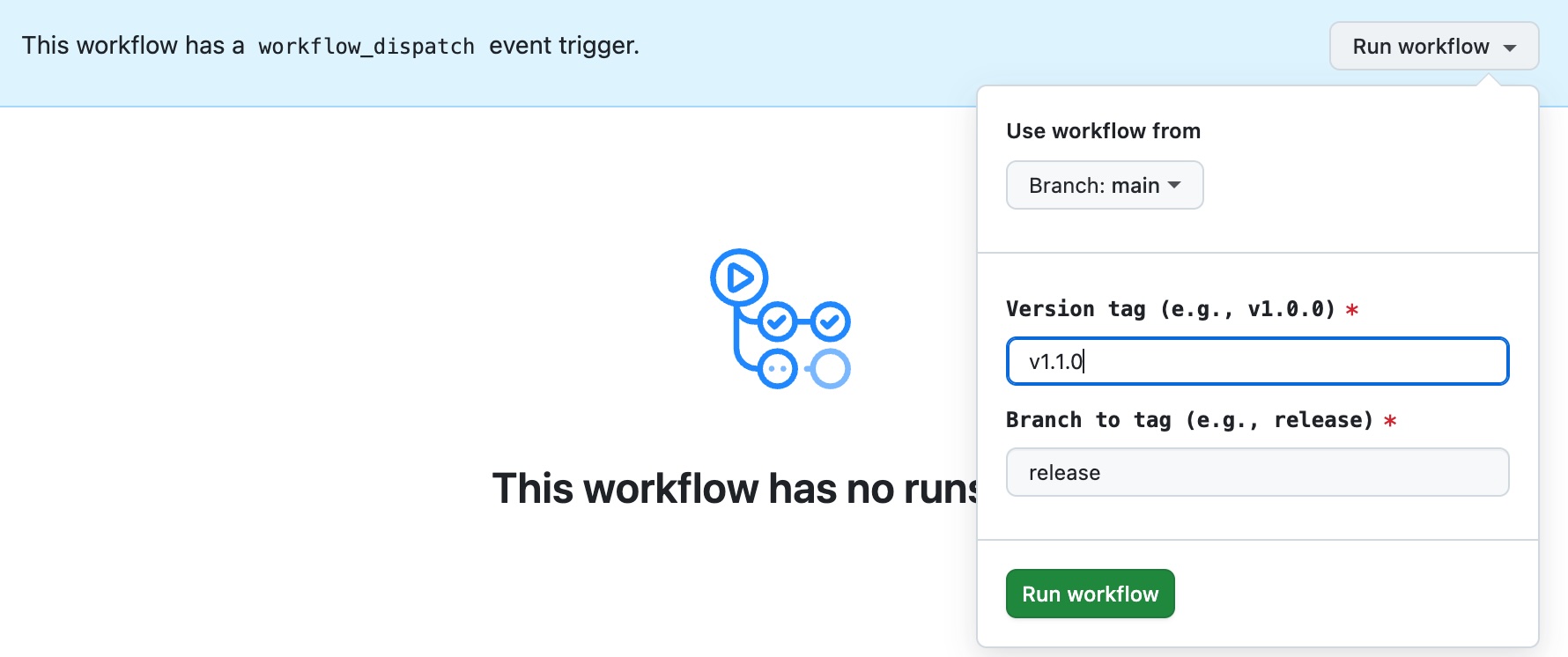
Once the workflow completes, your new version should be tagged and available in the list of releases
License
GPL-2.0-or-later
Author
Human Made Limited - https://humanmade.com
Releases
3 releases.
These releases are tags only. The author does not attach a packaged zip, so there are no download counts to report.