HM Carousel Block WP Registry grade A. No security issues foundWP RegistryNo security issues foundOpen the reportA
Carousel block plugin
Install
This is the repository archive. It installs, but the folder name will carry the branch suffix and updates will not flow.
Install straight from GitHub with WP-CLI:
wp plugin install https://github.com/humanmade/hm-carousel-block/archive/refs/heads/main.zipOn Packagist as humanmade/hm-carousel-block:
composer require humanmade/hm-carousel-blockHM Carousel Block is a lightweight WordPress plugin designed to add a carousel block to modern WordPress sites. It uses the Splide library, which is lightweight (12kB gzipped) and accessible.
Features
- Lightweight with no dependencies
- Uses Splide library for carousel functionality
- Accessible and responsive design
- Easy to use and customize
- Allows you to put any blocks or patterns in carousel slides
- Supports using the Query Loop block to create a carousel of posts
- Supports various navigation types (button, pagination, and thumbnails)
- Bring your own styles. We only load the minimal core splide CSS needed to function. You can style everything else as you wish. More info below.
Installation
- Download the plugin zip file.
- In your WordPress admin panel, go to Plugins > Add New.
- Click "Upload Plugin" and choose the downloaded zip file.
- Click "Install Now" and then "Activate" the plugin.
Usage
- In the WordPress editor, add a new block.
- Search for "Carousel" and add it to your page or post.
- Note that the view in the editor is a simplified version for ease of managing the content.
- Add Carousel Slide blocks to the carousel. You can then add whatever content you wish to these.
- Customize the carousel settings as needed.
Using with Query Loop & Arrow Position
You can use the Carousel block to display posts from a Query Loop. To do this:
- Add the Carousel block to your page or post.
- Select the "Articles Carousel" variation when inserting the block, or add a Query Loop block inside the carousel manually.
- The carousel will automatically detect the number of columns set in the Query Loop (e.g., columns-2, columns-3) and use that as the number of slides per page.
- To set the arrow position, open the block settings sidebar, enable navigation buttons, and choose the desired Arrow Position (Default, Top Left, Top Right, Bottom Left, Bottom Right). The arrows will be positioned accordingly.
Articles Carousel Variation
The block provides a variation called "Articles Carousel" for quickly creating a carousel of posts using the Query Loop. This variation is optimized for displaying articles and automatically configures the Query Loop inside the carousel.
Responsive Direction and Auto-scroll
The carousel supports separate desktop, tablet, and mobile settings for direction, slides per page, height, and fixed slide height.
Use Top to bottom direction for vertical carousels. Splide requires a carousel height or fixed slide height for vertical tracks, so set Carousel height or Fixed slide height when a breakpoint uses Top to bottom. Blank vertical breakpoint heights inherit the nearest earlier height value. When a later breakpoint switches back to a horizontal direction, inherited vertical height is cleared for that breakpoint.
Track padding follows the active axis. Horizontal carousels use left/right padding, and vertical carousels use top/bottom padding.
Auto-scroll applies across all breakpoints when enabled. It uses loop mode and disables autoplay, arrows, and pagination. Horizontal Auto-scroll breakpoints use content-width slide sizing unless a fixed slide width is configured, while vertical Auto-scroll breakpoints use the configured vertical height and slide sizing.
Styling
The recommended approach is to register a new block stylesheet with your custom CSS. This ensures it is only loaded when the block is on the page.
This code demnstrates how to do this for a CSS file build using @wordpress/scripts.
$filename = 'custom-carousel-styles';
$asset = require get_stylesheet_directory() . "/build/css/{$filename}.css.asset.php";

wp_enqueue_block_style(
    'hm/carousel,
    [
        'handle' => "my-project-{$filename}",
        'src'    => get_theme_file_uri( "build/css/{$filename}.css.css" ),
        'path'   => get_theme_file_path( "build/css/{$filename}.css.css" ),
        'ver'    => $asset['version'],
        'deps'   => $asset['dependencies'],
    ]
);
Release Process
Merges to main will automatically build to the release branch. A project may be set up to track the release branch using composer to pull in the latest built beta version.
Commits on the release branch may be tagged for installation via packagist and marked as releases in GitHub for manual download using a manually-dispatched "Tag and Release" GH Actions workflow.
To tag a new release,
- Review the unreleased features in the Changelog and choose the target version number for the next release using semantic versioning
- Checkout a
prepare-v#.#.#branch. In that branch,- Add a new header into CHANGELOG.md for any unreleased features
- Bump the version number in the hm-carousel-block.php file's PHPDoc header
- Open a pull request from your branch titled "Prepare release v#.#.#"
- Review and merge your "Prepare release" pull request
- Wait for the
releasebranch to update with the build that includes the new version number - On the "Tag and Release" GH Action page],
- Click the "Run workflow" button in the "workflow_dispatch" notification banner (see screenshot below)
- Fill out the "Version tag" field with your target version number
- This version must match the version in
hm-carousel-block.phpand your newest Changelog section - Use the format
v#.#.#for your version tag
- This version must match the version in
- Leave the "Branch to tag" field as
release(we will add the tag on the release branch containing the latest built code) - Click "Run workflow"
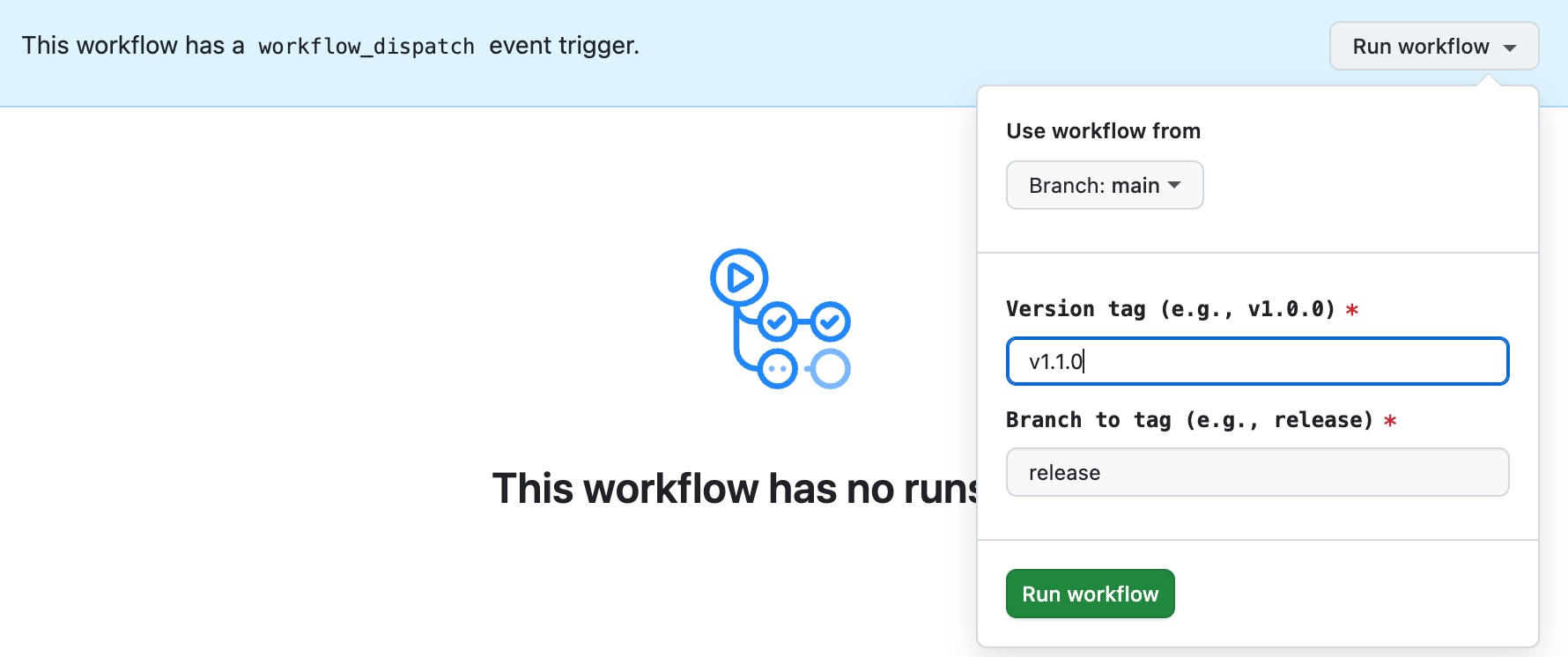
Once the workflow completes, your new version should be tagged and available in the list of releases
Local Development
We recommend cloning this repository into your active project (or installing the repository via composer with composer update humanmade/hm-carousel-block --prefer-source) so that feature development can be tested in the context of full applications, but this repository does support a lightweight wp-env development environment for testing within a vanilla, un-customized WordPress installation.
After running the env:start script, your site will start at localhost:2001. Log in with admin / password at localhost:2001/wp-admin.
| Command | Description |
|---|---|
| npm run env:start | Start a local docker-based WordPress environment |
| npm run env:stop | Turn off the WordPress environment |
| npm run env:cli -- wp ... | Run any WP-CLI command within your environment |
| npm run env:destroy | Delete the local wp-env docker environment and clean images and containers |
License
This plugin is licensed under the GPL v2 or later. The Splide library used in this plugin is licensed under the MIT License.
Credits
- Splide - A lightweight, flexible, and accessible slider/carousel library.
Releases
8 releases.
These releases are tags only. The author does not attach a packaged zip, so there are no download counts to report.