Block Supports Extended WP Registry grade A. No security issues foundWP RegistryNo security issues foundOpen the reportA
Simple extension for built in block support features
Install
This is the repository archive. It installs, but the folder name will carry the branch suffix and updates will not flow.
Install straight from GitHub with WP-CLI:
wp plugin install https://github.com/humanmade/block-supports-extended/archive/refs/heads/main.zipOn Packagist as humanmade/block-supports-extended:
composer require humanmade/block-supports-extendedHelpers for extending built in block support features such as color options.
Description
To use the plugin you will need to activate it and then register your new block supports properties like so:
Block_Supports_Extended\register( 'color', 'quoteMarks', [
    'label' => __( 'Quote Marks' ),
    // Properties are translated to what the setting value is applied to,
    // for example, text will give ".selector { color: value }". This is
    // the same as the options available for the "color" block.json.
    'property' => 'text',
    // %s is replaced with a generated class name applied to the block.
    'selector' => '.%1$s blockquote::before, .%1$s blockquote::after',
    // Optional list of default blocks to add support for. This can
    // also be done via a block's block.json "supports" property, or
    // later using the Block_Supports_Extended\add_support() function.
    'blocks' => [
        'core/pullquote',
    ],
] );
This will have the effect of extending the core quote block's block.json like so:
{
    "supports": {
        "color": {
            "quoteMarks": true
        }
    }
}
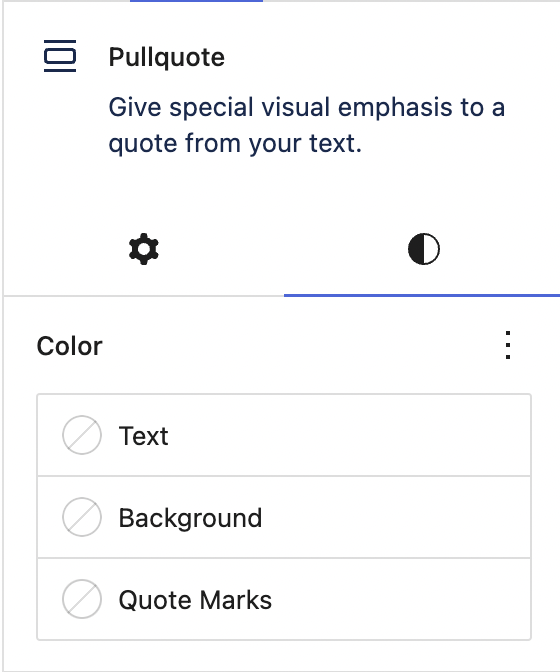
A "Quote Marks" option will be added to the default block colour settings. Everything else included CSS generation is then handled for you.
Future Roadmap
Currently only the color feature is supported, but we will likely extend this to typography, border etc…
Depending on the future direction of WordPress core which promises to make the styles engine more pluggable we may continue extending this or keep it limited.
Installation
This section describes how to install the plugin and get it working.
e.g.
- Upload the plugin files to the
/wp-content/plugins/block-supports-extendeddirectory, or install the plugin through the WordPress plugins screen directly. - Activate the plugin through the 'Plugins' screen in WordPress
Changelog
0.1.0
- Release
Releases
2 releases.
These releases are tags only. The author does not attach a packaged zip, so there are no download counts to report.