Asset Manager Framework WP Registry grade C-. High-severity findings · 1 findingWP RegistryHigh-severity findings · 1 findingOpen the reportC- #3 in Media & Images
A framework for overriding the WordPress media library with an external asset provider, such as a DAM
Install
This is the repository archive. It installs, but the folder name will carry the branch suffix and updates will not flow.
Install straight from GitHub with WP-CLI:
wp plugin install https://github.com/humanmade/asset-manager-framework/archive/refs/heads/master.zipOn Packagist as humanmade/asset-manager-framework:
composer require humanmade/asset-manager-frameworkThis WordPress plugin provides a framework for replacing the contents of the standard WordPress media library with assets from an external provider such as a DAM, another WordPress website, or a central site within a Multisite installation.
It handles the necessary integration with WordPress (Ajax endpoints and Backbone components) leaving you to focus on just the server-side API connection to your DAM.
The intention is that the media manager, the block editor, the classic editor, the REST API, XML-RPC, and anything that calls wp.media() should "just work" and not need to implement changes in order to support a media library that is powered by an external provider.
Installation
Install with Composer:
composer require humanmade/asset-manager-frameworkStatus
Current status: Alpha. Generally very functional but several features still in development.
The following features work as expected:
- [X] Block editor: All media features
- [X] Classic editor: All media features
- [X] Media screen: All features
- [X] Widgets: All media widgets
- [ ] Customizer:
- [X] Background Image
- [ ] Logo (functions if you skip cropping)
- [ ] Site Icon (unable to skip cropping of large images)
- [X] REST API media endpoints
- [X] XML-RPC requests for media
- [X] Any code that calls
wp.media()to open the media manager and work with the selected attachments
The following custom field libraries have been tested and are compatible out of the box:
- [X] CMB2
- [X] Advanced Custom Fields (ACF)
- [X] Fieldmanager
The following third party plugins are supported via an included integration layer:
- [X] MultilingualPress 3
The following new features are planned but not yet implemented:
- [ ] Various degrees of read-only media (to prevent local uploading, editing, cropping, or deletion)
- [x] Support for multiple simultaneous media providers
The following features will not be supported:
- Side-loading media from an external media provider. The intention of this framework is that media files remain remotely hosted.
- Built-in handling of authentication required to communicate with your external media provider. This responsibility lies within your implementation. Consider using the Keyring plugin if an OAuth connection is required.
- Built-in support for any given media provider (such as AEM Assets, Aprimo, Bynder, or ResourceSpace). This is a framework built to be extended in order to connect it to a media provider.
Known Implementations
- AMF WordPress for using another WordPress site, or another site on a Multisite network, as source for your media library.
- AMF Unsplash for using Unsplash as a source.
Implementation
There are two main aspects to the plugin.
- Allow the media manager grid to display external items which are not existing attachments.
- Subsequently create a local attachment for an external item when it's selected for use.
The design decision behind this is that allowing for external items to be browsed in the media manager is quite straight forward, but unless each item is associated with a local attachment then most of the rest of WordPress breaks when you go to use an item. Previous attempts to do this have involved lying about attachment IDs, or switching to another site on a Multisite network to provide a media item. Neither approach is desirable because such lies need to be maintained and eventually you run into a situation where your lies become unravelled.
Asset Manager Framework instead allows external media items to be browsed in the media library grid, but as soon as an item is selected for use (eg. to be inserted into a post or used as a featured image), an attachment is created for the media item, and this gets returned by the media manager.
The actual media file does not get sideloaded into WordPress - it intentionally remains at its external URL. The correct external URL gets referred to as necessary, while a local object attachment is maintained that can be referenced and queried within WordPress.
Integration
There are two steps needed to integrate a media provider using the Asset Manager Framework:
- Create a provider which extends the
AssetManagerFramework\Providerclass and implements itsget_id(),get_name()andrequest()methods to fetch results from your external media provider based on query arguments from the media manager. - Hook into the
amf/register_providersaction to register your provider for use.
Full documentation is coming soon, but for now here's an example of a provider which supplies images from placekitten.com:
use AssetManagerFramework\{
    ProviderRegistry
    Provider,
    MediaList,
    MediaResponse,
    Image
};

class KittenProvider extends Provider {

    public function get_id() {
        return 'kittens';
    }

    public function get_name() {
        return __( 'Place Kitten' );
    }

    protected function request( array $args ) : MediaResponse {
        $kittens = [
            500 => 'Boop',
            600 => 'Fuzzy',
            700 => 'Paws',
        ];
        $items = [];

        foreach ( $kittens as $id => $title ) {
            $item = new Image( $id, 'image/jpeg' );
            $item->set_url( sprintf(
                'https://placekitten.com/%1$d/%1$d',
                $id
            ) );
            $item->set_title( $title );
            $item->set_width( $id );
            $item->set_height( $id );

            $items[] = $item;
        }

        return new MediaResponse(
            new MediaList( ...$items ),
            count( $kittens ), // Total number of available results.
            count( $kittens )  // Number of items requested per page.
        );
    }

}

add_action( 'amf/register_providers', function ( ProviderRegistry $provider_registry ) {
    $provider_registry->register( new KittenProvider() );
} );
Try it and your media library will be much improved:
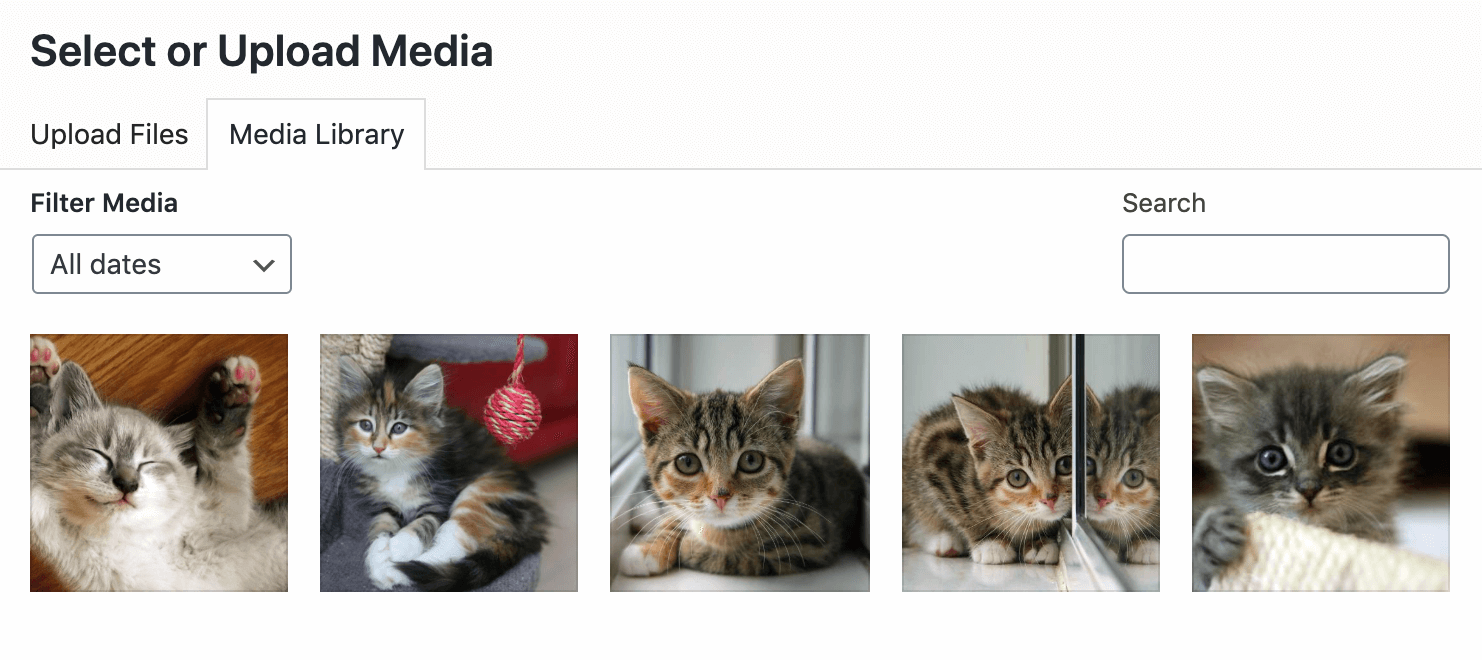
The MediaResponse object takes a MediaList along with the total number of available items and the number of items requested per page. This is to ensure pagination in the media library (introduced in WordPress 5.8) works.
You also have access to provider instances during registration via the amf/provider filter, so you could use it to decorate providers:
add_filter( 'amf/provider', function ( Provider $provider ) {
    if ( $provider->get_id() !== 'kittens' ) {
        return $provider;
    }

    return new DecoratingProvider( $provider );
} );
This is useful, for example, when you are using a third-party provider implementation and want to change certain behavior.
Local Media
Local media is supported by default and can be used side by side with any additional media providers but can also be controlled by using one the following methods:
- Defining the
AMF_ALLOW_LOCAL_MEDIAconstant as a boolean - Use the
amf/allow_local_mediafilter to return a boolean - Use the
amf/local_provider/namefilter to change theLocal Medialabel.
The filter will take precedence over the constant.
License: GPLv2
This program is free software; you can redistribute it and/or modify it under the terms of the GNU General Public License as published by the Free Software Foundation; either version 2 of the License, or (at your option) any later version.
This program is distributed in the hope that it will be useful, but WITHOUT ANY WARRANTY; without even the implied warranty of MERCHANTABILITY or FITNESS FOR A PARTICULAR PURPOSE. See the GNU General Public License for more details.
Releases
Newest 25 of 33 recorded releases.
These releases are tags only. The author does not attach a packaged zip, so there are no download counts to report.