Install
Upload it under Plugins → Add New Plugin → Upload Plugin, then activate.
Install straight from GitHub with WP-CLI:
wp plugin install https://github.com/hubwoop/cooking-by-the-book/releases/download/v1.1/Cookig-By-The-Book.zipMakes wordpress a community driven recipe sharing platform
Tested with Wordpress 5.2 and PHP 7.3.3
Uses modern JavaScript (>=ES6) tested in
Firefox Quantum 66.0.5,
Microsoft Edge 42.17134.1.0 (EdgeHTML 17.17134)
and Google Chrome 74.0.3729.157
How-To
Show recipes on the front page / home page
Make sure you're logged in and the Cooking By The Book plugin is installed and activated.
In the administrative screens navigate to: Settings -> Cooking By The Book
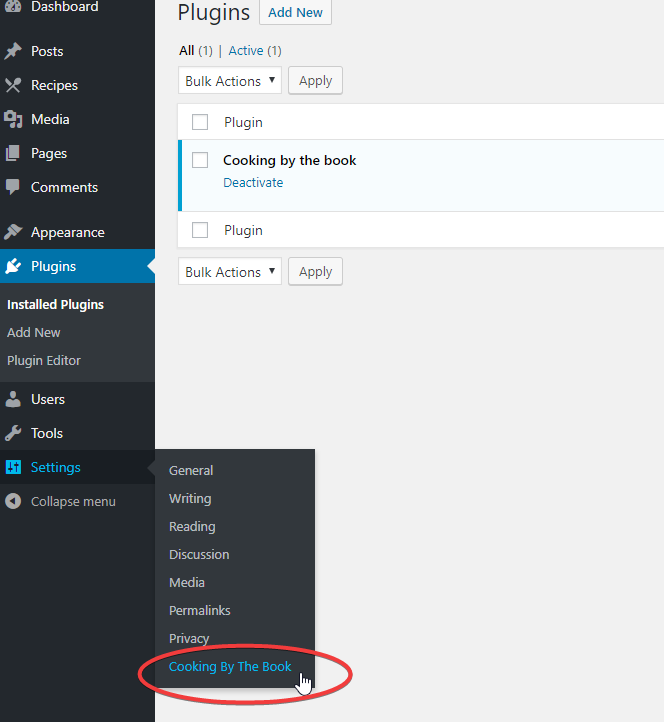
On the settings page, tick the box that enables the required feature. Then click save.
Please note that ideally your theme should support and display recipe type posts.
Allow visitors to self register
Make sure you're logged in and the Cooking By The Book plugin is installed and activated.
In the administrative screens navigate to: Settings -> General
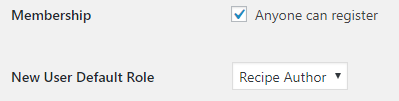
In the Membership section tick the Box "Anyone can register".
Set the "New User Default Role" to "Recipe Author".
Features
Adds a new post type: Recipe
- Reduced Block editor
- Added Meta-Boxes
- To manage: Ingredients, Durations, Difficulty, Servings
- Interaction with Gutenberg Editor via WP(/Redux)-Store
- Hand-made js library, utilizing only components already shipped with wordpress. Manages the creation of an
ingredients list as a meta datum of a recipe (see
assets/js/ingredients-meta-list.js)- Drag and Drop support
- Touch support (via jquery.ui.touch-punch plugin)
- History (Undo/Redo functionality)
- minified & transpiled with
npx babel ingredients-meta-list.js --out-file ingredients-meta-list-compiled.js --source-mapspresets defined in.babelrcand acquired via npm.
If you wish to compile yourself, have npm installed navigate toassets/jsrunnpm iand then thenpxcommand as documented above.
- Managed by
recipe-blocks.php:
Further Meta-Boxes can be by integrating like the other ones as described in the following UML diagram: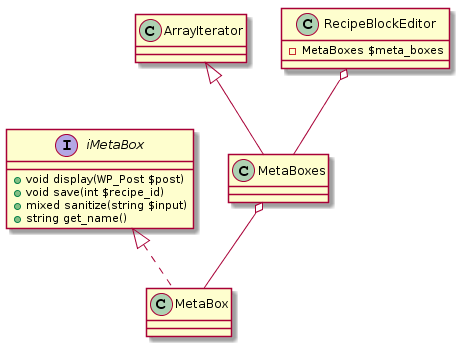
- Introduced new WP-API Endpoint for recipes.
Effort to improve the documentation along the way: https://github.com/WP-API/docs/pull/45 - Front and Back-end CSS to display metadata (input)
- Added Taxonomies
- World cuisine and meal type
Adds a new role: Recipe Author
- Modified (reduced) back-end for logged in recipe authors
- Can only create recipes
- Changed admin menu and admin bar
- Can only see own recipes
- Fixed counting of recipe post type in backend (counting only own recipes instead of recipes by all users)
- Can manage recipe related comments
- Can only see comments related to own recipes (in the backend)
- Can only edit/remove own comments
- Reduced moderation options in backend to "quick edit", "edit" and "trash"
- Reduced comment tabs to "all", "mine" and "trash"
- Reduced bulk actions
- Can only see own media
- Brings own capabilities that are checked throughout the plugin to ensure recipe authors can't do more than they should.
Logging
- Ships with it's own handcrafted logging module for debugging!
Full i18n support
- Text domain:
cbtb-recipe
Hooks & Filters
Allowing the extension of this plugin with your own functionality.
Filters
cbtb-ingredients-pre-table-generation: Allows to modify the array that is transformed into an front end HTML-Table of ingredients.cbtb-ingredients-post-table-generation: Allows to modify the generated html string (which represents the frontend facing ingredients list)Hooks
cbtb_plugin_activated: Fired when the plugin is activated.
Settings
- Ships with own settings page located as child under the WordPress settings menu (
options-general.php)
Default Settings
- Log: on/off
- Only recipes on home on/off
- append recipes the_content with recipe meta data on/off
Icons made by Freepik from www.flaticon.com is licensed by CC 3.0 BY
Releases
1 release. Each count is every asset in that release; expand a row for the breakdown.