Từ thiện WooCommerce
Plugin tạo chức năng từ thiện cho wordpress
by Your Name · github.com/hoangdaicntt/wp-plugin-crowdfunding-woocommerce · website
Install
No release zip yet. The repository archive installs, but the folder name will carry the branch suffix and updates will not flow:
wp plugin install https://github.com/hoangdaicntt/wp-plugin-crowdfunding-woocommerce/archive/refs/heads/main.zipCharity WooCommerce Plugin
A plugin to create a charity crowdfunding system integrated with WooCommerce, allowing you to create and manage online charity campaigns.
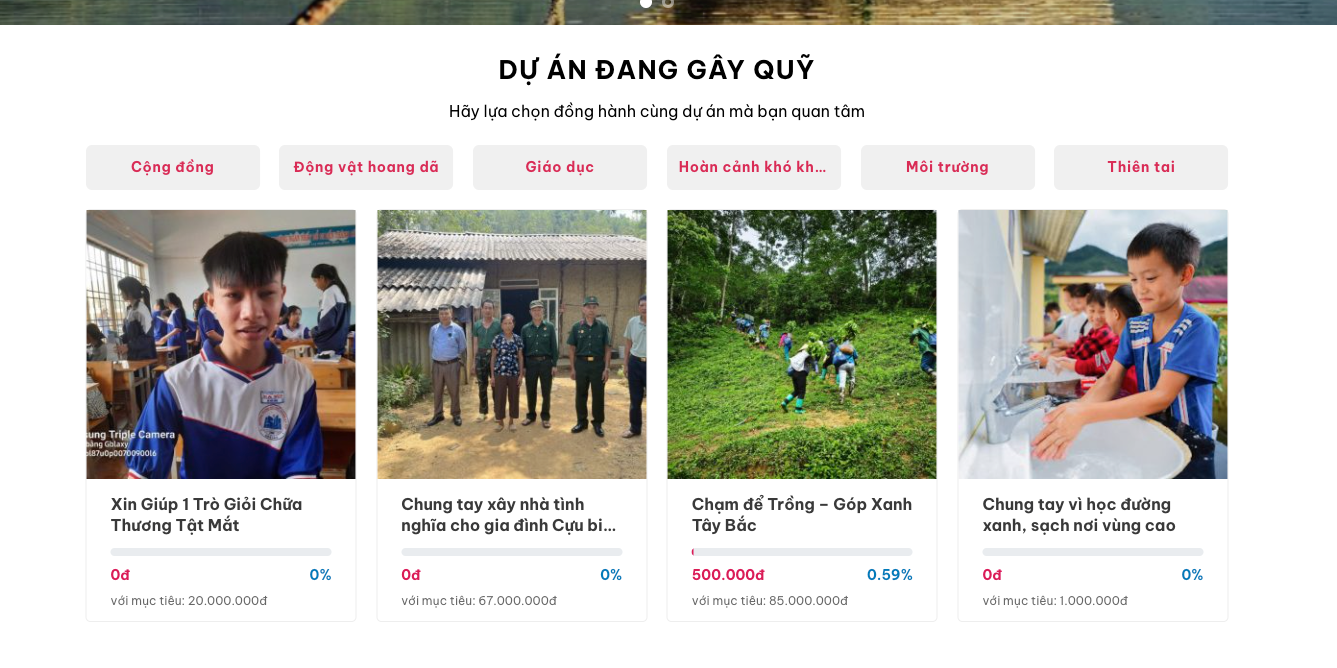
Main Features
🎯 Charity Campaign Management
- Create and manage charity fundraising campaigns
- Set fundraising goals
- Track donation progress in real time
- Upload campaign images and descriptions
💰 Donation System
- Donation form with suggested amounts
- Option for anonymous donations
- Payment processing via WooCommerce
- Display list of donors
📊 Tracking and Reporting
- Visual progress bar
- Statistics for total donations and completion percentage
- Detailed list of donations
- Campaign summary reports
🎨 Frontend Integration
- Display campaign information on product pages
- Progress bar and statistics in shop loop
- Shortcode to show donor list
- Responsive design
System Requirements
- WordPress: 5.0 or higher
- PHP: 7.2 or higher
- WooCommerce: 4.0 or higher
Installation
-
Download the plugin:
git clone [repository-url] crowdfunding-woocommerce -
Upload to WordPress:
- Compress the plugin folder into a ZIP file
- Go to WordPress Admin → Plugins → Add New → Upload Plugin
- Select the ZIP file and click "Install Now"
-
Activate the plugin:
- Go to Plugins → Installed Plugins
- Find "Charity WooCommerce" and click "Activate"
Configuration
Basic Settings
-
Go to Charity menu:
- After activation, the "Charity" menu will appear in the admin
- The default WooCommerce menu will be hidden to focus on charity functions
-
Configure settings:
- Go to Charity → Settings
- Set up basic options for the system
Create a New Campaign
- Go to Charity → Campaigns → Add New
- Fill in the information:
- Campaign name
- Detailed description
- Fundraising goal
- Illustrative image
- Publish the campaign
Usage
Create a Donation Page
Create a new page with the slug /donate-today to serve as the main donation page:
// This page will automatically handle the donation form and redirect to paymentDisplay Donor List
Use the shortcode in posts or pages:
[danh_sach_ung_ho limit="10" show_anonymous="yes" show_date="yes" show_amount="yes"]Shortcode parameters:
limit: Number of donors to display (default: 10)show_anonymous: Show anonymous donors (yes/no, default: yes)show_date: Show donation date (yes/no, default: yes)show_amount: Show donation amount (yes/no, default: yes)order: Sort by time (ASC/DESC, default: DESC)
File Structure
crowdfunding-woocommerce/
├── crowdfunding-woocommerce.php    # Main file
├── assets/                         # Resources
│   ├── admin-script.js            # Admin JavaScript
│   ├── admin-style.css            # Admin CSS
│   └── frontend-style.css         # Frontend CSS
├── includes/                       # Core Classes
│   ├── class-charity-campaigns.php    # Campaign management
│   ├── class-charity-donations.php    # Donation processing
│   ├── class-charity-frontend.php     # Frontend display
│   └── class-charity-settings.php     # Plugin settings
└── README.md                       # This documentation
API and Hooks
Actions and Filters
// Hook after a campaign is created
add_action('charity_campaign_created', 'your_function');

// Filter to change the donation button text
add_filter('charity_donate_button_text', 'your_function');

// Hook after a donation is completed
add_action('charity_donation_completed', 'your_function', 10, 2);
For advanced usage, refer to the class methods in:
includes/class-charity-campaigns.phpfor campaign managementincludes/class-charity-donations.phpfor donation processingincludes/class-charity-frontend.phpfor frontend display
Customization
Core CSS Classes
.charity-campaign-info          /* Campaign information container */
.charity-progress-bar           /* Progress bar */
.charity-progress               /* Completed portion */
.charity-donate-button          /* Donate button */
.charity-donors-list            /* Donor list */
.charity-campaign-info-loop     /* Info in shop loop */
Template Customization
The plugin will automatically display campaign information, but you can customize it by:
-
Overriding in the theme:
// functions.php of the theme function custom_charity_display() { // Custom code } -
Using CSS:
/* In style.css of the theme */
.charity-progress-bar {
    height: 15px;
    background: #custom-color;
}
Troubleshooting
Common Issues
1. Plugin not working:
- Check if WooCommerce is installed and activated
- Ensure PHP version is >= 7.2
2. Charity menu not visible:
- Check user permissions (needs manage_options)
- Deactivate and reactivate the plugin
3. Progress bar not displaying:
- Ensure the product is marked as a charity campaign
- Check meta fields
_is_charity_campaign,_charity_goal,_charity_raised
4. Payment not working:
- Check WooCommerce payment gateways
- Ensure the
/donate-todaypage exists
Debug Mode
Enable debug by adding to wp-config.php:
define('WP_DEBUG', true);
define('WP_DEBUG_LOG', true);
Changelog
Version 1.0.4 (Current)
- ✅ Hide WooCommerce menu in admin
- ✅ Add hook to display information in shop loop
- ✅ Improve UI/UX of progress bar
- ✅ Optimize shortcode for donor list
Version 1.0.1
- 🎯 First version
- 📊 Basic campaign management functions
- 💰 Donation and payment system
Support
- Email: hoangdaicntt@gmail.com
- Issues: [GitHub Issues]()
License
GPL v2 or later
Note: This plugin is developed to integrate with WooCommerce. Ensure you backup your website before installing on a production environment.