GSM WP Registry grade A. No security issues foundWP RegistryNo security issues foundOpen the reportA
Manage and synchronize Elementor global styles easily. Control typography, colors, and layout variables from a centralized dashboard with a built-in JSON code editor.
Install
Upload it under Plugins → Add New Plugin → Upload Plugin, then activate.
Install straight from GitHub with WP-CLI:
wp plugin install https://github.com/hisyamakbar/global-style-manager-for-elementor-wordpress/releases/download/v1.3.0/global-style-manager-1.3.0.zip🎨 GSM (Global Style Manager)


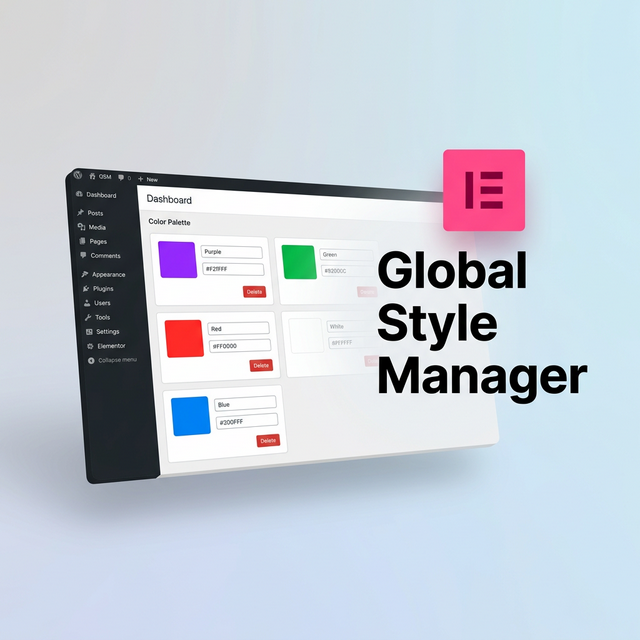
A robust, lightweight WordPress plugin designed to help you manage Elementor Global Colors and Global Typography outside of the heavy Elementor Editor. Built with a pristine, app-like UI natively in the WordPress Dashboard, GSM makes applying design systems to Elementor ultra-fast.
✨ Why Global Style Manager?
If you build WordPress sites using Elementor, you know how slow it can be to load the entire Elementor editor just to change a single primary color hex code or adjust a global font size. Global Style Manager (GSM) solves this by giving developers and designers a standalone, blazingly fast React-like interface within the WP Admin.
| The Elementor Problem | The GSM Solution |
|---|---|
| Editor takes too long to load just to tweak a hex code. | A lightweight, instant dashboard within your WordPress admin. |
| Clicking through multiple panels in Site Settings. | A consolidated dashboard featuring global colors and fonts on a single screen. |
| Inability to manage System styles easily. | Complete breakdown and visualization of both Custom and System variables. |
| Hard to mass-edit values across a design system. | Features a Raw JSON Code Editor for advanced users and mass Find/Replace. |
📦 Installation
- Download this
global-style-managerfolder. - Zip the folder so it becomes
global-style-manager.zip. - Go to WordPress Admin → Plugins → Add New → Upload Plugin.
- Upload the zip file and click Activate.
- The Style Manager (GSM) menu will now appear in your admin sidebar.
- A quick access shortcut (🎨) is also added to the top Admin Bar.
🚀 Key Features & How to Use
🎨 Global Colors
- Navigate to the Style Manager → Colors tab.
- Click "Add Color" to create a new variable.
- You can change the hue or opacity (Alpha), input hex codes directly, and assign a unique CSS variable ID.
- Drag and drop the cards to re-arrange your palette.
✏️ Global Typography
- Navigate to Style Manager → Typography.
- Click the font card to reveal the Accordion containing deep settings for Desktop, Tablet, and Mobile.
- Configure Font Family (Google Fonts autocomplete), Weight, Size, Line Height, Letter Spacing, and exact units (
px,em,rem,vw, etc).
💻 The Code Editor (JSON)
- Navigate to Style Manager → Code Editor.
- What is it? Elementor natively stores all your colors and fonts as a large JSON array in the database (under the Active Kit post meta).
- What does it do? This tab exposes that exact raw JSON to you. You can copy the code to back it up, paste another site's JSON to clone their design system instantly, or perform a mass "Find & Replace" text operation. Click "Apply to UI" to see your code changes mapped to the visual tabs!
💅 CSS Variables Reference
- A read-only tab that translates your current Elementor Kit into native
:rootCSS variables. - Copy snippets from here to use in your Custom CSS (
var(--e-global-color-primary)).
🛠️ Built For Performance (Architecture)
Built using modern WordPress Plugin architecture and vanilla ES6 frontend practices to ensure zero impact on your site's frontend speed:
global-style-manager.php: The main bootstrapper.includes/class-gsm-core.php: Core logic for manipulating the Elementor Active Kit database entries.includes/class-gsm-admin.php: Admin menu registration and lightweight asset enqueueing.includes/class-gsm-ajax.php: Secure nonce-protected REST endpoints for frontend UI operations.assets/js/admin.js: Vanilla JS application logic rendering a virtual DOM pattern.assets/css/admin.css: Complete app-like layout using native CSS variables.
⚠️ Disclaimer & Important Notes
⚠️ DISCLAIMER
Please use this plugin with caution as it hasn't been used or tested extensively yet in diverse environments. There is a concern it might conflict with other WordPress functions or third-party Elementor add-ons depending on your specific setup. Feel free to open an issue or report bugs on GitHub!
Tested and verified up to: Elementor version 3.35.5.
- Always click Publish Changes in the top right to push your modifications to the database.
- After saving, refresh your Elementor editor if it was open in another tab to see the live changes.
- This plugin requires the free Elementor Free plugin to be active. Elementor Pro is supported but not required.
- Elementor CSS cache is automatically cleared and regenerated when you publish changes via GSM.
🤝 Contributing
Issues and Pull Requests are welcome.
Tags: wordpress, elementor, elementor-extension, design-system, global-colors, typography, css-variables, wordpress-plugin
Releases
2 releases. Each count is every asset in that release; expand a row for the breakdown.