Hibira Live Visitors
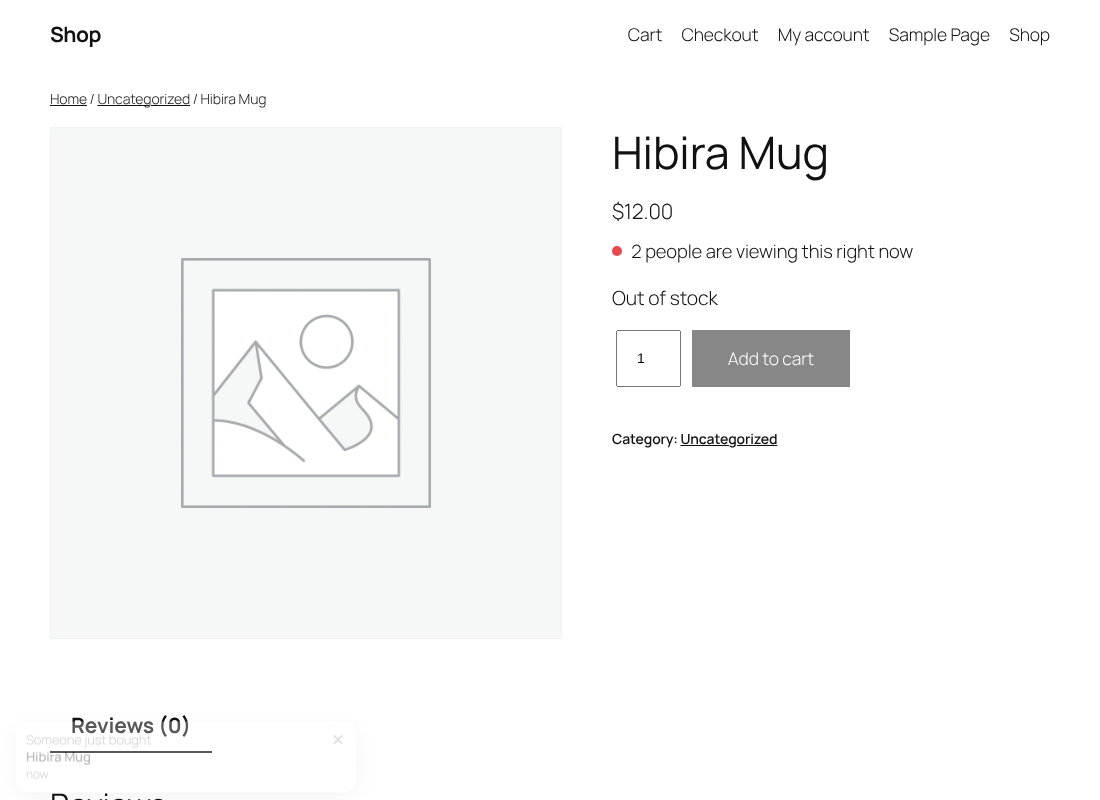
Real "12 people are viewing this" counts, "someone just bought" popups and live stock on product pages, counted from open browser tabs on Hibira's realtime service. No fake numbers.
Install
This is the repository archive. It installs, but the folder name will carry the branch suffix and updates will not flow.
Install straight from GitHub with WP-CLI:
wp plugin install https://github.com/hibira-io/woocommerce/archive/refs/heads/main.zipHibira Live Visitors for WooCommerce
Real "3 people are viewing this right now" counts, "Someone just bought" popups and live stock on WooCommerce product pages. Every number is an open browser tab counted by Hibira, so nothing is made up.
🇪🇸 Tutorial en español, with a short captioned video.
What it does
- Product viewers. A badge under the price shows how many shoppers have the product open. It hides below a threshold you pick (2 by default).
- Store-wide count.
[hibira_viewers scope="store"]shows how many shoppers are on the shop right now. - Purchase popups. When an order is paid, open pages show "Someone just bought" with the product. A visitor who arrives later sees one recent order (24 hours by default). No customer names or places are sent.
- Live stock. "Only 2 left in stock" and "Out of stock" update on open product pages as orders come in, and the add to cart button is disabled when the product sells out.
It works with classic and block themes and is compatible with HPOS and the cart and checkout blocks.
Requirements
- WordPress 6.5+, WooCommerce 8.0+, PHP 7.4+
- A Hibira app with subscription counting turned on (Free works: 100 connections)
Setup
- Install and activate the plugin.
- Create an app at hibira.io and turn on Subscription count in the app's settings.
- Open WooCommerce → Settings → Live visitors, paste the App ID, key and secret, save, and press Send test event.
You can keep the credentials out of the database with constants in wp-config.php:
define( 'HIBIRA_APP_ID', '...' );
define( 'HIBIRA_APP_KEY', '...' );
define( 'HIBIRA_APP_SECRET', '...' );
Shortcode
[hibira_viewers]                 viewers of the current product
[hibira_viewers scope="store"]   shoppers on the whole shop
[hibira_viewers min="1"]         show from one viewer
How it works
Each product page subscribes to a public channel for the product and, when the store-wide count is on, one for the store. Hibira sends the channel's subscriber count to every open tab, so the badge is the real number of tabs. Paid orders and stock changes are sent from WordPress after the response is finished, so checkout is not slowed down.
Filters: hibira_lv_load (load the script on more pages) and hibira_lv_client (replace the HTTP client).
Development
tests/e2e/live-visitors.cjs drives three shoppers with Playwright against a local WordPress + WooCommerce and a local Hibira server: viewer counts, a tab leaving, a stock change, a paid order (popup, out of stock, disabled button) and a later visitor's popup.
Releasing
Publishing a GitHub Release (tag v<Version>) attaches the zip (release.yml) and deploys to WordPress.org over SVN (wporg-deploy.yml): trunk, tags/<Version> and the directory assets in .wordpress-org/ (banners, icons, screenshots). It needs the SVN_PASSWORD repository secret (WordPress.org account hibira). Run it by hand from the Actions tab to redeploy, with dry_run to only print the SVN changes.
Translations come from translate.wordpress.org. translations/*.po (not shipped) are the starting translations to import there.
License
GPL-2.0-or-later
中文摘要
Hibira Live Visitors 為 WooCommerce 商品頁加上真實的「現在有 3 人正在看」、「有人剛買了」彈窗和即時庫存。所有數字都是 Hibira 數出的真實開啟分頁,不造假。
安裝後在 Hibira 建立 app 並開啟 Subscription count,到 WooCommerce → 設定 → Live visitors 貼上 App ID、key、secret 並送出測試事件即可。也可用 wp-config.php 的 HIBIRA_APP_* 常數設定。全站人數用短代碼 [hibira_viewers scope="store"]。支援區塊佈景主題與 HPOS,免費方案(100 連線)即可使用。後台介面支援英文、繁中、簡中、日、韓、泰、越、西班牙文。西班牙文教學(含字幕影片)在 docs/es/。
發布:發佈 GitHub Release(tag v<版本>)會自動上傳 zip 並經 SVN 部署到 WordPress.org(trunk、tags、.wordpress-org/ 的 banner/icon/截圖),需要 SVN_PASSWORD secret。翻譯在 translate.wordpress.org,translations/*.po 用於首次匯入。