Quick WP Lang WP Registry grade A. No security issues foundWP RegistryNo security issues foundOpen the reportA
Set the public language (hreflang) of any WordPress content to something different to the default language.
Install
Upload it under Plugins → Add New Plugin → Upload Plugin, then activate.
Install straight from GitHub with WP-CLI:
wp plugin install https://github.com/headwalluk/quick-wp-lang/releases/download/v1.2.1/quick-wp-lang.zipVersion: 1.2.1
Requires WordPress: 6.0+
Requires PHP: 8.0+
License: GPL v2 or later
Assign alternative languages to individual posts, pages, and custom post types for better SEO without requiring a full multilingual setup.
Overview
Quick WP Lang is a lightweight WordPress plugin that lets you assign an alternative language to individual posts, pages, or custom post types (including WooCommerce products) without requiring a full multilingual setup.
The Problem
Your site runs in a primary language (e.g., English UK) but you have a handful of pages written in another language (e.g., Polish, German). Without per-page language metadata, search engines see every page as the site default language, harming SEO for those alternative-language pages.
The Solution
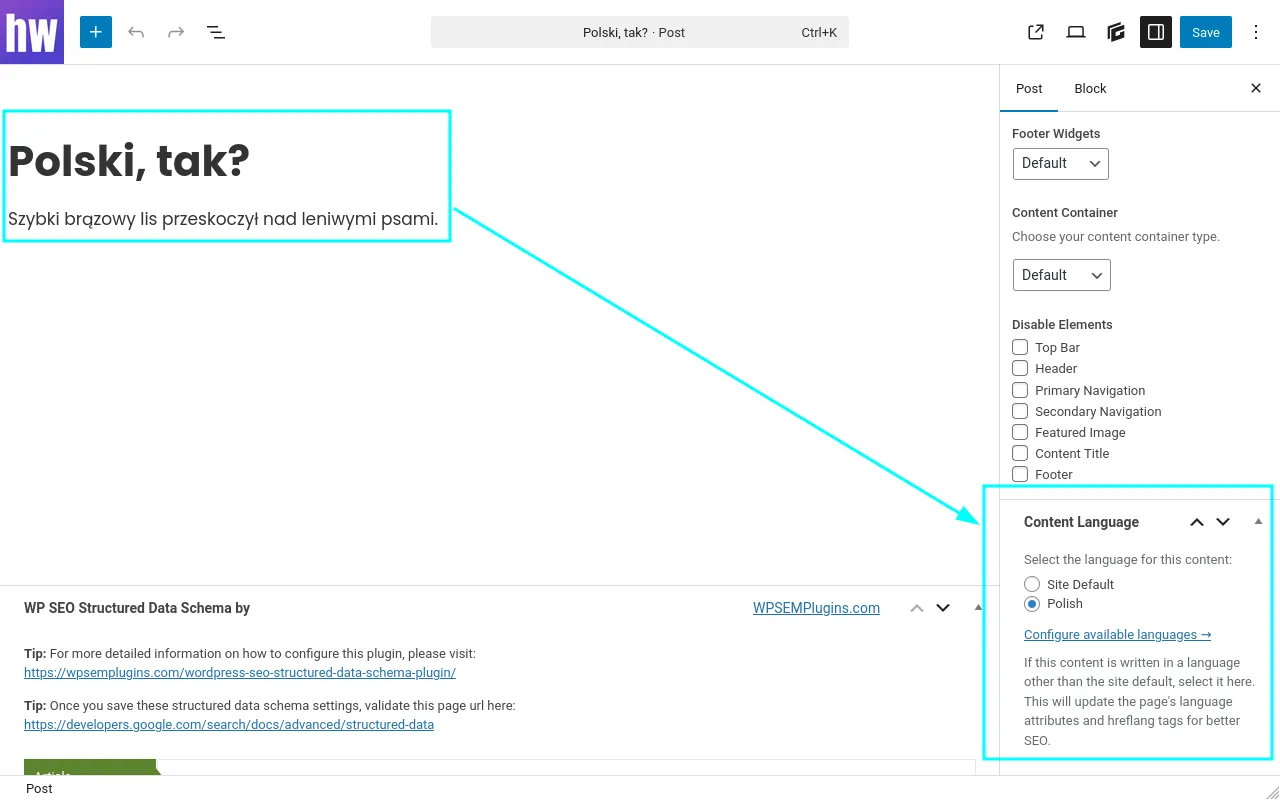
A simple meta box in the post editor lets you pick a language. On the front end, the plugin adjusts the page's <html lang=""> attribute, outputs the correct hreflang meta tag, and sets the Content-Language HTTP header — all scoped to that single post.
Important Distinction
This is not a translation plugin. There is no concept of "the same content in multiple languages". When a post is assigned an alternative language, that content exists only in that language — there is no counterpart in the site's default language. This is for ad-hoc alternative language provision for individual pieces of singular content.
Features
- ✅ Simple Meta Box — Select language from a curated list of 50+ common languages
- ✅ Settings Page — Enable only the languages you need (reduces clutter)
- ✅ Language Search — Filter available languages by name or code on settings page
- ✅ Smart Grouping — Enabled languages automatically float to top of list
- ✅ Radio Button UI — Clean, accessible interface in the post editor sidebar
- ✅ SEO Optimized — Automatically adjusts
langattribute, hreflang tags, andog:locale - ✅ SEO Plugin Compatible — Detects Yoast SEO, Rank Math, and All in One SEO
- ✅ WooCommerce Compatible — Works with WooCommerce products (HPOS compatible)
- ✅ Developer Friendly — Extensible via filters, follows WordPress Coding Standards
- ✅ No Build Step — Pure PHP, no JavaScript compilation required
- ✅ Translation Ready — Fully internationalized with text domain
quick-wp-lang
Installation
- Clone or download this repository to
/wp-content/plugins/quick-wp-lang/ - Activate the plugin through the 'Plugins' screen in WordPress
- Go to Settings → Content Language to enable your desired languages
- Edit any post or page and select a language from the Content Language meta box
Usage
1. Configure Available Languages
Go to Settings → Content Language and check the languages you want to make available. This keeps the meta box clean and focused.
2. Assign Language to Content
- Edit any post, page, or custom post type
- Look for the Content Language meta box in the sidebar
- Select the appropriate language (or keep "Site Default")
- Save/publish the post
3. Front-End Output
The plugin automatically handles:
<html lang="de-DE">attribute override<link rel="alternate" hreflang="de-DE" href="..." />tagContent-Language: de-DEHTTP header<meta property="og:locale" content="de_DE" />tag (if no SEO plugin is active)
Technical Details
Post Meta Key
- Key:
_qwl_language - Value: WordPress locale string (e.g.,
pl_PL,de_DE) or empty for site default - Prefix: Underscore-prefixed to hide from Custom Fields UI
Locale Format Conversion
WordPress uses en_GB, BCP 47 uses en-GB. The plugin automatically converts via str_replace( '_', '-', $locale ).
Filters
quick_wp_lang_languages
Modify the available languages list.
add_filter( 'quick_wp_lang_languages', function( $languages ) {
    $languages['cy'] = __( 'Welsh', 'quick-wp-lang' );
    return $languages;
} );
quick_wp_lang_supported_post_types
Modify which post types show the meta box and language column.
add_filter( 'quick_wp_lang_supported_post_types', function( $post_types ) {
    unset( $post_types['attachment'] );
    return $post_types;
} );
Development
Requirements
- PHP 8.0+
- WordPress 6.0+
Code Standards
This plugin follows WordPress Coding Standards.
# Check code standards
phpcs

# Auto-fix issues
phpcbf
File Structure
quick-wp-lang/
├── quick-wp-lang.php          # Main plugin file
├── constants.php               # Plugin constants
├── functions-private.php       # Private helper functions
├── includes/
│   ├── class-plugin.php        # Bootstrap & hook registration
│   ├── class-settings.php      # Settings page
│   ├── class-admin-hooks.php   # Meta box render/save
│   ├── class-public-hooks.php  # Front-end lang overrides
│   └── functions-languages.php # Language list helpers
├── dev-notes/                  # Development documentation
│   ├── patterns/               # Code patterns
│   └── workflows/              # Development workflows
└── languages/                  # Translation files
Changelog
See CHANGELOG.md for version history.
License
This plugin is licensed under the GPL v2 or later.
Support
For issues, questions, or feature requests, please contact Headwall or open an issue in this repository.
Releases
3 releases. Each count is every asset in that release; expand a row for the breakdown.