Auto Image Link Maker WP Registry grade A. No security issues foundWP RegistryNo security issues foundOpen the reportA
Automatically make iamges clickable in any WordPress site. Uses a lightbox for smooth UX.
Install
Upload it under Plugins → Add New Plugin → Upload Plugin, then activate.
Install straight from GitHub with WP-CLI:
wp plugin install https://github.com/headwalluk/auto-image-link-maker/releases/download/v1.0.2/auto-image-link-maker.zipA WordPress plugin that automatically wraps unwrapped images in clickable anchor links, with a built-in lightbox for smooth viewing.
Problem
Content managed in the WordPress block editor (particularly HTML tables) often contains images that are not wrapped in links. These images should be clickable, linking to their full-size source.
Approach
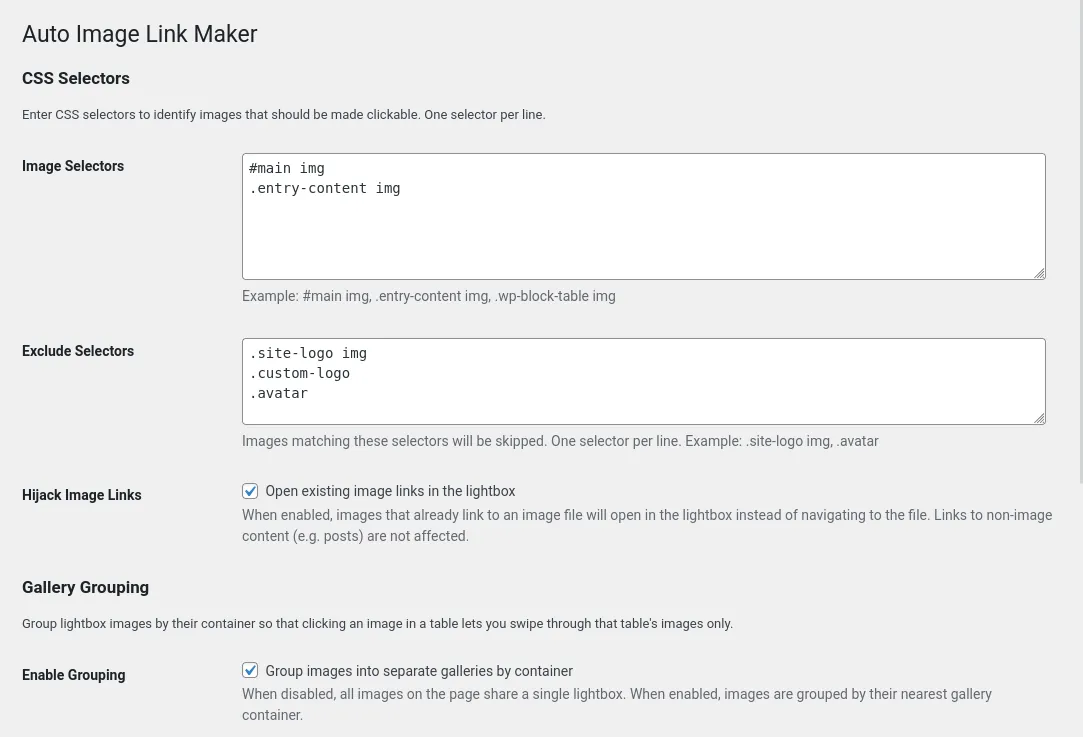
The plugin uses a client-side JavaScript approach rather than server-side HTML processing. A small script runs on the front end and:
- Selects images within a configurable container (default:
#main img). - For each matched image, checks whether it already has an
<a>ancestor usingelement.closest('a'). - If no anchor ancestor exists, wraps the image in an
<a>tag linking to the image'ssrc(or full-size source if available). - Opens clicked images in a GLightbox lightbox for a smooth viewing experience.
Why JavaScript instead of server-side?
- Reliable parent detection —
element.closest('a')is a clean, native way to check ancestry. The server-side equivalent (WP_HTML_Tag_Processor) is a forward-only stream parser that cannot easily inspect parent elements. - Works with the real DOM — no need to handle HTML serialization edge cases.
- Non-destructive — the stored content is never modified; links are added at render time in the browser.
Third-Party Libraries
GLightbox 3.3.1
- Website: https://github.com/biati-digital/glightbox
- Licence: MIT
- Location:
assets/vendor/glightbox/ - Files:
glightbox.min.js,glightbox.min.css
GLightbox is a dependency-free, touch-enabled lightbox used to display full-size images. It is bundled with the plugin — no external CDN references are used.
Translations
The plugin ships with machine-generated translations for the following locales. These have not been reviewed by native speakers and may contain inaccuracies — contributions and corrections are welcome.
- German (de_DE)
- Greek (el_GR)
- English UK (en_GB)
- Spanish (es_ES)
- French (fr_FR)
- Italian (it_IT)
- Dutch (nl_NL)
- Polish (pl_PL)
A POT file is included at languages/auto-image-link-maker.pot for generating additional translations.
Developer Filters
The plugin provides apply_filters() hooks so that theme and plugin developers can override behaviour on a per-page basis. All filters fire during wp_enqueue_scripts.
ailm_should_enqueue
Master switch — controls whether the plugin runs on the current page. Receives the boolean result of the page-type check.
// Disable the plugin on a specific page.
add_filter( 'ailm_should_enqueue', function ( bool $enabled ): bool {
    if ( is_page( 'no-lightbox' ) ) {
        return false;
    }
    return $enabled;
} );
ailm_css_selectors
Filter the array of CSS selectors used to find images.
// Add an extra selector on WooCommerce product pages.
add_filter( 'ailm_css_selectors', function ( array $selectors ): array {
    if ( is_singular( 'product' ) ) {
        $selectors[] = '.woocommerce-product-gallery img';
    }
    return $selectors;
} );
ailm_exclude_selectors
Filter the array of CSS selectors used to exclude images from processing.
// Exclude hero images on the front page.
add_filter( 'ailm_exclude_selectors', function ( array $selectors ): array {
    if ( is_front_page() ) {
        $selectors[] = '.hero-banner img';
    }
    return $selectors;
} );
ailm_hijack_image_links
Filter whether existing image links are hijacked to open in the lightbox.
// Never hijack links on archive pages.
add_filter( 'ailm_hijack_image_links', function ( bool $hijack ): bool {
    if ( is_archive() ) {
        return false;
    }
    return $hijack;
} );
ailm_skip_emoji
Filter whether emoji images are skipped.
ailm_emoji_selectors
Filter the array of CSS selectors used to identify emoji images.
ailm_gallery_grouping
Filter whether gallery grouping is enabled.
// Force gallery grouping on pages with tables.
add_filter( 'ailm_gallery_grouping', function ( bool $grouping ): bool {
    if ( is_singular() ) {
        return true;
    }
    return $grouping;
} );
ailm_gallery_containers
Filter the array of CSS selectors that define gallery container boundaries. Only used when gallery grouping is enabled.
// Add a custom container selector.
add_filter( 'ailm_gallery_containers', function ( array $containers ): array {
    $containers[] = '.my-image-grid';
    return $containers;
} );
ailm_group_ungrouped
Filter whether loose images (not inside any gallery container) are grouped into a shared lightbox. Only used when gallery grouping is enabled.
ailm_script_data
Catch-all filter on the full ailmData array before it is passed to JavaScript. Applied after all individual filters. Useful for adding custom keys or making bulk changes.
// Override multiple settings at once.
add_filter( 'ailm_script_data', function ( array $data ): array {
    if ( is_page( 'gallery' ) ) {
        $data['hijackImageLinks'] = true;
        $data['excludeSelectors'] = array();
    }
    return $data;
} );
Requirements
- WordPress 6.0+
- PHP 8.0+
Development
- Dev site:
http://bench3.local/ - WP-CLI:
wp(installed globally) - Code standards:
phpcs/phpcbf
Releases
2 releases. Each count is every asset in that release; expand a row for the breakdown.