Install
This is the repository archive. It installs, but the folder name will carry the branch suffix and updates will not flow.
Install straight from GitHub with WP-CLI:
wp plugin install https://github.com/hasukmistry/ai-provider-for-local-ollama/archive/refs/heads/main.zipWordPress Ollama Provider for Local AI (OpenAI-Compatible)
Connect your WordPress AI plugin to Ollama in minutes and run a private, self-hosted AI workflow with your own local LLM models.
This plugin is a production-minded AI provider for WordPress that uses Ollama's OpenAI-compatible API while keeping prompts and responses in your own environment.
Keywords: WordPress Ollama, Local AI, Self-hosted AI, OpenAI compatible, Offline AI, Private AI, Ollama provider.
What This Is
AI Provider for Local Ollama registers ollama_local as a provider in the WordPress Connectors ecosystem so your site can use local models through Ollama instead of sending traffic to cloud-only APIs.
Why Developers Use It
- Private by default: keep content in your local network or self-hosted infrastructure.
- Lower recurring cost for routine generation tasks.
- OpenAI-compatible request shape (
/v1/chat/completions) for familiar tooling. - Dynamic model discovery from Ollama (
/api/tags). - Endpoint health validation to reduce false "connected" states.
- Automatic default model selection from discovered local models.
Screenshots
Connector setup and connected state visuals:
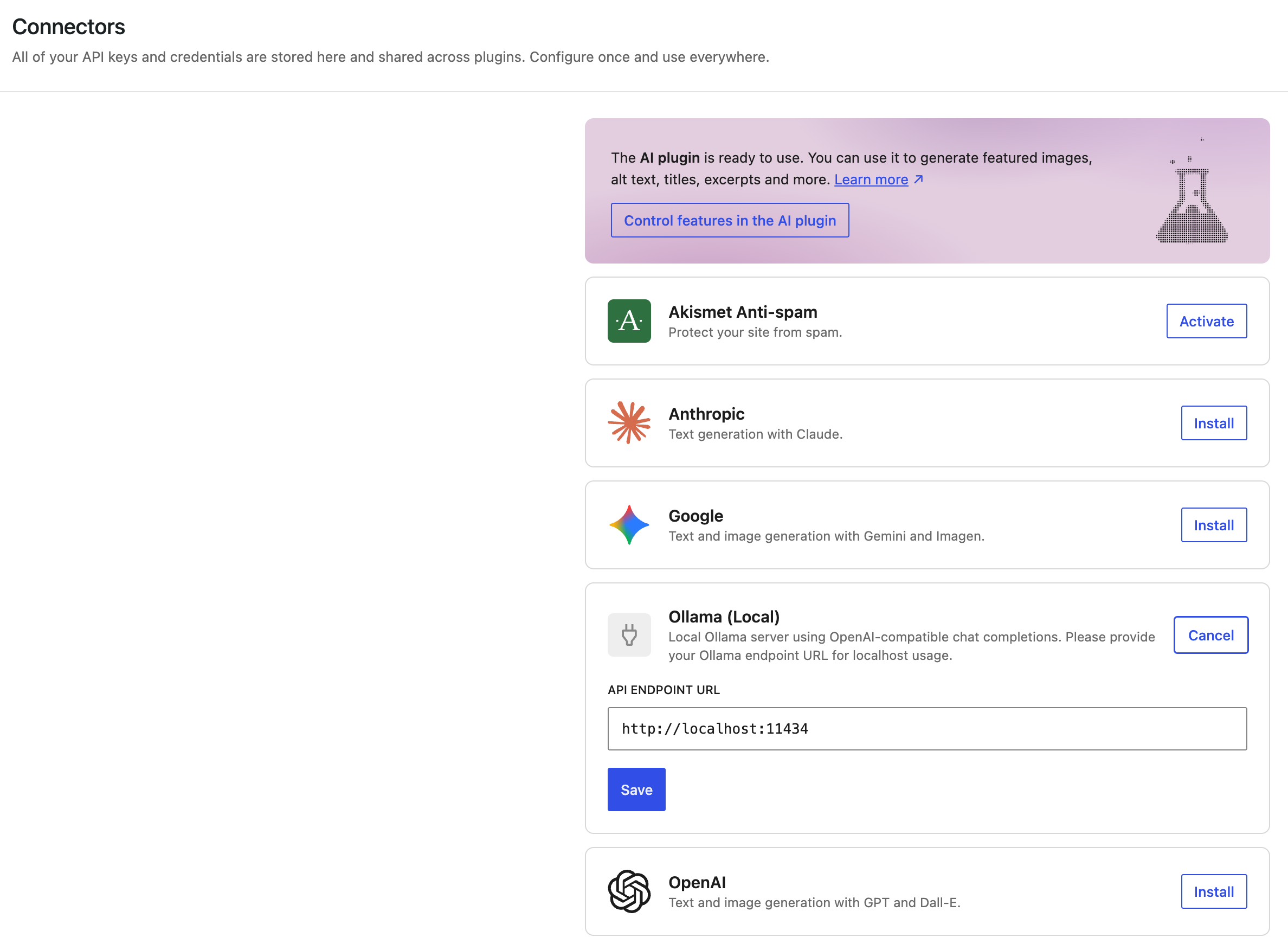
Replace these placeholders with real screenshots as your UI evolves.
Animated Demo (GIF)
- Planned demo path:
assets/demos/local-run.gif - Suggested flow:
- Open
wp-admin/options-connectors.php - Enter
http://localhost:11434 - Save connector settings
- Show successful connected state
- Generate AI Content
Quick Start (Under 5 Minutes)
- Install and activate the WordPress AI plugin.
- Install and run Ollama.
- Pull a model locally:
ollama pull qwen2.5:7b- Confirm Ollama is reachable:
curl http://localhost:11434
curl http://localhost:11434/api/tags- Activate this plugin.
- In WordPress admin, open
Settings > Connectors(wp-admin/options-connectors.php). - Configure endpoint as
http://localhost:11434and save.
Local Ollama Setup Guide (Step-by-Step)
Use this if you are new to Ollama or want to verify your local setup before connecting WordPress.
- Start Ollama runtime:
ollama serve- Check Ollama server health:
curl http://localhost:11434Expected output should include Ollama is running.
- Pull a model:
ollama pull qwen2.5:7b- Verify model list from Ollama API:
curl http://localhost:11434/api/tags- Confirm your model appears in
models. - In WordPress Connectors, set endpoint to
http://localhost:11434and save.
If Ollama is hosted on another machine, use that reachable host and port instead (example: http://192.168.1.10:11434).
Installation
1) WordPress Plugin Setup
- Copy this repository into your plugins directory.
- Activate AI Provider for Local Ollama in WordPress admin.
2) Ollama Setup
macOS:
brew install ollama
ollama serve
ollama pull qwen2.5:7b
Linux:
curl -fsSL https://ollama.com/install.sh | sh
ollama serve
ollama pull qwen2.5:7b
Windows:
- Install from ollama.com/download
- Launch Ollama and run model pull in terminal:
ollama pull qwen2.5:7bSupported Models
Any Ollama model that appears in:
curl http://localhost:11434/api/tagsExamples:
qwen2.5:7bllama3.1:8bmistral:7b
Use Cases
- Private editorial drafting in WordPress.
- Internal knowledge and content generation with offline AI workflows.
- Cost-controlled experimentation with local model swaps.
- Development environments requiring no external AI API keys.
Why Local AI Matters
Cloud APIs are excellent for many workloads, but local/self-hosted AI is often preferred when teams need:
- Stronger data locality and privacy guarantees.
- Predictable cost for high-frequency usage.
- Independence from third-party API outages.
- Control over model choice and upgrade timing.
Local Ollama vs Cloud API Providers
| Capability | Local Ollama Provider | Cloud OpenAI-Style APIs |
|---|---|---|
| Data control | High (self-hosted/private) | Lower (external service) |
| Marginal usage cost | Usually lower after setup | Per-token billing |
| Setup effort | Moderate | Low |
| Latency | Depends on local hardware | Depends on network/region |
| Internet dependency | Optional | Required |
Architecture Overview
WordPress AI Plugin
  -> Connectors API
    -> ollama_local provider (this plugin)
      -> Ollama endpoint (http://localhost:11434)
        -> /api/tags (model discovery)
        -> /v1/chat/completions (generation)
Core files:
ai-provider-for-local-ollama.phpincludes/class-ollama-provider.phpincludes/class-ollama-model-metadata-directory.phpincludes/class-ollama-text-generation-model.phpincludes/admin-connectors-ui.js
Reliability and Safety Notes
- Endpoint is normalized to
http(s)://host[:port]. - Path/query/fragment/user-info are dropped.
- Health checks gate connected state.
- Settings updates are capability-gated.
Troubleshooting
Connector connected, but generation fails
- Confirm Ollama process is running.
- Verify endpoint in connector settings:
http://localhost:11434 - Confirm at least one model exists:
curl http://localhost:11434/api/tagsNo model supports text_generation
- Ensure
/api/tagsreturns non-emptymodels. - Re-save connector endpoint to refresh default model selection.
UI still shows API-key wording
- Hard refresh browser.
- Reopen connectors page.
- Confirm plugin is active and admin JS loaded.
Contributing
Contributions are welcome. For now:
- Open an issue with reproduction details.
- Keep pull requests focused and minimal.
- Include before/after behavior notes for connector and model discovery flow.
(Planned: dedicated CONTRIBUTING.md, templates, and CI checks.)
Roadmap
- Add dedicated docs pages for architecture and development.
- Add issue/PR templates and contributor guidelines.
- Add Markdown/documentation lint workflow.
- Add richer demo assets (real screenshots + setup GIF).
- Add release checklist and semantic versioning guidance.
Star History
If this plugin helps your local WordPress AI workflow, a star helps discovery and signals demand for continued maintenance.
Version
Current plugin header version: 0.2.0