Install
This is the repository archive. It installs, but the folder name will carry the branch suffix and updates will not flow.
Install straight from GitHub with WP-CLI:
wp plugin install https://github.com/hasancse06/quixdevs-stripe-rest-payments-woocommerce/archive/refs/heads/master.zip
REST API Payment Integration for WooCommerce Stripe
Connect Apps. Process Payments.
This plugin extends the official WooCommerce Stripe Payment Gateway to support authorized payment workflows for external web and mobile applications. Prepare an existing customer order through a secure WooCommerce Stripe REST API, open the store's native payment page, and read server-verified payment status.
📦 Download & Install
⬇️ Download Latest Stripe REST Payments Plugin
Download the lightweight WordPress installation package, quixdevs-stripe-rest-payments.zip, from GitHub Releases → Assets.
Development build — target version 1.0.0. No public installation ZIP is available yet. The direct latest-download link becomes available only after a qualifying published release contains the correctly named ZIP asset; a draft or prerelease does not qualify. Merchant Stripe test-mode acceptance and publisher-rights checks remain outstanding. Use current development builds only for isolated/staging review. Publication readiness.
Installation
Once an approved installation asset is available:
- Install and activate WooCommerce.
- Install and activate the official WooCommerce Stripe Payment Gateway, currently exactly 11.0.1.
- Configure the Stripe gateway with valid merchant settings and enable its card payment method. Review the requirements, including HTTPS; use authorized test-mode settings for staging acceptance.
- Download
quixdevs-stripe-rest-payments.zipfrom the approved release’s Assets. - Open WordPress Admin → Plugins → Add Plugin.
- Select Upload Plugin.
- Choose the downloaded ZIP.
- Click Install Now.
- Activate QuixDevs Stripe REST Payments.
- Open WooCommerce → Stripe REST Payments to review dependency status and API information.
No Composer installation or command-line tools are required on the store server.
Important: Use
quixdevs-stripe-rest-payments.zipfrom GitHub Releases → Assets. Code → Download ZIP and the automatically generated Source code ZIP contain the complete development repository, including tests, documentation and tooling. They are not the optimized WordPress installation package.
Browse all releases · Build and release documentation
Installation · Quick start · REST API · Developer documentation
Overview
A WooCommerce Stripe API addon for existing-order payments. QuixDevs adds two authenticated endpoints and a small diagnostics screen. The official Stripe extension owns collection, PaymentMethods, PaymentIntents, authentication, settlement, and webhooks. No second gateway or merchant account is created.
Key Features
- Authenticated payment preparation for existing WooCommerce customer orders.
- Order ownership authorization and explicitly scoped server integrations.
- Request idempotency and duplicate preparation protection through persistent per-order locks.
- Verified Stripe payment state, amount, currency, mode and transaction matching.
- Native order-pay browser handoff for WooCommerce mobile payment integration.
- WooCommerce CRUD with legacy storage and HPOS integration coverage.
- Safe errors, no-store responses and minimal admin diagnostics.
Guest API access, embedded Payment Element confirmation, subscription renewals, native SDK payments, and split Stripe gateways are outside this version's scope. Preparation does not create an intent or charge a card. The customer must sign in as the order owner in the browser used for payment.
Screenshots
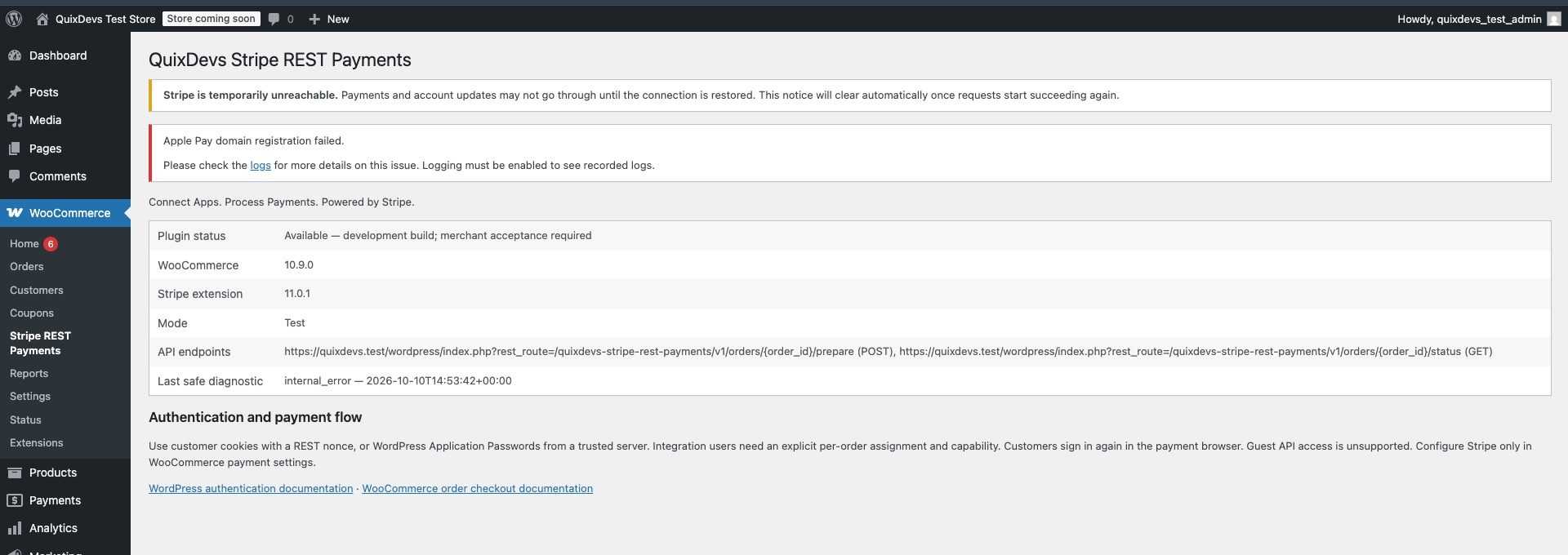
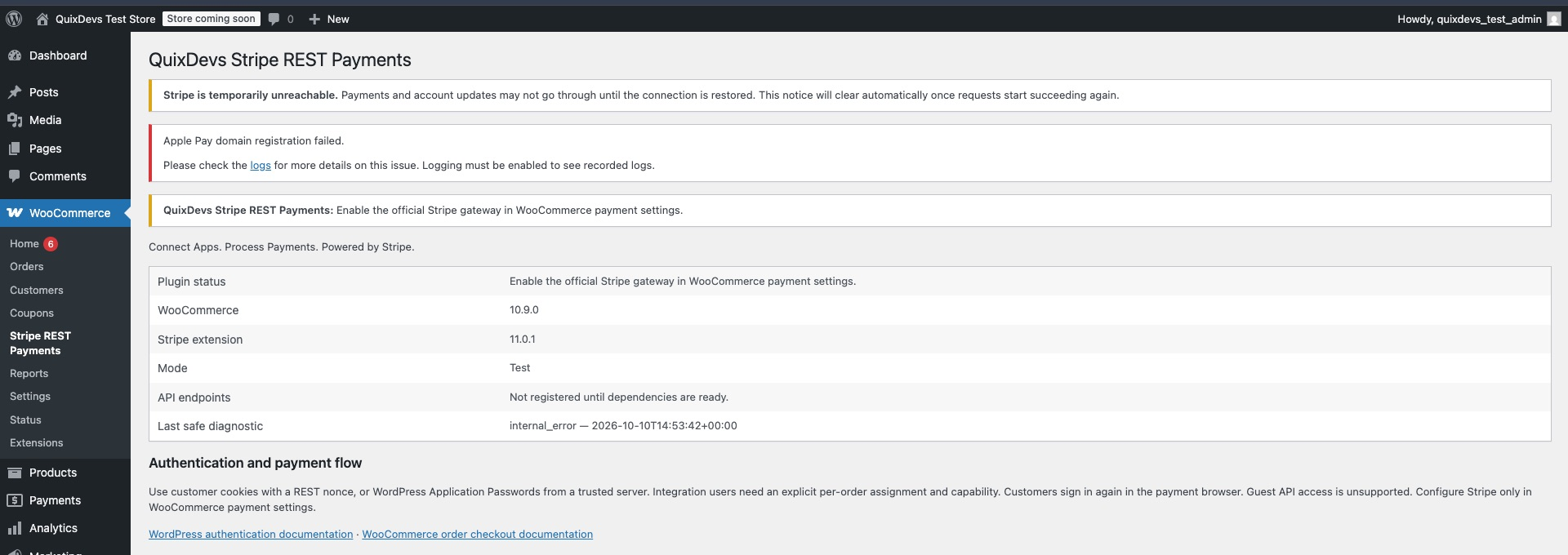
All four views are visible below. They show the actual addon on a disposable store using dummy credentials and blocked provider HTTP. Stripe’s connection warnings and the earlier negative-test diagnostic are part of that fixture; these screenshots do not show merchant payment acceptance. Capture details.
1. WooCommerce diagnostics and authentication guidance
2. Dependency failure diagnostics
3. Versioned API endpoints

4. Payment configuration and safe diagnostics

Requirements
| Component | Required | Locally verified |
|---|---|---|
| PHP | 8.2 or newer | 8.4.13 |
| WordPress | 6.9 or newer | 6.9 |
| WooCommerce | 10.9 or newer | 10.9.0 |
| Official WooCommerce Stripe Payment Gateway | Exactly 11.0.1, enabled and configured with cards enabled | 11.0.1 |
| Store transport | HTTPS | Disposable HTTPS fixture |
| Database | WordPress/WooCommerce supported database | MariaDB 10.4.28 |
The exact Stripe pin protects the inspected internal read interfaces. Declared minimums are guards; other combinations and future Stripe versions are not claimed as tested.
Maintainer Build
For current staging review, maintainers can build the development ZIP locally. Maintainer approval now permits tag-triggered or manual unpublished draft-release preparation in this public repository. After all required checks pass, the workflow attaches the ZIP and checksum to a prerelease draft; it never publishes the release. Payment acceptance and publisher-rights limits remain documented. Complete distribution procedure.
Build and verify from the source repository:
python3 tools/package.py
python3 tools/verify-package.py
Output: dist/quixdevs-stripe-rest-payments.zip, dist/quixdevs-stripe-rest-payments.zip.sha256, and dist/package-manifest.json. The explicit runtime allowlist includes 27 files: PHP bootstrap/classes/autoloader, uninstall handler, WordPress readme and license. Repository guides, images, tests, tooling and Composer development dependencies stay out of this lightweight ZIP. Complete distribution procedure.
The historical EventPro implementation is excluded from this repository. Do not activate it alongside this addon; its global function override remains unsafe.
Quick Start
- Create an existing, non-guest customer order with a positive total, pending/failed status and payment method
stripe. - Authenticate as the order owner, or use a backend integration identity explicitly assigned to that order.
- Call
preparewith an empty body or{}and a stableIdempotency-Key. - Open a returned
checkout_urlin the native payment browser. The customer signs in as the order owner and completes payment using the official gateway. - Poll
statusat a bounded rate. Display payment success only whenpaidistrue.
An existing payment attempt may return pending state with no new URL. Continue its original flow and reconcile uncertain state before retrying. Request/response contract · Runnable client examples.
How It Works
- An authenticated caller selects an owned, pending or failed, positive-value order assigned to
stripe. preparechecks authorization and existing payment state under an atomic preparation lock.- A fresh order returns its native WooCommerce order-pay URL. The owner opens it, signs in if needed, selects Stripe, and pays using the official checkout UI.
- Stripe's own browser flow handles customer authentication and its webhook/verification lifecycle updates WooCommerce.
- The application polls
statusat a bounded rate and displays success only whenpaidistrue.
Stripe Configuration
Manage all credentials, test/live mode, enabled methods and webhook settings in the official gateway. QuixDevs stores no additional merchant credentials and changes no webhook configuration. The native payment page can offer other configured gateways; QuixDevs verifies only orders whose current method is stripe.
REST API
Namespace: quixdevs-stripe-rest-payments/v1.
| Method | Route | Purpose |
|---|---|---|
| POST | /orders/{order_id}/prepare |
Authorized native payment handoff |
| GET | /orders/{order_id}/status |
Read-only verified order/payment state |
POST accepts an empty body or {} with a 16–128 character Idempotency-Key. No payment method IDs, amount, currency, tokens, raw card data or success flags are accepted. Complete contract.
Authentication
Same-store authenticated browser requests use WordPress cookies plus X-WP-Nonce. Trusted backends can use core Application Passwords over HTTPS. A separate integration user must have both the plugin capability and an explicit order assignment. Store credentials only on the backend. Authentication guide.
Payment Lifecycle
requires_action, processing, and requires_capture remain pending. Stripe succeeded alone does not imply WooCommerce fulfillment or a reconciled paid order. The addon never calls payment_complete() or forces processing orders to completed. Lifecycle · Idempotency and recovery.
API Examples
cURL · PHP backend · JavaScript · Postman.
Ionic Angular Integration
Use your existing authenticated backend to authorize the app's user, prepare the order, and open the native store payment URL in Capacitor Browser. Browser login is separate from app login. Return to the app and check verified status. Ionic Angular guide.
Security
This WordPress Stripe REST payments addon rejects anonymous access and cross-customer order access. It never accepts PAN/CVV and never returns client secrets or merchant keys. Exclude these routes and native order-pay pages from caching and URL analytics. Security policy · Deployment requirements.
Compatibility
HPOS and legacy order CRUD passed real database integration tests for the environment above. Classic/Blocks checkout hooks are left intact, but full checkout payment/browser/webhook acceptance is unverified. There is no second Checkout Blocks registration. Research and version decisions.
Troubleshooting
Missing routes indicate a dependency, HTTPS or merchant-configuration issue. An existing Stripe attempt yields a pending handoff with no new payment URL; continue the original browser flow and poll status. A persistent preparation lock requires operator reconciliation after stopping workers. Never clear a lock or metadata merely because a client timed out. See error codes.
Verification
Recorded local checks passed: 51 unit tests / 93 assertions, 18 real WordPress/WooCommerce integration tests / 81 assertions, 15 packaging tests and 18 draft-release safety tests, legacy and HPOS storage, repeated four-process lock contention, PHPCS, PHPStan level 5, PHP syntax, extracted-package Plugin Check, and Composer-free ZIP installation and lifecycle retention.
Provider HTTP was mocked or blocked throughout. Real Stripe success, decline, 3DS, capture, native browser checkout, webhook recovery, mobile-device return behavior and remote CI execution remain unverified. Test procedure and environment · Distribution verification · Acceptance status.
Developer Documentation
- REST API, authentication and scoped integration users, error codes
- Payment lifecycle, idempotency and lock recovery, deployment security
- cURL, PHP, JavaScript, Ionic Angular, Postman
- Architecture and implementation report, Stripe compatibility research, original source review
- Testing, changelog, publication readiness
- Lightweight ZIP and release workflow
- GitHub listing, draft prerelease notes, publishing checklist
- Branding and editable assets, WordPress.org asset handoff
For local development:
composer install
composer test
composer lint
composer analyse
python3 tools/check-source.py
python3 tools/check-repository.py
python3 tools/package.py
python3 tools/verify-package.py
python3 -m unittest discover -s tests/Packaging -v
Integration tests require an explicitly disposable database and WordPress installation. Follow the testing guide before running composer test:integration.
Contributing
See CONTRIBUTING.md. The source repository includes development tools; tools/package.py builds a production-file-only development ZIP.
License
MIT for the new implementation, as requested. The original file says only “MIT License”; it contains no complete grant or ownership notice. Rights/ownership attestation remains a publication prerequisite. No original EventPro code is bundled. See licensing review.
👨💻 Developer, Creator & Maintainer
Full-Stack Software Engineer with 10+ years of experience building web applications, SaaS platforms, WordPress and WooCommerce plugins, and hybrid mobile applications.
Technical Expertise: PHP, Laravel, WordPress, WooCommerce, Ionic Angular, TypeScript, REST APIs, and AI integrations.
- 🌐 Portfolio & About Me: hasan.online
- 🎓 Udemy Instructor: View Profile
- 🛠️ Envato Author: View Portfolio
- ✍️ Technical Blog: blog.hasan.online
Maintained by
QuixDevs Stripe REST Payments is developed and maintained under the QuixDevs brand.
Copyright © 2026 QuixDevs.
Independent addon; no official Stripe or WooCommerce endorsement is implied.
⭐ Support This Project
If you find this useful:
- ⭐ Star the repository on GitHub
- 🔗 Share it with fellow Ionic, WordPress, WooCommerce, or mobile app developers
- 💡 Contribute with feedback or pull requests
Together, we make WordPress more mobile-friendly and developer-first 🚀