Processing WP Rocket
Plugin Wordpress - Log Processamento de cache / WP-Rocket
Install
This is the repository archive. It installs, but the folder name will carry the branch suffix and updates will not flow.
Install straight from GitHub with WP-CLI:
wp plugin install https://github.com/gustavog2d/processing-wp-rocket/archive/refs/heads/master.zipA diagnostic companion for WP Rocket that visualizes processing information from WP Rocket’s internal database tables.
Heads‑up: This is not an official WP Rocket plugin. It does not replace or modify WP Rocket behavior; it only reads and displays information in the WordPress admin.
✨ Highlights
- Unified table view with search and filters, including an exact match toggle for finding a single URL (e.g. the home page) without substring noise
- Site Health panel at the top of the screen showing the percentage of URLs Pending/In Progress/Completed/Failed for each layer (cache, RUCSS, lazy render, priority elements)
- Cron Status panel showing WP Rocket's native WP-Cron hooks (next run, overdue flag) and Action Scheduler queue activity (last run, success/failure), so you don't need a separate generic cron-monitoring plugin
- Status badges (Pending, In Progress, Completed, Failed) with colors
- Status + date in the same cell (date adjusted to your WordPress timezone)
- Cache status unified (no desktop/mobile split)
- PageSpeed Insights button for each URL
- i18n-ready (English default) and pt_BR translation included
🔎 What it reads
From WP Rocket tables (auto‑detected):
wpr_rocket_cachewpr_rucss_used_csswpr_lazy_render_contentwpr_above_the_fold
The plugin aggregates data by canonical URL (scheme + host + path), showing per‑layer status (cache, Used CSS, lazy, priority elements).
✅ Requirements
- WordPress 6.0+
- PHP 7.4+
- WP Rocket active (for data to be available)
📦 Installation
- Download the plugin ZIP from the releases or build it locally.
- In WordPress Admin → Plugins → Add New → Upload Plugin, upload the ZIP.
- Activate. You’ll see Processing WP Rocket in the admin menu.
🧭 Usage
- Keep WP Rocket active.
- Go to Tools → Processing WP Rocket.
- Browse the table: each cell shows status (color) and last update date for that layer/device.
- Use the PageSpeed button to open a quick test for the URL.
Notes
- The plugin does not clear caches or change WP Rocket settings.
- For large sites, use the search/filter UI to reduce result sets.
🌐 Internationalization
- Default strings in English.
- Included translation: Português (Brasil)
pt_BR. - Text domain:
processing-wp-rocket. - WordPress will load the translation automatically according to Settings → General → Site Language.
🧩 Developer Notes
- Admin table built with
WP_List_Table. - Dates rendered with
wp_date()andwp_timezone()to respect the site timezone. - Status normalization maps common synonyms to:
pending,in_progress,completed,failed.
Filters
pwr_status_labels— customize status labels displayed on badges.pwr_datetime_format— change date format (defaultY-m-d H:i:s).pwr_tables— override/extend which WP Rocket tables are scanned.pwr_min_capability— adjust capability needed to access the screen (defaultmanage_options).pwr_table_per_page— rows per page in the admin list table (default20).pwr_repository_items— short-circuit the table scan entirely with customitems/totaldata (list table only; the Site Health panel always reads the tables live).pwr_health_cache_ttl— cache lifetime in seconds for the Site Health panel (default5 * MINUTE_IN_SECONDS).pwr_health_field_labels— customize the per-layer labels shown in the Site Health panel.pwr_cron_cache_ttl— cache lifetime in seconds for the Cron Status panel (default5 * MINUTE_IN_SECONDS).pwr_cron_hook_pattern— substring used to auto-detect WP Rocket's cron hooks and Action Scheduler actions (defaultrocket).pwr_cron_actions_limit— how many recent Action Scheduler actions to consider when computing the success/failure rollup (default50).
🖼 Visualization example
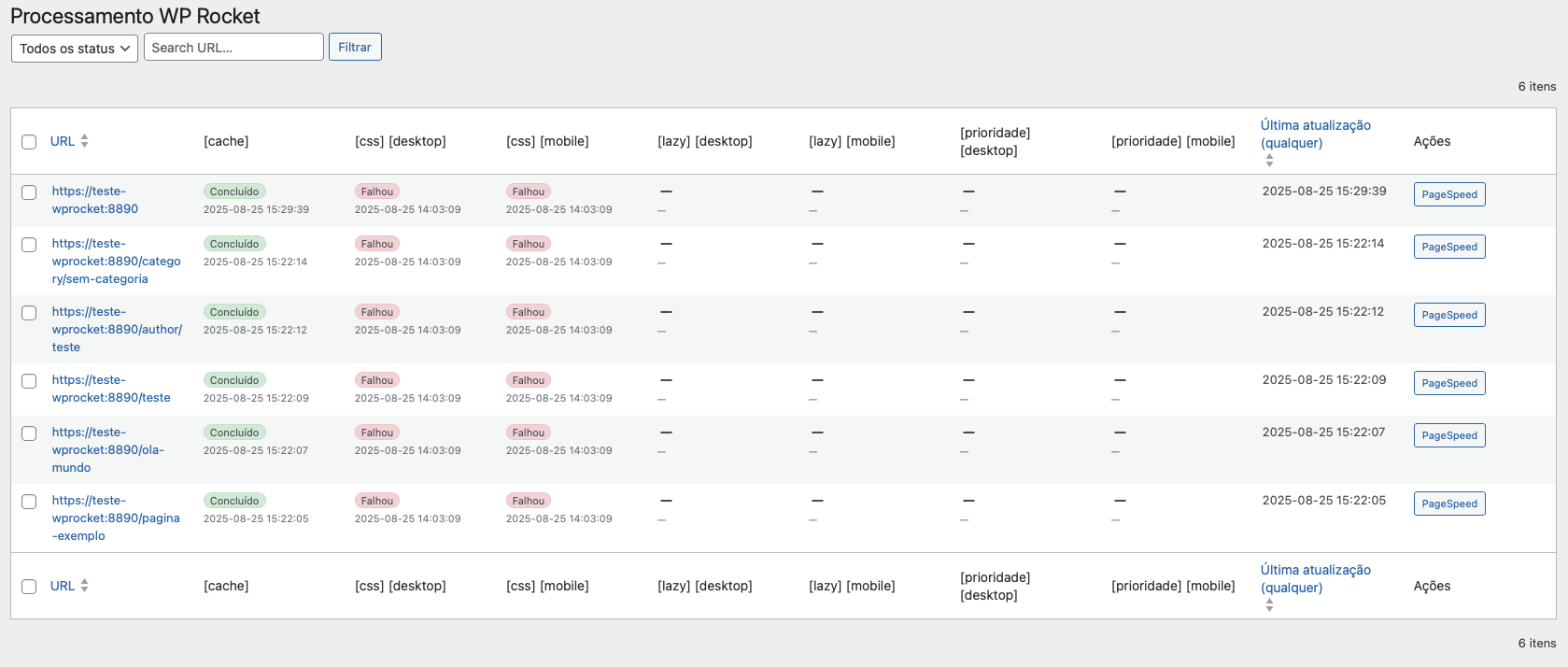
The example above shows the listing with status columns, identification colors and direct links to the URLs.
🚀 Changelog (excerpt)
2.1.0
- Added an exact match search toggle, for finding a single URL (e.g. the home page) without substring noise.
- Added a Site Health panel with per-layer status percentages across the whole site.
- Added a Cron Status panel combining native WP-Cron and Action Scheduler data specific to WP Rocket.
2.0.0
- Unified cache status (no desktop/mobile).
- Timezone‑aware date rendering.
- i18n support with pt_BR translation.
- Removed purge/clear buttons; kept only PageSpeed.
- UI cleanup & stability improvements.
1.0.0
- Initial release with admin table of WP Rocket processing info.
Full changelog lives in readme.txt (WordPress.org format).
📄 License
GNU General Public License v2.0 or later. See LICENSE or the header in the main plugin file.
Releases
4 releases.
These releases are tags only. The author does not attach a packaged zip, so there are no download counts to report.