LoadGate Forge
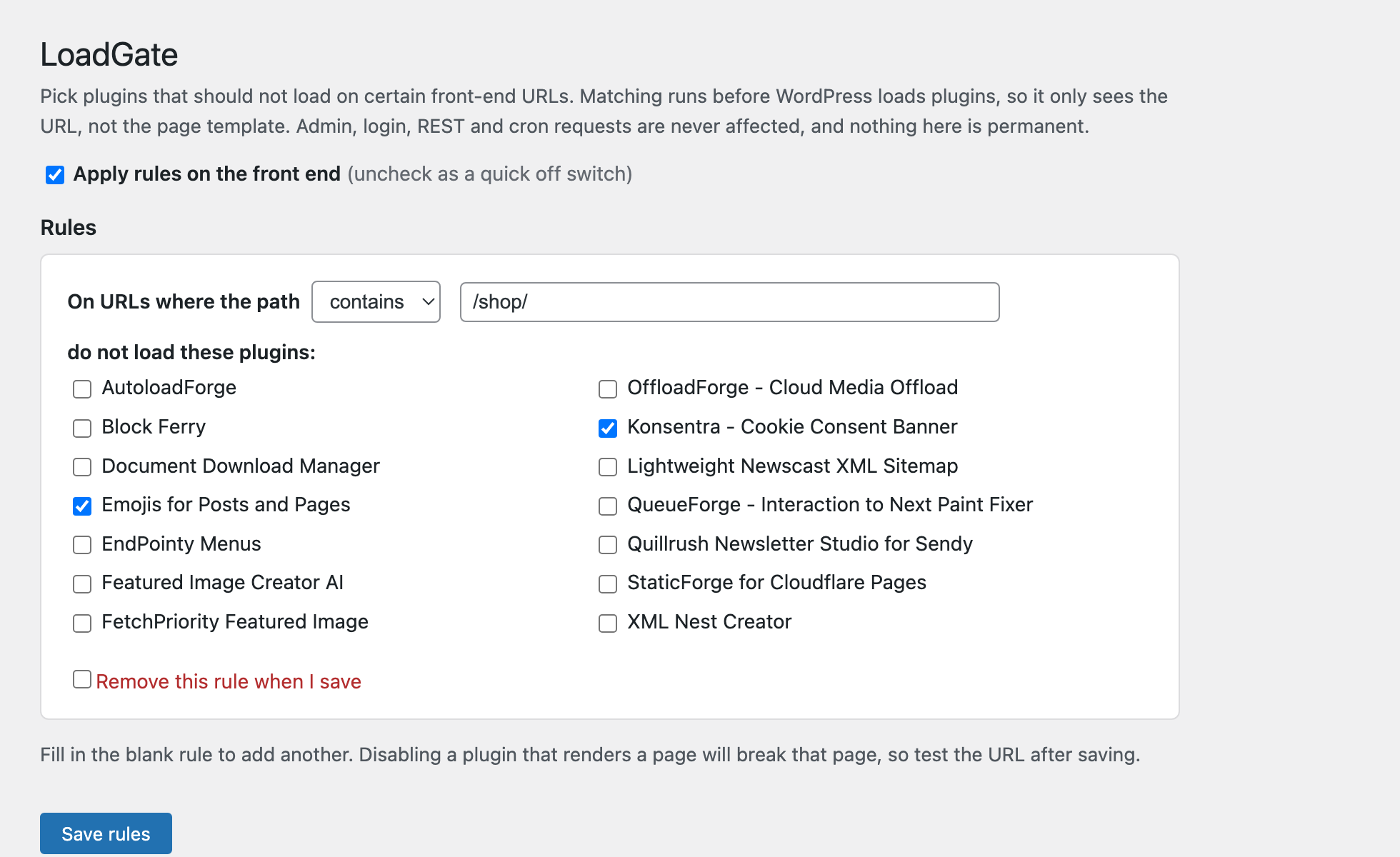
Pick plugins that should not load on certain front-end URLs. Matching runs before WordPress loads plugins, so it only sees the URL, not the page template. Admin, login, REST and cron requests are never affected, and nothing here is permanent.
Install
Upload it under Plugins → Add New Plugin → Upload Plugin, then activate.
Install straight from GitHub with WP-CLI:
wp plugin install https://github.com/gunjanjaswal/loadgate-forge/releases/download/v1.0.0/loadgate.zip






Stop plugins from loading where they aren't needed.
Pick a URL, pick the plugins to skip there, and LoadGate Forge keeps their code off that request. Reversible, and the admin is never affected.
The idea
Most sites carry a few plugins that only matter on one or two pages: a form builder on the contact page, a gallery on the portfolio, a chat widget on the homepage. WordPress still loads every active plugin on every request, so all that code runs on pages that never use it.
LoadGate Forge lets you say "don't load this plugin on these URLs." On a matching request the plugin is taken out of the active list before it loads, so its PHP never runs there. Everywhere else, it works exactly as before.
How it works (and an honest limit)
To stop a plugin from loading, the decision has to be made before WordPress loads plugins, through the option_active_plugins filter. Only a must-use plugin runs early enough for that, so LoadGate Forge installs a small loader into wp-content/mu-plugins/ on activation and removes it on deactivation.
Because that runs before WordPress knows which page you asked for, matching is by request URL, not by is_page() or block content. There's no way around that at plugin-load time, so LoadGate Forge is honest about it: rules match the URL path.
Safety
The loader bails out completely for anything that isn't a plain front-end page view:
| Never affected |
|---|
The admin area (/wp-admin/) |
| The login screen |
REST API calls (/wp-json/) |
| Cron and WP-CLI |
| Any non-GET request |
So even a rule that matches everything can't touch your dashboard, and LoadGate Forge never disables itself. There's also a master switch to turn every rule off at once, and clearing a rule restores normal loading. Nothing is ever deleted.
Installation
From your dashboard
- Download this repository as a ZIP.
- Plugins → Add New → Upload Plugin, choose the ZIP, install and activate.
Manually
- Copy the
loadgate-forgefolder intowp-content/plugins/. - Activate LoadGate Forge.
Either way, activation installs the loader into wp-content/mu-plugins/. Then open Settings → LoadGate Forge.
How to use it
- Open Settings → LoadGate Forge.
- In the blank rule, choose how to match (contains / starts with / is exactly) and type the URL path, for example
/contact/. - Tick the plugins that should not load on that URL.
- Save. Fill in the next blank rule to add another.
- Visit the URL and check the page still works. To undo, tick "Remove this rule" and save, or use the master switch.
Disabling a plugin that actually renders a page will break that page. Always test the URL after saving.
Requirements
- WordPress 6.3 or newer
- PHP 7.4 or newer
wp-content/mu-plugins/writable (created automatically if missing)- Single-site installs (multisite not supported yet)
Screenshot
Support
Useful to you? You can buy me a coffee on Ko-fi.
Bug or idea? Open an issue, or email hello@gunjanjaswal.me.
Author
Gunjan Jaswal
- Website: gunjanjaswal.me
- Email: hello@gunjanjaswal.me
- Ko-fi: ko-fi.com/gunjanjaswal
License
Released under the GPLv2 or later.
Releases
1 release. Each count is every asset in that release; expand a row for the breakdown.