WEI Warning Banner
Say no to Web Environment Integrity (WEI). WEI Warning Banner is a WordPress plugin that shows up a banner to alert your website visitors of potential privacy concerns when their browser is utilizing WEI. The aim is to encourage the use of privacy-respecting browsers and promote awareness about internet privacy.
Install
This is the repository archive. It installs, but the folder name will carry the branch suffix and updates will not flow.
Install straight from GitHub with WP-CLI:
wp plugin install https://github.com/groundcat/wordpress-wei-warning-banner/archive/refs/heads/main.zipWeb Environment Integrity (WEI) Warning Banner WordPress Plugin
WEI Warning Banner is a WordPress plugin that shows up a banner to alert your website visitors of potential privacy concerns when their browser is utilizing Web Environment Integrity (WEI). The aim is to encourage the use of privacy-respecting browsers and promote awareness about internet privacy.
Features
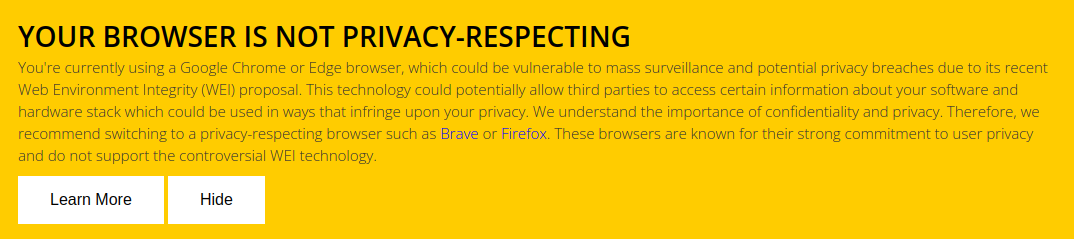
- Displays a fixed position warning banner at the bottom of the webpage if the user's browser uses WEI.
- Offers an admin settings page under the WordPress Settings menu, where admins can enable or disable the warning banner.
Todo
- Allows the admin to edit the banner content and styling at the settings page.
Installation
- Download the plugin files and upload them to your
/wp-content/plugins/directory. - Activate the plugin through the 'Plugins' menu in WordPress.
- Navigate to Settings > WEI Warning Banner in your WordPress dashboard.
- Enable or disable the warning banner as desired.
Contribute
Your contributions are always welcome! Feel free to improve existing features, add new features or fix issues. You can send us a pull request on GitHub.
License
MIT
Disclaimer
This plugin is a simple implementation and it is provided as-is with no guarantee or warranty. User discretion is advised while using this plugin on live sites.