Install
This is the repository archive. It installs, but the folder name will carry the branch suffix and updates will not flow.
Install straight from GitHub with WP-CLI:
wp plugin install https://github.com/govready/govready-wordpress-agent/archive/refs/heads/1.x-dev.zipGovReady
GovReady provides a dashboard and tools to enhance security for government websites and achieve FISMA compliance.
Note: This plugin is currently under active development and should not be used on production websites.
Overview
The GovReady Agent monitors your WordPress site, domain, and ssl certificate to ensure that you are following current security best-practices.
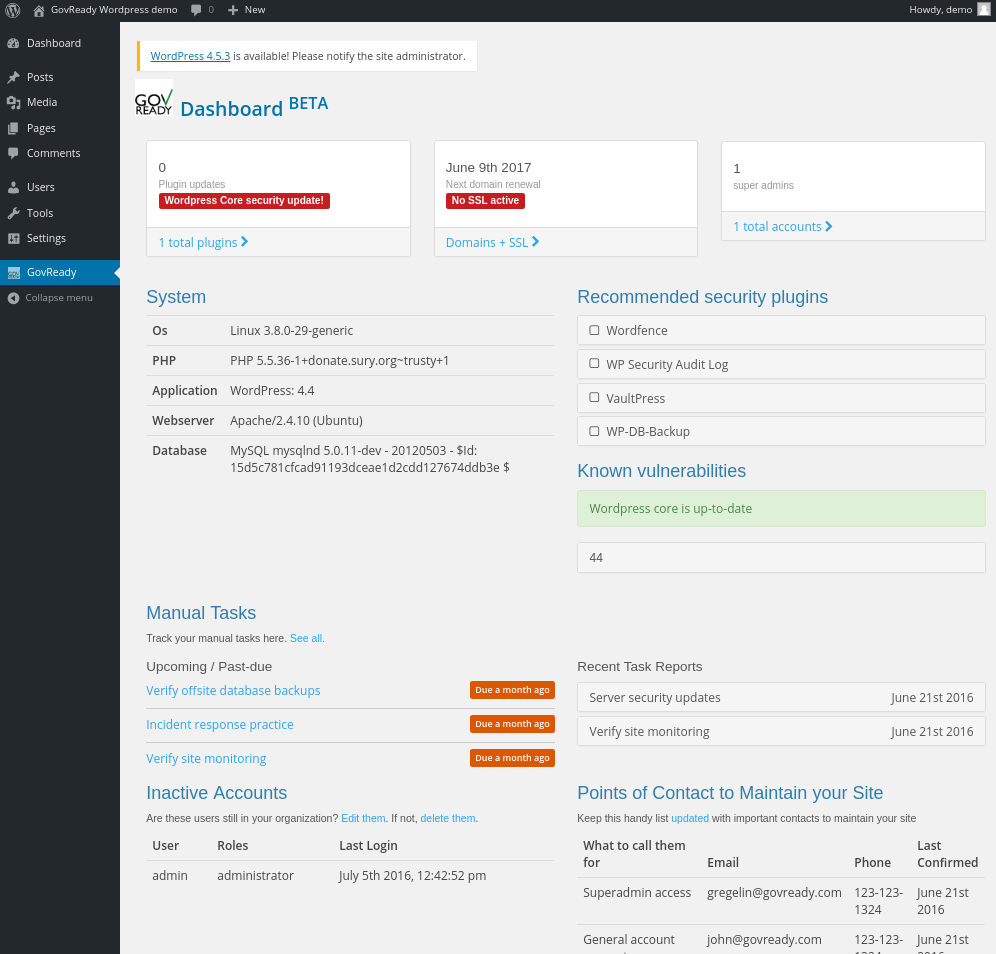
The GovReady Dashboard gives you a shared, easy-to-digest overview of the status of security on your website, including:
- WordPress Core update status
- Contributed plugin update status, with vulnerability warnings from the WPScan Vulnerability Database
- Superadmin accounts
- Site uptime monitoring
- The status of your domain and SSL certificate renewals
- A manual measures checklist to be completed periodically to ensure compliance
- A contact info matrix ("who do I contact to change my password", etc)
- Accounts that have not recently logged-in (and may have left your organization)
- Recent WordPress security news
- Recent important Internet security news (such as the recent HeartBleed bug)
Requirements
- cURL must be installed and appear in
php.ini. [Tutorial to enable cURL in PHP] (http://www.tomjepson.co.uk/enabling-curl-in-php-php-ini-wamp-xamp-ubuntu/).
Installation
NOT RECOMMENDED FOR PRODUCTION - UNDER ACTIVE DEVELOPMENT
This plugin code is under active development and has not been fully vetted for reliability or security.
That said, here is how to install the plugin and on say, your test blog.
- Download a zipped version of this repo.
- Open your WordPress blog in your browser.
- Log into WP admin page and navigate to "Plugins."
- Click "Add New."
- Click "Upload Plugin."
- Select the zipped version of this rep that you downloaded in step 1 and click "Install Now." (OS X automatically uncompresses a zipped file, so first compress the downloaded folder
GovReady-WordPress-Agent-masterto getGovReady-WordPress-Agent-master.zipto upload.) - Enter your FTP credentials if prompted.
- Activate the plugin.
Developing
To delete the token and force re-authentication, run this wp-cli command:
wp option delete govready_optionsMaking calls to the GovReady API
http://localhost:8080/wp-admin/admin-ajax.php?action=govready_proxy&endpoint=/initialize&method=POSTjQuery.get(
ajaxurl,
{
'action': 'govready_proxy',
'endpoint': '/sites/' + govready.siteId
},
function(response){
console.log('Data from the api', response);
}
);