JevGuard
WordPress comment spam filter using the jev decisions model on OpenRouter. 120/120 spam caught with zero false positives on 215 real comments, at ~$0.00004 each.
by Giorgio Gilestro · github.com/ggilestro/jevguard-wp · website
Install
No release zip yet. The repository archive installs, but the folder name will carry the branch suffix and updates will not flow:
wp plugin install https://github.com/ggilestro/jevguard-wp/archive/refs/heads/main.zipA WordPress plugin that screens incoming comments with the
~typesafe/jev-latest decisions model on OpenRouter and
flags the spam.
On 215 real comments from two live WordPress sites it caught 120 of 120 spam comments with zero false positives, at about 0.36 s and $0.00004 per comment.
Why a decisions model
jev is not a chat model — it rejects /chat/completions. It takes a state
(the thing being judged) and a map of named questions, and returns one
calibrated answer per question from POST https://openrouter.ai/api/alpha/decisions:
{
  "model": "~typesafe/jev-latest",
  "state":  { "comment_author": "...", "comment_content": "..." },
  "questions": {
    "spam": { "type": "noul", "instructions": "Is this comment spam?" }
  }
}
{
"model": "typesafe/jev-1.13-20260917",
"answers": { "spam": { "type": "noul", "noul": 0.98 } },
"usage": { "input_tokens": 291, "output_tokens": 22, "cost": 1.2e-05 }
}Three question types exist:
| type | extra field | answer |
|---|---|---|
noul |
— | noul: probability in 0–1 |
choice |
criteria as {key: desc} |
choice, probabilities, confidence |
score |
criteria as an ordered list |
score index, legend, probabilities |
A calibrated probability rather than a yes/no is what makes a two-band policy
possible: mark as spam above one threshold, quietly hold for moderation above a
lower one. JevGuard asks two questions per comment — a noul that decides, and
a choice that labels the kind of spam so the verdict is legible in the admin.
How well it works
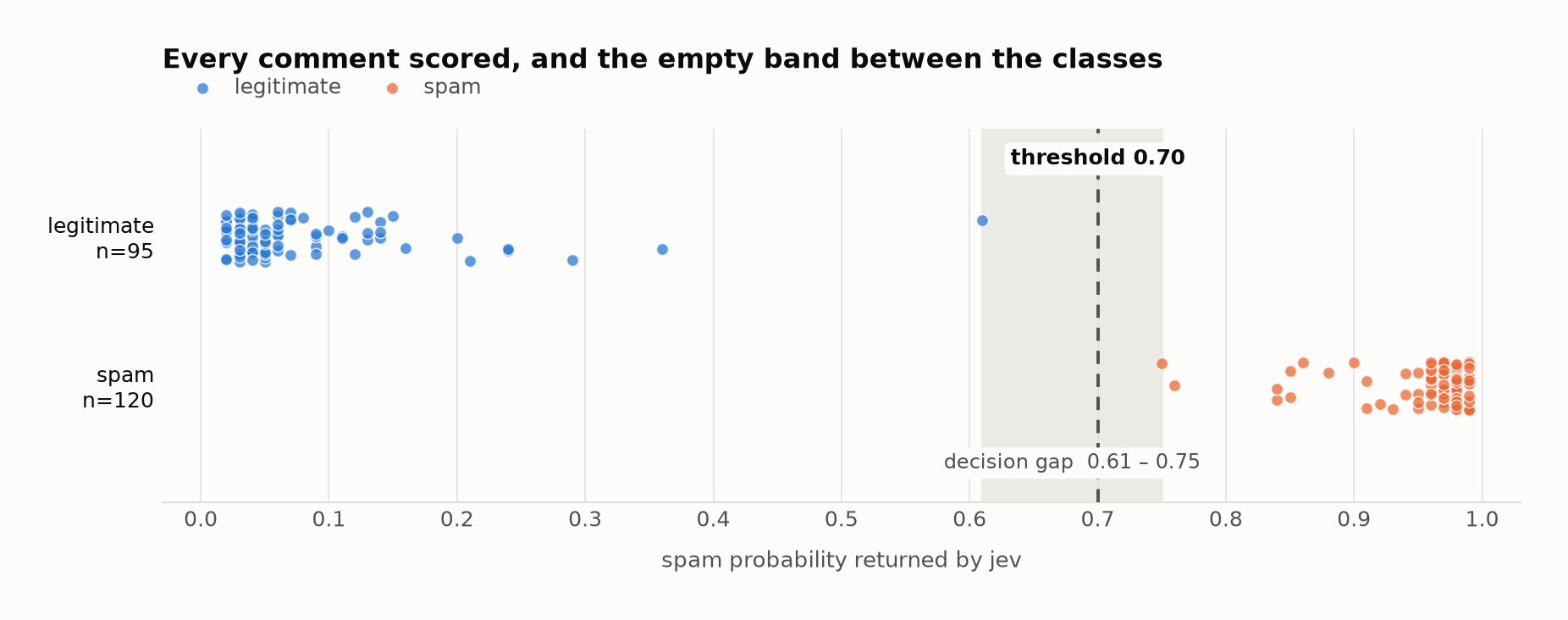
Each dot is one real comment. The two classes do not overlap: the highest-scoring legitimate comment lands at 0.61, the lowest-scoring spam at 0.75, and the default threshold sits in the gap. That margin — not the headline accuracy — is why the default works without tuning.
         spam   hold    ham  error
spam      120      0      0      0
ham         0      1     94      0

precision 1.0000   recall 1.0000   F1 1.0000
The single held comment was a bare "Thank you for this article!" — genuinely ambiguous, and held for a human rather than discarded.
On the labels. The spam in this corpus is spam that Antispam Bee had already caught on those sites, so this measures agreement with an existing filter rather than performance against a hand-labelled gold set. The comments were inspected and are unambiguous — Binance referral links, pharmacy spam, keyword salad — but a filter can only be credited with catching spam it was shown.
Two properties of the corpus shaped the prompt:
- Much real spam is content-innocuous. "Can you be more specific about the content of your article?" is an ordinary sentence; it is spam only because the author URL is a Binance referral link. So the author URL has to be in the state, and the prompt has to name that pattern. Scored without the site description, that comment came out at 0.17 — a miss.
- Short genuine praise looks exactly like bot flattery. Telling the model that terse, critical and even hostile comments are still legitimate is what keeps real readers out of the spam bucket.
What it costs
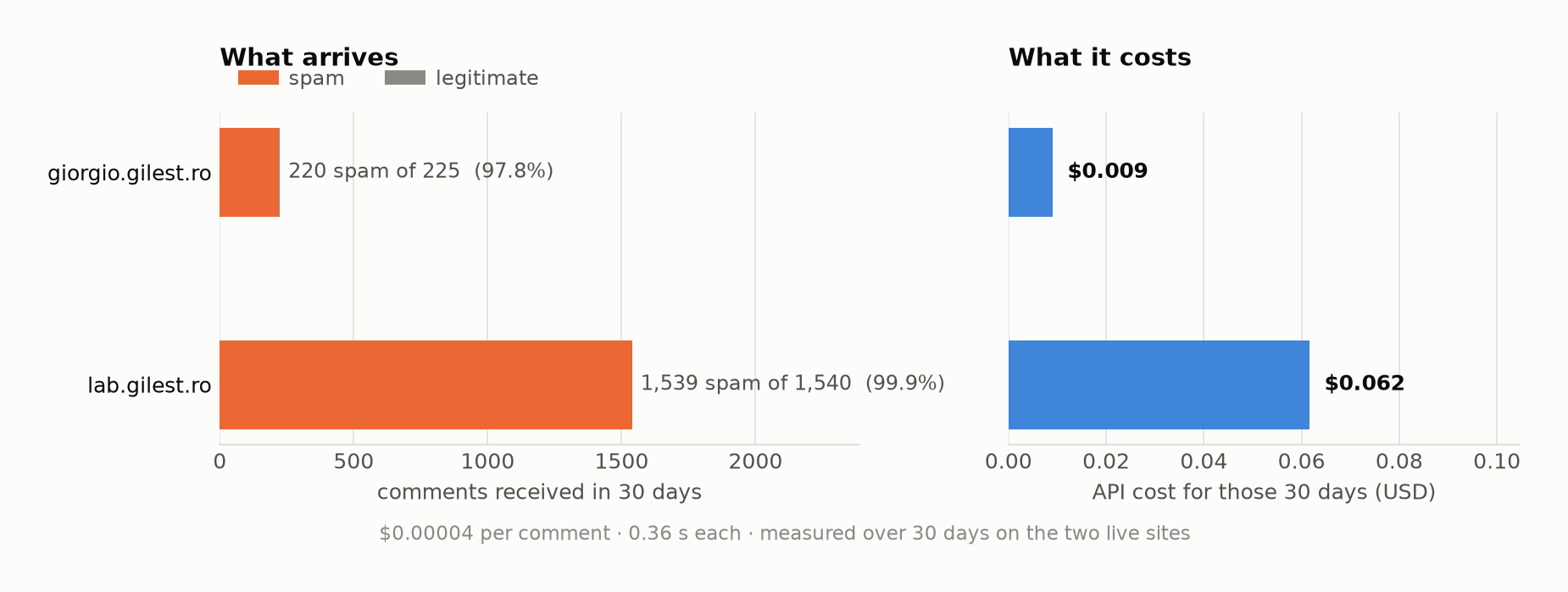
Roughly four cents per thousand comments. Those are 30 days of real traffic on the two sites it runs on; on both, almost everything arriving is spam.
Installation
-
Copy this directory into
wp-content/plugins/jevguard/, or upload the zip through Plugins → Add New → Upload. -
Activate JevGuard.
-
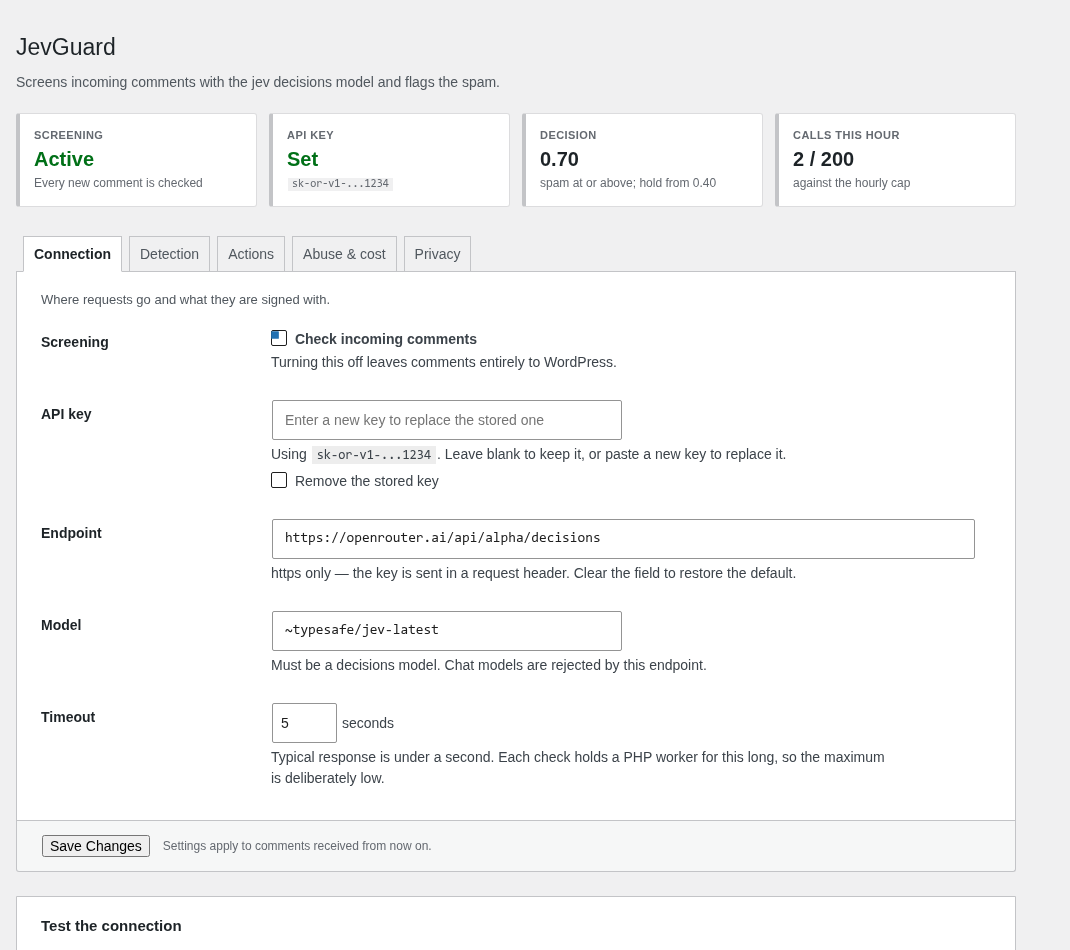
Paste your OpenRouter key into Settings → JevGuard (get one at openrouter.ai/keys). The page shows the stored key masked, so you can tell which one is in use, and rotating it is just pasting a new one.
If you would rather the key never touched the database, define it in
wp-config.phpinstead — the constant takes precedence and locks the settings field, so rotating then needs server access:define( 'JEVGUARD_API_KEY', 'sk-or-v1-...' ); -
Fill in What this site is about. It measurably improves accuracy: it is what lets the model tell an off-topic spam comment from an on-topic one.
-
Press Send test comment to confirm the connection.
Settings
| Setting | Default | Notes |
|---|---|---|
| API endpoint | https://openrouter.ai/api/alpha/decisions |
https only; see below |
| Model | ~typesafe/jev-latest |
Must be a decisions model |
| Mark as spam at or above | 0.70 |
Sits inside the measured 0.61–0.75 gap |
| Hold for moderation at or above | 0.40 |
0 disables the hold band |
| When a comment is spam | Move to spam | Or hold, or trash |
| If the check fails | Hold for moderation | Fails closed |
| Skip logged-in users | on | |
| Skip authors with a previously approved comment | on | Saves calls on regulars |
| Screen pingbacks and trackbacks | on | |
| Ban an IP after N comments/hour | 20 |
0 disables; blocked comments cost no API call |
| Ban duration | 60 min |
|
| Hourly call cap | 200 |
Bounds what a flood can spend; 0 for no cap |
| Timeout | 5 s |
Capped at 15 — each check holds a PHP worker |
| Send full email address | off | Only the domain is sent otherwise |
| Send commenter IP | off |
The API endpoint
The shipped default is served under /api/alpha/, so the path is expected to
move when the API stabilises; as a setting, that needs no plugin release.
Because an editable endpoint is a request the site controls, the field is
strict. It accepts https only — the API key travels in an Authorization
header — and every URL goes through WordPress's own wp_http_validate_url(),
which rejects hosts resolving to private or reserved addresses (loopback,
10.x, 192.168.x, and the 169.254.169.254 cloud metadata address). A
rejected value is not saved: the working endpoint stays and the reason is
shown. Clearing the field restores the default.
For an internal host, use the filter and take responsibility for the request:
add_filter( 'jevguard_api_endpoint', function ( $endpoint ) {
    return 'https://decisions.internal.lan/v1';
} );
Privacy
By default JevGuard sends the author name, author URL, comment text, any links in it, the post title and a short site description. The commenter's email is reduced to its domain and the IP is not sent at all. Both can be enabled, but they are personal data, and turning them on may mean saying so in your privacy policy. Neither is needed for the flood ban, which hashes the address locally.
Abuse resistance
Comment screening is adversarial: the commenter controls every field the model sees, and every comment costs money and a PHP worker.
Prompt injection
The decisions API helps by construction — state and instructions are
separate fields, so comment text never lands in the instruction channel. On top
of that the prompt declares every commenter-supplied field to be data, and
treats text that argues with the classifier as evidence of spam rather than as a
command.
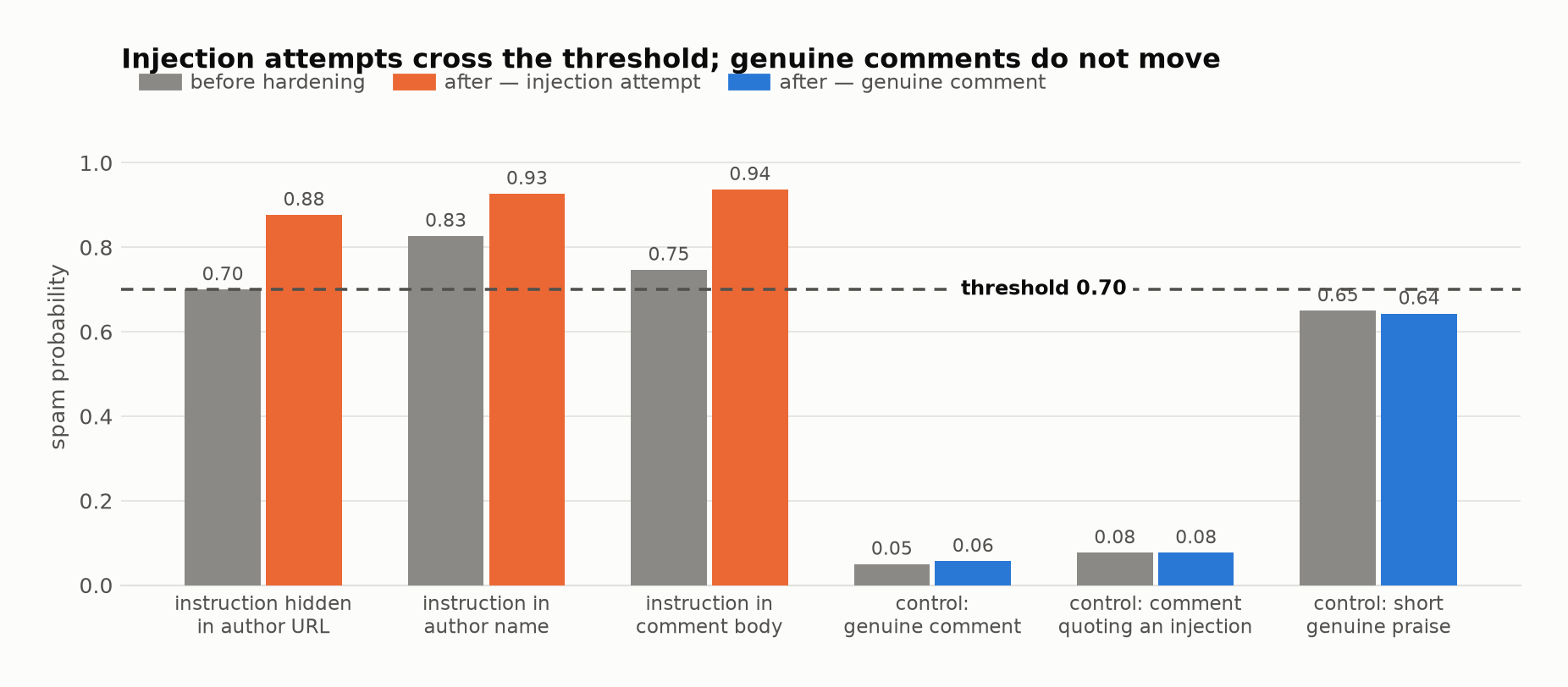
Injection attempts move up and over the threshold; genuine comments do not move
— including, deliberately, a real comment that quotes an injection string as a
topic of conversation. tests/adversarial-live.php runs sixteen such cases:
instruction override, a fake system prompt, a JSON breakout attempt, site-owner
impersonation, roleplay framing, unicode-obfuscated pharma, and payloads hidden
in the author name and in the URL.
Cost and availability
- A per-IP flood ban blocks an address posting more than 20 comments an hour,
for an hour. Blocked comments are marked spam with no API call, so a flood
stops costing money from the first block. The address is hashed (
wp_hash) before use as a storage key, so no raw visitor IP is kept. Keep the limit well above normal use: a shared office or university connection can put many genuine readers behind one address. - The check runs on
pre_comment_approved, after core's duplicate, flood and disallowed-list checks, so nothing is spent on comments WordPress rejects. - Comments with no text and no URL are never sent.
- An hourly call cap (default 200) bounds what a flood can spend.
- A circuit breaker opens after 5 consecutive API failures and stays open for 5 minutes, so a hanging endpoint cannot pile up blocked PHP workers.
- Every failure path falls back to the configured behaviour, which by default holds rather than approves. About 1% of calls fail transiently, which is what that default is for.
Hooks
// Skip screening for some comments.
add_filter( 'jevguard_should_check', function ( $check, $commentdata ) {
    return $check;
}, 10, 2 );

// Add or remove fields sent to the model.
add_filter( 'jevguard_state', function ( $state, $commentdata ) {
    return $state;
}, 10, 2 );

// Change the questions.
add_filter( 'jevguard_questions', function ( $questions, $settings ) {
    return $questions;
}, 10, 2 );

// Override a verdict before it is applied.
add_filter( 'jevguard_verdict', function ( $result, $commentdata, $response ) {
    return $result;
}, 10, 3 );

// Point the plugin at a different endpoint.
add_filter( 'jevguard_api_endpoint', function ( $endpoint ) {
    return $endpoint;
} );
Tests
php tests/test-jevguard.php                        # 146 unit tests, no network

OR_KEY=sk-or-v1-... php tests/integration-live.php corpus.jsonl 0 bench.json
OR_KEY=sk-or-v1-... php tests/adversarial-live.php
The unit suite stubs WordPress and the HTTP layer, so it runs anywhere PHP does. The integration script runs a labelled corpus through the plugin's real code path against the live API and prints a confusion matrix; it exits non-zero on any false positive or if recall drops below 0.95, so it works as a regression gate. With a fourth argument it writes per-comment scores as JSON.
The corpus is JSON Lines with the keys site, id, label (spam or ham),
author, url, content, post. It is not included here — it is other
people's comments.
Figures are rebuilt from that output:
python3 tools/make-figures.py bench.json docs/imgRequirements
WordPress 5.8+, PHP 7.4+, and an OpenRouter account.
License
GPL-2.0-or-later.