Install
This is the repository archive. It installs, but the folder name will carry the branch suffix and updates will not flow.
Install straight from GitHub with WP-CLI:
wp plugin install https://github.com/getdave/create-not-learn-editor/archive/refs/heads/trunk.zip
Create Not Learn Editor
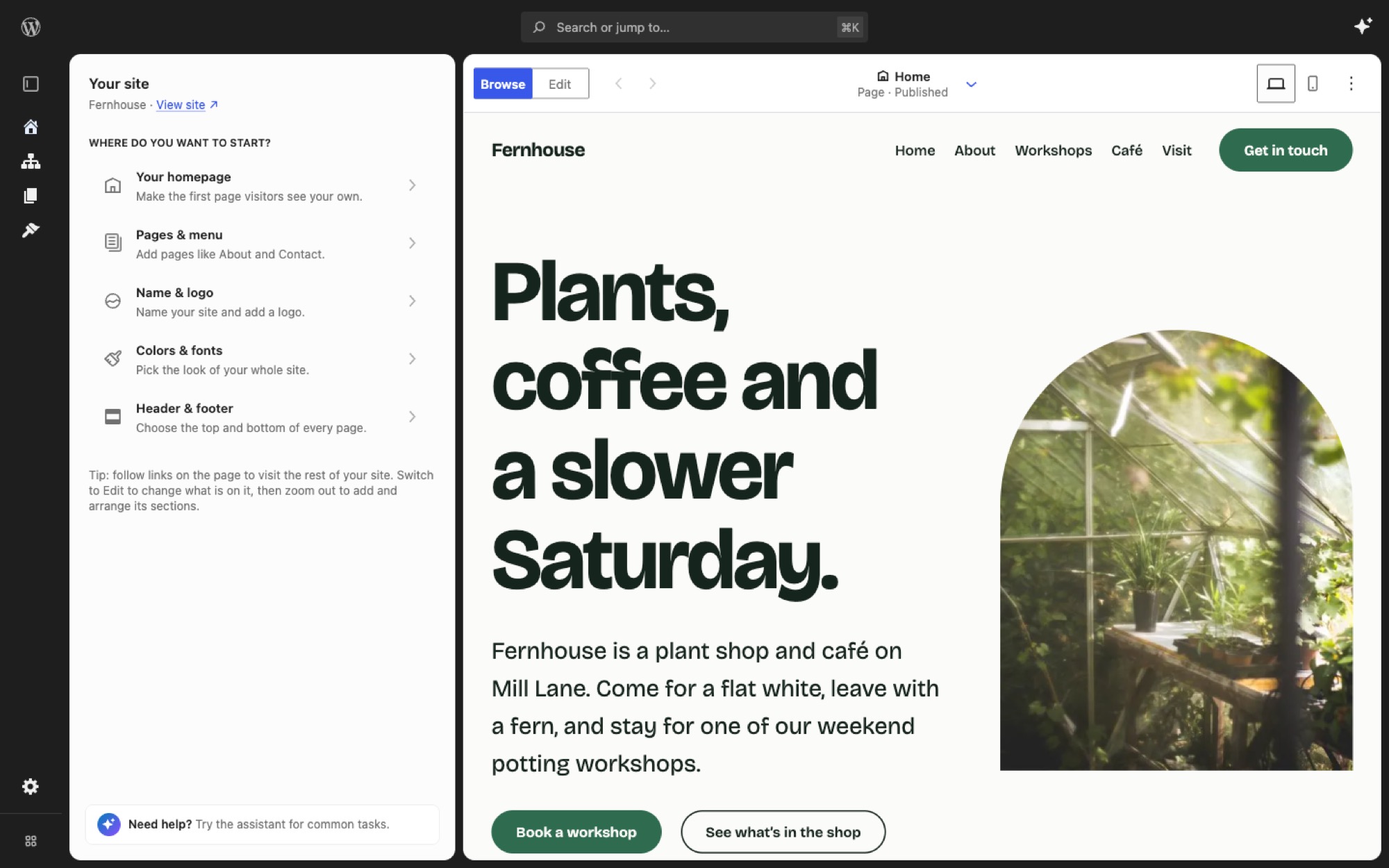
Try Create Not Learn in your browser. The demo opens the latest build of trunk in the editor, with the Fernhouse demo site ready to edit. There is nothing to install, and your changes go when you close the tab.
Create Not Learn Editor is a standalone WordPress plugin that experiments with a focused, extensible site-editing experience.
The plugin is intentionally not part of the Gutenberg repository. It consumes released WordPress and Gutenberg packages, declares the released Gutenberg plugin as a WordPress plugin dependency, and can be installed like a normal plugin.
Why This Exists
WordPress core and Gutenberg are moving toward a more extensible Site Editor architecture. Gutenberg currently includes an experimental full-page editor at:
/wp-admin/admin.php?page=site-editor-v2This project mirrors that experiment from the outside, as a plugin. The goal is to learn what can be built by composing the public packages and runtime exposed by the released Gutenberg plugin, without requiring a Gutenberg checkout, patch, submodule, or custom core build.
That matters because a standalone plugin is easier to install, evaluate, ship, and iterate on. It also keeps the experiment honest: if the editor cannot be built from released packages and plugin APIs, that is useful information.
What It Does Today
The first slice provides a full-page editor shell under:
/wp-admin/admin.php?page=create-not-learn-editorThe editor appears in the WordPress admin menu at:
Appearance > Create Not LearnThe shell mirrors Gutenberg's site-editor-v2 experiment setup:
- It registers a hidden admin page.
- It intercepts
admin_initand renders a standalone full-page HTML document. - It avoids the normal wp-admin wrapper, sidebar, and footer.
- It uses the Gutenberg
@wordpress/bootpackage for the editor frame. - It uses
@wordpress/routeroute modules for navigation. - It imports WordPress packages from
@wordpress/*modules and relies on generated asset metadata for runtime dependencies. - It preserves extension points for route, menu, and boot dependency registration.
The current routes are:
/for the Home route./types/$typefor a content type landing route./types/$type/list/$viewfor content lists./types/$type/edit/$idfor editing existing content./types/$type/newfor creating new content.
Home and Content currently include visible placeholder canvases. They are deliberately simple surfaces so the boot frame, routing, menu, and content list behavior can be developed before replacing the placeholders with richer previews.
Visual Theme
A small theme layer sits on top of the WordPress Design System. It softens corners, floats the site preview on a quiet backdrop, and tidies a few legacy components, while keeping WordPress's interface font, colors, and dark sidebar.
Headings use EB Garamond, the heading face on WordPress.org. The font lives in assets/fonts/eb-garamond/ under the SIL Open Font License and loads from the plugin, not a third-party CDN.
It is on by default. Switch it with the CNL_EDITOR_UI_THEME constant, either 'modern' or 'default' (stock WPDS):
npm run wp-env run cli wp config set CNL_EDITOR_UI_THEME default
npm run wp-env run cli wp config delete CNL_EDITOR_UI_THEME
The create-not-learn-editor_ui_theme filter can override it too. The theme's settings live in src/theme/.
Site Mutations Are Explicit
The editor does not automatically create pages, navigation, or homepage settings when it loads.
The setup behavior is behind an explicit action:
POST /wp-json/create-not-learn-editor/v1/setup-defaultsThat action creates or reuses a Home page, sets it as the static homepage, and ensures a basic Navigation menu exists. It is intended to be idempotent.
Requirements
- WordPress 7.0 or newer.
- PHP 7.4 or newer.
- Gutenberg plugin 24.0.0 or newer.
The plugin header declares:
Requires Plugins: gutenbergWordPress plugin dependencies do not support minimum dependency versions, so the plugin also checks GUTENBERG_VERSION >= 24.0.0 at runtime. If Gutenberg is missing or too old, the editor page is not registered and an admin notice is shown.
Development
Install dependencies:
npm installStart the local WordPress environment:
WP_ENV_PORT="<dev-port>" WP_ENV_TESTS_PORT="<test-port>" npm run wp-env startUse available non-default local ports for WP_ENV_PORT and WP_ENV_TESTS_PORT.
The local environment uses WordPress 7.1 with the released Gutenberg 24.0.0 plugin. npm run wp-env start downloads these once into a cache that every checkout shares (~/.cache/create-not-learn-editor/wp-env), rather than once per checkout.
To try another plugin alongside the editor, such as Canvas, build it somewhere and map it in a .wp-env.override.json next to .wp-env.json. The file is ignored by git.
{
    "mappings": {
        "wp-content/plugins/canvas": "~/path/to/canvas"
    }
}
Then restart and activate it:
npm run wp-env start
npm run wp-env run cli wp plugin activate canvas
Demo site
The development site (not the tests site) is set up as a demo the first time wp-env starts. scripts/setup-demo-site.mjs runs after every start and calls scripts/demo-site/seed.php, which:
- activates the bundled Mainstay theme (
themes/mainstay/); - names the site Fernhouse and fills Home, About, Workshops, Café and Visit pages with the theme's sections;
- adds three journal posts with photos and a menu.
It records that it has run in the cnl_demo_site_version option and leaves the site alone after that, so later edits survive restarts. It never overwrites a page that already has content. To run it again, delete the option and restart:
npm run wp-env run cli wp option delete cnl_demo_site_version
npm run wp-env start
To skip it, start with WP_ENV_LIFECYCLE_SCRIPT_AFTER_START=true.
Mainstay is a block theme made for this editor: pages are stacks of full-width sections, each with Soft, Tint, Brand, Contrast and Highlight colour styles for Compose's Colour menu, plus header and footer layouts, page layouts, palettes, font pairings and full looks for Colors & fonts. It lives in this repo but is not part of the plugin zip.
Run the development build watcher:
npm run devCreate production assets:
npm run buildCreate an installable plugin zip:
npm run plugin-zipGenerated build/ assets and plugin zips are intentionally ignored by git. The source repo is the canonical state; build artifacts are generated when needed.
Playground demo
The demo link at the top of this README opens WordPress Playground with demos/blueprint.json. The blueprint installs Gutenberg, this plugin and the Mainstay theme, runs scripts/demo-site/seed.php to build Fernhouse, and lands in the editor.
Playground can't install from the plugin source, which needs building first, or from workflow artifacts. So on every push to trunk, .github/workflows/plugin-zip.yml builds the plugin zip and publishes it to the playground-build branch, along with a zip of the theme and the seed script. The blueprint installs from that branch, so the demo always runs the latest successful build of trunk.
Keep the Gutenberg version in the blueprint in step with .wp-env.json. Canvas is left out, as the plugin doesn't need it.
Plugin directory images
.wordpress-org/ holds the images for a WordPress.org plugin directory listing: the icon, the banner and screenshots, named the way the directory expects. They are not part of the plugin zip.
The icon is drawn in .wordpress-org/icon.svg and the banner in scripts/wordpress-org-assets/banner.html. Both use the Mainstay theme's colours, and the banner borrows its fonts and photos, so the listing looks like the sites the editor makes. After changing either, run npm run wporg-assets to render the PNG sizes the directory asks for.
The screenshot at the top of this README is .wordpress-org/screenshot-1.jpg. It shows the Fernhouse demo site in a 1440 by 900 window, so retake it from a fresh wp-env site when the editor changes.
Scripts
npm run devwatches and rebuilds development assets.npm run startis an alias for the same watcher.npm run buildbuilds production assets.npm run sync:list-viewregenerates the temporary vendored Gutenberg ListView bridge from the pinned@wordpress/block-editorpackage.npm run check:list-viewverifies the committed ListView bridge is current.npm run lint:jsruns JavaScript linting.npm run lint:cssruns stylesheet linting.npm run test:unitruns the unit tests with Vitest. Its settings live invitest.config.mjs.npm run plugin-zipcreates an installable plugin zip.npm run test:e2eruns every end-to-end test against thewp-envtests site.test:e2e:smoke,test:e2e:viewsandtest:e2e:interactionsrun one group. See the end-to-end tests guide.npm run wporg-assetsrenders the plugin directory icon and banner PNGs in.wordpress-org/.npm run wp-envproxies towp-env, after preparing the shared downloads onstart.
Vendored ListView Bridge
Gutenberg's full ListView implementation is currently exposed only as a private @wordpress/block-editor API. This plugin temporarily vendors that ListView as a narrow exception to the normal no-copied-source rule.
The vendored source lives in:
src/vendor/gutenberg/list-viewDo not edit those files by hand. Regenerate them with:
npm run sync:list-viewThe sync script copies from the installed, lockfile-pinned @wordpress/block-editor package, applies the minimal local patch in patches/gutenberg-list-view.patch, rewrites known internal imports to plugin-local compatibility shims, and writes provenance.json with the upstream package version, git head, copied files, and patch checksum.
The local patch is limited to the prototype appender extension points (renderAppender and appenderParentClientId). When Gutenberg exposes the required ListView API publicly, replace src/list-view.js with the public package import and remove this bridge.
Editor Workarounds
Some behaviour the prototype needs has no supported extension point in the released Gutenberg, so it is reached by leaning on private APIs, core class names, or editor internals. Everything of that kind is listed here. Each entry says what it depends on and what would let it go away, because each one can break on a Gutenberg update.
Hiding core's "Edit original" toolbar button
Template parts are edited through this plugin's own "Edit Header" button instead, so core's is redundant. Core renders it whenever the onNavigateToEntityRecord editor setting is present, and offers no way to suppress it for one block type. Dropping that setting would work but would also take the button away from synced patterns, which still need it.
Instead src/editor-extensions/template-part-editing.js adds a cnl-editor-template-part-selected class to the admin document body while a template part is the selected block, and src/style.scss hides the button's toolbar group in that state.
The whole group is hidden rather than the slot inside it, because a group emptied of its contents still draws its own borders and reads as a broken gap in the toolbar.
Every slot in the toolbar carries the same block-editor-block-toolbar__slot class, so the group is picked out as the last one holding a slot, which is where the "other" group is rendered. Earlier slot groups carry controls that should stay, such as block alignment while a part is being edited.
So this depends on three things: the block-editor-block-toolbar.is-synced and block-editor-block-toolbar__slot class names, the "other" group being rendered last of the slots, and that group holding nothing but "Edit original" for a selected template part.
The replacement is rendered into __unstableBlockToolbarLastItem, the slot core's own template part toolbar buttons use, which is what keeps it out of the hidden group.
It also depends on the canvas being portalled into its iframe from the admin document's JavaScript realm, which is what makes document there the document the toolbar lives in.
Remove this once the template part block offers a way to opt out of the button.
Unlocking a template part for in-place editing
The editor sets disableContentOnlyForTemplateParts whenever renderingMode is template-locked, which is the mode pages are edited in. Template parts are therefore not content-only sections there, and DisableNonPageContentBlocks additionally locks each part to contentOnly and each of its children to disabled.
Entering the overlay's edit mode dispatches the private editContentOnlySection action, which disables everything outside the part, and then lifts those explicit locks with setBlockEditingMode( clientId, 'default' ). Leaving puts them back as contentOnly and disabled.
The locks are re-read on every change and re-lifted if they come back, because DisableNonPageContentBlocks re-applies them whenever a block is added to or removed from the part, which would otherwise strand the author mid-edit.
This assumes the editor keeps locking parts exactly that way. Remove it if template parts become editable in place without the lock, or if the rendering mode stops forcing disableContentOnlyForTemplateParts.
Leaving edit mode by clicking away
useEditContentOnlySectionExit in @wordpress/editor is meant to handle this, but every block outside the edited section is inert, so a click aimed at one never reaches the handler and editing never ends. The same module listens for clicks on the canvas document and ends editing when the click lands outside the part, ignoring popovers so in-canvas UI such as the link editor still works.
Remove it once core's handler fires for clicks on inert blocks.
Entering edit mode on a second click
A click on an already selected template part enters edit mode. Knowing whether the part was selected before the click means reading the store ahead of the editor's own selection handling, so the listener runs in the capture phase on the canvas document, which fires before the editor's handlers at the React root. A first click therefore only ever selects.
Remove it if the editor gains its own click-into-section behaviour for template parts.
Direct package imports in editor extensions
src/editor-extensions/ imports each @wordpress/* package directly rather than through src/wordpress-packages.js, which is the convention everywhere else. The barrel reaches @wordpress/lazy-editor, and these modules are registered from app init, so going through it would make the editor a static dependency of page boot and stop it loading lazily.
Block name label on hover
includes/block-canvas-styles.php styles the block wrapper's data-title attribute to show a block's name on hover. It depends on that attribute and on the block-editor-block-list__block class.
The label normally sits above its block. The topmost block has nothing above it, so the label would be drawn outside the canvas and clipped, which is what hid it on a site header. That one block gets the label just inside its top edge instead, matched through .is-root-container > .block-editor-block-list__block:first-child.
Template parts and synced patterns get the label in --wp-block-synced-color rather than the admin colour, since they are shared across the site rather than owned by the page. They are matched by .wp-block-template-part and .is-reusable, the same two selectors core uses to colour its own outline around them.
Both of those rules repeat the base rule's :not() chain. Without it the base rule wins on specificity and the override silently does nothing.
Verification
Before handing off functional changes, run:
npm run build
npm run check:list-view
npm run lint:js
npm run lint:css
find . -path ./node_modules -prune -o -path ./build -prune -o -path ./.wp-env -prune -o -name '*.php' -print | xargs -n1 php -l
When checking runtime behavior, start wp-env with explicit local ports and visit:
http://localhost:<dev-port>/wp-admin/admin.php?page=create-not-learn-editorRepository Shape
create-not-learn-editor.phpis the plugin entry point.includes/contains PHP bootstrap, dependency checks, admin page rendering, REST endpoints, and setup behavior.src/contains JavaScript route modules, content surfaces, settings helpers, and styles.routes/contains thin@wordpress/buildentry wrappers for the editor routes.src/list-view.jsis the stable internal wrapper around the temporary vendored ListView bridge.src/editor-extensions/contains block editor filters registered at app init, such as template part editing.@wordpress/buildcreates the browser bundles and asset metadata underbuild/..wp-env.jsondefines the local WordPress and Gutenberg plugin environment.themes/mainstay/is the demo block theme the development site uses.scripts/demo-site/seeds its content.demos/holds the WordPress Playground blueprints for the demo link..wordpress-org/holds the plugin directory icon, banner and screenshots.
Current Design Constraints
- Do not depend on a local Gutenberg repository checkout.
- Do not copy source from Gutenberg into this plugin, except for the scripted ListView bridge under
src/vendor/gutenberg/list-view. - Use published
@wordpress/*packages and runtime modules from the released Gutenberg plugin. - Import WordPress packages directly from
@wordpress/*; do not access package APIs throughwindow.wp. - Keep automatic site changes out of editor load.
- Preserve PHP 7.4 compatibility.
- Keep the plugin installable on the latest WordPress release once Gutenberg is installed and active.