Install
This is the repository archive. It installs, but the folder name will carry the branch suffix and updates will not flow.
Install straight from GitHub with WP-CLI:
wp plugin install https://github.com/georgestephanis/connector-priority/archive/refs/heads/trunk.zip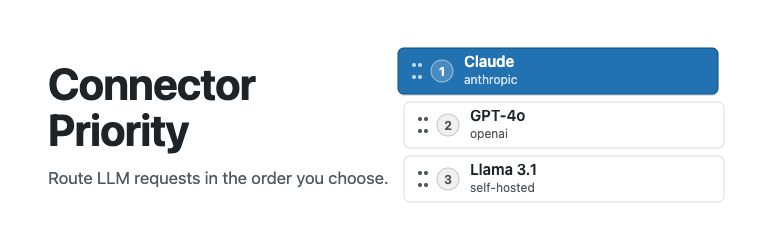
A WordPress plugin that adds drag-and-drop priority ordering for AI connectors on the Settings > Connectors screen introduced in WordPress 7.0.
What it does
When multiple AI provider connectors are active (e.g. OpenAI, Anthropic, and Google are all connected), WordPress currently has no way to express which one should be preferred. This plugin adds:
- A "Set AI Priority Order" button on the Connectors screen that opens a dedicated priority editor inside the same admin SPA.
- A drag-and-drop list of all registered AI providers — drag to reorder, then click Save Priority Order.
- The saved order is stored in the
wp_connector_priority_ordersite option and exposed via the/wp/v2/settingsREST endpoint. - Two public PHP functions for use by other plugins and themes:
wp_get_connector_priority_order()— returns the full ordered list of connector IDs.wp_get_preferred_ai_connector()— returns the ID of the highest-priority AI connector that is currently active.
Requirements
- WordPress 7.0 or later (requires the Connectors API and Boot module SPA).
- At least one AI provider plugin installed (Anthropic, Google, OpenAI, or a third-party provider).
Installation
- Upload the
connector-priorityfolder towp-content/plugins/. - Activate the plugin from Plugins > Installed Plugins.
- Visit Settings > Connectors — a "Set AI Priority Order" button will appear at the top of the connector list.
Usage
- Click Set AI Priority Order on the Connectors screen.
- Drag providers up or down to set your preferred order.
- Click Save Priority Order.
The saved order is immediately available via wp_get_connector_priority_order().
Runtime enforcement (what works today):
- Connectors screen UI — the main connector list renders AI providers in your saved priority order.
aiplugin features — excerpt generation, content suggestions, alt-text, etc. respect the saved order via thewpai_preferred_text_models,wpai_preferred_image_models, andwpai_preferred_vision_modelsfilters.
What still needs a core change: Code that calls wp_ai_client_prompt() directly
(outside the ai plugin) bypasses these filters. Full enforcement for all callers
requires upstream changes to PromptBuilder; see CORE-CHANGES.md
for proposed patches.
Developer API
// Returns all connector IDs in priority order (padded with any unordered ones at the end).
$order = wp_get_connector_priority_order();
// → ['openai', 'anthropic', 'google', 'akismet']

// Returns the ID of the highest-priority active AI connector, or null.
$provider = wp_get_preferred_ai_connector();
// → 'openai'
Architecture notes
Source JavaScript and CSS live in src/; built assets are committed to build/ and served by WordPress. npm run build (webpack via @wordpress/scripts) bundles both JS entries as native ES modules so WordPress's Script Module system can load them with type="module". dnd-kit is bundled into the content file; React/ReactDOM are externalised to the WP page globals.
The drag-and-drop UI (src/priority-content.js) is a native ES module registered as a WordPress Script Module and mounted at the /priority route inside the existing connectors SPA. Navigation uses the Boot module's ?p= path-parameter convention.
See CORE-CHANGES.md for a full description of the upstream WordPress core changes that would give this plugin complete end-to-end priority enforcement.
Development
npm install          # install tooling
npm run build        # compile src/ → build/
npm run lint:js      # ESLint
npm run lint:css     # Stylelint
npm run lint:php     # PHPCS (requires composer install)
npm run format       # Prettier (JS + CSS)
npm run build-plugin # package a distributable zip
License
GPL-2.0-or-later — see https://www.gnu.org/licenses/gpl-2.0.html.