Install
This is the repository archive. It installs, but the folder name will carry the branch suffix and updates will not flow.
Install straight from GitHub with WP-CLI:
wp plugin install https://github.com/georgestephanis/application-passwords-scoped/archive/refs/heads/trunk.zipAn exploration of per-password permissions for WordPress Application Passwords.
When Application Passwords merged into core in 5.6, scoping individual passwords was explicitly left as a follow-up. Today, every application password carries the full power of the user who made it. If an administrator connects a blog client, a read-only dashboard, and an AI agent, all three can install plugins.
This plugin is a working prototype of what scoping could look like. It is built only on hooks core already ships, so it doubles as a test of whether those hooks are enough. They almost are: see What core would need, and docs/core-gaps.md for which gaps have workarounds.
Restriction types
Every restriction only removes access. A scope can never give a password more than its user has.
| Restriction | Example | Where it's enforced |
|---|---|---|
| Roles | An admin's password acts as at most an Author, keeping SEO Manager but dropping Forum Keymaster | map_meta_cap |
| Denied capability groups | "Never: manage plugins, manage users" | map_meta_cap |
| Read-only | REST GET/HEAD/OPTIONS (the effective method, after _method overrides), XML-RPC get* methods, and anything a plugin declares read-only, such as a GraphQL query |
REST dispatch filters, XML-RPC auth |
| Abilities allowlist | Only core/get-site-info, my-plugin/* |
wp_ability_permission_result |
| Abilities-only | REST access limited to /wp-abilities/v1 |
REST dispatch filters |
| Block XML-RPC | Refused on XML-RPC; REST, GraphQL and other endpoints still work | wp_authenticate_application_password_errors |
| Expiry | Stops working after 7 days | wp_authenticate_application_password_errors |
| Granter cap (automatic) | A password an admin creates for someone else can't exceed what the admin can do | map_meta_cap |
These combine, for example: an Author ceiling, no publishing, expiring in a week.
New passwords get full access unless someone narrows them, matching core today. Sites can change the default with the application_password_scope_default filter. Scopes can be edited later from the passwords list ("Edit access") or with a REST PUT.
Asking for more access
On the authorize screen, an app's requested scope is the most it can get. The person approving can narrow it further, but anything broader isn't offered: roles above the request are hidden, and restrictions the app asked for are locked on.
If the app later needs more, it asks with its own password:
POST /wp-json/application-passwords-scoped/v1/access-requests
{ "scope": { "read_only": true }, "reason": "The dashboard needs to list users." }
The owner sees a notice in wp-admin comparing the current and requested access, and approves or denies it. The app can check the outcome at GET …/access-requests/<uuid>, or with introspect. A password can't widen its own scope any other way.
Roles: a ladder plus toggles
Core's roles nest: Administrator ⊃ Editor ⊃ Author ⊃ Contributor ⊃ Subscriber. Plugin roles usually don't. bbPress's Keymaster, Yoast's SEO Manager and similar roles are held alongside a core role and grant an unrelated set of capabilities. A single "at most X" ceiling can't express "keep SEO Manager, drop Keymaster".
So a scope stores a list of roles (roles: ["author", "wpseo_manager"]). The password may use a capability only if the user has it and at least one listed role grants it. The UI presents that list as:
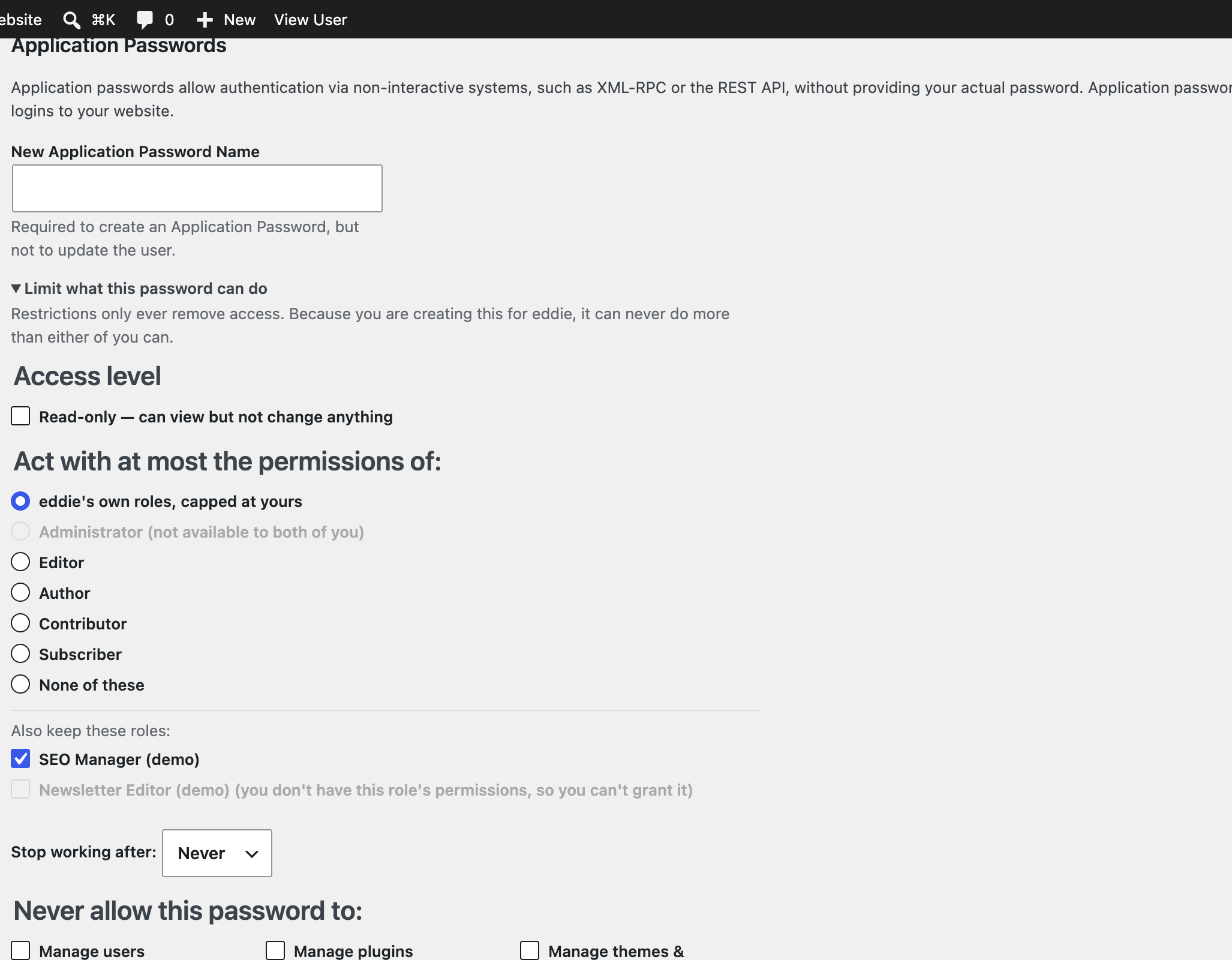
- Radio buttons for the core ladder, with rungs above the user's own role shown but disabled.
- Checkboxes for every other role the user holds, each kept or dropped independently.
Which roles count as the ladder is filterable via application_password_scope_hierarchical_roles.
Scoping someone else's password
An administrator can create passwords for other users. Without care, that's a way to mint credentials stronger than the creator's own. On multisite, for example, a site admin could create a password for a super admin. So whenever the acting user isn't the owner:
- The plugin records
granted_byon the password, even if no scope was requested. Every capability must then pass for both the owner and the granter. If the granter is later deleted, the password stops working. - The form greys out any role or toggle the granter couldn't hand over. It also says, by name, that the password can't do more than either user can.
Why both roles and capability groups?
They answer different questions:
- A role limit ("act as an Author") is easy for people to understand. It also covers capabilities from plugins that the scope author never heard of: if the Author role doesn't have
manage_woocommerce, the password doesn't either. - Capability groups ("anything except plugins") keep a high-trust integration's power while cutting the parts that make a leaked credential catastrophic. Raw capabilities like
promote_usersare too fine-grained for someone approving an app, so they are bundled into about a dozen named groups. The groups are filterable viaapplication_password_scope_capability_groups.
How the Abilities API fits
The Abilities API is a natural fit for the positive side of scoping, meaning what may this password do? rather than what may it not do?:
- Abilities are named and described, with input/output schemas. That makes them a far better unit for consent ("Allow Create draft post") than capabilities or REST routes.
readonlyanddestructiveannotations let read-only mode apply to abilities by metadata instead of guesswork.- Abilities-only mode is a strong option for AI agents and MCP clients. The agent sees a curated surface of declared operations instead of the whole REST API.
The Abilities API does not replace capability scoping. Ability permission_callbacks still call current_user_can(), so both layers apply: a password allowed to run my-plugin/delete-everything under an Author ceiling still fails the ability's own capability check. Most of the REST API is also not expressed as abilities yet.
How it works
application_password_did_authenticaterecords which password authenticated and loads its scope.- A
map_meta_capfilter atPHP_INT_MAXchecks every primitive capability the authenticated user needs against the scope. If any is out of scope, the result isdo_not_allow. This covers REST, XML-RPC, abilities, and any plugin code callingcurrent_user_can(). - Request-level rules (read-only, abilities-only) are checked three times on REST: first in
rest_pre_dispatch, again just before the route's callback, and on the response. A plugin that answers a route itself can't get an out-of-scope response past them. They also run per sub-request inside/batch/v1. - Off REST, the same rules are applied when the password authenticates. XML-RPC authenticates inside each method call, so read-only can be judged by method name there.
- Scopes are stored in user meta (
_application_password_scopes), keyed by password UUID, and removed when the password is deleted. Every save from REST, a form or an access approval goes through one function, which sets the granter server-side.
Escalation hardening
A scoped password could otherwise free itself. Any password with any restriction is therefore denied:
create_app_password,edit_app_password, anddelete_app_password(s), so it can't mint an unscoped sibling or rewrite its own scope.edit_user,delete_user,promote_user, andremove_useron its own account, and on any account that can do more than the scope allows. Otherwise it could change that account's email or password, then log in with a full cookie session.- Assigning a role it couldn't exercise itself, when creating or promoting a user. That covers the site's default role too: a user created without one gets no role if the default is out of scope.
- On multisite, a password with a role limit or denied groups loses super-admin status for that request, because
is_super_admin()skipsmap_meta_cap. Both sources of super admins are covered: thesite_adminsoption and a$super_adminsglobal declared inwp-config.php. That's all-or-nothing: denying even one group drops all network powers, and the password keeps only the user's role on the site. The technique is borrowed from t3admin.tests/multisite.shcovers it. - Off REST, restrictions that can't be enforced fail authentication instead of being silently ignored. Ability restrictions always do. Read-only does unless the request is known to read: XML-RPC
get*andsupported*methods (but notsystem.multicall), or anything a plugin declares read-only. Any password can also Block XML-RPC outright.
A restricted password can always do two things: GET …/application-passwords/introspect to see what it was granted, and file an access request to ask for more. Neither changes what it may do.
Deactivating the plugin suspends scoped passwords
Core doesn't know about scopes, so without this plugin a scoped password would silently regain its owner's full access. Instead, deactivating the plugin suspends every scoped password: it stops working, and its name says why. Reactivating restores them exactly, and nothing is deleted. A plugin can't cover a fatal error or missing files, though, which is the strongest argument for doing this in core (#13).
When a granter is deleted or demoted
A password someone created for another user stays capped at what that person can do now. It narrows if they're demoted, and stops working entirely if they're deleted. The delete-user screen lists the passwords that will stop. Sites that would rather revoke them can return true from application_password_scope_revoke_granted.
Interfaces
Authorize Application flow. An app can request a scope in the authorize URL. The person approving sees it pre-filled and can narrow it, but not broaden it (see Asking for more access):
/wp-admin/authorize-application.php?app_name=My+Agent
    &scope[roles][]=author&scope[roles][]=wpseo_manager
    &scope[deny][]=plugins&scope[deny][]=users
    &scope[abilities_only]=1
    &scope[expires_in]=604800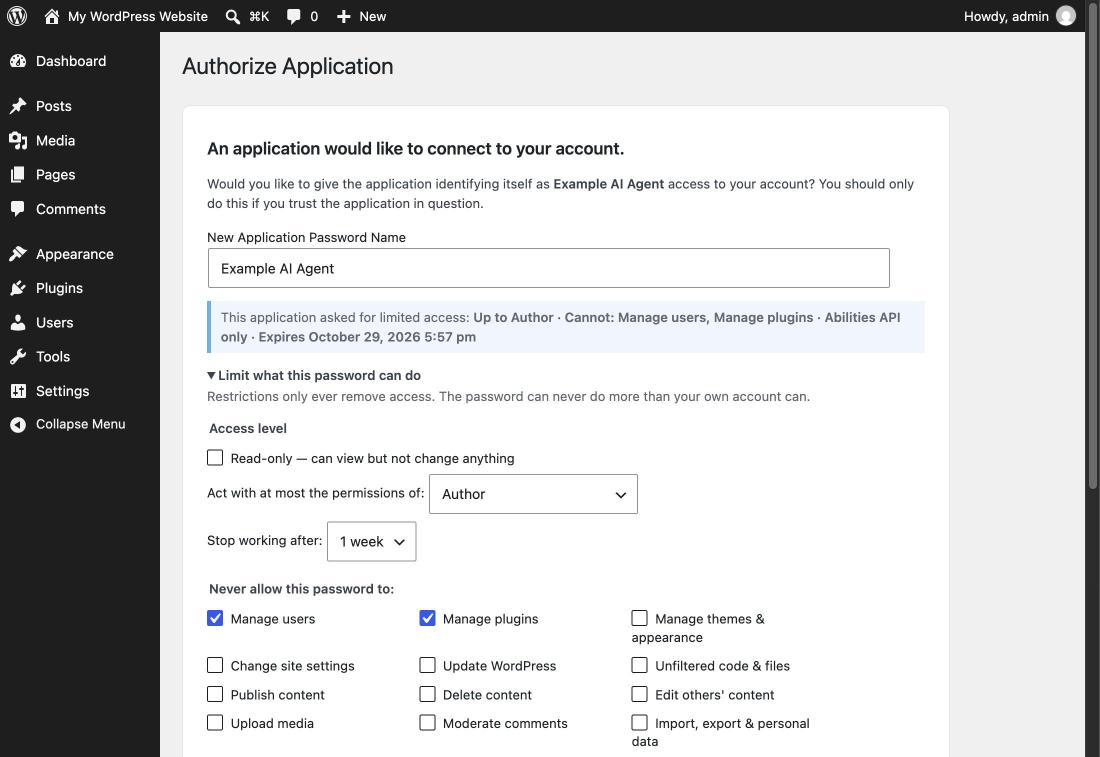
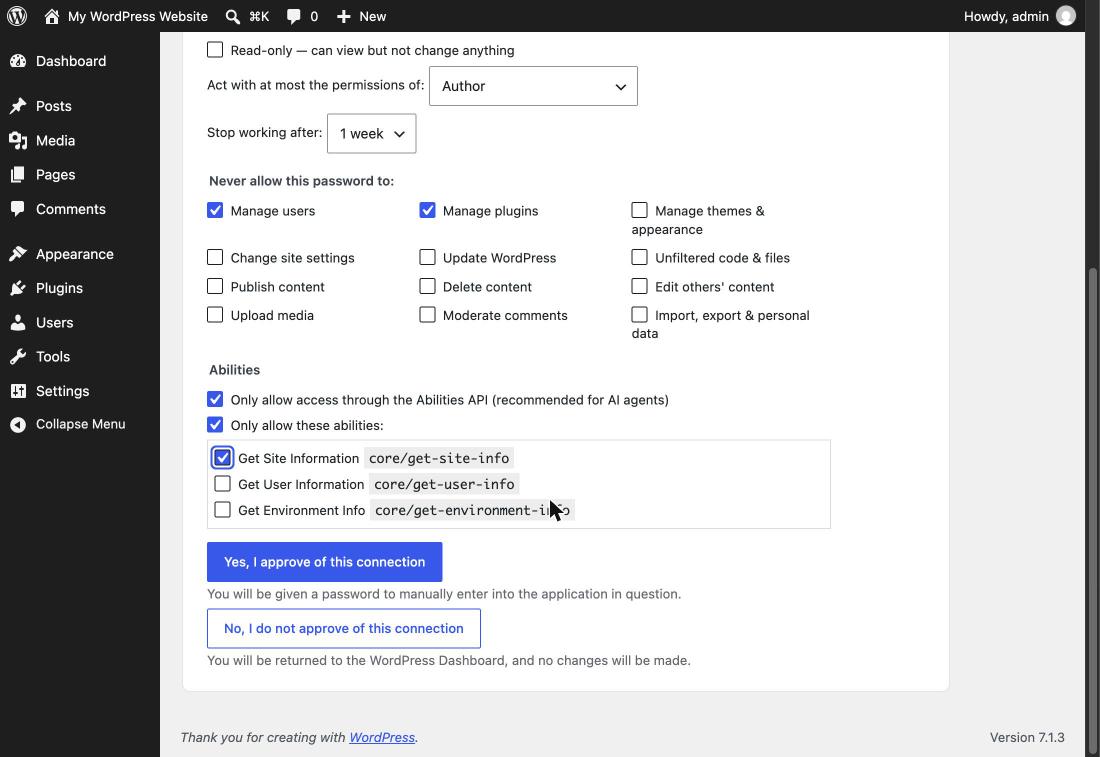
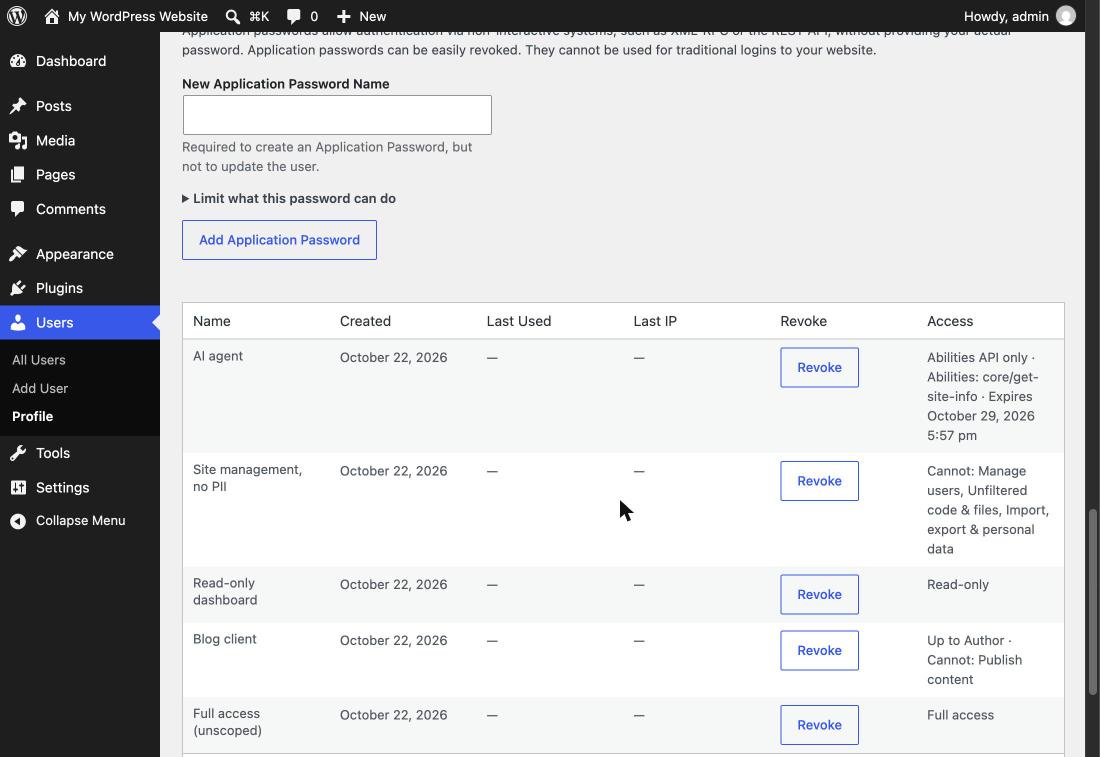
Profile screen. A collapsible Limit what this password can do section under Add New Application Password, and an Access column in the list table with an inline Edit access form.
REST. A scope field on the core /wp/v2/users/<id>/application-passwords endpoints, readable and writable on create and update:
{
  "name": "Reporting dashboard",
  "scope": { "read_only": true, "expires_in": 2592000 }
}
WP-CLI.
wp application-password scope set admin <uuid> --roles=author,wpseo_manager --deny=plugins,users --expires-in=86400
wp application-password scope set admin <uuid> --abilities-only --abilities='core/get-site-info,my-plugin/*'
wp application-password scope get admin <uuid> --format=summary
wp application-password scope clear admin <uuid>
wp application-password scope groups
What core would need
Almost everything was possible with existing hooks, which is a credit to the 5.6 extension points. docs/core-gaps.md compares each gap's plugin workaround with a core change; only #13 truly needs core. Each gap is tracked as a sub-issue of #1:
- #3 Store metadata on the Application Password item
- #4 Expose the authenticated Application Password outside REST
- #5
is_super_admin()needs a filter - #6 Read-only scopes need route-level
readonlyannotations - #7 Standard authorize-flow protocol for requesting and reporting scopes
- #13 Enforcement when the plugin isn't running (deactivation is handled; fatals and missing files aren't)
Design decisions
Settled, and implemented as described above. docs/design-decisions.md explains the reasoning behind each, plus lessons from building it:
- #8 Approvers can only narrow what an app requested. Apps ask for more with an access request.
- #9 Scopes are editable after creation.
- #10 Plugins can register capability groups (with wildcards) and filter every decision. See docs/plugin-authors.md.
- #11 New passwords default to full access; sites can filter the default, and people narrow from it.
- #12 Granter changes: passwords narrow with the granter and fail closed if they're deleted, with a filter to revoke instead.
- #14 Bypass audit done. Abilities executed directly in PHP, outside the API, are out of scope: that's code the site already trusts.
Still open, tracked as sub-issues of #2:
- #16 Read-only detection beyond HTTP methods (GraphQL, XML-RPC, POST reads)
Development
composer install && npm ci --ignore-scripts
composer lint:php     # WordPress Coding Standards + PHP 7.4 compatibility
npm run lint          # @wordpress/scripts: JS, CSS, package.json, docs
tests/smoke.sh        # end-to-end tests against WordPress Playground
tests/multisite.sh    # the same, for multisite and super admins
Requires WordPress 6.9+ (Abilities API) and PHP 7.4+. See AGENTS.md for setup, local testing, architecture, and the invariants any change must keep. The Playground link above sets up example scoped passwords and opens the authorize screen with a pre-filled scope request.
License
GPL-2.0-or-later