GV Simple Firewall
Minimal WordPress request firewall. XML-RPC blocking, bad-UA filters, basic injection signatures, login/XML-RPC rate limits, optional HTTPS enforcement, optional security headers, REST/user-enum hardening, HTTP method gate, lightweight file logging. Settings: Settings → GV Firewall.
Install
This is the repository archive. It installs, but the folder name will carry the branch suffix and updates will not flow.
Install straight from GitHub with WP-CLI:
wp plugin install https://github.com/gardevault/gv-simple-firewall/archive/refs/heads/main.zipA lightweight, performance-focused firewall providing essential security hardening for WordPress sites.
Designed to be a simple “set it and forget it” baseline that blocks the most common attacks without configuration noise or performance loss.
Minimal WordPress request-firewall plugin
Blocks XML-RPC, bad user-agents, and common injection patterns. Adds rate limits, REST & enumeration hardening, security headers, and lightweight logging.
Changelog – Version 2.0
✨ New Features
Security Headers
Added an option to send essential headers (HSTS, X-Frame-Options, X-Content-Type-Options, Referrer-Policy, Permissions-Policy).
Content-Security-Policy (CSP)
Sends a robust, baseline CSP (in “Report-Only” mode by default) to help block XSS and data-injection attacks.
REST API Hardening
Blocks unauthenticated requests to the wp/v2/users REST endpoint, preventing user-enumeration.
User Enumeration Blocking
Blocks ?author=N scans with a 404 error.
HTTP Method Gate
Blocks all HTTP methods except GET, HEAD, and POST, returning a 405 error.
Per-Username Rate Limiting
Adds a separate throttle that limits login attempts per-username in addition to the IP-based limit.
Log File Manager
The Tools → GV Firewall Logs page lists all log files under
wp-content/uploads/gv-firewall/ and allows downloading any historical log.
🚀 Enhancements
Major Signature Engine Upgrade
Replaced the basic signature scanner with trips_signatures_hardened.
The new engine:
- Scans
$_GET,$_POST, and$_COOKIErecursively - Uses precise regex rules for SQLi, XSS, LFI, and RCE
Detailed Block Logging
Each blocked request now records:
- RULE triggered
- SOURCE (e.g. POST, COOKIE)
- KEY (parameter name)
- VALUE (truncated)
Robust Log Parser
parse_log_line rewritten to read extended log fields in any order.
Improved Dashboard Widgets
“Recent Blocks” and “Recent Logins” now pull from all log files (newest first) for more consistent visibility after daily rotation.
UI Update
New sections and toggles for all features on the admin settings page.
🧠 Notes
- Requires WordPress 6.0+ and PHP 7.4+
- Logs stored at
wp-content/uploads/gv-firewall/ - Compatible with GardeVault Core, but works standalone
🛡️ Author
GardeVault
https://gardevault.eu/plugins/gv-simple-firewall
Screenshots
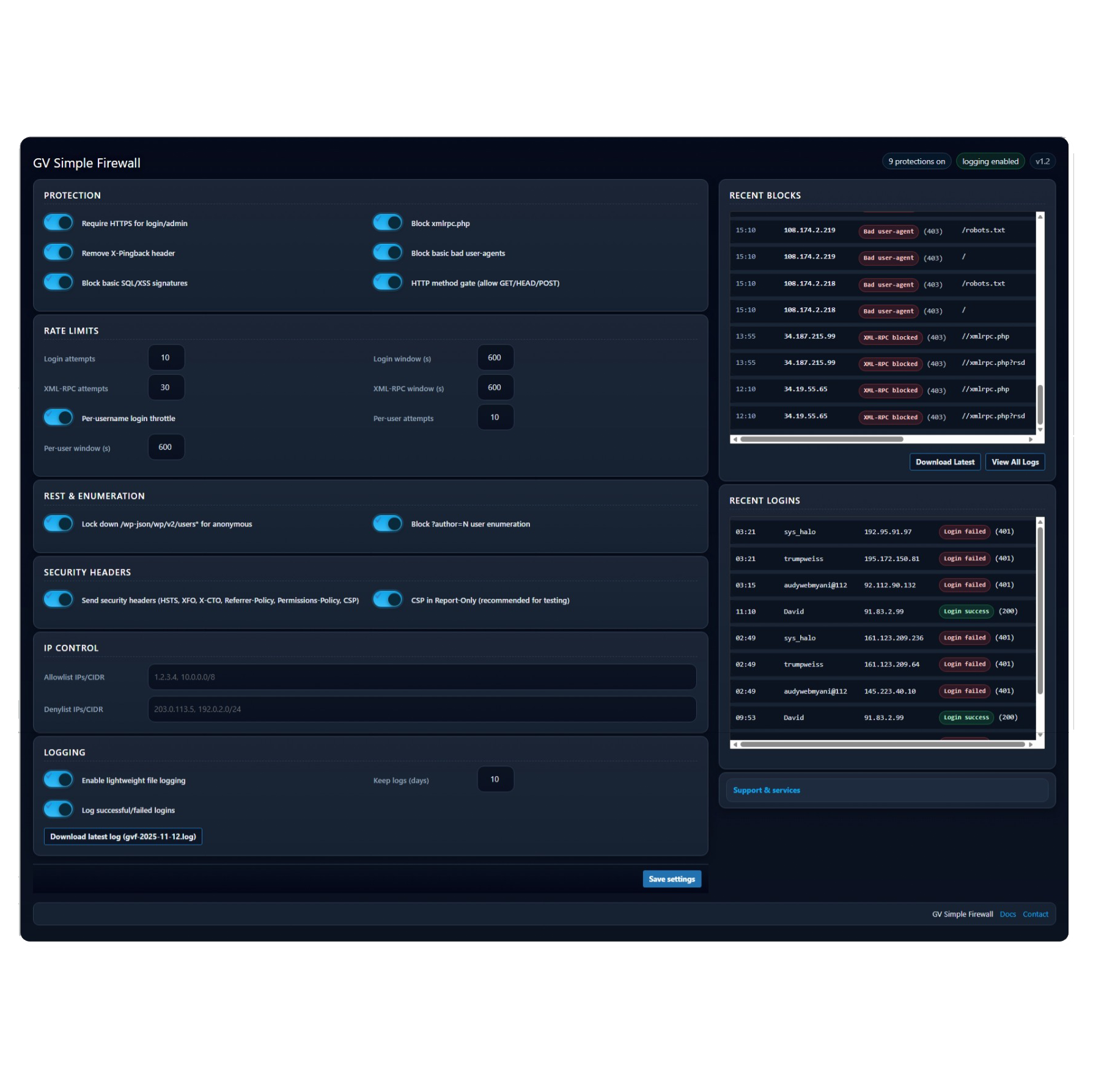
Main dashboard showing settings, recent blocks, and recent logins.
Features
- Modern Admin UI: Clean, dark-mode-ready interface.
- Login Logging: Optionally log all successful and failed logins with username and IP.
- Dashboard Widgets: Real-time “Recent Blocks” and “Recent Logins” on the admin page.
- Core Protections: Blocks XML-RPC, bad user-agents, and detects SQLi/XSS attempts.
- Rate Limiting: Throttles login and XML-RPC attempts per IP and per user.
- Advanced IP/CIDR Management: Supports IPv4/IPv6 allow- and deny-lists with flexible separators.
- Smart IP Detection: Detects visitor IPs correctly behind proxies or Cloudflare.
- Secure File Logging: Logs stored safely in
/uploads/gv-firewall/with.htaccessandindex.htmlprotection. - Optional HTTPS Enforcement: Can force SSL for login and admin routes.
Installation
- Download the latest
.zipfrom Releases. - In WordPress Admin → Plugins › Add New.
- Click Upload Plugin, select the
.zip. - Activate the plugin.
- Open Settings › GV Firewall to configure protections.